linkedin
zipBoard logo
play Build better products with zipBoard
zipBoard Dashboard
zipBoard Bug Tracking

zipBoard

Brand: zipBoard

  • 4.2

  • 5 Ratings

zipBoard software is a bug-tracking tool that facilitates efficient collaboration and bug tracking for web development projects, streamlining the debugging process and enhancing productivity.

See More

Have you used zipBoard before?

Share your insights for better experience

Add a Review
Starting Price
$99

View plans

100% Genuine
Products
Best Price
Guaranteed
Safe & Secure
Payment
  • Description

  • Pricing

  • Features

  • Specification

  • Review

  • Compare

  • Alternatives

  • FAQ

Starting at $99

zipBoard Software Overview

What is zipBoard?

zipBoard is a bug-tracking tool designed to accelerate digital content development. It allows teams to collect feedback directly in their product, app, courses, videos, or other digital assets, using comments, screenshots, and videos to provide deeper context. This easy-to-use proofing tool facilitates faster approval and production by enabling in-context feedback on websites, courses, videos, PDF documents, and other assets.

Its features include real-time alerts, notifications, and direct communication channels for queries and concerns, enhancing customer support. The software also offers reporting and analytics, allowing businesses to track message readership and conversion rates and optimize marketing campaigns.

Why Choose zipBoard Software?

  • User-Friendly Interface: The software's intuitive design makes it simple for users to navigate and handle projects.
  • Effective Bug Tracking: It enables efficient management and resolution of issues, ensuring smooth project progress.
  • In-Context Feedback: Users can gather feedback directly within their digital assets, enhancing clarity and understanding.
  • Centralized Management: It provides a unified platform for overseeing feedback, bugs, and project advancement, streamlining workflows.
  • Versatility: Supporting various digital formats, it accommodates different project types, enhancing adaptability.
  • Collaborative Environment: Facilitating team communication fosters efficient collaboration and teamwork.
  • Time-Efficient: Optimizing workflows helps teams save time and boost productivity.
  • Secure Access: Maintaining data integrity, it offers secure access for both internal and external stakeholders.
  • Remote-Friendly: Ideal for remote work setups, it facilitates effective collaboration among distributed teams.
  • Flexible Project Management: It allows customized project setups, providing flexibility tailored to team requirements.
  • Responsive Customer Support: Users appreciate the responsive and helpful customer support provided.
  • Free Trial: Offering a trial period, users can evaluate the software's suitability before committing to a purchase.

Benefits of zipBoard Platform

  • Simplified Feedback Collection: Users can easily collect feedback on digital content, apps, images, videos, and PDFs, enabling non-technical collaborators to share reviews using annotations and screen recordings.
  • Efficient Markup Tools: The software's markup tools allow for precise and efficient feedback by enabling users to highlight, draw, and add notes directly to the content.
  • Video Reviews and Screen Recording: The support for video reviews and screen recording is particularly beneficial for capturing and sharing detailed feedback on video content.
  • Versatile Sharing Options: Different resolutions and sharing options ensure that feedback is provided in the appropriate context.
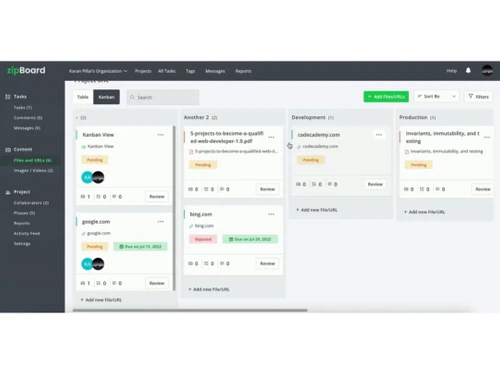
  • Clear Kanban View: The Kanban view offers a clear overview of the review and feedback process, aiding teams in managing their work more effectively.
  • Integration Capabilities: Integration with JIRA and Slack streamlines workflow management and keeps everyone updated on project progress.
  • Web-based and Cloud-hosted: Being web-based and cloud-hosted, the tool requires no software installation or back-end infrastructure setup, offering convenience and accessibility.
  • User-friendly Interface: Designed to be user-friendly, the software does not require technical expertise for setup and issue tracking.

Pricing of zipBoard Bug Tracking Tool

zipBoard price in India starts at $99 at techjockey.com.

The pricing model is based on different parameters, including extra features, deployment type, and the total number of users. For further queries related to the product, you can contact our product team and learn more about the pricing and offers.

Read more

zipBoard Company Details

Founded Year:  2016

zipBoard is a bug tracking and visual feedback tool that offers designers take screenshots and assign tasks.

Director/Founders Bhavya Aggarwal, Nitin Khanna, Pranab Agarwal
Company Size 1-100 Employees

zipBoard Pricing & Plans

Team
Key Features
  • Up to 20 Digital Asset Pieces
  • Up to 1GB Storage
  • Unlimited Collaborators
  • Unlimited Reviewers
  • Unlimited Projects
  • Standard Email Support
Starting at $99
    • Monthly

      Monthly
      Monthly

Key Features

  • Up to 20 Digital Asset Pieces

  • Up to 1GB Storage

  • Unlimited Collaborators

  • Unlimited Reviewers

  • Unlimited Projects

  • Standard Email Support

zipBoard Features

  • icon_check Backlog Management
    Organize and prioritize tasks efficiently for effective project planning and execution.
  • icon_check Ticket / Issue Tracking
    Track and manage issues or tickets throughout their lifecycle, ensuring timely resolution.
  • icon_check Filtering
    Easily sort and filter tasks or issues based on various criteria to focus on specific areas of concern.
  • icon_check Task Management
    Create, assign, and track tasks seamlessly to ensure progress and accountability.
  • icon_check Annotations
    Provide detailed feedback and markups directly on web pages for precise communication and issue identification.
  • icon_check Communication Tools
    Facilitate clear and collaborative communication among team members to streamline workflows and resolve issues effectively.
  • icon_check Status Tracking
    Monitor the status of tasks or issues in real time to stay informed about progress and make data-driven decisions.
zipBoard Demo Video play icon

Get zipBoard Demo

Watch the demo video to explore key features, real workflows, and how the software fits your business needs.

Understand
Key Features
Personal
Demo Insights
Interactive
Demo Support

zipBoard Specifications

Supported Platforms
Ubuntu Ubuntu Windows Windows MacOS MacOS Linux Linux
Devices
Desktop Desktop
Deployment
Cloud-Based Cloud-Based
Suitable For
All Industries
Business Specific
All Businesses
Business Size
Small Business Startups Medium Business Enterprises
Customer Support
Email Communities
Language
English
Training Resources
Videos

Explore the Best Alternative Solutions Similar to Your Business Size and Needs

zipBoard Review

4.2

Out of 5

img

Overall Rating

Based on
5 Verified Ratings

Rating Breakdown

  • Features 4.2
  • Value for Money 4.1
  • Ease of Use 4.3
  • Customer Support 4.4

88% Recommend this Product

Add Review

Techjockey Trusted Reviews from Verified Users

No reviews are currently available for zipBoard. Discover similar Bug Tracking Tools reviews

  • Bugasura

    4.7

    Whats great - We had to stop Jira licenses for issue tracing as it cost a bomb for a team of 20. However, Bugasura is easy and business tea... read more

  • Jira

    4.5

    Whats great - Jira's emphasis on visuals when tracking performance and tickets is something I appreciate. Since our project is a support pr... read more

  • Clickup

    4.3

    Whats great - ClickUp is great for helping us stay organized. The platform’s customization options let us set it up exactly how we need it.... read more

Compare zipBoard With other Bug Tracking Tools

Products
Ratings
Pricing
Device Supported
Deployment
Supported Platforms
  • img

    zipBoard

  • 4.2

  • Price On Request

  • Desktop

    Mobile

  • Web based

    On Premises

  • Windows

    Mac OS

  • img

    Bugasura

  • 4.6

  • Price On Request

  • Desktop

    Mobile

  • Web based

    On Premises

  • Windows

    Mac OS

  • img

    Zoho Bug Tracker

  • 4.3

  • ₹ 240

  • Desktop

    Mobile

  • Web based

    On Premises

  • Windows

    Mac OS

  • img

    Nitpicks AI

  • 4.3

  • Price On Request

  • Desktop

    Mobile

  • Web based

    On Premises

  • Windows

    Mac OS

  • img

    Marker io

  • 4.5

  • Price On Request

  • Desktop

    Mobile

  • Web based

    On Premises

  • Windows

    Mac OS

  • img

    BugTrace AI

  • 4.1

  • Price On Request

  • Desktop

    Mobile

  • Web based

    On Premises

  • Windows

    Mac OS

  • img

    BugHerd

  • 4.2

  • Price On Request

  • Desktop

    Mobile

  • Web based

    On Premises

  • Windows

    Mac OS

  • img

    Ruttl

  • 4.3

  • Price On Request

  • Desktop

    Mobile

  • Web based

    On Premises

  • Windows

    Mac OS

  • img

    Reqtest

  • 4.5

  • Price On Request

  • Desktop

    Mobile

  • Web based

    On Premises

  • Windows

    Mac OS

  • img

    Bugzilla

  • 4.4

  • Price On Request

  • Desktop

    Mobile

  • Web based

    On Premises

  • Windows

    Mac OS

  • img

    MantisBT

  • 4.1

  • Price On Request

  • Desktop

    Mobile

  • Web based

    On Premises

  • Windows

    Mac OS

(0) Product(s) selected

zipBoard Alternatives

See All zipBoard Alternatives

Available

Price on Request

Articles for zipBoard

See All Related Articles

Which operating system does zipBoard Software Support?

zipBoard Software is compatible with Ubuntu, Windows, Linux and MacOS.

Is there any zipBoard Software App?

zipBoard Software is not available for Android and iOS app users.

What is the deployment type of zipBoard Software?

zipBoard Software supports web-based deployment.

How much does zipBoard Software Cost?

zipBoard price in India starts at $99 at techjockey.com.

Who are the potential users of zipBoard Software?

zipBoard Software is typically used by all industries to collect feedback on digital content, apps, images, videos, and PDFs, facilitating efficient collaboration among team members and stakeholders.

Is there any free demo for zipBoard Software?

A demo of zipBoard is available at techjockey.com.

Is zipBoard Software Free?

zipBoard Software is not free. You can contact our product experts to learn more about the pricing plans.

Does zipBoard offer a free trial?

Yes, zipBoard Software offers a free trial.

How can you download zipBoard Software?

zipBoard Software installation is not required, as it is web-based. Just open the Setup Wizard to get started.

How does zipBoard Software Work?

zipBoard allows users to collect feedback on digital content by annotating, marking it up, and adding comments directly to the content. It streamlines collaboration by providing a centralized platform for managing feedback, bugs, tasks, and project progress.

20,000+ Software Listed

Best Price Guranteed

Free Expert Consultation

2M+ Happy Customers

Terms and Condtions

close

Users with registered businesses can purchase goods from merchants on the platform to satisfy their business needs. Users are not permitted to utilize any products acquired through the platform for resale, advertising, business, or further distribution.

For each purchase made, users will receive a Tax Invoice (or 'GST invoice') that includes specific details such as:

  • the GSTIN of the user associated with their registered business, and

  • the specified Entity Name for their business.

It should be noted that not all products are eligible for GST Invoice. Only the products displayed by participating sellers with the 'GST-based Invoice Available' callout on the product description page would qualify.

Certain goods and services are not eligible to get a GST Invoice, including items with VAS, i.e., Value Added Services (e.g., Total Mobile Protection/Assured Buyback) and those involving an exchange offer at the time of purchase.

Users must ensure the accuracy of the GSTIN, and business entity name provided for the GST Invoice. Requests for corrections into GST Invoice would not be accommodated by Techjockey.com or any Seller, and any issues arising from user-provided information are the sole responsibility of users.

Techjockey.com is not liable for the GST Invoice or any associated input tax credit. To efficiently claim an input tax credit, users should select the registered place of business address as per the GST authority's data and follow the provisions of the GST Act and rules.

To claim an input tax credit, the delivery and billing addresses must match. Furthermore, input tax credits will not be granted if the delivery address and GSTIN on the invoice are from different states. In case of incorrect GST details provided during the order placement, the order will be canceled automatically.