linkedin
Workshop Software logo
play Repair Shop Management Software for Mechanical Auto Repair businesses
Workshop Software Customer Page
Workshop Software Sale Summary

Workshop Software

Brand: Workshop Software

  • 4.5

  • 4 Ratings

Running your auto shop shouldn't feel like a constant repair job in and of itself. Workshop Software takes the chaos out of scheduling, billing, and parts management. Focus on what matters most: fixing cars and keeping customers happy!

See More

Have you used Workshop Software before?

Share your insights for better experience

Add a Review
Starting Price
$70

View plans

100% Genuine
Products
Best Price
Guaranteed
Safe & Secure
Payment
  • Description

  • Pricing

  • Features

  • Specification

  • Review

  • Compare

  • Alternatives

  • FAQ

Starting at $70

Workshop Software Overview

What is Workshop Software?

Ditch the mess of those sticky notes and overflowing file cabinets! Workshop software is a digital game-changer for auto shops. Imagine a world where appointments magically appear on a shared calendar, reminding both mechanics and customers of upcoming visits. No more frantic searches for that crucial gasket as Workshop keeps a watchful eye on your inventory, ensuring you have everything needed for the job.

The software doesn't just stop there! It streamlines the entire billing process, letting you whip up professional invoices in minutes. It is nothing less than your secret weapon for a well-oiled auto shop, freeing you from paperwork purgatory and letting you focus on what matters most: keeping your customers happy and their cars humming along the road!

Why Choose Workshop Auto Repair Software?

  • Attract Top Talent: Mechanics, like all esteemed professionals, crave a smooth work environment. Workshop makes their jobs easier with clear schedules, readily available repair histories, and efficient parts management. This can help attract and retain seasoned, skilled, and valued employees.
  • Boost Your Reputation: Customers in the present day expect transparency. Workshop allows you to share detailed service reports with clients, aimed at fostering trust and confidence in your expertise.
  • Go Green, Save Green: Ditch the paper trail now! Workshop reduces reliance on physical documents, minimising waste and contributing to a more eco-friendly auto shop.
  • Data-Driven Decisions: Workshop collects valuable data on repairs, parts usage, and customer trends. You can use this data to pinpoint areas needing improvement, fine-tune pricing, and make strategic and smart business choices.
  • Always Accessible, Always Connected: Workshop operates in the cloud, granting you and your team members secure and convenient access to shop information and management controls from any location with internet connectivity. This flexibility is invaluable for mobile teams and unexpected scenarios.

Benefits of Workshop Auto Repair Software

  • Say Goodbye to Paper Chaos: Here’s your chance to steer clear of all the messy paperwork and overflowing cabinets. Workshop keeps everything organised digitally, be it appointments, customer information, or even parts inventory.
  • Appointment Magic: No more worrying about double bookings or missed reminders! Workshop creates a shared calendar for customers and mechanics in a bid to keep everyone (involved) on the same page.
  • Inventory Champion: Spend less time searching, more time fixing! Workshop tracks your parts inventory, so you always have knowledge of what's remaining in stock and what must be reordered.
  • Invoicing in a Flash: Forget scrambling for calculators and handwritten bills. Workshop helps generate professional invoices easily in the blink of an eye.
  • Focus on What Actually Matters Most: With Workshop handling the back-office tasks, you can free up your valuable time to focus on what you are best at: fixing cars and keeping customers happy!

Pricing of Workshop Software

Workshop pricing starts at $70 at techjockey.com.

The pricing model is based on different parameters, including extra features, deployment type, and the total number of users. For further queries related to the product, you can contact our product team and learn more about the pricing and offers.

Read more

Workshop Software Company Details

Founded Year:  2013

Workshop Software provides auto shop management, mechanical repair and servicing software for automotive mechanical garages.

Director/Founders James Mitchell
Company Size 1-100 Employees

Workshop Software Pricing & Plans

BRONZE
Key Features
  • Job Management
  • Vehicle History
  • Powerful Searching
  • Access Anywhere/Any Device
  • Reminders
Starting at $70
    • Monthly

      Monthly
      Monthly

Key Features

  • Job Management

  • Vehicle History

  • Powerful Searching

  • Access Anywhere/Any Device

  • Reminders

Workshop Software Features

  • icon_check Billing & Invoicing
    Create professional bills in seconds with Workshop. Happy clients, happy cash flow.
  • icon_check Digital Vehicle Inspections
    Ditch the paper! Workshop goes digital for inspections, capturing details and photos for clear repairs.
  • icon_check Inventory Management
    No more panic! Workshop tracks stock, alerts you to low supplies, and keeps you fully stocked.
  • icon_check CRM
    Make fans, not just clients! Workshop helps manage information and interactions, building loyalty and happy customers.
  • icon_check Maintenance Scheduling
    Scheduling simplified! Keep your shop organised with Workshop's clear calendar for maintenance.
  • icon_check Parts Management
    Master the art of part management! Track usage and optimise stock with Workshop. Always be equipped!
  • icon_check Service History
    Trust built, repairs informed! Workshop creates a detailed service history for each vehicle, wowing customers.
  • icon_check Work Order Management
    Jobs on track! Workshop streamlines work order creation and management for clear communication.
  • icon_check Vehicle Tracking
    Know exactly where cars are! Track locations for added convenience.
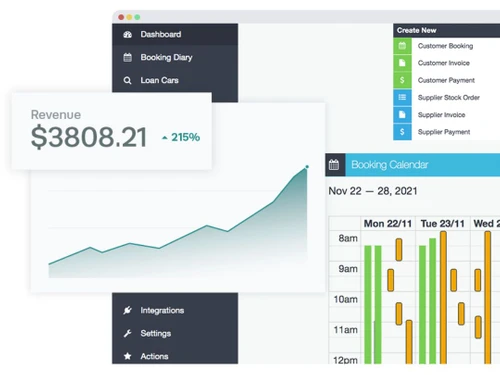
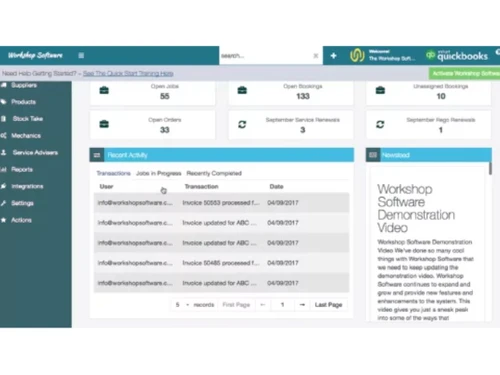
Workshop Software Demo Video play icon

Get Workshop Software Demo

Watch the demo video to explore key features, real workflows, and how the software fits your business needs.

Understand
Key Features
Personal
Demo Insights
Interactive
Demo Support

Workshop Software Specifications

Supported Platforms
Ubuntu Ubuntu Windows Windows MacOS MacOS Linux Linux
Devices
Desktop Desktop Mobile Mobile Tablet Tablet iPad iPad
Deployment
Cloud-Based Cloud-Based
Suitable For
Automobiles
Business Specific
Automobile
Business Size
Small Business Medium Business Enterprises
Customer Support
Email Communities
Language
English
Training Resources
Videos

Explore the Best Alternative Solutions Similar to Your Business Size and Needs

Workshop Software Review

4.5

Out of 5

img

Overall Rating

Based on
4 Verified Ratings

Rating Breakdown

  • Features 4.5
  • Value for Money 4.5
  • Ease of Use 4.7
  • Customer Support 4.5

92% Recommend this Product

Add Review

Be the First to Review

This product has no reviews yet. Be the first to leave your feedback.

Add Review

Compare Workshop Software With other Auto Repair Software

Products
Ratings
Pricing
Device Supported
Deployment
Supported Platforms
  • img

    Workshop Software

  • 4.5

  • Price On Request

  • Desktop

    Mobile

  • Web based

    On Premises

  • Windows

    Mac OS

  • img

    Tekmetric

  • 4.6

  • Price On Request

  • Desktop

    Mobile

  • Web based

    On Premises

  • Windows

    Mac OS

  • img

    Shopmonkey

  • 4.5

  • Price On Request

  • Desktop

    Mobile

  • Web based

    On Premises

  • Windows

    Mac OS

  • img

    Alldata

  • 4.1

  • Price On Request

  • Desktop

    Mobile

  • Web based

    On Premises

  • Windows

    Mac OS

  • img

    Autoleap

  • 4.5

  • Price On Request

  • Desktop

    Mobile

  • Web based

    On Premises

  • Windows

    Mac OS

  • img

    Identifix

  • 4.0

  • Price On Request

  • Desktop

    Mobile

  • Web based

    On Premises

  • Windows

    Mac OS

  • img

    Mitchell1

  • 4.2

  • Price On Request

  • Desktop

    Mobile

  • Web based

    On Premises

  • Windows

    Mac OS

  • img

    GarageBox

  • 4.0

  • Price On Request

  • Desktop

    Mobile

  • Web based

    On Premises

  • Windows

    Mac OS

  • img

    AutoRepair Cloud

  • 4.3

  • Price On Request

  • Desktop

    Mobile

  • Web based

    On Premises

  • Windows

    Mac OS

  • img

    Auto Repair Bill

  • 4.4

  • Price On Request

  • Desktop

    Mobile

  • Web based

    On Premises

  • Windows

    Mac OS

  • img

    Orderry

  • 4.4

  • Price On Request

  • Desktop

    Mobile

  • Web based

    On Premises

  • Windows

    Mac OS

(0) Product(s) selected

Workshop Software Alternatives

See All Workshop Software Alternatives

Starting Price:

$69

Which operating system does Workshop Auto Repair Software Support?

Workshop software is compatible with Ubuntu, Windows, MacOS, and Linux systems.

Is there any Workshop App?

No, there is no mobile app available for Workshop at present.

What is the deployment type of Workshop Auto Repair Software?

Workshop system supports web-based deployment.

How much does Workshop Software Cost?

Workshop pricing starts at $70 at techjockey.com.

Who are the potential users of Workshop?

The potential users of the product typically include mechanics, auto repair shops, and independent garages.

Is there any free trial or demo for Workshop Auto Repair Software?

Yes, a free demo of this product is available at techjockey.com.

Is Workshop Software Free?

No, the product is not available for free.

Does Workshop offer a free trial?

Yes, the product certainly offers a free trial.

How can you download Workshop Auto Repair Software?

Since the product supports web-based deployment there is no need for software installation. Just open the setup wizard and get started.

How does Workshop Work?

Workshop acts as a digital hub for auto shops, centralising tasks like scheduling appointments, tracking inventory, creating invoices, and managing customer information—all to keep repair jobs running smoothly.

20,000+ Software Listed

Best Price Guranteed

Free Expert Consultation

2M+ Happy Customers

Terms and Condtions

close

Users with registered businesses can purchase goods from merchants on the platform to satisfy their business needs. Users are not permitted to utilize any products acquired through the platform for resale, advertising, business, or further distribution.

For each purchase made, users will receive a Tax Invoice (or 'GST invoice') that includes specific details such as:

  • the GSTIN of the user associated with their registered business, and

  • the specified Entity Name for their business.

It should be noted that not all products are eligible for GST Invoice. Only the products displayed by participating sellers with the 'GST-based Invoice Available' callout on the product description page would qualify.

Certain goods and services are not eligible to get a GST Invoice, including items with VAS, i.e., Value Added Services (e.g., Total Mobile Protection/Assured Buyback) and those involving an exchange offer at the time of purchase.

Users must ensure the accuracy of the GSTIN, and business entity name provided for the GST Invoice. Requests for corrections into GST Invoice would not be accommodated by Techjockey.com or any Seller, and any issues arising from user-provided information are the sole responsibility of users.

Techjockey.com is not liable for the GST Invoice or any associated input tax credit. To efficiently claim an input tax credit, users should select the registered place of business address as per the GST authority's data and follow the provisions of the GST Act and rules.

To claim an input tax credit, the delivery and billing addresses must match. Furthermore, input tax credits will not be granted if the delivery address and GSTIN on the invoice are from different states. In case of incorrect GST details provided during the order placement, the order will be canceled automatically.