linkedin
WhatSender Pro logo
Whatsender Profile
Whatsender Profile
Whatsender Profile

WhatSender Pro

Brand: WhatSender

  • 4.6

  • 1 Rating & 1 Review

About WhatSender Profile WhatSender Profile is a WhatsApp marketing software that can be used for sending messages to WhatsApp contacts in bulk. The software uses WhatsApp Web technology to help its users with their whatsapp marketing strategies. Users can customize all the messages before finally ...

See More

Have you used WhatSender Pro before?

Share your insights for better experience

Add a Review
Starting Price
₹1,000 excl.GST
₹ 1,000 incl. GST

View plans

100% Genuine
Products
Best Price
Guaranteed
Safe & Secure
Payment
  • Description

  • Pricing

  • Features

  • Specification

  • Review

  • Compare

  • Alternatives

  • FAQ

Starting at ₹1,000

WhatSender Pro Software Overview

About WhatSender Profile 

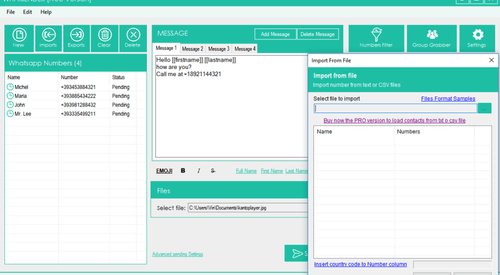
WhatSender Profile is a WhatsApp marketing software that can be used for sending messages to WhatsApp contacts in bulk. The software uses WhatsApp Web technology to help its users with their whatsapp marketing strategies. Users can customize all the messages before finally sending them. They can create their contact base either by manually adding the numbers or by importing them from a file. It supports all major file formats.

WhatSender allows its users to send messages to even those contacts which are not saved within their address book. The software also enables users to manage multiple accounts within a single platform. Finally, users can check the performance of their campaigns with the help of the report provided by the software. The latest version of WhatSender Profile was launched on 27th of March 2020.

How does WhatSender Profile help users with their brand marketing?

Users can strategically plan and represent their brand with the help of WhatSender Profile in the following ways:

  1. Customized Messages: End users can use the software for customizing messages so that your customers receive personalized messages based on their choices and requirements.
  2. Multiple Accounts: You can use a single platform software for operating multiple accounts. As a result, sending messages on a rotational basis is easy and convenient.
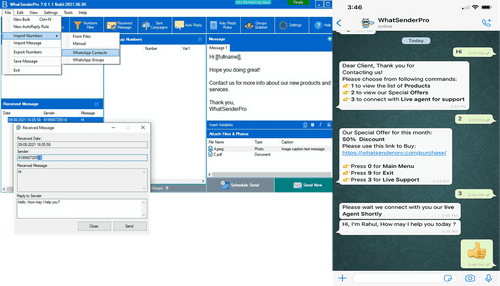
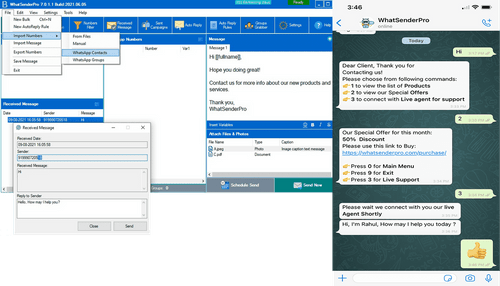
  3. Import Contacts: Manually adding contacts is easy with the software. You can also select specific WhatsApp groups for sending messages.
  4. Bulk Messages: Bulk messaging is hassle free and the best part is end users have the freedom for timing messages so that they reach the recipient’s inbox and not spam/junk folder.

Pricing of WhatSender Profile 

The software is available for Rs.1000, for 1 year and supports one PC. You can initiate a callback request if you are interested. 

Compatible Platforms of WhatSender Profile 

The software is compatible with XP, Vista, 7, 8 and 10 (32 and 64-bit) versions of the Windows operating system. Users can also use the software from their macOS by downloading the WhatSender Chrome Extension in their system.

What are the benefits of using WhatSender Profile 

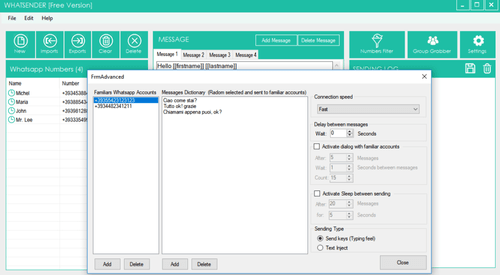
  1. SpinTax: SpinTax feature of the software allows the users to set multiple words with similar meanings. The inbuilt programmer will randomly select those words while sending messages to the contacts. Thus, ensuring that different messages are sent to each contact and the user will not be reported as spam by the recipients. 
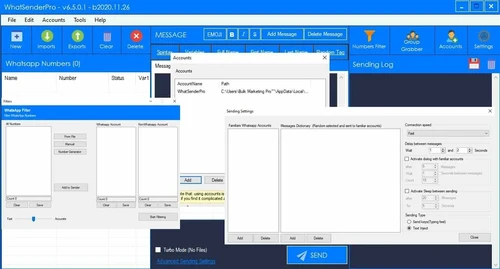
  2. Multiple Accounts: Users can add multiple WhatsApp accounts within the software and send messages from them in a rotational form (eg: 30 messages per account).
  3. Contact Grabber: Users can grab all the contacts from a selected WhatsApp group using this feature. They need to open WhatsApp on their phone and select a group from where the software will automatically extract the contacts that will be listed on the ‘contact grabber’ window.
  4. Numbers Filter: By using this feature, users can filter out the numbers which are there in WhatsApp and send messages to their users.
Read more

WhatSender Pro Pricing & Plans

Standard Edition

Calculated Price

1000 Exclusive of all taxes
    • Licenses

      Licenses
      Licenses
    • Yearly

      Yearly
      Yearly

Key Features

  • Import Contacts  .CSV & .TXT

  • Send Unlimited Wapp Messages

  • Wapp Group Contact Grabber

  • Change Sender Number Anytime

  • Sender Personalized Messages

  • Add Multiple Sender Accounts

  • Send Photo, Video & Document Files

Business Edition Pro

Calculated Price

3499 Exclusive of all taxes
    • Licenses

      Licenses
      Licenses
    • Yearly

      Yearly
      Yearly

Key Features

  • Import Contacts  .CSV & .TXT

  • Send Fast Unlimited Wapp Messages

  • Fast Wapp Number Filter

  • Fast Wapp Group Contact Grabber

  • Change Sender Number Anytime

  • Send Personalized Messages

  • Multiple Sender Profile

  • Fast Send Photo, Video, Audio & Documents

WhatSender Pro Features

Bulk Messaging & Broadcasting

  • icon_check Bulk Messaging
    Send messages to multiple contacts simultaneously.
  • icon_check Customizable Templates
    Pre-approved message templates for fast communication.
  • icon_check Auto Replies
    Automatically respond to frequently asked questions.
  • icon_check Rich Media Support
    Send images, videos, documents, and audio.
  • icon_check Scheduled Messaging
    Automate message delivery at a predefined time.
  • icon_check Message Templates
    Use WhatsApp-approved templates for structured messaging.
  • icon_check Preview Mode
    Review messages before sending to ensure accuracy.
  • icon_check Broadcast Lists
    Create lists for mass messaging without group limitations.

Contact Management & Segmentation

  • icon_check Sync Contacts
    Auto-sync contacts with CRM and business databases.
  • icon_check Import/Export Contacts
    Add or retrieve contacts via CSV, Excel, or APIs.
  • icon_check Deduplication
    Detect and merge duplicate contacts automatically.
  • icon_check Blacklist/Unsubscribe
    Manage opt-out requests and block specific users.
  • icon_check Contact Tagging & Segmentation
    Group contacts for targeted messaging.

Chatbot & Automation

  • icon_check Canned Responses
    Use saved replies for quick and consistent responses.
  • icon_check Auto Replies
    Automatically respond to frequently asked questions.
  • icon_check Campaign Scheduling
    Plan and automate messaging campaigns in advance.
  • icon_check Automatic Retry
    Resend messages if delivery fails initially.
  • icon_check Drip Campaigns
    Schedule sequential messages for lead nurturing.
  • icon_check Workflow Automation
    Set rule-based triggers for messaging actions.
  • icon_check Automated Follow-Ups
    Send reminders or additional messages based on user response.
  • icon_check Hybrid Mode
    Combine chatbot and human agent responses.
  • icon_check Recurring Messaging
    Schedule periodic messages for regular updates.

AI Features

  • icon_check AI Chatbots
    Automate conversations using Natural Language Processing (NLP).
  • icon_check Auto-Responders
    AI-driven replies to enhance response efficiency.
  • icon_check AI Sentiment Analysis
    Detect and analyze customer emotions in messages.
  • icon_check Predictive Analytics
    Use AI to forecast user behavior and engagement.
  • icon_check Lead Qualification
    AI-based lead scoring to identify high-potential prospects.

Multi-Agent & Team Collaboration

  • icon_check Alerts & Notifications
    Get instant alerts for new messages and updates.
  • icon_check Live Agent Support
    Enable human assistance for complex queries.
  • icon_check Shared Inbox
    Unified inbox for team-based message handling.
  • icon_check Unlimited Agents
    Allow multiple agents to manage conversations.
  • icon_check Internal Notes
    Add private comments within conversations.
  • icon_check Chat Transfer
    Seamlessly transfer chats between agents.

Integrations

  • icon_check Chatbot Integration
    Enhance automation with AI-driven chatbot support.
  • icon_check OpenAI Integration
    AI-powered content suggestions and chat automation.
  • icon_check WhatsApp Business API
    Secure API for automated and bulk messaging.
  • icon_check E-Commerce Platforms
    Integrate with Shopify, WooCommerce, and Magento.
  • icon_check CRM Integration
    Sync leads and conversations with HubSpot, Zoho, etc.
  • icon_check Webhooks Integration
    Enable real-time updates with third-party tools.
  • icon_check API Integration
    Connect with various business applications via API.
  • icon_check ERP Integration
    Synchronize with enterprise resource planning systems.
  • icon_check Payment Gateway Integration
    Enable payments within WhatsApp conversations.
  • icon_check Third Party Integrations
    Connect with marketing, analytics, and CRM tools.
  • icon_check TallyPrime Integration
    Link WhatsApp messages with accounting software.
  • icon_check E-Signatures
    Collect legally binding electronic signatures.

Analytics & Reporting

  • icon_check Campaign Performance
    Analyze the success of marketing campaigns.
  • icon_check Delivery & Read Reports
    Track message delivery and open status.
  • icon_check Engagement Metrics
    Measure click-through rates and response times.
  • icon_check Real Time Dashboards
    Get live updates on chat and campaign performance.
  • icon_check Conversion Tracking
    Monitor leads and customer actions post-message.
  • icon_check Agent Performance Metrics
    Assess agent response times and efficiency.

Security & Compliance

  • icon_check Data Encryption
    Secure messages with end-to-end encryption.
  • icon_check GDPR & CCPA Compliance
    Ensure data protection and regulatory adherence.
  • icon_check Anti Spam Filtering
    Detect and filter spam or suspicious messages.
  • icon_check Data Retention
    Manage data storage and deletion policies.
  • icon_check Opt-In/Opt-Out Management
    Ensure compliance with user consent rules.
  • icon_check API Rate Limiting
    Prevent spam by controlling API request frequency.
  • icon_check Role-Based Access Control (RBAC)
    Define user roles and access permissions.
  • icon_check Audit Logs
    Maintain records of system and user activities.
  • icon_check Audit Trail
    Track and review system actions for compliance.
  • icon_check IP Whitelisting
    Restrict access to authorized IP addresses only.

Others

  • icon_check Lead Generation
  • icon_check Secure Hosting
  • icon_check Anti-Blocking Mechanisms

WhatSender Pro Specifications

Supported Platforms
Windows Windows
Devices
Desktop Desktop
Deployment
Cloud-Based Cloud-Based
Suitable For
All Industries
Business Specific
All Businesses
Business Size
Small Business Startups Medium Business Enterprises
Customer Support
Email
Language
English
Training Resources
Videos
Compliance Regulation
DPDP

Explore the Best Alternative Solutions Similar to Your Business Size and Needs

WhatSender Pro Review

4.6

Out of 5

img

Overall Rating

Based on
1 Verified Review

Rating Breakdown

  • Features 5
  • Value for Money 4.5
  • Ease of Use 5
  • Customer Support 4

80% Recommend this Product

Add Review

Mustafa Shahansha

User

4.6

Reviewed on: Feb 20, 2021

Techjockey Verified

“Good experience, user friendly software”

Pros

User friendly

Cons

Unable to reach service support

Compare WhatSender Pro With other WhatsApp Marketing Software

Products
Ratings
Pricing
Device Supported
Deployment
Supported Platforms
  • img

    WhatSender Pro

  • 4.6

  • ₹ 1000.00 excl. GST

  • Desktop

    Mobile

  • Web based

    On Premises

  • Windows

    Mac OS

  • img

    Whatso

  • 4.0

  • Price On Request

  • Desktop

    Mobile

  • Web based

    On Premises

  • Windows

    Mac OS

  • img

    Flowcart

  • 4.4

  • ₹ 1900

  • Desktop

    Mobile

  • Web based

    On Premises

  • Windows

    Mac OS

  • img

    Chati

  • 4.3

  • ₹ 999

  • Desktop

    Mobile

  • Web based

    On Premises

  • Windows

    Mac OS

  • img

    Foxglove

  • 5

  • ₹ 10000

  • Desktop

    Mobile

  • Web based

    On Premises

  • Windows

    Mac OS

  • img

    Gallabox

  • 4.1

  • ₹ 43188

  • Desktop

    Mobile

  • Web based

    On Premises

  • Windows

    Mac OS

  • img

    WappBlaster

  • 3.9

  • ₹ 1549

  • Desktop

    Mobile

  • Web based

    On Premises

  • Windows

    Mac OS

  • img

    WAPlus

  • 4.2

  • ₹ 9999

  • Desktop

    Mobile

  • Web based

    On Premises

  • Windows

    Mac OS

  • img

    ChatMitra

  • 4.4

  • ₹ 980

  • Desktop

    Mobile

  • Web based

    On Premises

  • Windows

    Mac OS

  • img

    NovoChat

  • 4.3

  • Price On Request

  • Desktop

    Mobile

  • Web based

    On Premises

  • Windows

    Mac OS

  • img

    Finbite

  • 4.3

  • ₹ 24999

  • Desktop

    Mobile

  • Web based

    On Premises

  • Windows

    Mac OS

(0) Product(s) selected

WhatSender Pro Alternatives

See All WhatSender Pro Alternatives

Starting Price:

₹999 /Month

Starting Price:

₹10,000 /OneTime

Starting Price:

$25 /Month

Starting Price:

₹24,999 /Year

Available

Price on Request

Starting Price:

₹699 /Month

Articles for WhatSender Pro

See All Related Articles

How efficient is the Numbers Filter feature of WhatSender Profile?

The Numbers Sender feature enables users to know whether a particular number from the list is associated with WhatsApp or not.

How useful is the SpinTax feature of WhatSender Profile?

The SpinTax feature of the software allows users to add a set of words with the same meaning and the inbuilt programmer will randomly select those words while sending messages to the recipients.

Can I Get a demo of WhatSender Profile?

Yes, you can take an online demo for this software with Techjockey. You simply need to raise a demo request along with your preferred date and time.

How efficient is the Number Grabber feature of WhatSender Profile?

Users need to select a WhatsApp group and the software will automatically extract all the numbers from that group and show them on the ‘contact grabber’ window.

Does WhatSender Profile have a mobile app?

Users can operate the software from their personal computers. They can only use their mobile devices to enable WhatsApp web technology.

20,000+ Software Listed

Best Price Guranteed

Free Expert Consultation

2M+ Happy Customers

Terms and Condtions

close

Users with registered businesses can purchase goods from merchants on the platform to satisfy their business needs. Users are not permitted to utilize any products acquired through the platform for resale, advertising, business, or further distribution.

For each purchase made, users will receive a Tax Invoice (or 'GST invoice') that includes specific details such as:

  • the GSTIN of the user associated with their registered business, and

  • the specified Entity Name for their business.

It should be noted that not all products are eligible for GST Invoice. Only the products displayed by participating sellers with the 'GST-based Invoice Available' callout on the product description page would qualify.

Certain goods and services are not eligible to get a GST Invoice, including items with VAS, i.e., Value Added Services (e.g., Total Mobile Protection/Assured Buyback) and those involving an exchange offer at the time of purchase.

Users must ensure the accuracy of the GSTIN, and business entity name provided for the GST Invoice. Requests for corrections into GST Invoice would not be accommodated by Techjockey.com or any Seller, and any issues arising from user-provided information are the sole responsibility of users.

Techjockey.com is not liable for the GST Invoice or any associated input tax credit. To efficiently claim an input tax credit, users should select the registered place of business address as per the GST authority's data and follow the provisions of the GST Act and rules.

To claim an input tax credit, the delivery and billing addresses must match. Furthermore, input tax credits will not be granted if the delivery address and GSTIN on the invoice are from different states. In case of incorrect GST details provided during the order placement, the order will be canceled automatically.