linkedin
UnSpot logo
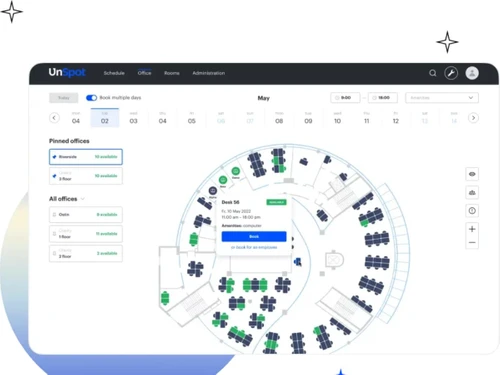
unspot office
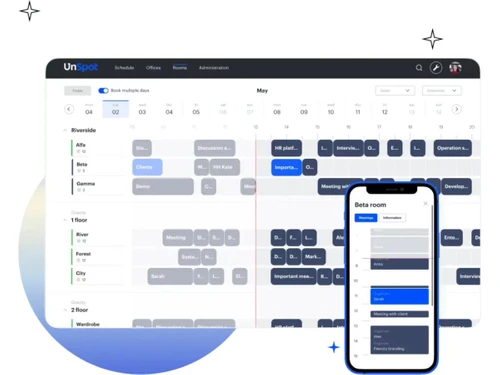
unspot rooms
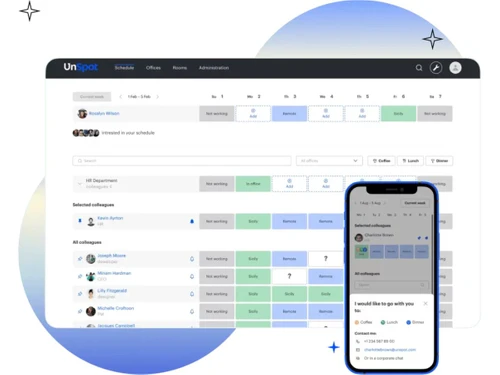
unspot scheduling

UnSpot

Brand: UnSpot

  • 5

  • 2 Ratings & 2 Reviews

UnSpot is a game changer and an all-in-one hybrid office platform.

See More

Have you used UnSpot before?

Share your insights for better experience

Add a Review
Starting Price
$3

View plans

100% Genuine
Products
Best Price
Guaranteed
Safe & Secure
Payment
  • Description

  • Pricing

  • Features

  • Specification

  • Review

  • Compare

  • Alternatives

  • FAQ

Starting at $3

UnSpot Software Overview

What is UnSpot?

UnSpot is the all-in-one hybrid office platform designed to revolutionize workspace management, streamline meeting scheduling, and provide valuable office insights, all within one intelligent solution. Say farewell to the hassle of routine office management tasks such as desk bookings, employee scheduling, and meeting coordination. With UnSpot, you can optimize space utilization, book desks, create schedules, and enhance overall workspace efficiency.

Empower your organization with a comprehensive suite of features, including desk booking, room reservation, week scheduling, office analytics, and an internal help desk. Simplify workspace management by providing employees with a convenient tool for desk booking, facilitating quick and easy access to meeting rooms, and ensuring seamless collaboration through effective schedule planning and coordination.

UnSpot is the go-to platform for all your workspace needs, eliminating the need to switch between multiple software solutions. Seamlessly integrate UnSpot with your favourite tools, such as Brivo, Asana, Google Workspace, Microsoft Teams, Slack, Zoom, and more, for a unified and efficient office management experience.

Why Choose UnSpot Software?

  • Streamline Operations: Simplify routine office management tasks and streamline operations for improved efficiency.
  • Optimize Space Utilization: Effectively utilize office spaces, optimize capacity, and effectively accommodate teams of all sizes.
  • Comprehensive Solutions: Access a wide range of features within one platform, eliminating the need for multiple software solutions.
  • Enhance Productivity: Provide employees with convenient tools for desk booking, room reservation, and schedule planning, enhancing productivity and collaboration.
  • Make Informed Decisions: Utilize office analytics to gain insights and make data-driven decisions to improve office performance.

Benefits of UnSpot Platform

  • Streamlined Office Management: Say goodbye to time-consuming tasks and streamline routine office management processes, improving overall operational efficiency.
  • Optimal Space Utilization: Empower large teams to operate smoothly within limited office spaces, optimize office capacity, and accommodate the entire team effortlessly.
  • Comprehensive Workspace Solution: Access a comprehensive suite of features within one platform, eliminating the need for multiple software solutions.
  • Enhanced Employee Experience: Provide employees with a convenient tool for desk booking, quick access to meeting rooms, and effective schedule planning.
  • Data-Driven Decision Making: Leverage office analytics to gain valuable insights into workspace usage, determine space requirements, and make informed decisions.
  • Integrated Ecosystem: Seamlessly integrate UnSpot with your preferred tools and software solutions, ensuring a unified and efficient office management experience.

Pricing of UnSpot

UnSpot meeting room booking system pricing starts from $3 at techjockey.com.

Read more

UnSpot Company Details

Founded Year:  -0001

UnSpot is an all-in-one Hybrid Office Platform. Experience the power of our software. With UnSpot, you get a desk booking system, scheduling software, office analytics, navigation, and room reservation system – all seamlessly integrated.

Director/Founders Mr. Meshkov
Company Size 1-100 Employees

UnSpot Pricing & Plans

Basic
Starting at $3
    • Users

      Users
      Users
    • Monthly

      Monthly
      Monthly

Key Features

  • Server Application Hosting/Mobile applications

  • Ability to work from a web browser

  • Desk booking/ Reservation of meeting rooms

  • Interactive office map/Reporting and analytics

Advanced
Starting at $5
    • Users

      Users
      Users
    • Monthly

      Monthly
      Monthly

Key Features

  • Server Application Hosting/Mobile applications

  • Ability to work from a web browser

  • Desk booking/ Reservation of meeting rooms

  • Interactive office map/Reporting and analytics

UnSpot Features

  • icon_check Meeting rooms
    Easily find and book meeting rooms for seamless collaboration and productivity.
  • icon_check Desk booking
    Streamline workspace organization by allowing employees to book desks with flexibility and ease.
  • icon_check Scheduling meetings
    Simplify the scheduling process to ensure efficient time management and coordination.
  • icon_check Access Groups
    Manage access permissions and group settings to ensure security and streamlined collaboration within the organization.
  • icon_check Office analytics
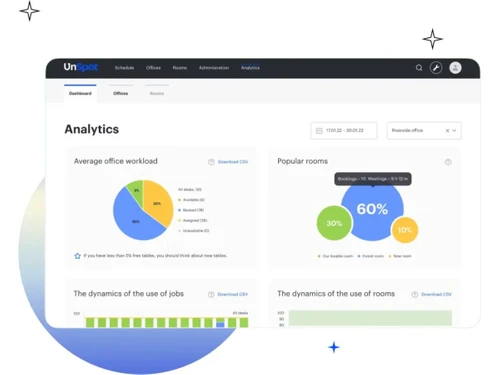
    Gain valuable insights into workspace utilization and performance to make data-driven decisions for office optimization.
  • icon_check Internal Help Desk
    Provide employees with a centralized platform to report and resolve office-related issues quickly and efficiently.

UnSpot Specifications

Supported Platforms
Ubuntu Ubuntu Windows Windows iOS iOS Android Android MacOS MacOS Linux Linux
Devices
Desktop Desktop Mobile Mobile
Deployment
Cloud-Based Cloud-Based
Suitable For
All Industries
Business Specific
All Businesses
Business Size
Small Business Startups Medium Business Enterprises SMBs
Customer Support
Phone Email Live Chat Forums
Language
English Deutsche
Training Resources
Live Online Documentation Videos

UnSpot Reviews

5

Out of 5

img

Overall Rating

Based on
2 Verified Reviews

Rating Breakdown

  • Features 5
  • Value for Money 5
  • Ease of Use 5
  • Customer Support 5

100% Recommend this Product

Add Review

Jack

Product Manager

Industry: Design

5

Reviewed on: Aug 31, 2024

Techjockey Verified

“Smooth setup and great support”

Implementing UnSpot was a smooth process, and the learning curve for our team was minimal. It's been a great addition to our office

Pros

The setup was easy, and the tech support has been excellent. They're always quick to help when needed, which I really appreciate

Cons

It's not the cheapest solution out there, and I wish their software could lock third-party room display tablets to just run UnSpot. Right now, they rely on third-party apps for that, which doesn't always work perfectly

Andrey

Project Manager

Industry: Arts and Crafts

5

Reviewed on: Aug 28, 2024

Techjockey Verified

“Great for shared spaces”

UnSpot has been fantastic for managing our shared office with other start-ups, especially during the pandemic. It's kept everything running smoothly, even with all the restrictions.

Pros

It's super easy to check what rooms are available and to book them. I also like how simple it is to add colleagues to reservations, and the reminders are a nice touch.

Cons

I've lost my reservation a couple of times because I forgot to check-in. Also, it would be great if there was a reminder when someone's reservation is up so I don't have to awkwardly ask them to leave

Compare UnSpot With other Meeting Room Booking System

Products
Ratings
Pricing
Device Supported
Deployment
Supported Platforms
  • img

    UnSpot

  • 5

  • Price On Request

  • Desktop

    Mobile

  • Web based

    On Premises

  • Windows

    Mac OS

  • img

    truMe Meeting Room

  • 5

  • Price On Request

  • Desktop

    Mobile

  • Web based

    On Premises

  • Windows

    Mac OS

  • img

    Meetable

  • 4.3

  • Price On Request

  • Desktop

    Mobile

  • Web based

    On Premises

  • Windows

    Mac OS

(0) Product(s) selected

UnSpot Alternatives

See All UnSpot Alternatives

Available

Price on Request

Articles for UnSpot

See All Related Articles

What are the pricing details for UnSpot?

The starting price for UnSpot is $3.

Is there a mobile application available for UnSpot?

Certainly, UnSpot offers a mobile application designed for mobile device usage.

Does UnSpot provide a free trial period?

Yes, UnSpot does provide a free trial period.

Which operating systems are supported by UnSpot?

UnSpot is compatible with various operating systems, including Ubuntu, Windows, iOS, Android, MacOS, and Linux.

Who typically benefits from using UnSpot?

UnSpot is tailored for organizations of all sizes and industries seeking to streamline workspace management and enhance collaboration efficiency.

How does UnSpot work?

UnSpot simplifies office management by offering a comprehensive suite of features for desk booking, room reservation, schedule planning, and office analytics, all integrated within one platform.

How do you manage meeting room bookings?

With UnSpot's intuitive platform, meeting room bookings are managed effortlessly. Employees can easily find and reserve meeting rooms.

What is a meeting room reservation system?

Meeting room reservation systems like UnSpot simplify the scheduling process and ensure efficient time management and coordination by providing a centralized platform for booking and managing reservations.

Why do we need a meeting room booking system?

A meeting room booking system such as UnSpot is essential for optimizing workspace utilization, enhancing collaboration, and improving overall operational efficiency. It empowers employees to easily schedule and access meeting rooms.

20,000+ Software Listed

Best Price Guranteed

Free Expert Consultation

2M+ Happy Customers

Terms and Condtions

close

Users with registered businesses can purchase goods from merchants on the platform to satisfy their business needs. Users are not permitted to utilize any products acquired through the platform for resale, advertising, business, or further distribution.

For each purchase made, users will receive a Tax Invoice (or 'GST invoice') that includes specific details such as:

  • the GSTIN of the user associated with their registered business, and

  • the specified Entity Name for their business.

It should be noted that not all products are eligible for GST Invoice. Only the products displayed by participating sellers with the 'GST-based Invoice Available' callout on the product description page would qualify.

Certain goods and services are not eligible to get a GST Invoice, including items with VAS, i.e., Value Added Services (e.g., Total Mobile Protection/Assured Buyback) and those involving an exchange offer at the time of purchase.

Users must ensure the accuracy of the GSTIN, and business entity name provided for the GST Invoice. Requests for corrections into GST Invoice would not be accommodated by Techjockey.com or any Seller, and any issues arising from user-provided information are the sole responsibility of users.

Techjockey.com is not liable for the GST Invoice or any associated input tax credit. To efficiently claim an input tax credit, users should select the registered place of business address as per the GST authority's data and follow the provisions of the GST Act and rules.

To claim an input tax credit, the delivery and billing addresses must match. Furthermore, input tax credits will not be granted if the delivery address and GSTIN on the invoice are from different states. In case of incorrect GST details provided during the order placement, the order will be canceled automatically.