linkedin
Ubuntu logo
play Ubuntu 23.10 FIRST LOOK! Here's Everything They Changed! (NEW)
ubuntu email
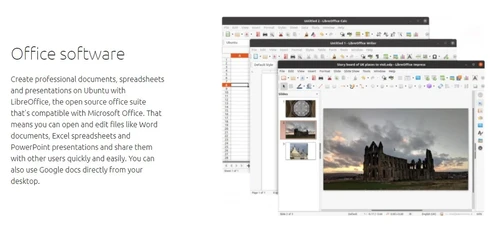
ubuntu office software

Ubuntu

Brand: Canonical

  • 4.6

  • 2 Ratings & 1 Review

Ubuntu is a Linux-based operating system known for its user-friendly interface and open-source community support, offering stability, security, and flexibility for desktop and server environments.

See More

Have you used Ubuntu before?

Share your insights for better experience

Add a Review

Free Forever

Get started immediately at no cost. Upgrade anytime if your business demand more.

100% Genuine
Products
Best Price
Guaranteed
Safe & Secure
Payment
  • Description

  • Pricing

  • Features

  • Specification

  • Review

  • Compare

  • Alternatives

  • FAQ

  • Questions

Ubuntu Software Overview

What is Ubuntu?

Ubuntu is a widely-used open-source server operating system developed and maintained by Canonical Ltd. It is known for its ease of use, regular releases, and strong community support. Ubuntu is designed for desktops, servers, and cloud computing, offering a versatile platform for various computing needs.

It features a user-friendly interface, extensive software repository, and robust security measures. Ubuntu follows a six-month release cycle, with Long-Term Support (LTS) versions providing extended support for up to five years. It is freely available for download and widely adopted by individuals, organizations, and businesses worldwide.

Why Choose Ubuntu Server Operating System?

  • Stability and Reliability: It is known for its stability and reliability, making it a dependable choice for both personal and enterprise use. Its Long-Term Support (LTS) releases offer extended support and security updates, ensuring a consistent and secure computing environment.
  • Ease of Use: It features a user-friendly interface and intuitive design, making it accessible to users with varying levels of technical expertise. Its software center provides easy access to a vast repository of applications, simplifying the installation and management of software.
  • Security: It prioritizes security with regular updates and built-in security features such as AppArmor and UFW (Uncomplicated Firewall). Its open-source nature allows for transparent security auditing and community-driven development, enhancing trust and confidence in the platform.
  • Flexibility and Customization: It offers extensive customization options, allowing users to tailor their computing experience to suit their preferences and requirements. Its support for various desktop environments, themes, and software packages provides flexibility and versatility.
  • Community and Support: It has a large and active community of users and developers who contribute to its development, provide support, and share knowledge. The community forums, documentation, and online resources offer valuable assistance and guidance for users encountering issues or seeking information.
  • Cost-effectiveness: It is free to download, use, and distribute, making it a cost-effective choice for individuals, businesses, and organizations. Its open-source nature also eliminates licensing fees, reducing the total cost of ownership compared to proprietary operating systems.

Benefits of Ubuntu Software

  • Fast and Lightweight: It is designed to be fast and lightweight, offering quick boot times and smooth performance even on older hardware, enhancing overall user experience and productivity.
  • Wide Hardware Support: It offers broad hardware compatibility, supporting a wide range of devices and peripherals out of the box, reducing compatibility issues and ensuring a seamless user experience.
  • Community-driven Development: It benefits from a vibrant and active community of developers and users who contribute to its development, provide support, and create a diverse ecosystem of applications and resources.
  • Regular Updates: It receives regular updates and security patches, ensuring that users have access to the latest features, improvements, and security fixes, keeping their systems up-to-date and protected.
  • Accessibility: It is committed to accessibility, providing features and tools to support users with disabilities, ensuring inclusivity and equal access to technology for all users.
  • Ecosystem of Applications: It offers a vast ecosystem of applications and software packages through its repositories and software center, providing users with a wide range of options for productivity, creativity, entertainment, and more.

Pricing of Ubuntu

Ubuntu is available for FREE.

Read more

Canonical Company Details

Founded Year:  2004

Canonical is a computer software company that markets commercial support and related services for Ubuntu and related projects.

Director/Founders Jane Silber, Mark Shuttleworth
Company Size 501-1000 Employees

Ubuntu Pricing & Plans

This Product is Available Free Forever.

Start instantly with no fees, no subscriptions, and no commitments.

  • Full access to basic version available
  • No credit card or sign-up required

Free Forever Plan

Get started immediately at no cost. Upgrade anytime if your business demand more.

Free Forever

Ubuntu Features

  • icon_check Office Software
    It offers LibreOffice, enabling efficient creation and editing of documents, spreadsheets, and presentations.
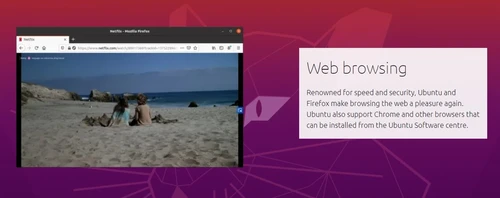
  • icon_check Web Browsing
    Pre-installed browsers like Mozilla Firefox and Google Chrome ensure seamless internet browsing.
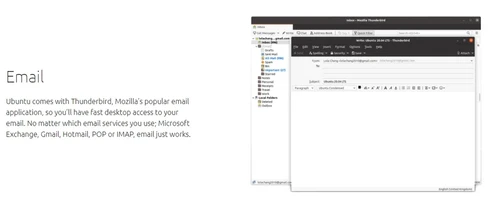
  • icon_check Email
    With email clients like Thunderbird, users can manage accounts and organize their inbox effectively.
  • icon_check Photo
    It includes Shotwell and GIMP for photo management and editing tasks.
  • icon_check Videos
    VLC Media Player on Ubuntu supports various video formats for multimedia enjoyment.
  • icon_check Gaming
    It supports gaming through platforms like Steam and native Linux games, providing diverse entertainment options.
Ubuntu Demo Video play icon

Get Ubuntu Demo

Watch the demo video to explore key features, real workflows, and how the software fits your business needs.

Understand
Key Features
Personal
Demo Insights
Interactive
Demo Support

Ubuntu Specifications

Supported Platforms
Ubuntu Ubuntu
Devices
Desktop Desktop
Deployment
Cloud-Based Cloud-Based Perpetual Perpetual
Suitable For
All Industries
Business Specific
All Businesses
Business Size
Small Business Startups Medium Business Enterprises SMBs SMEs MSMBs MSMEs
Customer Support
Email Live Chat Forums
Language
English
Training Resources
Documentation Videos
AI Features
AI Integrated

Ubuntu Review

4.6

Out of 5

img

Overall Rating

Based on
1 Verified Review

Rating Breakdown

  • Features 4.7
  • Value for Money 4.7
  • Ease of Use 4.5
  • Customer Support 4.5

90% Recommend this Product

Add Review

Ubuntu Video Review

youtubeVideoId

4.3

“Ubuntu 25.10 Review: Bold Move or Big Mistake?”

Review by: Savage Reviews

Compare Ubuntu With other Server Operating System

Products
Ratings
Pricing
Device Supported
Deployment
Supported Platforms
  • img

    Ubuntu

  • 4.6

  • FREE

  • Desktop

    Mobile

  • Web based

    On Premises

  • Windows

    Mac OS

  • img

    Oracle Solaris 11

  • 4.1

  • Price On Request

  • Desktop

    Mobile

  • Web based

    On Premises

  • Windows

    Mac OS

  • img

    Linux Mint

  • 4.3

  • Price On Request

  • Desktop

    Mobile

  • Web based

    On Premises

  • Windows

    Mac OS

(0) Product(s) selected

Ubuntu Alternatives

See All Ubuntu Alternatives
SAVE UPTO 24%

Available

Price on Request

Articles for Ubuntu

See All Related Articles

Which operating system does Ubuntu Software Support?

Ubuntu Software is compatible with Ubuntu.

Is there any Ubuntu Software App?

Ubuntu Software app is not available for Android and iOS app users.

What is the deployment type of Ubuntu Software?

Ubuntu Software supports on-premise deployment.

How much does Ubuntu Software Cost?

Ubuntu is available for FREE.

Who are the potential users of Ubuntu Software?

Ubuntu Software is typically used by all industries for its ease of use, regular releases, and strong community support.

Is there any free demo for Ubuntu Software?

Free demo of Ubuntu is available at techjockey.com.

Is Ubuntu Software Free?

Ubuntu Software is available for free. You can connect with our product experts to know more about the pricing plans.

Does this product offer a free trial?

Yes, Ubuntu Software offers a free trial.

How can you download Ubuntu Software?

For Ubuntu installation, you can go directly to its official website and download it. Once done, you can install it on your device easily.

How does Ubuntu Software Work?

Ubuntu Software operates as an open-source Linux-based operating system, providing users with a customizable and secure computing environment for various tasks and applications.

Ubuntu Questions

Q:

How to download movies from hdmoviespoint.com in Ubuntu?

BRAJ KISHOR RAM Apr 24, 2024
A:

To download movies from hdmoviespoint.com in Ubuntu, make use of XDM (Xtreme Download manager). It is a replica of IDM but for Linux.

Mohammad Shabbir Apr 24, 2024
Q:

What is the best downloading software for Ubuntu?

davinder singh Apr 24, 2024
A:

In order to download stuff from the internet one could use any normal browser and the terminal window. To do so follow the steps given below:

  • Copy the hyperlink of the item that you wish to download
  • Open the terminal window
  • Enter the command:
    • wget –c ‘copid_link’
  • The item gets downloaded.
Vinod Apr 24, 2024
Q:

What download managers are available for Ubuntu?

fahim ahmad Apr 24, 2024
A:

Download managers available for Ubuntu are as follows:

  • uGet
  • Xtreme Download Manager
  • kGet
  • Motrix
  • FlashGet
Shailesh Chavda Apr 24, 2024
A:

To create a custom application launcher for Wine Installed Apps, follow the steps given below:

  • Right click on the panel
  • Choose Add to Panel
  • Select Custom Application Launcher
  • Make the required changes and you are good to go.
Nilankur Das Apr 24, 2024
Q:

How to install Wine on Lubuntu 20.04 LTS?

SYED REHAN Apr 24, 2024
A:

To install Wine on Lubuntu 20.04 LTS, follow the steps given below:

  • Make sure that your OS is a 64-bit operating system
  • Download and add WineHQ repository key
  • Download WineHQ source file
  • Update the package database
  • Once the application has been completely installed, configure Wine and run it.
Nilankur Das Apr 24, 2024
See All Ubuntu Questions

20,000+ Software Listed

Best Price Guranteed

Free Expert Consultation

2M+ Happy Customers

Terms and Condtions

close

Users with registered businesses can purchase goods from merchants on the platform to satisfy their business needs. Users are not permitted to utilize any products acquired through the platform for resale, advertising, business, or further distribution.

For each purchase made, users will receive a Tax Invoice (or 'GST invoice') that includes specific details such as:

  • the GSTIN of the user associated with their registered business, and

  • the specified Entity Name for their business.

It should be noted that not all products are eligible for GST Invoice. Only the products displayed by participating sellers with the 'GST-based Invoice Available' callout on the product description page would qualify.

Certain goods and services are not eligible to get a GST Invoice, including items with VAS, i.e., Value Added Services (e.g., Total Mobile Protection/Assured Buyback) and those involving an exchange offer at the time of purchase.

Users must ensure the accuracy of the GSTIN, and business entity name provided for the GST Invoice. Requests for corrections into GST Invoice would not be accommodated by Techjockey.com or any Seller, and any issues arising from user-provided information are the sole responsibility of users.

Techjockey.com is not liable for the GST Invoice or any associated input tax credit. To efficiently claim an input tax credit, users should select the registered place of business address as per the GST authority's data and follow the provisions of the GST Act and rules.

To claim an input tax credit, the delivery and billing addresses must match. Furthermore, input tax credits will not be granted if the delivery address and GSTIN on the invoice are from different states. In case of incorrect GST details provided during the order placement, the order will be canceled automatically.