linkedin
Twine logo
Twine Dashboard
Twine Scriptwriting
Twine Notes

Twine

Brand: Twine

  • 4.1

  • 3 Ratings

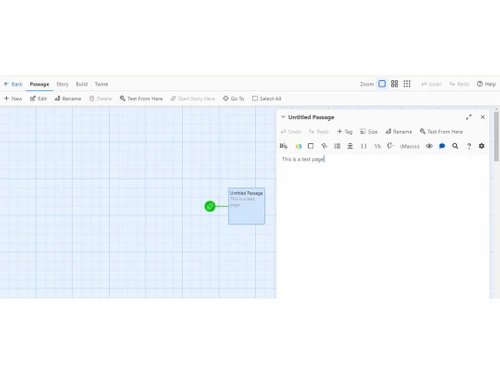
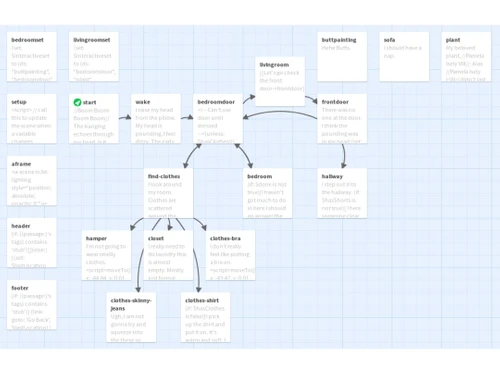
Twine is an open-source tool for creating interactive stories and games using a simple visual interface.

See More

Have you used Twine before?

Share your insights for better experience

Add a Review

Price Available on Request

Questions about pricing or customization? We’re here to help, just a click away.

100% Genuine
Products
Best Price
Guaranteed
Safe & Secure
Payment
  • Description

  • Pricing

  • Features

  • Specification

  • Review

  • Compare

  • Alternatives

  • FAQ

Twine Software Overview

What is Twine?

Twine is a script-writing software for creating interactive, nonlinear stories without coding skills. It allows adding variables, conditional logic, images, CSS, and JavaScript for more complex narratives. Twine publishes stories in HTML, making them easy to share online. It supports various story formats, like game engines, offering different features and coding styles.

It works on Linux, macOS, Windows, and as a web app. Licensed under GPL v3, it's used for interactive fiction and films. It focuses on visual hypertext structure and requires no programming knowledge, making it accessible for all. It has a community-driven development and relies on donations for support.

Why Choose Twine Software?

  • Versatile Storytelling: Users can create branching narratives, interactive stories, and text-based adventure games, allowing creative storytelling possibilities.
  • No Coding Required: The tool does not require users to have extensive coding knowledge; a few simple codes are enough to get started, making it ideal for writers of all levels.
  • Flexibility in Story Creation: Writers can experiment with character development, narrative choices, and multiple outcomes, promoting creativity and depth in storytelling.
  • Educational Potential: It can be a valuable tool for primary literacy education, helping young writers deepen their understanding of storytelling, promote collaboration, and encourage digital literacy.
  • Community Support: An active community offers tutorials, forums, and resources to help users learn and enhance their storytelling skills.
  • Interactive Features: Users can add images, photos, variables, conditional logic, CSS, and JavaScript to their stories, enhancing interactivity and engagement with the audience.
  • Publishing Options: Stories created with this tool can be published online, shared with others, and sold, giving writers control over how their creations are distributed.

Benefits of Twine Platform

  • Modularity: It allows for modular design, enabling creators to break their narratives into smaller, manageable sections for easier organization and editing.
  • Visual Storyboarding: Some versions offer visual storyboarding features, allowing creators to map out their narrative flow visually and aiding in planning and structuring.
  • Interactive Elements: It supports a variety of interactive elements beyond text, such as images, audio, and video, enhancing the richness and immersion of the storytelling experience.
  • Export Options: It provides various export options, allowing creators to publish their projects in formats suitable for web hosting, downloadable applications, or print.
  • Experimentation: With its low barrier to entry and flexible design capabilities, it encourages experimentation and exploration of new storytelling techniques and game mechanics.

Pricing of Twine

Twine price details are available on request at techjockey.com.

The pricing model is based on different parameters, including extra features, deployment type, and the total number of users. If you have further queries related to the product, you can contact our product team to learn more about the pricing and offers.

Read more

Twine Pricing & Plans

Looking for The Right Pricing?

Share your requirements and get a plan built around your business.

  • Define your business needs
  • Get customised pricing
  • Choose features that fit your workflow

Price Available on Request

Get personalised Twine pricing that fits your needs. Our team will connect with you.

Twine Features

  • icon_check Story Board
    Visualize your project's narrative flow and structure, aiding in planning and organization.
  • icon_check Content Management
    Easily manage and organize various elements of your project, such as passages, images, and multimedia assets.
  • icon_check Outliner
    Plan and outline your story easily, arranging and structuring content for coherent storytelling.
  • icon_check Script Writing
    Write scripts for interactive narratives or games using Twine's dedicated tools tailored to your creative needs.
  • icon_check Screenwriting
    Format your scripts professionally for screenplays, ensuring compliance with industry standards.
  • icon_check Data Import/Export
    Seamlessly import and export your project data to and from Twine for enhanced flexibility and collaboration.
  • icon_check Dashboard
    Access a centralized hub to view and manage all aspects of your project, including progress tracking and goal setting.
  • icon_check Browser Twine
    Use Twine in your web browser without needing to install any software.
  • icon_check Desktop Application
    Install Twine on Windows, macOS or Linux for offline story creation.
  • icon_check Local Storage Saving
    Browser Twine saves your stories in your browser’s local storage.
  • icon_check Story Library
    Manage multiple stories; Twine keeps a library of all your creations.
  • icon_check Unlimited Stories
    There’s no fixed limit on how many stories you can store in Twine.
  • icon_check Import / Export Stories
    Import existing stories or export to HTML, Twee, etc.

Twine Specifications

Supported Platforms
Ubuntu Ubuntu Windows Windows MacOS MacOS Linux Linux
Devices
Desktop Desktop
Deployment
Cloud-Based Cloud-Based Perpetual Perpetual
Suitable For
All Industries
Business Specific
All Businesses
Business Size
Small Business Startups Medium Business Enterprises
Customer Support
Email Communities
Language
English
Training Resources
Videos

Twine Review

4.1

Out of 5

img

Overall Rating

Based on
3 Verified Ratings

Rating Breakdown

  • Features 4
  • Value for Money 4.5
  • Ease of Use 4.1
  • Customer Support 4

93% Recommend this Product

Add Review

Be the First to Review

This product has no reviews yet. Be the first to leave your feedback.

Add Review

Compare Twine With other Script Writing Software

Products
Ratings
Pricing
Device Supported
Deployment
Supported Platforms
  • img

    Twine

  • 4.1

  • Price On Request

  • Desktop

    Mobile

  • Web based

    On Premises

  • Windows

    Mac OS

  • img

    Squibler

  • 4.4

  • Price On Request

  • Desktop

    Mobile

  • Web based

    On Premises

  • Windows

    Mac OS

  • img

    Scrivener

  • 4.1

  • ₹ 4900

  • Desktop

    Mobile

  • Web based

    On Premises

  • Windows

    Mac OS

  • img

    NolanAI

  • 4.2

  • Price On Request

  • Desktop

    Mobile

  • Web based

    On Premises

  • Windows

    Mac OS

  • img

    DramaQueen

  • 4.1

  • ₹ 9583

  • Desktop

    Mobile

  • Web based

    On Premises

  • Windows

    Mac OS

  • img

    Manuskript

  • 4.0

  • Price On Request

  • Desktop

    Mobile

  • Web based

    On Premises

  • Windows

    Mac OS

  • img

    Inklewriter

  • 4.4

  • Price On Request

  • Desktop

    Mobile

  • Web based

    On Premises

  • Windows

    Mac OS

  • img

    Celtx

  • 4.2

  • Price On Request

  • Desktop

    Mobile

  • Web based

    On Premises

  • Windows

    Mac OS

(0) Product(s) selected

Twine Alternatives

See All Twine Alternatives

Starting Price:

$29 /Month

Starting Price:

$40 /Month

Available

Price on Request

Starting Price:

$15 /month

Articles for Twine

See All Related Articles

What is the cost of Twine Software?

Twine price details are available on request at techjockey.com.

Is there any Twine Software App?

No, Twine is primarily web-based and does not have an app.

What operating systems does Twine Software support?

Twine supports Ubuntu, Windows, macOS, and Linux.

Can I get a free trial of Twine Script Writing Software?

Twine is entirely free to use.

How Does Twine Software Work?

Twine allows users to create interactive stories by connecting text passages with hyperlinks.

Who are the potential users of Twine Software?

Twine is designed for all industries that want to create interactive, nonlinear stories and experimental games without extensive coding knowledge.

Is Twine Software Free?

Yes, Twine is free to download and use.

What does Twine do?

Twine allows users to create interactive, nonlinear stories and games by building narratives with branching paths and interactive components, engaging the audience in digital storytelling.

Can I include JavaScript or CSS in my Twine projects for advanced customization?

Twine allows for advanced customization through JavaScript and CSS, enabling developers to create complex interactive elements and visual styles.

20,000+ Software Listed

Best Price Guranteed

Free Expert Consultation

2M+ Happy Customers

Terms and Condtions

close

Users with registered businesses can purchase goods from merchants on the platform to satisfy their business needs. Users are not permitted to utilize any products acquired through the platform for resale, advertising, business, or further distribution.

For each purchase made, users will receive a Tax Invoice (or 'GST invoice') that includes specific details such as:

  • the GSTIN of the user associated with their registered business, and

  • the specified Entity Name for their business.

It should be noted that not all products are eligible for GST Invoice. Only the products displayed by participating sellers with the 'GST-based Invoice Available' callout on the product description page would qualify.

Certain goods and services are not eligible to get a GST Invoice, including items with VAS, i.e., Value Added Services (e.g., Total Mobile Protection/Assured Buyback) and those involving an exchange offer at the time of purchase.

Users must ensure the accuracy of the GSTIN, and business entity name provided for the GST Invoice. Requests for corrections into GST Invoice would not be accommodated by Techjockey.com or any Seller, and any issues arising from user-provided information are the sole responsibility of users.

Techjockey.com is not liable for the GST Invoice or any associated input tax credit. To efficiently claim an input tax credit, users should select the registered place of business address as per the GST authority's data and follow the provisions of the GST Act and rules.

To claim an input tax credit, the delivery and billing addresses must match. Furthermore, input tax credits will not be granted if the delivery address and GSTIN on the invoice are from different states. In case of incorrect GST details provided during the order placement, the order will be canceled automatically.