linkedin
Solarwinds Observability logo
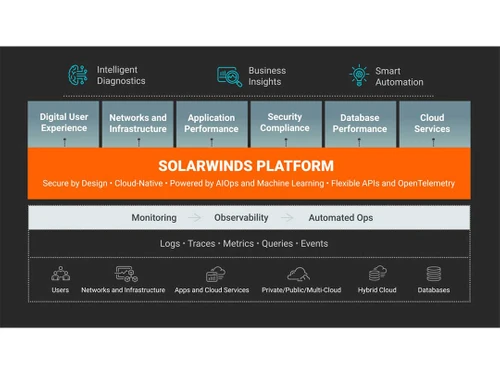
solarwinds observability unified visibility
solarwinds observability secure
solarwinds observability integrations

Solarwinds Observability

Brand: SolarWinds

  • 4.1

  • 5 Ratings

SolarWinds Observability is a tool that helps businesses monitor and understand their digital systems and applications by tracking performance, availability, and behaviour, allowing quick issue detection and troubleshooting.

See More

Have you used Solarwinds Observability before?

Share your insights for better experience

Add a Review

Price Available on Request

Questions about pricing or customization? We’re here to help, just a click away.

100% Genuine
Products
Best Price
Guaranteed
Safe & Secure
Payment
  • Description

  • Pricing

  • Features

  • Specification

  • Review

  • Compare

  • Alternatives

  • FAQ

Solarwinds Observability Software Overview

What is SolarWinds Observability?

SolarWinds Observability is a tool that helps businesses monitor and understand their digital systems and applications. It tracks the performance, availability, and behaviour of various components, such as servers, networks, databases, and applications.

With SolarWinds Observability, companies can detect and troubleshoot issues quickly, ensuring smooth operations. It provides insights through visualizations and alerts, helping teams stay on top of their IT infrastructure's health. Analyzing real-time data allows businesses to optimize performance, improve user experience, and prevent downtime. In simple terms, this Observability tool acts like a digital watchdog, keeping an eye on everything to ensure things run smoothly.

Why Choose SolarWinds Observability Software?

  • Monitoring: It offers thorough monitoring of digital systems, including servers, networks, databases, and applications, providing a complete view of the IT infrastructure's health.
  • Quick Issue Detection: It enables fast detection of performance issues or downtime, allowing businesses to troubleshoot problems promptly and minimize disruptions to operations.
  • Real-time Insights: The software provides real-time insights through visualizations and alerts, helping teams stay informed about system performance and potential issues as they arise.
  • User-friendly Interface: It features a user-friendly interface that makes it easy for teams to navigate and understand the data, even for non-technical users.
  • Scalability: It can scale the business's needs, accommodating growth and changes in the IT environment without sacrificing performance or functionality.
  • Proactive Optimization: Analyzing data and identifying trends enables businesses to optimize performance proactively and improve user experience before issues occur.
  • Integration Capabilities: It offers integration capabilities with other tools and platforms, allowing seamless communication and collaboration across different teams and systems.

Benefits of SolarWinds Observability

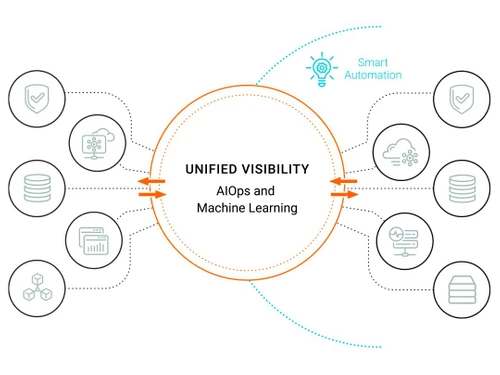
  • Unified Visibility: The software provides a unified dashboard, enabling IT teams to monitor and visualize their entire IT environment from one place. This enhances situational awareness and facilitates swift issue responses.
  • Customizable Dashboards: IT teams can create personalized dashboards and reports for real-time insights into their IT environment.
  • Cloud-based Architecture: Cloud-based architecture offers accessibility from anywhere and scalability to accommodate growing IT environments.
  • Cost Savings: Consolidating multiple IT monitoring tools into one platform can help reduce costs and enhance efficiency.
  • Enhanced Security: Advanced security features offer real-time alerts and notifications, enabling swift responses to security threats.
  • Improved Incident Response: Real-time visibility and analytics empower IT teams to swiftly identify and respond to incidents, minimizing downtime and improving customer satisfaction.
  • Automated Event Correlation: Automated event correlation capabilities assist IT teams in quickly identifying and resolving issues, reducing the mean time to resolve (MTTR).
  • Advanced Search and Filter: It offers advanced search and filtering capabilities to help IT teams quickly find and analyze data, improving incident response and reducing mean detection time (MTTD).
  • Improved Compliance: Features aid IT teams in meeting compliance requirements through real-time auditing and reporting capabilities.

SolarWinds Observability Pricing

SolarWinds Observability price details are available on request at techjockey.com.

The pricing model is based on different parameters, including extra features, deployment type, and the total number of users. If you have further queries related to the product, you can contact our product team to learn more about the pricing and offers.

Read more

SolarWinds Company Details

Founded Year:  1999

SolarWinds is a leading provider of simple, powerful and secure solutions designed to help organizations accelerate business transformation in today’s hybrid IT world by monitor and manage the performance of their IT environments, whether on-premises, in the cloud or in hybrid deployments

Director/Founders Don Yonce, Donald Yonce, Greg Gonzalez
Company Size 1000+ Employees

Solarwinds Observability Pricing & Plans

Looking for The Right Pricing?

Share your requirements and get a plan built around your business.

  • Define your business needs
  • Get customised pricing
  • Choose features that fit your workflow

Price Available on Request

Get personalised Solarwinds Observability pricing that fits your needs. Our team will connect with you.

Solarwinds Observability Features

  • icon_check Website Monitoring
    Keep tabs on your website's performance and availability to ensure a smooth user experience.
  • icon_check Application Crash Monitor
    Detect and address application crashes swiftly to minimize disruptions and maintain system stability.
  • icon_check Kubernetes Monitoring
    Monitor the performance and health of your Kubernetes clusters, ensuring optimal operation of containerized applications.
  • icon_check Application CPU Memory Use Monitor
    Track your applications' CPU and memory usage to identify performance bottlenecks and optimize resource utilization.
  • icon_check PHP Performance Monitoring
    Specifically monitor PHP applications to ensure they run efficiently and effectively.
  • icon_check Real user Monitoring
    Gain insights into user interactions with applications to optimize performance and enhance user experience.
  • icon_check Real-Time Application Monitoring
    Monitor applications in real-time to detect issues promptly and respond quickly to maintain system health and performance.

Solarwinds Observability Specifications

Supported Platforms
Windows Windows MacOS MacOS Linux Linux
Devices
Desktop Desktop
Deployment
Cloud-Based Cloud-Based Perpetual Perpetual
Suitable For
All Industries
Business Specific
All Businesses
Business Size
Small Business Startups Medium Business Enterprises SMBs SMEs MSMBs
Customer Support
Email
Language
English
Integration
API Integration
Training Resources
In Person Documentation

Explore the Best Alternative Solutions Similar to Your Business Size and Needs

Solarwinds Observability Review

4.1

Out of 5

img

Overall Rating

Based on
5 Verified Ratings

Rating Breakdown

  • Features 4.3
  • Value for Money 4.2
  • Ease of Use 3.6
  • Customer Support 4.4

96% Recommend this Product

Add Review

Be the First to Review

This product has no reviews yet. Be the first to leave your feedback.

Add Review

Compare Solarwinds Observability With other Observability Tools

Products
Ratings
Pricing
Device Supported
Deployment
Supported Platforms
  • img

    Solarwinds Observability

  • 4.1

  • Price On Request

  • Desktop

    Mobile

  • Web based

    On Premises

  • Windows

    Mac OS

  • img

    Evidently AI

  • 4.3

  • Price On Request

  • Desktop

    Mobile

  • Web based

    On Premises

  • Windows

    Mac OS

  • img

    Metaplane

  • 4.3

  • Price On Request

  • Desktop

    Mobile

  • Web based

    On Premises

  • Windows

    Mac OS

  • img

    observIQ

  • 4.4

  • Price On Request

  • Desktop

    Mobile

  • Web based

    On Premises

  • Windows

    Mac OS

  • img

    Sifflet

  • 4.2

  • Price On Request

  • Desktop

    Mobile

  • Web based

    On Premises

  • Windows

    Mac OS

  • img

    Fiddler AI

  • 4.1

  • Price On Request

  • Desktop

    Mobile

  • Web based

    On Premises

  • Windows

    Mac OS

  • img

    Edge Delta

  • 4.4

  • Price On Request

  • Desktop

    Mobile

  • Web based

    On Premises

  • Windows

    Mac OS

  • img

    Chronosphere

  • 4.2

  • Price On Request

  • Desktop

    Mobile

  • Web based

    On Premises

  • Windows

    Mac OS

  • img

    Giggso

  • 4.2

  • Price On Request

  • Desktop

    Mobile

  • Web based

    On Premises

  • Windows

    Mac OS

  • img

    Honeycomb

  • 4.1

  • Price On Request

  • Desktop

    Mobile

  • Web based

    On Premises

  • Windows

    Mac OS

  • img

    Robusta

  • 4.3

  • Price On Request

  • Desktop

    Mobile

  • Web based

    On Premises

  • Windows

    Mac OS

(0) Product(s) selected

Solarwinds Observability Alternatives

See All Solarwinds Observability Alternatives

Available

Price on Request

Available

Price on Request

Available

Price on Request

Available

Price on Request
Available

Price on Request

Available

Price on Request

Starting Price:

$99 /Month

Available

Price on Request

Available

Price on Request

Available

Price on Request

Articles for Solarwinds Observability

See All Related Articles

Is SolarWinds Observability Software available for free?

No, SolarWinds Observability Software is not available for free. It is a paid software solution.

Does SolarWinds Observability Software offer a free trial period?

SolarWinds Observability Software typically offers a free trial period for potential customers to test its features and functionality before making a purchase decision.

What operating systems does SolarWinds Observability Software support?

SolarWinds Observability Software is compatible with various operating systems, including Windows, Linux, and macOS.

Can SolarWinds Observability Software monitor both on-premises and cloud-based systems?

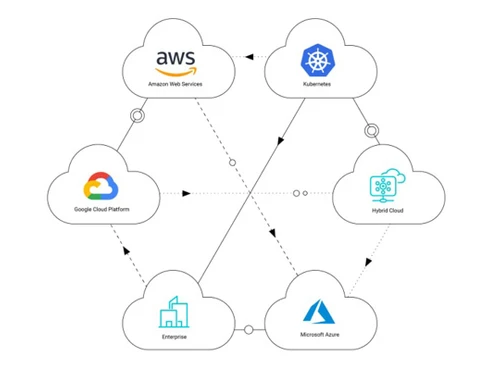
SolarWinds Observability Software can monitor both on-premises and cloud-based systems, providing visibility across hybrid IT environments.

How does SolarWinds Observability Software work?

SolarWinds Observability Software monitors servers, networks, apps, and databases, collecting real-time data, analyzing issues, and alerting IT teams for proactive management.

What are common use cases for SolarWinds Observability Software?

Common use cases for SolarWinds Observability Software include performance monitoring, troubleshooting, and security monitoring.

How does it help troubleshoot network performance issues?

SolarWinds Observability Software helps troubleshoot network performance issues by providing visibility into network traffic and performance metrics.

20,000+ Software Listed

Best Price Guranteed

Free Expert Consultation

2M+ Happy Customers

Terms and Condtions

close

Users with registered businesses can purchase goods from merchants on the platform to satisfy their business needs. Users are not permitted to utilize any products acquired through the platform for resale, advertising, business, or further distribution.

For each purchase made, users will receive a Tax Invoice (or 'GST invoice') that includes specific details such as:

  • the GSTIN of the user associated with their registered business, and

  • the specified Entity Name for their business.

It should be noted that not all products are eligible for GST Invoice. Only the products displayed by participating sellers with the 'GST-based Invoice Available' callout on the product description page would qualify.

Certain goods and services are not eligible to get a GST Invoice, including items with VAS, i.e., Value Added Services (e.g., Total Mobile Protection/Assured Buyback) and those involving an exchange offer at the time of purchase.

Users must ensure the accuracy of the GSTIN, and business entity name provided for the GST Invoice. Requests for corrections into GST Invoice would not be accommodated by Techjockey.com or any Seller, and any issues arising from user-provided information are the sole responsibility of users.

Techjockey.com is not liable for the GST Invoice or any associated input tax credit. To efficiently claim an input tax credit, users should select the registered place of business address as per the GST authority's data and follow the provisions of the GST Act and rules.

To claim an input tax credit, the delivery and billing addresses must match. Furthermore, input tax credits will not be granted if the delivery address and GSTIN on the invoice are from different states. In case of incorrect GST details provided during the order placement, the order will be canceled automatically.