linkedin
Smart Workforce logo
play Smart Workforce: Top Workforce Management Software
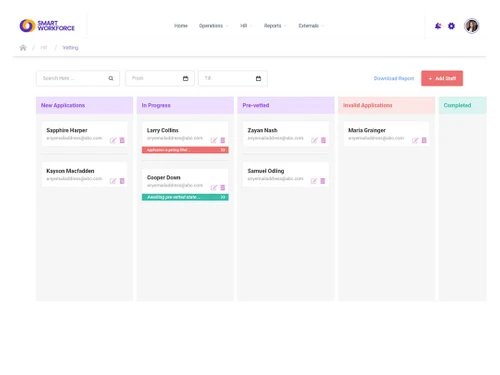
smartworkforce vetting
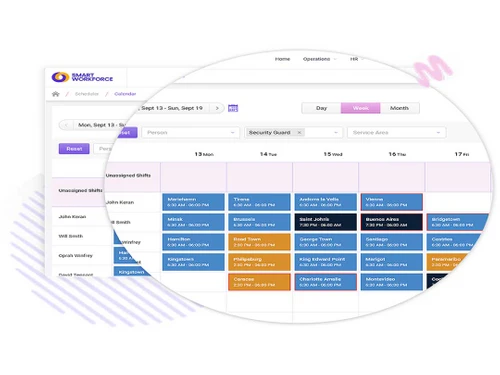
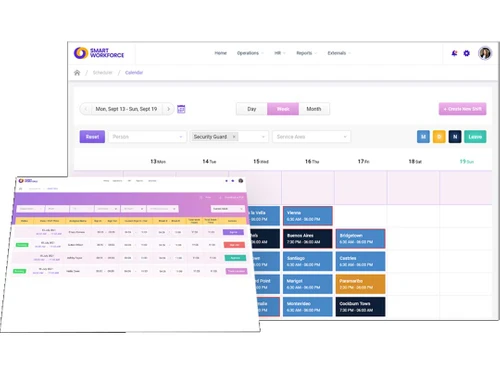
smartworkforce calendar

Smart Workforce

Brand: Smart Workforce

  • 4

  • 3 Ratings

Empower your workforce with our intelligent Smart Workforce solutions.

See More

Have you used Smart Workforce before?

Share your insights for better experience

Add a Review
Starting Price
£100

View plans

100% Genuine
Products
Best Price
Guaranteed
Safe & Secure
Payment
  • Description

  • Pricing

  • Features

  • Specification

  • Review

  • Compare

  • Alternatives

  • FAQ

Starting at £100

Smart Workforce Software Overview

What is Smart Workforce?

A mainstay of workforce management, Smart Workforce provides a powerful software program designed to increase worker productivity and streamline processes. Its cloud-based technology allows it to provide unmatched real-time visibility into all facets of workforce operations, including task management, performance analytics, and employee calendars.

Enhanced skills management functions are incorporated into the Smart Workforce. Employee abilities are matched with task requirements to guarantee that people are given assignments that correspond with their areas of competence. By successfully utilising their talents, this strategic alignment not only enhances job performance but also promotes employee growth and happiness. All things considered, Smart Workforce enables businesses to attain operational excellence by streamlining workforce management procedures, increasing productivity, cutting expenses, and eventually fostering sustainable growth.

Why Choose Smart Workforce?

  • Improve employee productivity: Boost worker productivity by keeping an eye on attendance and timekeeping, as well as scheduling, to make sure your team is operating at maximum capacity.
  • Reduce costs: To save time and money, automate operations like payroll and scheduling.
  • Improve compliance: Make sure your company complies with all relevant labor regulations.
  • Enhance employee engagement: Give staff members self-service resources to help them plan their time off and schedules.
  • Gain insights into your workforce: Create reports to monitor worker performance and pinpoint areas in need of development.

Benefits of Smart Workforce

  • Real-time visibility: Monitor the tasks, location, and status of employees in real-time.
  • Automated scheduling: Through the optimisation of personnel schedules, Smart Workforce minimises overtime expenses and improves productivity, guaranteeing the best possible deployment of resources.
  • Skills management: Determine employee strengths and effectively match them to job needs in order to enhance productivity and optimise performance.
  • Time and attendance tracking: With Smart Workforce, you can easily keep an eye on employee attendance and hours worked, assuring precise tracking and effective workforce management.
  • Performance monitoring: Keep tabs on their output and pinpoint areas in need of development.
  • Mobile accessibility: Use any device at any time to manage worker data and view reports.

Pricing Of Smart Workforce

Smart Workforce price starts at £100 and is available at techjockey.com. The pricing model is based on different parameters, including extra features, deployment type, and the total number of users. For further queries related to the product, you can contact our product team and learn more about the pricing and offers.

Read more

Smart Workforce Company Details

Founded Year:  2020

Smart Workforce is a fully automated workforce management software built for smart teams. Equipped with powerful features and multiple functionalities

Director/Founders SW
Company Size 1-100 Employees

Smart Workforce Pricing & Plans

Premium (Up to 50 Staff Members)
Key Features
  • Automated BS7858 Staff Vetting
  • Automated Control Room Management
  • Time and Attendance
  • Incident Management
  • £10 per report charges applicable
  • Patrolling Management
Starting at £100
    • Licenses

      Licenses
      Licenses
    • Monthly

      Monthly
      Monthly

Key Features

  • Automated BS7858 Staff Vetting

  • Automated Control Room Management

  • Time and Attendance

  • Incident Management

  • £10 per report charges applicable

  • Patrolling Management

Smart Workforce Features

  • icon_check Scheduling & Reporting
    Make and oversee staff schedules and provide reports to monitor attendance and time spent by staff members.
  • icon_check Patrolling Management
    Assign and monitor security guards' and other staff members' patrols.
  • icon_check Time & Attendance
    Track employee attendance and time, as well as compute overtime and other payroll-related information.
  • icon_check Leave Management
    It can effectively manage staff’s leave requests and also oversees absences to guarantee seamless operations.
  • icon_check Incident Management
    Smart Workforce’s proactive incident management responds quickly & effectively to situations like accidents and emergencies.
  • icon_check Automated Control Room Management
    Business can easily outsource monotonous duties to your control room, such as monitoring and dispatching.
Smart Workforce Demo Video play icon

Get Smart Workforce Demo

Watch the demo video to explore key features, real workflows, and how the software fits your business needs.

Understand
Key Features
Personal
Demo Insights
Interactive
Demo Support

Smart Workforce Specifications

Supported Platforms
Windows Windows iOS iOS Android Android
Devices
Desktop Desktop Mobile Mobile Tablet Tablet iPad iPad
Deployment
Cloud-Based Cloud-Based
Suitable For
All Industries
Business Specific
All Businesses
Business Size
Small Business Startups Medium Business Enterprises SMBs SMEs
Customer Support
Email
Language
English
Training Resources
In Person Webinars

Explore the Best Alternative Solutions Similar to Your Business Size and Needs

Smart Workforce Review

4

Out of 5

img

Overall Rating

Based on
3 Verified Ratings

Rating Breakdown

  • Features 3.6
  • Value for Money 4.1
  • Ease of Use 3.6
  • Customer Support 4.5

90% Recommend this Product

Add Review

Techjockey Trusted Reviews from Verified Users

No reviews are currently available for Smart Workforce. Discover similar Workforce Management Software reviews

  • Workstatus

    4.6

    Whats great - Workstatus can monitor your team's performance through screenshots and tracking their assigned tasks. Installation is simple ... read more

  • Cubiloon

    4.3

    Whats great - Scalable features and responsive support team. read more

  • Rippling

    4.4

    Whats great - Combines multiple HR functions, user-friendly interface, and good automation. read more

Compare Smart Workforce With other Workforce Management Software

Products
Ratings
Pricing
Device Supported
Deployment
Supported Platforms
  • img

    Smart Workforce

  • 4

  • Price On Request

  • Desktop

    Mobile

  • Web based

    On Premises

  • Windows

    Mac OS

  • img

    Workstatus

  • 4.5

  • ₹ 399

  • Desktop

    Mobile

  • Web based

    On Premises

  • Windows

    Mac OS

  • img

    Payoneer WFM

  • 4.1

  • Price On Request

  • Desktop

    Mobile

  • Web based

    On Premises

  • Windows

    Mac OS

  • img

    GoodDay

  • 4.4

  • Price On Request

  • Desktop

    Mobile

  • Web based

    On Premises

  • Windows

    Mac OS

  • img

    ProHance

  • 4.3

  • Price On Request

  • Desktop

    Mobile

  • Web based

    On Premises

  • Windows

    Mac OS

  • img

    Trackforce

  • 4.3

  • Price On Request

  • Desktop

    Mobile

  • Web based

    On Premises

  • Windows

    Mac OS

  • img

    Jolt

  • 4.6

  • Price On Request

  • Desktop

    Mobile

  • Web based

    On Premises

  • Windows

    Mac OS

  • img

    T3Workforce

  • 3.8

  • ₹ 80

  • Desktop

    Mobile

  • Web based

    On Premises

  • Windows

    Mac OS

  • img

    TeamWise

  • 4.5

  • Price On Request

  • Desktop

    Mobile

  • Web based

    On Premises

  • Windows

    Mac OS

  • img

    WorkMax

  • 4.4

  • Price On Request

  • Desktop

    Mobile

  • Web based

    On Premises

  • Windows

    Mac OS

(0) Product(s) selected

Smart Workforce Alternatives

See All Smart Workforce Alternatives

Starting Price:

$6

Available

Price on Request

Available

Price on Request

Jolt

4.6

Available

Price on Request

Starting Price:

₹30 /Month

Available

Price on Request
Available

Price on Request

Available

Price on Request

Starting Price:

$8 /Month

Available

Price on Request

How much does Smart Workforce Platform Cost?

The starting price for Smart Workforce is £100. For further queries about pricing plans you can contact techjockey.com.

Is there any Smart Workforce Management Software App?

For both iOS and Android smartphones, Smart Workforce does indeed provide mobile apps.

Who are the potential users of Smart Workforce Software?

Owners of big and retail enterprises can utilise Smart Workforce for company management.

Does Smart Workforce offer a free trial or available for free?

It is true that Smart Workforce is not free, however it does provide a free trial. Regarding price plans, you may get in touch with techjockey.com.

How does Smart Workforce software Work?

By giving real-time insight into employee schedules, assignments, and performance, Smart Workforce assists organisations in increasing staff productivity and efficiency.

Which operating system does Smart Workforce Software Support?

Windows and Mac OS are supported by Smart Workforce software. As the software is web based you can use any browser for your workforce management.

What is a workforce management app?

It automates attendance monitoring to increase data accuracy and decrease payroll mistakes, allowing employees to quickly and readily submit their hours worked and absences.

20,000+ Software Listed

Best Price Guranteed

Free Expert Consultation

2M+ Happy Customers

Terms and Condtions

close

Users with registered businesses can purchase goods from merchants on the platform to satisfy their business needs. Users are not permitted to utilize any products acquired through the platform for resale, advertising, business, or further distribution.

For each purchase made, users will receive a Tax Invoice (or 'GST invoice') that includes specific details such as:

  • the GSTIN of the user associated with their registered business, and

  • the specified Entity Name for their business.

It should be noted that not all products are eligible for GST Invoice. Only the products displayed by participating sellers with the 'GST-based Invoice Available' callout on the product description page would qualify.

Certain goods and services are not eligible to get a GST Invoice, including items with VAS, i.e., Value Added Services (e.g., Total Mobile Protection/Assured Buyback) and those involving an exchange offer at the time of purchase.

Users must ensure the accuracy of the GSTIN, and business entity name provided for the GST Invoice. Requests for corrections into GST Invoice would not be accommodated by Techjockey.com or any Seller, and any issues arising from user-provided information are the sole responsibility of users.

Techjockey.com is not liable for the GST Invoice or any associated input tax credit. To efficiently claim an input tax credit, users should select the registered place of business address as per the GST authority's data and follow the provisions of the GST Act and rules.

To claim an input tax credit, the delivery and billing addresses must match. Furthermore, input tax credits will not be granted if the delivery address and GSTIN on the invoice are from different states. In case of incorrect GST details provided during the order placement, the order will be canceled automatically.