linkedin
SeTrack logo
play Advanced GPS Tracking System | SeTrack GPS
setrack gps tracker
setrack locations

SeTrack

Brand: SeTrack Info

  • 4.3

  • 3 Ratings

SeTrack GPS Vehicle Tracking System offers real-time tracking, detailed reporting, and enhanced communication capabilities, empowering businesses to manage their fleet operations effectively.

See More

Have you used SeTrack before?

Share your insights for better experience

Add a Review

Price Available on Request

Questions about pricing or customization? We’re here to help, just a click away.

100% Genuine
Products
Best Price
Guaranteed
Safe & Secure
Payment
  • Description

  • Pricing

  • Features

  • Specification

  • Review

  • Compare

  • Alternatives

  • FAQ

SeTrack Software Overview

What is SeTrack Software?

SeTrack GPS tracking software is a highly effective GPS vehicle tracking system that enables you to track your assets from anywhere. It can track your vehicle and smartphone and help ensure friends and family members are safe. It is compatible to work as an app-to-web and app-to-app solution.

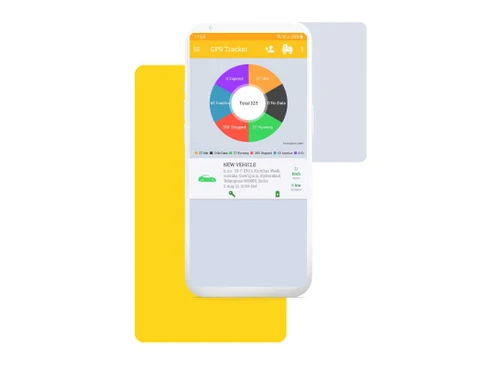
SeTrack helps you track your vehicle's real-time movement, the routes taken, the stoppages taken, the live location, the total distance covered, the maximum speed, the fuel consumption details, etc. You can get 90 days past data of your vehicle, speeding alerts and notifications, speed details, etc. which can be used for analytics purposes. This tool enables real-time communication with the driver. It also provides you with the option of an anti-theft alarm and tracking multiple fleets of vehicles in one go.

Apart from vehicle tracking, you can use this to track your friends and family members. They can share live locations, send photos and messages, get alert notifications, instant communication, etc., that make them feel safe and secure.

SeTrack also offers detailed reporting functionalities, allowing users to access insightful data about their fleet's performance. Reports on vehicle mileage, fuel consumption, and driver behavior can be generated, helping businesses identify areas for improvement, optimize resources, and enforce best practices. The data-driven insights provided by SeTrack enable businesses to make informed decisions to enhance operational efficiency and reduce costs.

Furthermore, SeTrack facilitates seamless collaboration and communication between fleet managers and drivers. It offers two-way messaging and notifications, enabling efficient communication and coordination. Fleet managers can send instructions, alerts, and updates to drivers in real-time, ensuring smooth operations and quick responses to any changes or issues that may arise.

Why Choose SeTrack System?

  • It is a leading easy-to-use GPS tracking system and mobile tracking system.
  • It can be used as App to Web and App to App solutions and can be used over the Internet of Things devices.
  • It allows you to monitor your assets from anywhere and ensure the safety and security of your assets.
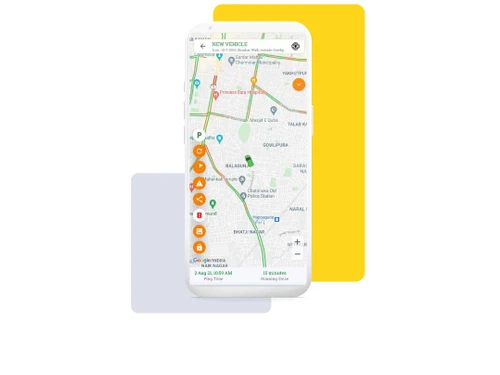
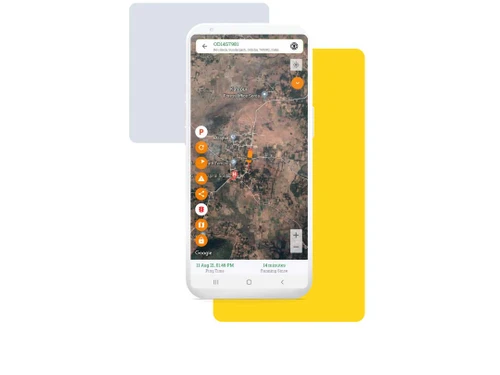
  • The GPS vehicle monitoring system allows live tracking of vehicles, gives vehicle satellite and route views, and enables communication with the driver.
  • It allows the notification for anti-theft, speeding alerts, route change alerts, and danger zone alerts.
  • It allows you to monitor vehicle usage statistics like fuel consumption, total distance traveled, and average speed and gives you the control to remote engine cut-off.
  • It can track any vehicle like a four-wheeler, two-wheeler, cargo container, boat, helicopter, etc.
  • It uses secure socket layer encryption to ensure data communication security.
  • For multiple-vehicle tracking, you can view all vehicles on one map.
  • You can also track your loved ones and their location on the map, establish communication, share photographs, and share locations.

Benefits of SeTrack Software

  • Easy to use: This easy-to-use tool supports app-to-web versions and app-to-app communication.
  • Accuracy: The tool GPS tracking is highly accurate and instant.
  • Compatible: It is compatible with any type of vehicle like a bus, car, scooter, boat, helicopter, tempo, truck etc.
  • One view: For multiple vehicle monitoring, it saves your effort and time by providing one view map that offers live tracking of all vehicles.
  • Security: It uses a secure socket layer and user authentication mechanisms that ensure the safety of the data.

Pricing of SeTrack GPS Vehicle Tracking Software

SeTrack GPS vehicle tracking software pricing is available on request at techjockey.com.

The overall pricing model is based on different factors such as personalization, extra features required, total users, and deployment type. Please feel free to request a call from our product experts if you want to learn more about our subscription plans or premium package deals.

Read more

SeTrack Pricing & Plans

Looking for The Right Pricing?

Share your requirements and get a plan built around your business.

  • Define your business needs
  • Get customised pricing
  • Choose features that fit your workflow

Price Available on Request

Get personalised SeTrack pricing that fits your needs. Our team will connect with you.

SeTrack Features

  • icon_check Real-Time Tracking
    It allows you to track the vehicle's real-time location with a refresh rate of 5 seconds.
  • icon_check Engine cut-off
    You can control your vehicle remotely from anywhere by using remote locking and unlocking.
  • icon_check History
    The user can access the 90 days history of driving data from cloud servers and use it for analysis.
  • icon_check Geofences
    The user can define safe zones for the vehicle.
  • icon_check Alerts & Notifications
    The software sends alert notifications for speed over the limit, entry and exit of safe zones, and any other set alerts.
  • icon_check Daily Statistics
    The software gives details like total distance, stoppage time, the average speed of the day, idle time, run time etc.
  • icon_check Share Location
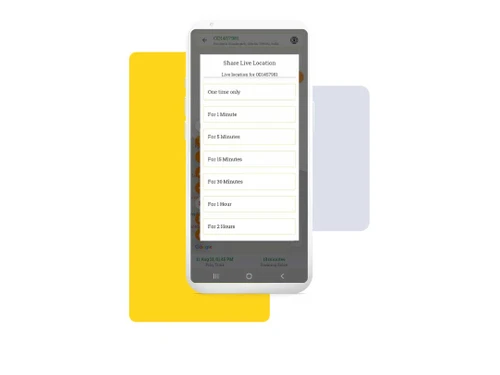
    It allows you to share your live location with your near and dear ones.
  • icon_check Fuel Tracking
    It details fuel consumption, calculations, and spending on rides.
  • icon_check Parking / Anti-theft Mode
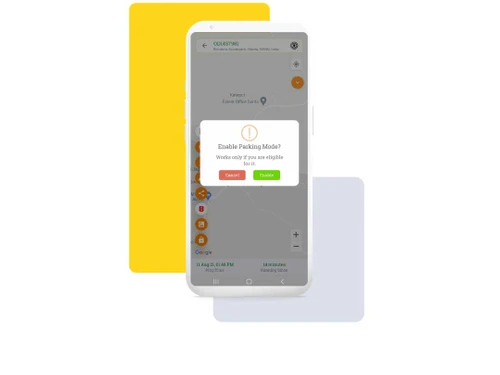
    In case of the vehicle's unauthorized movement or towing, the software raises the alarm on the smartphone.
  • icon_check Compatability
    This GPS tracking mechanism is compatible with all kinds of vehicles like buses, cars, trucks, two-wheeler, three-wheeler etc.
  • icon_check Ride Playback
    It plays the old ride details which can be shared with your family and friends.
  • icon_check Contact Driver
    The software allows you to contact the driver and thus establish communication.
SeTrack Demo Video play icon

Get SeTrack Demo

Watch the demo video to explore key features, real workflows, and how the software fits your business needs.

Understand
Key Features
Personal
Demo Insights
Interactive
Demo Support

SeTrack Specifications

Supported Platforms
Ubuntu Ubuntu Windows Windows iOS iOS Android Android MacOS MacOS
Devices
Desktop Desktop Mobile Mobile Tablet Tablet iPad iPad
Deployment
Cloud-Based Cloud-Based
Suitable For
All Industries
Business Specific
All Businesses
Business Size
Small Business Startups Medium Business SMBs SMEs MSMBs
Language
English

Explore the Best Alternative Solutions Similar to Your Business Size and Needs

SeTrack Review

4.3

Out of 5

img

Overall Rating

Based on
3 Verified Ratings

Rating Breakdown

  • Features 4.3
  • Value for Money 3.8
  • Ease of Use 4.6
  • Customer Support 4.5

93% Recommend this Product

Add Review

Techjockey Trusted Reviews from Verified Users

No reviews are currently available for SeTrack. Discover similar GPS Vehicle Tracking System reviews

  • GPS Gateway

    4.5

    Whats great - Easier asset recovery in the event of theft, kidnapping, or another emergency Easier asset recovery in the event of theft, ki... read more

  • Fleet Stack

    5.0

    Whats great - One-touch installation setup, User-friendly interface, Accurate real-time data Reliable performance, Exceptional customer su... read more

  • eTechSchoolBus

    4.8

    Whats great - Application is functioning admirably. Last time I whined about postponement in guide live area. It is because of deferral of ... read more

Compare SeTrack With other GPS Vehicle Tracking System

Products
Ratings
Pricing
Device Supported
Deployment
Supported Platforms
  • img

    SeTrack

  • 4.3

  • Price On Request

  • Desktop

    Mobile

  • Web based

    On Premises

  • Windows

    Mac OS

  • img

    VTMS

  • 4.5

  • ₹ 550

  • Desktop

    Mobile

  • Web based

    On Premises

  • Windows

    Mac OS

  • img

    Trakom

  • 4.6

  • ₹ 45

  • Desktop

    Mobile

  • Web based

    On Premises

  • Windows

    Mac OS

  • img

    Lynktrac

  • 4.6

  • ₹ 4200

  • Desktop

    Mobile

  • Web based

    On Premises

  • Windows

    Mac OS

  • img

    CarX

  • 4.1

  • Price On Request

  • Desktop

    Mobile

  • Web based

    On Premises

  • Windows

    Mac OS

  • img

    Falcon Trackers

  • 4.1

  • Price On Request

  • Desktop

    Mobile

  • Web based

    On Premises

  • Windows

    Mac OS

  • img

    Fleet Stack

  • 5

  • ₹ 3499

  • Desktop

    Mobile

  • Web based

    On Premises

  • Windows

    Mac OS

  • img

    GPS Gateway

  • 4.5

  • Price On Request

  • Desktop

    Mobile

  • Web based

    On Premises

  • Windows

    Mac OS

(0) Product(s) selected

SeTrack Alternatives

See All SeTrack Alternatives

CarX

4.1

Available

Price on Request

Available

Price on Request

Available

Price on Request

Available

Price on Request

Articles for SeTrack

See All Related Articles

Which operating system does the SeTrack Software Support?

SeTrack software is compatible with Windows and macOS operating systems.

Is there any SeTrack app?

The SeTrack app is available on Android and iOS devices.

What is the deployment type of the SeTrack platform?

SeTrack supports web-based deployment.

How much does the SeTrack cost?

SeTrack pricing is available on request at techjockey.com.

Who are the potential users of the SeTrack System?

SeTrack can be used by logistic firms, schools, transportation businesses, and individuals looking for reliable GPS tracking software.

Is there any free trial or demo for SeTrack?

SeTrack Software?s demo is available for free with techjockey.com.

Is the SeTrack System free?

SeTdoes not offer a free trial.

How can you download the SeTrack Software?

You can download the SeTrack app from the app store.

How does SeTrack Solution work?

SeTrack is a cutting-edge GPS vehicle tracking tool that enables you to monitor and manage your vehicles anywhere in the world. It provides real-time location updates, allowing you to easily track your vehicles and ensure their safety and security.

20,000+ Software Listed

Best Price Guranteed

Free Expert Consultation

2M+ Happy Customers

Terms and Condtions

close

Users with registered businesses can purchase goods from merchants on the platform to satisfy their business needs. Users are not permitted to utilize any products acquired through the platform for resale, advertising, business, or further distribution.

For each purchase made, users will receive a Tax Invoice (or 'GST invoice') that includes specific details such as:

  • the GSTIN of the user associated with their registered business, and

  • the specified Entity Name for their business.

It should be noted that not all products are eligible for GST Invoice. Only the products displayed by participating sellers with the 'GST-based Invoice Available' callout on the product description page would qualify.

Certain goods and services are not eligible to get a GST Invoice, including items with VAS, i.e., Value Added Services (e.g., Total Mobile Protection/Assured Buyback) and those involving an exchange offer at the time of purchase.

Users must ensure the accuracy of the GSTIN, and business entity name provided for the GST Invoice. Requests for corrections into GST Invoice would not be accommodated by Techjockey.com or any Seller, and any issues arising from user-provided information are the sole responsibility of users.

Techjockey.com is not liable for the GST Invoice or any associated input tax credit. To efficiently claim an input tax credit, users should select the registered place of business address as per the GST authority's data and follow the provisions of the GST Act and rules.

To claim an input tax credit, the delivery and billing addresses must match. Furthermore, input tax credits will not be granted if the delivery address and GSTIN on the invoice are from different states. In case of incorrect GST details provided during the order placement, the order will be canceled automatically.