linkedin
Scrivener logo
play Getting Started - Scrivener's Core Concepts
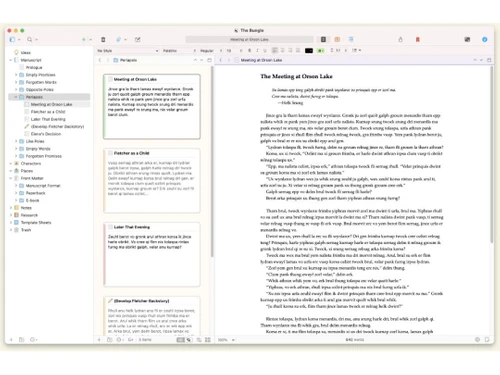
Scrivener Dashboard
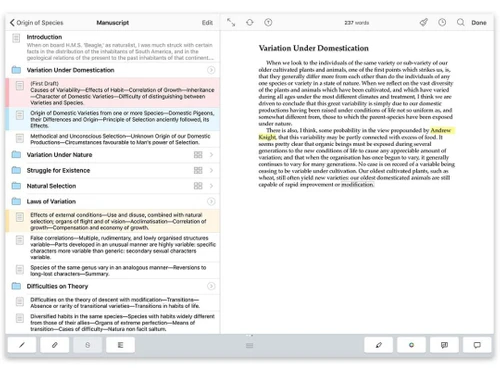
Scrivener Manuscript

Scrivener

Brand: Literature and Latte

  • 4.1

  • 4 Ratings

Scrivener is designed for long-form projects like novels, research papers, and scripts.

See More

Have you used Scrivener before?

Share your insights for better experience

Add a Review
Starting Price
₹4,900 excl.GST
₹ 5,782 incl. GST

View plans

offer Save upto 18%, Get GST Invoice on your business purchase T&C
offer Buy Now & Pay Later, Check offer on payment page.
Buy Now
100% Genuine
Products
Best Price
Guaranteed
Safe & Secure
Payment
  • Description

  • Pricing

  • Features

  • Specification

  • Review

  • Compare

  • Alternatives

  • FAQ

Starting at ₹4,900
Buy Now

Scrivener Software Overview

What is Scrivener?

Scrivener is versatile scripting writing software tailored for authors, screenwriters, and researchers. It enables the management of complex writing projects and offers robust tools for outlining, organizing, and composing text within a single application.

Users can easily break their work into manageable sections, rearrange content, and access research materials alongside their writing. Scrivener supports various writing formats, including screenplays, novels, and academic papers. Its features include corkboard views, keyword tagging, and comprehensive formatting options. Ideal for any long-form writing project, Scrivener streamlines the creative process from concept to completion.

Why Choose Scrivener Software?

  • Organizational Tools: It allows writers to break their projects into manageable sections, making it easier to outline, rearrange, and structure their work.
  • Versatile Formatting: It supports various writing formats, including novels, screenplays, and academic papers, with specialized templates and formatting tools.
  • Integrated Research: Writers can store research materials, notes, and references directly within the project, keeping everything needed in one place.
  • Corkboard and Outliner Views: These features help visualize and reorganize project components, enhancing the creative process and workflow.
  • Distraction-Free Writing: It offers a full-screen writing mode to minimize distractions, allowing writers to focus on their work.
  • Comprehensive Export Options: Projects can be compiled and exported in multiple formats, making sharing or publishing the final product easy.

Benefits of Scrivener Platform

  • Robust Backup Options: It provides automatic backup features to prevent data loss, ensuring your work is safe and recoverable.
  • Cross-Platform Compatibility: It is available for Mac and Windows, with sync options for iOS, allowing you to work seamlessly across different devices.
  • Customizable Interface: Users can tailor the workspace to fit their preferences with adjustable layouts and toolbars.
  • Project Targets and Statistics: Use built-in project statistics and target-setting tools to set word count goals and track your progress.
  • Snapshots: Take 'snapshots' of your work to save different versions, making it easy to revert to earlier drafts.
  • Scriptwriting Tools: Specialized features for screenwriters, including screenplay formatting, auto-complete for character names, and scene management.

Pricing of Scrivener

Scrivener price in India starts from INR 4900 at techjockey.com.

The pricing model is based on different parameters, including extra features, deployment type, and the total number of users. If you have further queries related to the product, you can contact our product team to learn more about the pricing and offers.

Read more

Literature and Latte Company Details

Founded Year:  2006

Apps for writers of all types, from novelists and screenwriters to academics and journalists.

Director/Founders Julia Pierce, Keith Blount
Company Size 1-100 Employees

Scrivener Pricing & Plans

Standard License for macOS/Windows
Key Features
  • Intelligent Formatting
  • Script Writing
  • Story Board
  • Data Import/Export

Calculated Price

4900 Exclusive of all taxes
    • Licenses

      Licenses
      Licenses

Key Features

  • Intelligent Formatting

  • Script Writing

  • Story Board

  • Data Import/Export

Scrivener Features

  • icon_check Intelligent Formatting
    Automatically formats your text according to industry standards, especially useful for screenplays and manuscripts.
  • icon_check Dashboard
    Provides a central hub for tracking your writing progress, goals, and project status.
  • icon_check Data Import/Export
    You can easily import and export your work in various formats, including Word, PDF, and ePub.
  • icon_check Script Writing
    Includes specialized tools and templates for writing scripts, catering to the needs of screenwriters and playwrights.
  • icon_check Screenwriting
    Offers features like auto-complete for character names and scene management, making screenplay writing efficient.
  • icon_check Content Management
    Organize and manage different parts of your project, including notes, research, and drafts, all within the software.
  • icon_check Drag & Drop
    Easily rearrange sections and scenes by dragging and dropping them within the project.
  • icon_check Story Board
    Visualize and outline your project with a virtual corkboard, pinning and moving index cards for different sections.
  • icon_check Ring-binder Project Structure
    Uses a ring-binder metaphor to gather manuscript, research and notes in one place for seamless project flow.
  • icon_check Scrivenings Mode
    Lets you view and edit multiple document sections together as if they were a single continuous document.
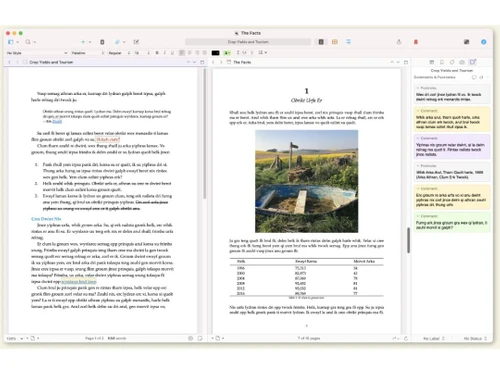
  • icon_check Split-Screen Editing
    Open up to four documents side-by-side in the same project window for easy cross-reference while writing.
  • icon_check Corkboard View
    Visualise index-cards for each section on a virtual corkboard, rearranging them to restructure the manuscript.
  • icon_check Outliner View
    Use the outliner to view document hierarchy, synopses and custom columns, then drag-and-drop to reorganise.
  • icon_check Full-screen Composition Mode
    Enter a distraction-free full-screen space with adjustable theme/background to focus on writing.
  • icon_check Templates and Icons
    Create project templates and document templates, assign custom icons to sections to speed up planning.
Scrivener Demo Video play icon

Get Scrivener Demo

Watch the demo video to explore key features, real workflows, and how the software fits your business needs.

Understand
Key Features
Personal
Demo Insights
Interactive
Demo Support

Scrivener Specifications

Supported Platforms
Windows Windows iOS iOS MacOS MacOS
Devices
Desktop Desktop Mobile Mobile iPad iPad
Deployment
Cloud-Based Cloud-Based Perpetual Perpetual
Suitable For
All Industries
Business Specific
All Businesses
Business Size
Small Business Startups Medium Business Enterprises
Customer Support
Email Communities
Language
English
Training Resources
Videos

Scrivener Review

4.1

Out of 5

img

Overall Rating

Based on
4 Verified Ratings

Rating Breakdown

  • Features 3.8
  • Value for Money 4.1
  • Ease of Use 4.3
  • Customer Support 4.1

95% Recommend this Product

Add Review

Be the First to Review

This product has no reviews yet. Be the first to leave your feedback.

Add Review

Compare Scrivener With other Script Writing Software

Products
Ratings
Pricing
Device Supported
Deployment
Supported Platforms
  • img

    Scrivener

  • 4.1

  • ₹ 4900.00 excl. GST

  • Desktop

    Mobile

  • Web based

    On Premises

  • Windows

    Mac OS

  • img

    Squibler

  • 4.4

  • Price On Request

  • Desktop

    Mobile

  • Web based

    On Premises

  • Windows

    Mac OS

  • img

    NolanAI

  • 4.2

  • Price On Request

  • Desktop

    Mobile

  • Web based

    On Premises

  • Windows

    Mac OS

  • img

    DramaQueen

  • 4.1

  • ₹ 9583

  • Desktop

    Mobile

  • Web based

    On Premises

  • Windows

    Mac OS

  • img

    Manuskript

  • 4.0

  • Price On Request

  • Desktop

    Mobile

  • Web based

    On Premises

  • Windows

    Mac OS

  • img

    Inklewriter

  • 4.4

  • Price On Request

  • Desktop

    Mobile

  • Web based

    On Premises

  • Windows

    Mac OS

  • img

    Celtx

  • 4.2

  • Price On Request

  • Desktop

    Mobile

  • Web based

    On Premises

  • Windows

    Mac OS

  • img

    Twine

  • 4.1

  • Price On Request

  • Desktop

    Mobile

  • Web based

    On Premises

  • Windows

    Mac OS

(0) Product(s) selected

Scrivener Alternatives

See All Scrivener Alternatives

Starting Price:

$29 /Month

Starting Price:

$40 /Month

Available

Price on Request

Starting Price:

$15 /month

Available

Price on Request

Articles for Scrivener

See All Related Articles

What is the price of Scrivener software?

The price of Scrivener software in India starts at INR 4900 on techjockey.com.

Does Scrivener software have a mobile app available?

Yes, there is a Scrivener app available for iOS.

Which operating system does Scrivener software support?

Scrivener supports both MacOS and Windows operating systems.

Does Scrivener platform offer a free trial?

Yes, Scrivener offers a free trial.

How does Scrivener operate?

Scrivener allows users to organize, outline, and write long-form projects with integrated tools and templates.

Who are the potential users of Scrivener software?

Potential users include authors, screenwriters, researchers, and anyone working on long-form writing projects.

Is Scrivener software free?

No, Scrivener is not free; it requires a purchase.

Can I customize the appearance of my Scrivener workspace?

Yes, Scrivener allows you to customize the layout, colors, and toolbars of your workspace.

20,000+ Software Listed

Best Price Guranteed

Free Expert Consultation

2M+ Happy Customers

Terms and Condtions

close

Users with registered businesses can purchase goods from merchants on the platform to satisfy their business needs. Users are not permitted to utilize any products acquired through the platform for resale, advertising, business, or further distribution.

For each purchase made, users will receive a Tax Invoice (or 'GST invoice') that includes specific details such as:

  • the GSTIN of the user associated with their registered business, and

  • the specified Entity Name for their business.

It should be noted that not all products are eligible for GST Invoice. Only the products displayed by participating sellers with the 'GST-based Invoice Available' callout on the product description page would qualify.

Certain goods and services are not eligible to get a GST Invoice, including items with VAS, i.e., Value Added Services (e.g., Total Mobile Protection/Assured Buyback) and those involving an exchange offer at the time of purchase.

Users must ensure the accuracy of the GSTIN, and business entity name provided for the GST Invoice. Requests for corrections into GST Invoice would not be accommodated by Techjockey.com or any Seller, and any issues arising from user-provided information are the sole responsibility of users.

Techjockey.com is not liable for the GST Invoice or any associated input tax credit. To efficiently claim an input tax credit, users should select the registered place of business address as per the GST authority's data and follow the provisions of the GST Act and rules.

To claim an input tax credit, the delivery and billing addresses must match. Furthermore, input tax credits will not be granted if the delivery address and GSTIN on the invoice are from different states. In case of incorrect GST details provided during the order placement, the order will be canceled automatically.