 USA
USA UAE
UAESmall Business
Designed for startups and growing businesses


See More





Brand: ScreenApp
ScreenApp is a video-making and screen recording software that enables users to capture and create high-quality videos of their screen activities with ease. It offers intuitive tools for recording, editing, and sharing screen recordings for various purposes.
See MoreHave you used ScreenApp before?
Share your insights for better experience
Brand: ScreenApp
Founded Year: 2022
ScreenApp
 Audio Analyzer Audio Translator Video Translator Audio Summarizer Call Recording Video Analyzer YouTube Stream Recorder Video Summarizer AI Video Notetaker Online Voice Tester

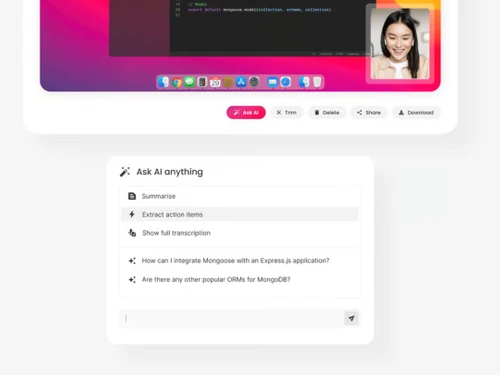
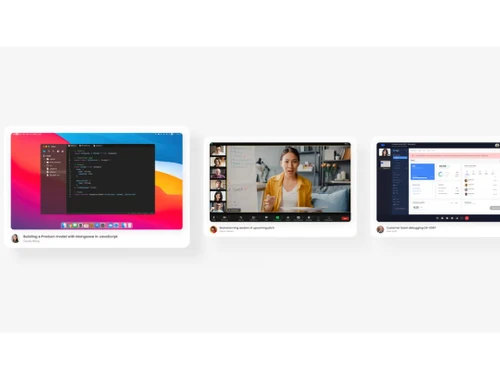
Watch the demo video to explore key features, real workflows, and how the software fits your business needs.
 Ubuntu
  Windows
  MacOS
MacOS  Linux
Linux  Desktop
  Mobile
  Tablet
  iPad
iPad  Cloud-Based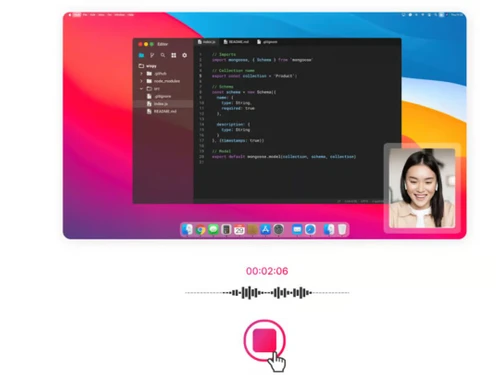
Small Business
Designed for startups and growing businesses
Medium Business
Built for business growth and flexibility
Enterprises
Designed for complex and large-scale business needs
4.3
Out of 5

Overall Rating
Based on
3 Verified Ratings
Rating Breakdown
93% Recommend this Product
Add ReviewTechjockey Trusted Reviews from Verified Users
No reviews are currently available for ScreenApp. Discover similar Screen Recording Software reviews

GOM CAM Screen Recording
Whats great - So easy to use, not only for simply recording your pc screen also you can add text, underline it, add webcams. So useful for ... read more

Camtasia
Whats great - Have made great videos for my youtube channel and the overall experience is great read more

DU Recorder
Whats great - Edit all your recordings with this recorder. Equally easy is cropping and linking together of the different fragments. read more

ScreenApp
Price On Request
Desktop
Mobile
Web based
On Premises
Windows
Mac OS

Apowersoft Screen Recorder
Price On Request
Desktop
Mobile
Web based
On Premises
Windows
Mac OS
Camtasia
₹ 7099
Desktop
Mobile
Web based
On Premises
Windows
Mac OS

Ace Thinker Screen Recorder
Price On Request
Desktop
Mobile
Web based
On Premises
Windows
Mac OS

ScreenPal
Price On Request
Desktop
Mobile
Web based
On Premises
Windows
Mac OS

Fraps
Price On Request
Desktop
Mobile
Web based
On Premises
Windows
Mac OS

Fluvid
Price On Request
Desktop
Mobile
Web based
On Premises
Windows
Mac OS

Screen Studio
Price On Request
Desktop
Mobile
Web based
On Premises
Windows
Mac OS

Macro Recorder
₹ 9376
Desktop
Mobile
Web based
On Premises
Windows
Mac OS

TechSmith Snagit
₹ 1499
Desktop
Mobile
Web based
On Premises
Windows
Mac OS

Movavi Screen Recorder
₹ 2399
Desktop
Mobile
Web based
On Premises
Windows
Mac OS
(0) Product(s) selected
Starting Price:
$40 /Month
Starting Price:
$10 /Month
Starting Price:
$37 /Quantity
Available
Price on Request
Starting Price:
$29 /Month
Starting Price:
₹9,376 /Quantity

Starting Price:
$39 /LifeTime

Starting Price:
$33 /Year
Starting Price:
$30 /Year
Available
Price on Request

Starting Price:
$6 /Month




Yes, there is a free trial available for users to try out the software before purchasing.
ScreenApp pricing starts at $30 at techjockey.com.
ScreenApp operates directly in your browser with no need for software downloads or extensions, ensuring a quick and easy start.
ScreenApp likely supports multiple operating systems such as Windows, MacOS, Ubuntu, and Linux.
ScreenApp software works by allowing users to record and share videos, transcribe audio and video content, and provide AI-powered tools for summarization, note-taking, and analytics, all within a user-friendly interface.
Potential users could include educators, business professionals, content creators, and anyone needing screen recording or screenshot capabilities.
ScreenApp provides a free version with basic screen recording capabilities. For more advanced features, explore premium plans, available at competitive prices.
No, Videos remain clean and entirely free of any watermarks.
20,000+ Software Listed
Best Price Guranteed
Free Expert Consultation
2M+ Happy Customers
Terms and Condtions

Users with registered businesses can purchase goods from merchants on the platform to satisfy their business needs. Users are not permitted to utilize any products acquired through the platform for resale, advertising, business, or further distribution.
For each purchase made, users will receive a Tax Invoice (or 'GST invoice') that includes specific details such as:
the GSTIN of the user associated with their registered business, and
the specified Entity Name for their business.
It should be noted that not all products are eligible for GST Invoice. Only the products displayed by participating sellers with the 'GST-based Invoice Available' callout on the product description page would qualify.
Certain goods and services are not eligible to get a GST Invoice, including items with VAS, i.e., Value Added Services (e.g., Total Mobile Protection/Assured Buyback) and those involving an exchange offer at the time of purchase.
Users must ensure the accuracy of the GSTIN, and business entity name provided for the GST Invoice. Requests for corrections into GST Invoice would not be accommodated by Techjockey.com or any Seller, and any issues arising from user-provided information are the sole responsibility of users.
Techjockey.com is not liable for the GST Invoice or any associated input tax credit. To efficiently claim an input tax credit, users should select the registered place of business address as per the GST authority's data and follow the provisions of the GST Act and rules.
To claim an input tax credit, the delivery and billing addresses must match. Furthermore, input tax credits will not be granted if the delivery address and GSTIN on the invoice are from different states. In case of incorrect GST details provided during the order placement, the order will be canceled automatically.



