linkedin
RazorpayX Payroll logo
play RazorpayX Payroll - 3 Clicks, Payroll fixed | Ft. Shashank Mehta | The Whole Truth Founder’s tale
RazorpayX Payments
RazorpayX payroll compliance

RazorpayX Payroll

Brand: Razorpay Software Private Limited ts_icon_wide

  • 3.9

  • 14 Ratings & 10 Reviews

RazorpayX Payroll streamlines salary processing, tax filing and payment– enabling businesses to pay employees directly and manage statutory compliance with ease.

See More

Have you used RazorpayX Payroll before?

Share your insights for better experience

Add a Review
Starting Price
₹29,988 excl.GST
₹ 35,386 incl. GST

View plans

100% Genuine
Products
Best Price
Guaranteed
Safe & Secure
Payment
  • Description

  • Pricing

  • Features

  • Specification

  • Review

  • Compare

  • Alternatives

  • FAQ

  • Questions

Starting at ₹29,988

RazorpayX Payroll Software Overview

What is RazorpayX Payroll?

RazorpayX Payroll is an automated payroll software designed to automate and simplify salary processing and compliance for businesses. It allows companies to disburse salaries directly into employees' bank accounts while automatically handling tax filings and payments for TDS, PT, and ESIC. The platform is user-friendly, enabling quick onboarding and bulk entry of employee details. With features like instant reimbursements and easy attendance tracking, it streamlines various HR functions.

RazorpayX Payroll also provides real-time compliance reports and alerts, ensuring businesses stay updated with regulatory changes. Additionally, it integrates seamlessly with various HR management software, making it a comprehensive solution for payroll management.

Why Choose RazorpayX Payroll Software?

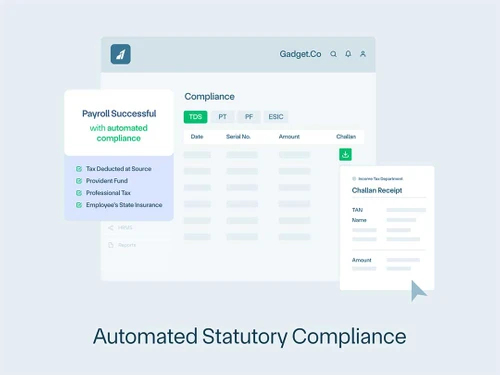
  • Fully Automated Payroll: Automates salary disbursement and tax filing, including TDS, PT, and ESIC, from a single dashboard.
  • Direct Salary Deposits: Enables instant and accurate salary deposits directly into employees' bank accounts.
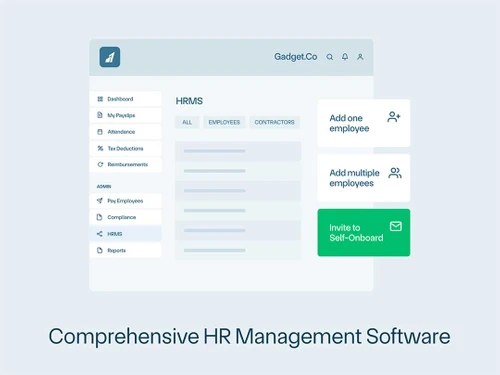
  • Quick Onboarding: Offers a seamless onboarding process that can be completed in just one hour.
  • Comprehensive Compliance: Automatically handles multi-state compliance laws without extra charges, ensuring businesses stay compliant.
  • Instant Reimbursements: Allows for immediate reimbursement approvals and payments, enhancing employee satisfaction.
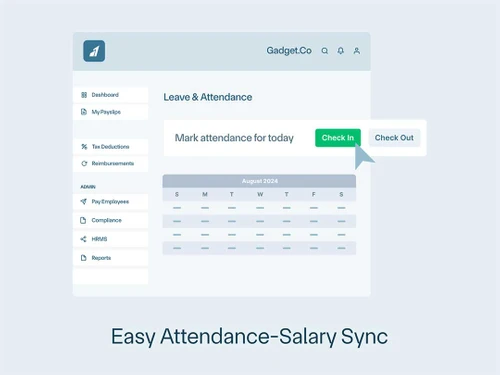
  • Easy Attendance Management: Integrates attendance tracking seamlessly into payroll calculations, reducing manual errors.
  • Powerful Integrations: Compatible with over 25 HRMS partners for easy integration into existing systems.
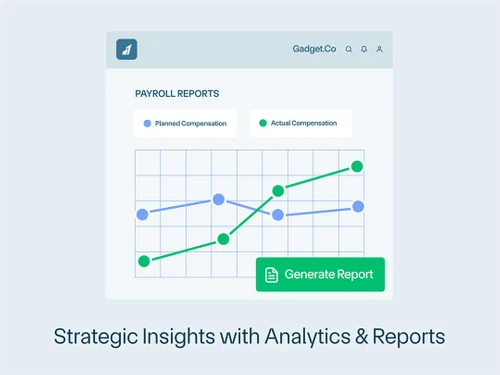
  • Analytics and Reporting: Provides detailed reports and insights on payroll data, helping businesses make informed decisions.
  • User-Friendly Interface: Designed for ease of use, making payroll management accessible even for non-technical users.

Benefits of RazorpayX Payroll Software

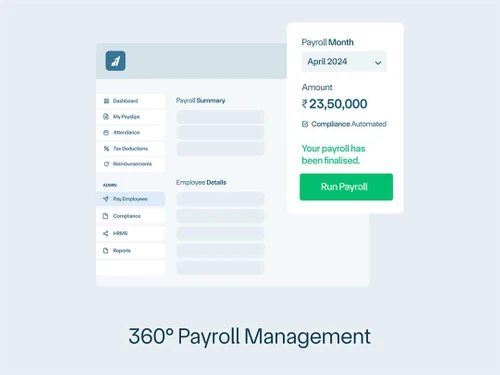
  • 360° Payroll Management: Offers comprehensive payroll features that cover everything from salary disbursement to compliance management.
  • Automated Arrears and Salary Revisions: Allows for easy adjustments to past or future salaries, including mid-month changes.
  • Custom User Roles: Enables businesses to create tailored user roles for efficient workflow management.
  • Instant Access to Payslips: Employees can quickly access their payslips through a self-service dashboard and WhatsApp.
  • Advanced Data Visualization: Simplifies complex payroll data with visual reports for better understanding and analysis.
  • Bulk Wizard Feature: Facilitates quick execution of bulk changes like additions, deductions, or loss of pay, saving time on manual updates.
  • Real-Time Regulatory Alerts: Keeps users informed about changes in compliance regulations, ensuring they remain up-to-date.
  • Integrated Attendance Management: Automatically calculates attendance into salary payouts, reducing manual errors and discrepancies.
  • Powerful Integration Capabilities: Works seamlessly with over 25 HRMS partners, allowing for easy integration into existing systems.

Pricing of RazorpayX Payroll

RazorpayX Payroll price in India starts at INR 29988 per year at techjockey.com.

The pricing model is based on different parameters, including extra features, deployment type, and the total number of users. For further queries related to the product, you can contact our product team and learn more about the pricing and offers.

Read more

RazorpayX Payroll Pricing & Plans

Prime (INR 2499 per month, Billed Annual)

Calculated Price

29988 Exclusive of all taxes
    • Licenses

      Licenses
      Licenses
    • Yearly

      Yearly
      Yearly

Key Features

  • Max. Employees Supported: 20

  • Payroll Calculation

  • Payslip Generation

  • Direct Salary Payment

  • One-Time Payments

  • Salary Adjustment

  • Salary Register

  • Compliance Calculation (TDS, PT)

  • Advance Compliance (PF, ESI)

  • Compliance Payment

Elite (INR 8499 per month, Billed Annual)

Calculated Price

65988 ₹101988
SAVE UPTO 35%
Exclusive of all taxes
    • Licenses

      Licenses
      Licenses
    • Yearly

      Yearly
      Yearly

Key Features

  • Max. Employees Supported: 100

  • Payroll Calculation

  • Payslip Generation

  • Direct Salary Payment

  • One-Time Payments

  • Salary Adjustment

  • Salary Register

  • Compliance Calculation (TDS, PT)

  • Advance Compliance (PF, ESI)

  • Compliance Payment

RazorpayX Payroll Features

Payroll Management

  • icon_check Overtime Management
    Tracks and calculates employee overtime hours.
  • icon_check Gratuity Calculation
    Calculates gratuity as per Indian statutory requirements.
  • icon_check Automated Payroll
    Streamlined payroll calculations for timely processing.
  • icon_check Direct Bank Transfers
    Automated salary deposits directly to bank accounts.
  • icon_check Off-Cycle Payroll Processing
    Process unscheduled payrolls for bonuses or adjustments.
  • icon_check Bonus and Incentive Management
    Configures and manages employee bonuses and incentives.
  • icon_check Variable Pay & Commission Management
    Manages variable pay and commissions accurately.
  • icon_check Expense Reimbursements
    Automates employee expense reimbursement processing.
  • icon_check Tax Deductions
    Calculates pre-tax and post-tax deductions for compliance.
  • icon_check Employee Benefits Management
    Administers employee health, retirement, and other benefits.
  • icon_check Multiple Pay Rates and Schedules
    Supports varied pay rates and custom pay cycles.

Compliance Management

  • icon_check Income Tax (TDS) Management
    Automates TDS calculations and deductions.
  • icon_check Provident Fund (PF) Compliance
    Ensures timely PF contributions and reporting.
  • icon_check Professional Tax (PT) Compliance
    Manages PT deductions per state regulations.
  • icon_check Labour Welfare Fund (LWF) Management
    Manages LWF deductions for eligible employees.
  • icon_check Employee State Insurance (ESI) Compliance
    Tracks and manages ESI contributions.

Time, Attendance & Leave Management

  • icon_check Leave & Absence Management
    Tracks leave balances and employee absences.
  • icon_check Sick Leave and Vacation Tracking
    Manages sick and vacation leave with accruals.
  • icon_check Attendance Tracking
    Monitors employee attendance for accurate payroll.
  • icon_check Leave Policy Customization
    Customizable leave policies to suit company rules.
  • icon_check Holiday & Leave Calendar
    Manages holiday schedules and leave tracking.

Employee Self-Service (ESS)

  • icon_check Payslip Access
    Provides digital payslips for employee download.
  • icon_check Expense Claims
    Employees submit and track expense reimbursements.
  • icon_check Income Tax Planner
    Allows employees to plan and declare tax exemptions.

Employee Lifecycle Management

  • icon_check Employee Database
    Centralized repository for all employee information.
  • icon_check Employee Shift Scheduling
    Schedules shifts for diverse work hour needs.
  • icon_check F&F Settlement
    Automates final settlements upon employee exit.
  • icon_check Document Management
    Stores important employee documents securely.

Banking Integration & Payment Processing

  • icon_check Direct Deposit Scheduling
    Schedules direct salary deposits on paydays.
  • icon_check Multi-Bank Support
    Integrates with multiple banks for payroll.
  • icon_check Bank Transfer Files
    Generates files for seamless bank transfers.
  • icon_check Cheque Processing
    Supports cheque payments for payroll processing.

Automation and Customization

  • icon_check Alerts & Notifications
    Sends automated notifications for payroll events.
  • icon_check API Access
    Provides API for integrations with other systems.
  • icon_check Scheduled Payroll Processing
    Automates scheduled payroll cycles.
  • icon_check Custom Payroll Rules and Policies
    Customizable payroll rules for flexibility.
  • icon_check Configurable Workflows & Approvals
    Set workflows for approvals in payroll.

Security and Data Privacy

  • icon_check User Access Management
    Manages access permissions to secure payroll data.
  • icon_check Two-Factor Authentication (2FA)
    Enhances security with 2FA for logins.
  • icon_check Audit Logs and Monitoring
    Tracks and logs activities for audit compliance.
  • icon_check Data Backup and Recovery
    Ensures secure data backup and easy recovery.
  • icon_check Encrypted Data Transmission
    Protects payroll data during transfers.

Integrations

  • icon_check API Integration
    Connects to external systems for data exchange.
  • icon_check Performance Management
    Connects with PMS for performance-linked pay.
  • icon_check Payment Gateway
    Integrates with gateways for payment processing.
  • icon_check Third Party Integration
    Integrates with third-party software solutions.
  • icon_check Biometric Integration
    Links with biometric systems for attendance.
  • icon_check Accounting Software
    Integrates with accounting systems for seamless data.
  • icon_check HRMS
    Syncs with HRMS for unified employee data.

Reporting and Analytics

  • icon_check Payroll Reports
    Detailed reports on payroll processing and expenses.
  • icon_check Compliance Reports
    Provides reports on statutory compliance.
  • icon_check Leave and Attendance Reports
    Tracks leave and attendance records.
  • icon_check Employee Master Report
    Comprehensive report on employee details.
RazorpayX Payroll Demo Video play icon

Get RazorpayX Payroll Demo

Watch the demo video to explore key features, real workflows, and how the software fits your business needs.

Understand
Key Features
Personal
Demo Insights
Interactive
Demo Support
Product Enrichment Section Image

RazorpayX Payroll Specification

Supported Platforms
Ubuntu Ubuntu Windows Windows MacOS MacOS Linux Linux
Devices
Desktop Desktop
Deployment
Web-Based Web-Based
Suitable For
All Industries
Business Specific
All Businesses
Business Size
Small Business Startups Medium Business Enterprises SMBs SMEs MSMBs MSMEs
Customer Support
Email Communities
Language
English
Integration
API Integration
Training Resources
Documentation Videos

Explore the Best Alternative Solutions Similar to Your Business Size and Needs

RazorpayX Payroll Reviews

3.9

Out of 5

img

Overall Rating

Based on
10 Verified Reviews

Rating Breakdown

  • Features 3.9
  • Value for Money 3.8
  • Ease of Use 3.8
  • Customer Support 4

81% Recommend this Product

Add Review

RazorpayX Payroll Video Review

youtubeVideoId

4.8

“Just in: Why Ankur ?loves RazorpayX Payroll ”

Review by: Razorpay

Nishant Kumar

Manager

Industry: SAAS User since: 1-2 years

3.7

Reviewed on: Jun 19, 2024

Techjockey Verified

“RazorpayX for Simplified Vendor Payments”

With RazorpayX, we’ve streamlined vendor payments and significantly reduced manual intervention. The scheduling feature ensures payments are made on time, while the reports keep us well-informed about our financial outflows. While the desktop version is quite comprehensive, the mobile app could use some additional features to make it more versatile.

Pros

The ability to schedule payments in advance has been a significant benefit, allowing us to focus on other important tasks. The platform also generates detailed reports that help us monitor and control expenses.

Cons

The mobile app lacks several of the advanced features available on the desktop version, making it less useful for on-the-go management. More functionalities would improve its overall performance.

Switched from PayCare

Reason to switch

To automate vendor payments and minimize the chances of manual errors in the process.

Sandeep Yadav

Manager

Industry: SAAS User since: 1-2 years

3.7

Reviewed on: Sep 5, 2024

Techjockey Verified

“RazorpayX’s Payroll Automation at Its Best”

RazorpayX has been instrumental in automating our payroll management, giving us confidence that salaries will be disbursed without delays. Employees can access their own payslips, cutting down on repetitive queries to HR. However, the platform occasionally lags, particularly during high activity periods, and could use more customization options.

Pros

The system automatically processes payroll, removing the hassle of manual payments. The feature that allows employees to view payslips on their own has reduced queries and saved us time.

Cons

The platform can be slow at times, especially when processing large volumes of data. Also, there is limited scope for customizing payroll categories, which could be improved.

Vipin Agarwal

Manager

Industry: SAAS User since: 1-2 years

3.6

Reviewed on: Jun 19, 2024

Techjockey Verified

“RazorpayX for Efficient Payouts”

RazorpayX has allowed us to automate payments to multiple vendors, making our payout process quicker and more reliable. The reporting features help keep our records accurate, though it takes a bit of time to fully explore the platform’s capabilities. Overall, it’s made managing payouts easier for our team.

Pros

The platform enables us to make bulk payments without individually processing each transaction. Its detailed financial reporting has been helpful for keeping track of our payments and reconciling accounts accurately.

Cons

Navigating the reporting feature is somewhat cumbersome, especially when trying to generate specific reports. It could benefit from more flexibility in filtering data.

Switched from Pagaar

Reason to switch

We wanted to reduce the time spent processing payments and improve the accuracy of our financial records.

See All RazorpayX Payroll Reviews

Compare RazorpayX Payroll With other Payroll Software

Products
Ratings
Pricing
Device Supported
Deployment
Supported Platforms
  • img

    RazorpayX Payroll

  • 3.9

  • ₹ 29988.00 excl. GST

  • Desktop

    Mobile

  • Web based

    On Premises

  • Windows

    Mac OS

  • img

    PagarBook

  • 4.2

  • ₹ 499

  • Desktop

    Mobile

  • Web based

    On Premises

  • Windows

    Mac OS

  • img

    TankhaPay

  • 4.9

  • ₹ 40

  • Desktop

    Mobile

  • Web based

    On Premises

  • Windows

    Mac OS

  • img

    PayWise

  • 4.5

  • ₹ 300

  • Desktop

    Mobile

  • Web based

    On Premises

  • Windows

    Mac OS

  • img

    Zoho Payroll

  • 3.8

  • ₹ 1250

  • Desktop

    Mobile

  • Web based

    On Premises

  • Windows

    Mac OS

  • img

    ADP Vista

  • 4.2

  • Price On Request

  • Desktop

    Mobile

  • Web based

    On Premises

  • Windows

    Mac OS

  • img

    QuickBooks Payroll

  • 4.2

  • Price On Request

  • Desktop

    Mobile

  • Web based

    On Premises

  • Windows

    Mac OS

  • img

    Papaya Global

  • 4.6

  • Price On Request

  • Desktop

    Mobile

  • Web based

    On Premises

  • Windows

    Mac OS

  • img

    UnboxPayroll

  • 4.8

  • ₹ 2000

  • Desktop

    Mobile

  • Web based

    On Premises

  • Windows

    Mac OS

  • img

    HivePayroll

  • 4.9

  • ₹ 1499

  • Desktop

    Mobile

  • Web based

    On Premises

  • Windows

    Mac OS

  • img

    SPIKYARC Payroll

  • 4.3

  • Price On Request

  • Desktop

    Mobile

  • Web based

    On Premises

  • Windows

    Mac OS

(0) Product(s) selected

RazorpayX Payroll Alternatives

See All RazorpayX Payroll Alternatives

Available

Price on Request

Starting Price:

₹10 /Month

Available

Price on Request

Warp

4.3

Starting Price:

$25 /Employee/Month

Articles for RazorpayX Payroll

See All Related Articles

How much does RazorpayX Payroll Software cost?

RazorpayX Payroll price in India starts at INR 29988 per year at techjockey.com.

Is there any RazorpayX Payroll Software app?

No, RazorpayX Payroll software doesn't have a mobile app available for users. However, RazorpayX Payroll is mobile-friendly and can be accessed on the mobile web.

Which operating system does RazorpayX Payroll Software support?

RazorpayX Payroll supports Ubuntu, Windows, MacOS, and Linux.

How does RazorpayX Payroll Software work?

RazorpayX Payroll Software works by automating payroll processing, allowing businesses to calculate and disburse salaries directly to employees' bank accounts while managing compliance with tax regulations and providing an employee self-service portal for easy access to payslips and reimbursements.

Who are the potential users of RazorpayX Payroll Software?

The potential users of RazorpayX Payroll Software include startups, small and medium-sized enterprises (MSMEs), and large organizations looking to automate their payroll processing and ensure compliance with tax regulations.

Is there any demo for RazorpayX Payroll Software?

Yes, RazorpayX Payroll offers demos upon request at techjockey.com.

Is RazorpayX Payroll Software free?

No, RazorpayX Payroll Software is not available for free.

RazorpayX Payroll Questions

A:

To change your RazorpayX account password, follow the steps given below:

  • Open your Razorpay account
  • Go to 'Account & Settings'
  • Press on the 'Edit' option next to 'Password'
  • Input your current password
  • Set your new password
  • Click on 'Change Password' to Confirm it.
Bhautik Soni Nov 8, 2024
A:

To reactivate your RazorpayX Payroll account, follow the steps given below:

  • open your Razorpay account
  • Go to the ‘Payroll’ section
  • Start the process of reactivation by providing the required details
Amit arora Nov 8, 2024
A:

In RazorpayX you cannot cancel a payout once it is actively processing.

Priyanka Tanti Nov 8, 2024
A:

To add multiple bank accounts or VPA addresses to a contact on RazorpayX, follow the steps given below:

  • Open your RazorpayX account
  • go to the contact's profile
  • Hit 'Add Fund Account'
  • specify the details for each new bank account or VPA address you wish to add
aggrinder Nov 8, 2024
A:

To add the same bank account against many Contacts in RazorpayX, simply create a 'Fund Account' with the bank information once, then link that Fund Account to each Contact you wish to attach to it.

Rakesh Kumar Nov 8, 2024
See All RazorpayX Payroll Questions

20,000+ Software Listed

Best Price Guranteed

Free Expert Consultation

2M+ Happy Customers

Terms and Condtions

close

Users with registered businesses can purchase goods from merchants on the platform to satisfy their business needs. Users are not permitted to utilize any products acquired through the platform for resale, advertising, business, or further distribution.

For each purchase made, users will receive a Tax Invoice (or 'GST invoice') that includes specific details such as:

  • the GSTIN of the user associated with their registered business, and

  • the specified Entity Name for their business.

It should be noted that not all products are eligible for GST Invoice. Only the products displayed by participating sellers with the 'GST-based Invoice Available' callout on the product description page would qualify.

Certain goods and services are not eligible to get a GST Invoice, including items with VAS, i.e., Value Added Services (e.g., Total Mobile Protection/Assured Buyback) and those involving an exchange offer at the time of purchase.

Users must ensure the accuracy of the GSTIN, and business entity name provided for the GST Invoice. Requests for corrections into GST Invoice would not be accommodated by Techjockey.com or any Seller, and any issues arising from user-provided information are the sole responsibility of users.

Techjockey.com is not liable for the GST Invoice or any associated input tax credit. To efficiently claim an input tax credit, users should select the registered place of business address as per the GST authority's data and follow the provisions of the GST Act and rules.

To claim an input tax credit, the delivery and billing addresses must match. Furthermore, input tax credits will not be granted if the delivery address and GSTIN on the invoice are from different states. In case of incorrect GST details provided during the order placement, the order will be canceled automatically.