linkedin
Quicko logo
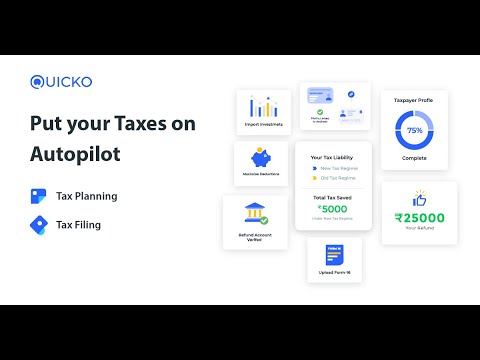
play Put your Taxes on Auto-Pilot | Tax Planning | Tax Filing | Tax Payer Dashboard - Quicko Demo
quicko itr
quicko invoicing

Quicko

Brand: Quicko Infosoft Limited

  • 4.7

  • 3 Ratings & 3 Reviews

Quicko offers a DIY platform for salaried individuals, traders, freelancers, and small businesses to file online tax returns, plan taxes, and stay compliant effortlessly. With features like automated ITR selection, over 50 tax-saving deductions, and expert assistance, it is a go to solution for smal...

See More

Have you used Quicko before?

Share your insights for better experience

Add a Review
Starting Price
₹799 excl.GST
₹ 943 incl. GST

View plans

offer Save upto 18%, Get GST Invoice on your business purchase T&C
offer Buy Now & Pay Later, Check offer on payment page.
Buy Now
100% Genuine
Products
Best Price
Guaranteed
Safe & Secure
Payment
  • Description

  • Pricing

  • Features

  • Specification

  • Review

  • Compare

  • Alternatives

  • FAQ

Starting at ₹799
Buy Now

Quicko Software Overview

What is Quicko Software?

Quicko is an online income tax filing application. It helps its clients simplify tax-related processes, fill taxes easily, file returns and maintain good tax records. Its main goal is to plan taxes, file taxes regularly on time, be compliant with norms, and file for returns. The user interface is designed in such a manner that it makes the form-filling process and tasks easier and faster. This feature helps to save time and stay on top of obligations. This platform also provides self-service options and expert opinions to businesses and individuals regarding tax.

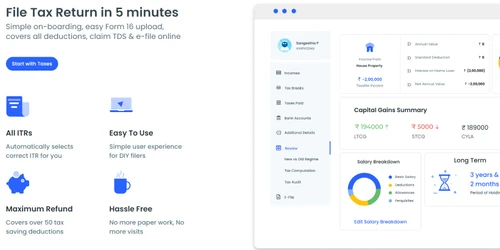
It helps users, including salaried employees, investors, traders, freelancers, small business companies and proprietors, file their income tax returns. It has a quick and straightforward onboarding process, allowing users to file tax returns in less than 5 minutes. It deals with over 50 tax-saving deductions that help users reduce their tax liabilities and maximize their refunds. It replaced the need for paperwork and physical visits, making the tax filing process easier and more efficient. It also provides easy Form 16 upload services.

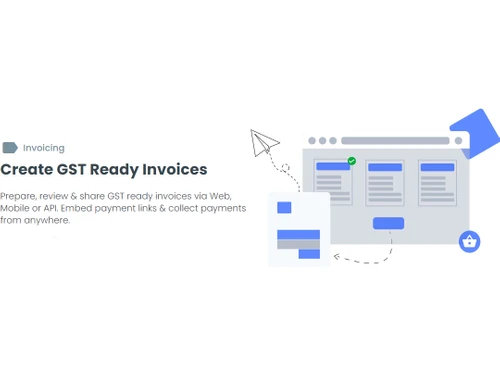
Quick assists businesses in preparing, reviewing, and sharing sales invoices and filling GST returns. It helps to record salary and non-salary payments and file TDS (Tax Deducted at Source) returns. It offers APIs that businesses can use to integrate tax-related functionalities into their applications, such as E-Commerce platforms, fintech solutions, etc.

Why Choose Quicko?

This application is designed with a user-centric design and thus helps manage the tax filing process simply. It allows individuals and businesses to complete their tax returns quickly and on time. With its automated deductions, simple-to-use forms and easy document uploads, users can file taxes, file returns, and save valuable time. It allows users to avoid the hectic work of traditional paperwork, tax filing, and lengthy tax office visits. It enables users to focus on their business or work while ensuring that they meet tax deadlines.

The platform's comprehensive approach covers over 50 tax-saving deductions. This helps the users to take advantage of potential savings. It helps users to identify deductions they might be eligible for. It also guides them through the entire process of claiming these deductions. It offers expert advice on taxation and benefits. In this way, it helps to maximize deductions and returns. Users can thus reduce their tax liabilities and increase their refunds.

Benefits of Quicko Income Tax Software

  • User-Friendly Interface: It simplifies tax-related tasks, making it easy for everyone to access.
  • Time-Saving: The automated processes reduce the time required for tax planning and filing.
  • Maximized deductions: The platform provides different deduction schemes, knowledge and expert advice that helps users claim all eligible deductions.
  • Paperless Convenience: It eliminates the need for paperwork and physical visits to tax offices.
  • Expert Support: It helps users connect with tax experts for personalized assistance and quick problem resolution.

Quicko Pricing

Quicko pricing starts from INR 799 at techjockey.com.

The pricing model is based on different parameters, including extra features, deployment type, and total users. For further queries related to the product, you can contact our product team and learn more about the pricing and offers.

Read more

Quicko Infosoft Limited Company Details

Founded Year:  2015

Quicko is a tax planning, preparation, GST, and TDS filing platform for individuals and businesses.

Director/Founders Vishvajit Sonagara
Company Size 1-100 Employees

Quicko Pricing & Plans

Essential

Calculated Price

₹ 799 Exclusive of all taxes
    • Licenses (One-Time Purchase)

      Licenses (One-Time Purchase)
      Licenses (One-Time Purchase)

Key Features

  • Total Income-Up to 15 lac

  • App Connections-Up to 5 connections

  • Income Sources-Basic plus Capital Gains and B&P

  • Regime analyzer

  • Advance Tax Calculator

  • Self Assessment Tax

Elite

Calculated Price

₹ 899 Exclusive of all taxes
    • Licenses (One-Time Purchase)

      Licenses (One-Time Purchase)
      Licenses (One-Time Purchase)

Key Features

  • Total Income-Unlimited

  • App Connections-Unlimited

  • Income Sources-All Income Sources including Foreig

  • Regime analyzer

  • Advance Tax Calculator

  • Self Assessment Tax

Quicko Features

  • icon_check Tax Management
    Manage tax planning, filing, GST and compliance using this solution.
  • icon_check Manage TDS
    Smoothly manage your profile's Tax Deducted at Source (TDS) requirements.
  • icon_check Income Tax
    Conveniently files income tax returns and maximizes deductions and refunds.
  • icon_check For Business
    Provides tailored services for businesses, including GST filing and expert assistance.
  • icon_check File e-TDS
    File electronic TDS returns for your organization's tax compliance.
  • icon_check File TDS
    Simplify TDS filing tasks to ensure timely and accurate submissions.
  • icon_check Generate Form-16s
    Create Form-16s to manage employee tax compliance.
  • icon_check PAN Verification
    Verify PAN (Permanent Account Number) details efficiently and accurately.
Quicko Demo Video play icon

Get Quicko Demo

Watch the demo video to explore key features, real workflows, and how the software fits your business needs.

Understand
Key Features
Personal
Demo Insights
Interactive
Demo Support

Quicko Specifications

Supported Platforms
Windows Windows iOS iOS Android Android MacOS MacOS
Devices
Desktop Desktop Mobile Mobile
Deployment
Cloud-Based Cloud-Based
Suitable For
All Industries
Business Specific
All Businesses
Business Size
Small Business Startups Enterprises SMBs SMEs MSMBs MSMEs
Customer Support
Phone Email Live Chat Communities
Language
English
Integration
API Integration
Training Resources
Documentation Videos

Explore the Best Alternative Solutions Similar to Your Business Size and Needs

Quicko Reviews

4.7

Out of 5

img

Overall Rating

Based on
3 Verified Reviews

Rating Breakdown

  • Features 5
  • Value for Money 4.8
  • Ease of Use 4.6
  • Customer Support 4.5

93% Recommend this Product

Add Review

Quicko Video Reviews

youtubeVideoId

4.8

“It’s My Right to Pay Tax, says Ayaz Menon | Quicko”

Review by: Ayaz Memon

youtubeVideoId

4.8

“How to file IT returns, How quicko helped me”

Review by: Soulstride

youtubeVideoId

4.8

“Right to Pay Tax for Better India, says Rajesh Kejriwal | Quicko”

Review by: Rajesh Kejriwal

Compare Quicko With other Income Tax Software

Products
Ratings
Pricing
Device Supported
Deployment
Supported Platforms
  • img

    Quicko

  • 4.7

  • ₹ 799.00 excl. GST

  • Desktop

    Mobile

  • Web based

    On Premises

  • Windows

    Mac OS

  • img

    EasyOFFICE

  • 4.6

  • ₹ 3900

  • Desktop

    Mobile

  • Web based

    On Premises

  • Windows

    Mac OS

  • img

    FreeTaxUSA

  • 4.4

  • Price On Request

  • Desktop

    Mobile

  • Web based

    On Premises

  • Windows

    Mac OS

  • img

    TdsPac

  • 5

  • Price On Request

  • Desktop

    Mobile

  • Web based

    On Premises

  • Windows

    Mac OS

  • img

    GEN Income Tax

  • 4.8

  • ₹ 7000

  • Desktop

    Mobile

  • Web based

    On Premises

  • Windows

    Mac OS

  • img

    CompuTax

  • 3.7

  • Price On Request

  • Desktop

    Mobile

  • Web based

    On Premises

  • Windows

    Mac OS

  • img

    DAVO

  • 4.4

  • Price On Request

  • Desktop

    Mobile

  • Web based

    On Premises

  • Windows

    Mac OS

  • img

    GEN Genius

  • 4.3

  • ₹ 7000

  • Desktop

    Mobile

  • Web based

    On Premises

  • Windows

    Mac OS

  • img

    TaxCloud

  • 4

  • Price On Request

  • Desktop

    Mobile

  • Web based

    On Premises

  • Windows

    Mac OS

  • img

    Eztax It Filing

  • 4.3

  • ₹ 990

  • Desktop

    Mobile

  • Web based

    On Premises

  • Windows

    Mac OS

(0) Product(s) selected

Quicko Alternatives

See All Quicko Alternatives

Available

Price on Request

Available

Price on Request

DAVO

4.4

Starting Price:

$58 /Month

Starting Price:

₹2,999 /quantity

Starting Price:

₹899 /User/Year

Available

Price on Request

Articles for Quicko

See All Related Articles

Which operating system does the Quicko Software Support?

Quicko software is compatible with Windows and macOS operating systems.

Is there any Quicko Income Tax App?

The Quicko Income Tax app is unavailable on Android and iOS devices.

What is the deployment type of the Quicko System?

The Quicko system supports web-based deployment.

How much does the Quicko Income Tax Software Cost?

Quicko pricing starts from INR 799 at techjockey.com.

Who are the potential users of the Quicko Income Tax Software?

The Quicko Income Tax Software can be used by small to large businesses, entrepreneurs, firms and anyone needing Income Tax Software.

Is there any free trial or demo for Quicko Software?

Quicko Software demo is available for free with techjockey.com.

Is Quicko Software free?

Quicko software does not offer a free trial.

How can you download the Quicko Income Tax software?

Quicko is a web-based platform. So, you need not download any software or app to use it.

How Does the Quicko Income Tax Software Work?

Quicko is a comprehensive software that simplifies tax processes in India for individuals and businesses. It covers Income Tax, GST, and TDS. By leveraging its user-friendly interface, Quicko helps users accurately calculate and file their taxes, ensuring compliance with regulations while saving time and effort.

20,000+ Software Listed

Best Price Guranteed

Free Expert Consultation

2M+ Happy Customers

Terms and Condtions

close

Users with registered businesses can purchase goods from merchants on the platform to satisfy their business needs. Users are not permitted to utilize any products acquired through the platform for resale, advertising, business, or further distribution.

For each purchase made, users will receive a Tax Invoice (or 'GST invoice') that includes specific details such as:

  • the GSTIN of the user associated with their registered business, and

  • the specified Entity Name for their business.

It should be noted that not all products are eligible for GST Invoice. Only the products displayed by participating sellers with the 'GST-based Invoice Available' callout on the product description page would qualify.

Certain goods and services are not eligible to get a GST Invoice, including items with VAS, i.e., Value Added Services (e.g., Total Mobile Protection/Assured Buyback) and those involving an exchange offer at the time of purchase.

Users must ensure the accuracy of the GSTIN, and business entity name provided for the GST Invoice. Requests for corrections into GST Invoice would not be accommodated by Techjockey.com or any Seller, and any issues arising from user-provided information are the sole responsibility of users.

Techjockey.com is not liable for the GST Invoice or any associated input tax credit. To efficiently claim an input tax credit, users should select the registered place of business address as per the GST authority's data and follow the provisions of the GST Act and rules.

To claim an input tax credit, the delivery and billing addresses must match. Furthermore, input tax credits will not be granted if the delivery address and GSTIN on the invoice are from different states. In case of incorrect GST details provided during the order placement, the order will be canceled automatically.