USA
USA UAE
UAESmall Business
Designed for startups and growing businesses

See More




Brand: ConstructConnect
Rise above that overabundance of paperwork right now! PlanSwift's user-friendly software can save you a great deal of time and money. Just try it out and see all of your construction estimating issues disappear.
See MoreHave you used PlanSwift before?
Share your insights for better experience
Brand: ConstructConnect
Founded Year: 2016
ConstructConnect provides of cloud-based data, collaboration, and workflow automation solutions.
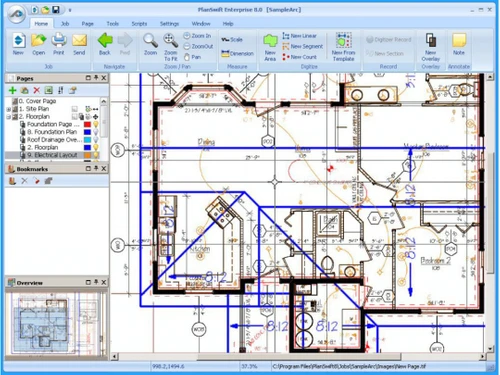
 Drag & Drop 100% Accurate Calculations Single Click Selection Pre Built Assemblies Export to Excel Area & Linear Tools Speedy Perimeter Measurement Accurate Framing Estimates Print or Export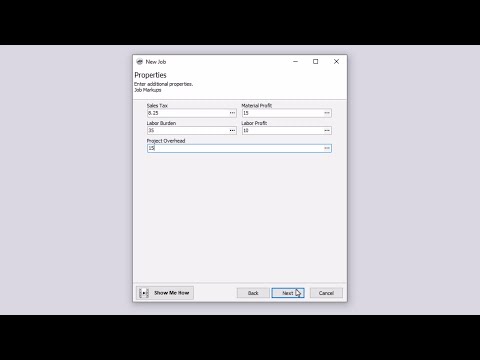

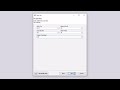
Watch the demo video to explore key features, real workflows, and how the software fits your business needs.
 Windows
  Desktop
  Perpetual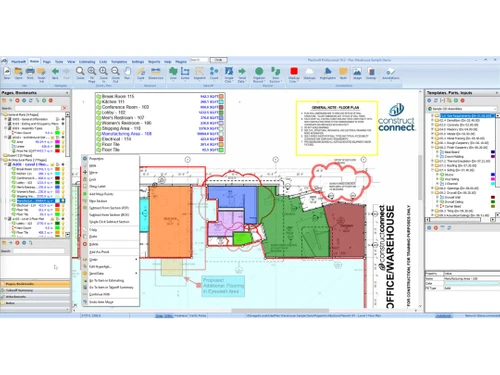
Small Business
Designed for startups and growing businesses
Medium Business
Built for business growth and flexibility
Enterprises
Designed for complex and large-scale business needs
4.4
Out of 5

Overall Rating
Based on
5 Verified Ratings
Rating Breakdown
86% Recommend this Product
Add ReviewThis product has no reviews yet. Be the first to leave your feedback.
Add Review
PlanSwift
Price On Request
Desktop
Mobile
Web based
On Premises
Windows
Mac OS

Quick Bid
Price On Request
Desktop
Mobile
Web based
On Premises
Windows
Mac OS

RSMeans Data
Price On Request
Desktop
Mobile
Web based
On Premises
Windows
Mac OS

RIB CostX
Price On Request
Desktop
Mobile
Web based
On Premises
Windows
Mac OS

QS Plus Builder Plus
Price On Request
Desktop
Mobile
Web based
On Premises
Windows
Mac OS
HeavyBid
Price On Request
Desktop
Mobile
Web based
On Premises
Windows
Mac OS

STACK
Price On Request
Desktop
Mobile
Web based
On Premises
Windows
Mac OS

Sage Estimating
Price On Request
Desktop
Mobile
Web based
On Premises
Windows
Mac OS

RIB Candy
Price On Request
Desktop
Mobile
Web based
On Premises
Windows
Mac OS

Access ConQuest
Price On Request
Desktop
Mobile
Web based
On Premises
Windows
Mac OS

Clear Estimates
Price On Request
Desktop
Mobile
Web based
On Premises
Windows
Mac OS
(0) Product(s) selected
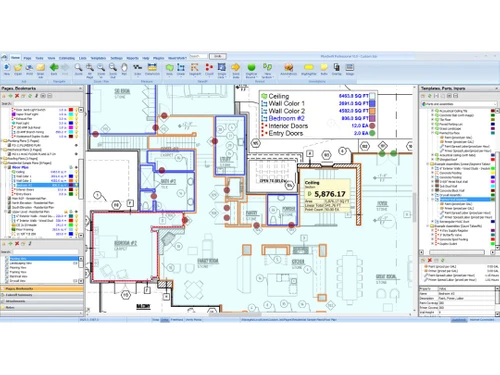
PlanSwift features a simple drag-and-drop user interface. With just one click, you can measure and take off quantities straight from digital blueprints, which is more convenient than slow and conventional manual procedures.
Certainly! PlanSwift provides services to a wide range of construction professionals, such as general contractors, subcontractors and specialists in HVAC, electrical, concrete, framing, and landscaping.
PlanSwift starts at $1749 and can be purchased at techjockey.com. The number of users, deployment method, and extra features are a few variables considered while establishing the pricing structure. Contact the Techjockey product team to learn more about the product and discover its prices and offers.
Yes, PlanSwift does offer a free trial that can be accessed through techjockey.com or the company's official website.
A large user base may take advantage of PlanSwift since it is compatible with one of the most popular (Windows) operating systems.
PlanSwift promises increased takeoff accuracy, improved estimating efficiency, and significant time savings during the bidding process.
Yes, PlanSwift integrates with renowned programmes like Microsoft Excel, letting users export takeoff amounts straight into spreadsheets they already have for simple cost calculations.
There is no denying that PlanSwift is among the most easily navigable and customizable takeoff and estimating software programs available. Even so, your ideal choice will depend on your demands and budget. As such, you may consider looking at alternative software to find the best fit.
Visit the official PlanSwift website for product demonstrations and further information or to contact sales or support staff.
20,000+ Software Listed
Best Price Guranteed
Free Expert Consultation
2M+ Happy Customers
Terms and Condtions

Users with registered businesses can purchase goods from merchants on the platform to satisfy their business needs. Users are not permitted to utilize any products acquired through the platform for resale, advertising, business, or further distribution.
For each purchase made, users will receive a Tax Invoice (or 'GST invoice') that includes specific details such as:
the GSTIN of the user associated with their registered business, and
the specified Entity Name for their business.
It should be noted that not all products are eligible for GST Invoice. Only the products displayed by participating sellers with the 'GST-based Invoice Available' callout on the product description page would qualify.
Certain goods and services are not eligible to get a GST Invoice, including items with VAS, i.e., Value Added Services (e.g., Total Mobile Protection/Assured Buyback) and those involving an exchange offer at the time of purchase.
Users must ensure the accuracy of the GSTIN, and business entity name provided for the GST Invoice. Requests for corrections into GST Invoice would not be accommodated by Techjockey.com or any Seller, and any issues arising from user-provided information are the sole responsibility of users.
Techjockey.com is not liable for the GST Invoice or any associated input tax credit. To efficiently claim an input tax credit, users should select the registered place of business address as per the GST authority's data and follow the provisions of the GST Act and rules.
To claim an input tax credit, the delivery and billing addresses must match. Furthermore, input tax credits will not be granted if the delivery address and GSTIN on the invoice are from different states. In case of incorrect GST details provided during the order placement, the order will be canceled automatically.