linkedin
PIX4Dmapper logo
play Discover Pix4Dmapper
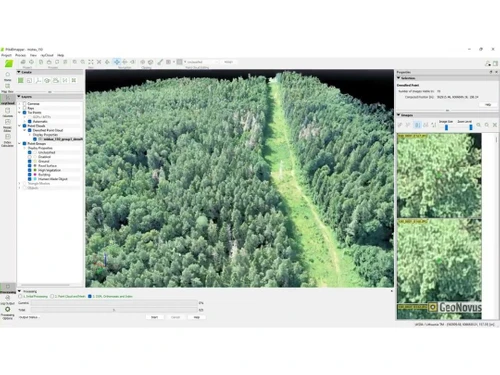
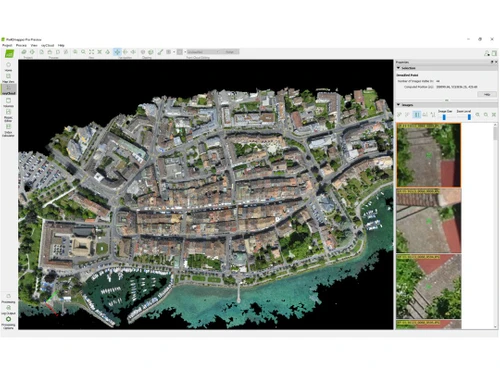
PIX4Dmapper Dashboard
PIX4Dmapper Interface

PIX4Dmapper

Brand: PIX4D

  • 4.1

  • 5 Ratings

PIX4Dmapper transforms photos into detailed 3D models and maps. It is used in surveying, mining, and infrastructure industries to create accurate digital spatial models.

See More

Have you used PIX4Dmapper before?

Share your insights for better experience

Add a Review
Starting Price
$292

View plans

100% Genuine
Products
Best Price
Guaranteed
Safe & Secure
Payment
  • Description

  • Pricing

  • Features

  • Specification

  • Review

  • Compare

  • FAQ

Starting at $292

PIX4Dmapper Software Overview

What is PIX4Dmapper?

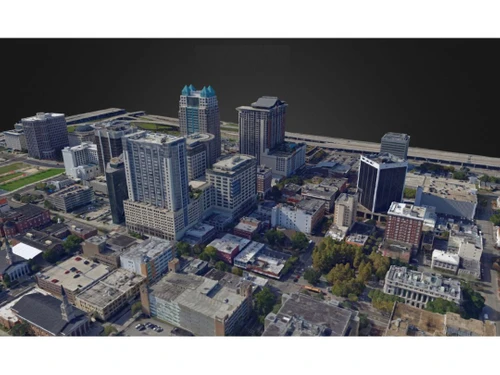
PIX4Dmapper is a professional software used for photogrammetry, which means it takes pictures and turns them into detailed, accurate 3D models and maps. It can create various outputs such as 3D point clouds, digital surface models, terrain models, and orthomosaics (detailed, accurate maps made from aerial photos).

This versatile software can be used in surveying, mining, public safety, infrastructure, energy, and telecommunications. It offers flexible processing options, meaning you can adjust how the data is processed to meet your needs. PIX4Dmapper is known for its robust capabilities, making it a reliable choice for creating high-quality digital spatial models from images.

Why Choose PIX4Dmapper Software?

  • Accurate and Georeferenced Outputs: Produces precise 3D models, point clouds, and orthomosaics with georeferenced accuracy.
  • Versatile Applications: Suitable for various industries, including surveying, mining, public safety, infrastructure, energy, and telecommunications.
  • Flexible Processing Options: Offers customizable processing settings to meet various project requirements.
  • High-Quality Data Processing: Utilizes advanced algorithms for robust and reliable data processing.
  • User-Friendly Interface: Intuitive design makes it accessible for both beginners and professionals.
  • Comprehensive Tools: Provides a variety of tools for detailed analysis and measurement.
  • Integration Capabilities: Easily integrates with other software and hardware, enhancing workflow efficiency.
  • Regular Updates: Continuously updated to include the latest features and improvements.
  • Strong Support and Community: This is backed by extensive customer support and an active user community.
  • Scalability: Can handle projects of all sizes, from small-scale surveys to large, complex mapping projects.

Benefits of PIX4Dmapper Platform

  • 3D Point Cloud Generation: Converts images into dense, accurate 3D point clouds for detailed spatial analysis.
  • Orthomosaic Creation: Produces high-resolution, georeferenced orthomosaic maps from aerial imagery.
  • Digital Surface and Terrain Models (DSM/DTM): Generates detailed digital surface models (DSM) and digital terrain models (DTM) for topographic mapping.
  • Mesh and Texture Generation: Creates 3D textured meshes, providing realistic visual representations of objects and landscapes.
  • Thermal Mapping: Integrates thermal imagery to produce temperature maps, which is beneficial for inspections and environmental monitoring.
  • Multispectral Processing: Supports multispectral image processing for agriculture and vegetation analysis applications.
  • GCP (Ground Control Points) Management: Incorporates ground control points to enhance georeferencing accuracy and overall model precision.
  • Measurement and Analysis Tools: Provides tools for measuring distances, areas, and angles directly within the software.
  • Reporting and Export Options: Generates detailed reports and supports export in various formats (e.g., PDF, DXF, LAS, GeoTIFF) for easy sharing and further analysis.
  • Quality Report Generation: Generates comprehensive quality reports to evaluate the accuracy and reliability of processed models and maps.

Pricing of PIX4Dmapper

PIX4Dmapper price in India starts at $292 at techjockey.com.

The pricing model is based on different parameters, including extra features, deployment type, and the total number of users. For further queries related to the product, you can contact our product team and learn more about the pricing and offers.

Read more

PIX4D Company Details

Founded Year:  2011

Pix4D offers a software package that converts standard pictures into professional geo-referenced images and 3D models.

Director/Founders Christoph Strecha, Olivier Kung
Company Size 1-100 Employees

PIX4Dmapper Pricing & Plans

Starter
Key Features
  • Georeferenced Orthomosaics
  • Photogrammetry
  • 3D Models
  • 2D and 3D Maps
Starting at $292
    • Monthly

      Monthly
      Monthly

Key Features

  • Georeferenced Orthomosaics

  • Photogrammetry

  • 3D Models

  • 2D and 3D Maps

PIX4Dmapper Features

  • icon_check Multispectral
    Processes and analyzes multispectral images for agriculture and environmental monitoring applications.
  • icon_check Data Import/Export
    Seamlessly imports and exports various data formats for workflow integration.
  • icon_check Photogrammetry
    Converts photos into precise 2D and 3D spatial data.
  • icon_check 2D and 3D Maps
    Creates accurate 2D and 3D maps for surveying and construction.
  • icon_check 3D Models
    Builds high-resolution 3D models for visualization and analysis.
  • icon_check Measure Distances
    Measures distances directly within the software.
  • icon_check Elevation Models
    Produces Digital Elevation Models (DEMs) for topographic analysis.
  • icon_check Orthomosaics
    Creates geometrically corrected orthomosaic images for mapping.
PIX4Dmapper Demo Video play icon

Get PIX4Dmapper Demo

Watch the demo video to explore key features, real workflows, and how the software fits your business needs.

Understand
Key Features
Personal
Demo Insights
Interactive
Demo Support

PIX4Dmapper Specifications

Supported Platforms
Ubuntu Ubuntu Windows Windows MacOS MacOS Linux Linux
Devices
Desktop Desktop
Deployment
Cloud-Based Cloud-Based
Suitable For
All Industries
Business Specific
All Businesses
Business Size
Small Business Medium Business Enterprises
Customer Support
Email Communities
Language
English
Training Resources
Videos

Explore the Best Alternative Solutions Similar to Your Business Size and Needs

PIX4Dmapper Review

4.1

Out of 5

img

Overall Rating

Based on
5 Verified Ratings

Rating Breakdown

  • Features 4.1
  • Value for Money 4.3
  • Ease of Use 3.7
  • Customer Support 4.3

88% Recommend this Product

Add Review

Be the First to Review

This product has no reviews yet. Be the first to leave your feedback.

Add Review

Compare PIX4Dmapper With other Photogrammetry Software

Products
Ratings
Pricing
Device Supported
Deployment
Supported Platforms
  • img

    PIX4Dmapper

  • 4.1

  • Price On Request

  • Desktop

    Mobile

  • Web based

    On Premises

  • Windows

    Mac OS

  • img

    Autodesk ReCap

  • 4.2

  • Price On Request

  • Desktop

    Mobile

  • Web based

    On Premises

  • Windows

    Mac OS

  • img

    Agisoft Metashape

  • 4.3

  • Price On Request

  • Desktop

    Mobile

  • Web based

    On Premises

  • Windows

    Mac OS

  • img

    Nexys

  • 4.4

  • Price On Request

  • Desktop

    Mobile

  • Web based

    On Premises

  • Windows

    Mac OS

  • img

    ImageStation

  • 4.1

  • Price On Request

  • Desktop

    Mobile

  • Web based

    On Premises

  • Windows

    Mac OS

  • img

    PhotoModeler

  • 4.1

  • Price On Request

  • Desktop

    Mobile

  • Web based

    On Premises

  • Windows

    Mac OS

  • img

    Mapware

  • 4.1

  • Price On Request

  • Desktop

    Mobile

  • Web based

    On Premises

  • Windows

    Mac OS

(0) Product(s) selected

How much does PIX4Dmapper software cost?

PIX4Dmapper pricing in India starts from $292 at techjockey.com.

Is there a PIX4Dmapper software app?

No, PIX4Dmapper does not have a mobile app.

Which operating systems does PIX4Dmapper software support?

PIX4Dmapper supports Ubuntu, Windows, macOS, and Linux operating systems.

Does PIX4Dmapper offer a free trial?

Yes, PIX4Dmapper offers a free trial period.

How does PIX4Dmapper software work?

PIX4Dmapper processes images to create accurate 2D maps and 3D models using photogrammetry techniques.

Who are the potential users of PIX4Dmapper software?

Potential users of PIX4Dmapper include professionals in surveying, construction, agriculture, and public safety industries.

Can PIX4Dmapper handle large datasets?

Yes, PIX4Dmapper can process large datasets efficiently, making it suitable for both small and large-scale projects.

What types of cameras and sensors are compatible with PIX4Dmapper?

PIX4Dmapper supports a wide range of cameras, including RGB, multispectral, fisheye, thermal cameras, and various sensors.

20,000+ Software Listed

Best Price Guranteed

Free Expert Consultation

2M+ Happy Customers

Terms and Condtions

close

Users with registered businesses can purchase goods from merchants on the platform to satisfy their business needs. Users are not permitted to utilize any products acquired through the platform for resale, advertising, business, or further distribution.

For each purchase made, users will receive a Tax Invoice (or 'GST invoice') that includes specific details such as:

  • the GSTIN of the user associated with their registered business, and

  • the specified Entity Name for their business.

It should be noted that not all products are eligible for GST Invoice. Only the products displayed by participating sellers with the 'GST-based Invoice Available' callout on the product description page would qualify.

Certain goods and services are not eligible to get a GST Invoice, including items with VAS, i.e., Value Added Services (e.g., Total Mobile Protection/Assured Buyback) and those involving an exchange offer at the time of purchase.

Users must ensure the accuracy of the GSTIN, and business entity name provided for the GST Invoice. Requests for corrections into GST Invoice would not be accommodated by Techjockey.com or any Seller, and any issues arising from user-provided information are the sole responsibility of users.

Techjockey.com is not liable for the GST Invoice or any associated input tax credit. To efficiently claim an input tax credit, users should select the registered place of business address as per the GST authority's data and follow the provisions of the GST Act and rules.

To claim an input tax credit, the delivery and billing addresses must match. Furthermore, input tax credits will not be granted if the delivery address and GSTIN on the invoice are from different states. In case of incorrect GST details provided during the order placement, the order will be canceled automatically.