linkedin
Opus 2 logo
play Opus 2 Case Preparation
Opus 2 Case
Opus 2 Clients

Opus 2

Brand: Opus 2

  • 4.3

  • 4 Ratings

Opus 2 is a legal technology company that provides software solutions for the legal profession by providing tools for case preparation, collaboration, and presentation, aiming to streamline legal workflows and enhance efficiency in legal proceedings.

See More

Have you used Opus 2 before?

Share your insights for better experience

Add a Review

Price Available on Request

Questions about pricing or customization? We’re here to help, just a click away.

100% Genuine
Products
Best Price
Guaranteed
Safe & Secure
Payment
  • Description

  • Pricing

  • Features

  • Specification

  • Review

  • Compare

  • Alternatives

  • FAQ

Opus 2 Software Overview

What is Opus 2?

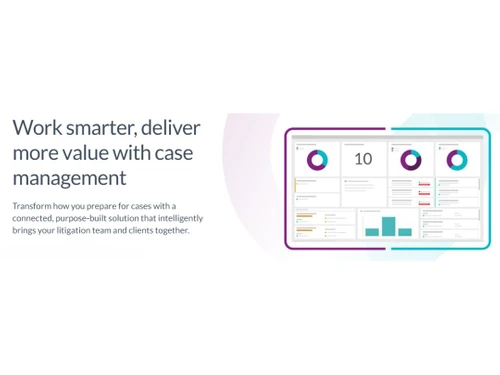
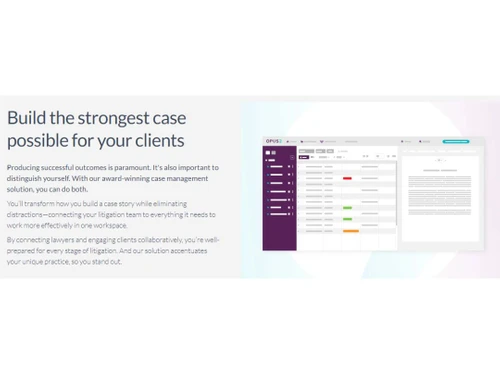
Opus 2 is a leading provider of legal technology solutions known for its flagship product, Opus 2 Magnum. This software offers advanced tools for case preparation, collaboration, and presentation in the legal industry. Opus 2 software enables lawyers and legal teams to efficiently manage case documents, transcripts, exhibits, and more in a secure digital environment.

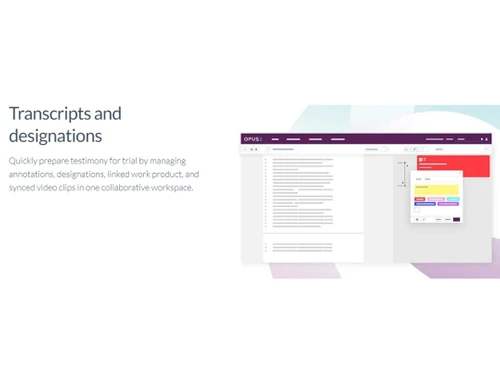
With features like real-time transcription streaming, synchronized annotations, and remote access capabilities, Opus 2 enhances the efficiency and effectiveness of legal proceedings. The software is designed to streamline workflows, improve communication among team members, and facilitate better decision-making during complex legal cases.

Why Choose Opus 2 Software?

  • Innovative Technology: It offers cutting-edge technology solutions to enhance collaboration, efficiency, and productivity in legal proceedings.
  • User-friendly Interface: The software is known for its intuitive and user-friendly interface, making it easier for legal professionals to navigate and utilize its features effectively.
  • Secure and Confidential: It maintains high levels of security to ensure the confidentiality of sensitive legal information shared and stored within the platform.
  • Collaborative Tools: The software provides robust tools for real-time collaboration, enabling legal teams to work together seamlessly on cases and projects.
  • Efficiency and Time-Saving: It streamlines various legal processes, saving time and improving overall efficiency in tasks such as case preparation, document management, and trial presentation.
  • Customization Options: The platform offers customization options to tailor the software to meet the specific needs and requirements of different legal practices and cases.
  • Support and Training: It typically provides comprehensive support and training resources to help users maximize the benefits of the software and optimize their workflow.
  • Track Record: With a proven track record of successful implementations and positive user feedback, It is recognized as a reliable and trusted solution in the legal industry.

Benefits of Opus 2 Platform

  • Case Management: It allows users to organize case-related documents, evidence, and information in a structured manner for easy access and reference.
  • Collaboration Tools: Users can collaborate in real-time, and share annotations, comments, and insights with team members, experts, and clients to facilitate communication and decision-making.
  • Transcription Services: It may offer transcription services to convert spoken words into written text, making reviewing and referencing discussions and testimonies easier.
  • Search Capabilities: The software typically includes advanced search functionalities to quickly locate specific information within a vast collection of documents and data.
  • Annotation and Mark-up Tools: Users can highlight, annotate, and mark up documents within the software, allowing for easy identification of key points or issues.
  • Exhibit Management: It helps manage exhibits and visual aids used in presentations or court proceedings, ensuring they are organized and readily available when needed.
  • Real-time Reporting: The software may offer real-time reporting features to track case progress, deadlines, tasks, and other important metrics to inform all stakeholders.
  • Secure Communication: It typically provides secure communication channels to protect sensitive information and ensure confidentiality during legal proceedings.
  • Trial Preparation: Users can prepare for trials more effectively by organizing case materials, creating timelines, and setting reminders for key dates and tasks.
  • Customization Options: Depending on the software version, users may be able to customize features to suit their specific needs and preferences.

Pricing of Opus 2 Legal Case Management Software

Opus 2 price details are available on request at techjockey.com.

The pricing model is based on different parameters, including extra features, deployment type, and the total number of users. For further queries related to the product, you can contact our product team and learn more about the pricing and offers.

Read more

Opus 2 Company Details

Founded Year:  2008

Opus 2 helping to build future legal practices by making them more agile, connected and learning organisations.

Director/Founders Graham Smith
Company Size 1-100 Employees

Opus 2 Pricing & Plans

Looking for The Right Pricing?

Share your requirements and get a plan built around your business.

  • Define your business needs
  • Get customised pricing
  • Choose features that fit your workflow

Price Available on Request

Get personalised Opus 2 pricing that fits your needs. Our team will connect with you.

Opus 2 Features

  • icon_check Collaboration
    Allows for easy teamwork and sharing of information.
  • icon_check Case Management
    Helps in organizing and tracking legal cases efficiently.
  • icon_check Transcript
    Facilitates managing and accessing transcripts easily.
  • icon_check Deposition Management
    Streamlines the process of organizing and managing depositions.
  • icon_check Client Portal
    Provides clients with a secure platform for communication and accessing information.
  • icon_check Calendar Management
    Helps in scheduling and organizing important dates and events.
  • icon_check Document Management
    Centralizes storage and organization of documents.
  • icon_check Time Tracking
    Allows for tracking and managing time spent on various tasks.
  • icon_check Communication Management
    Helps in managing and organizing communication effectively.
Opus 2 Demo Video play icon

Get Opus 2 Demo

Watch the demo video to explore key features, real workflows, and how the software fits your business needs.

Understand
Key Features
Personal
Demo Insights
Interactive
Demo Support

Opus 2 Specifications

Supported Platforms
Ubuntu Ubuntu Windows Windows MacOS MacOS Linux Linux
Devices
Desktop Desktop
Deployment
Cloud-Based Cloud-Based
Suitable For
Law Firms
Business Specific
Law Firm
Business Size
Small Business Medium Business Enterprises
Customer Support
Email Communities
Language
English
Training Resources
Videos

Explore the Best Alternative Solutions Similar to Your Business Size and Needs

Opus 2 Review

4.3

Out of 5

img

Overall Rating

Based on
4 Verified Ratings

Rating Breakdown

  • Features 4.5
  • Value for Money 4.5
  • Ease of Use 4.2
  • Customer Support 4.2

87% Recommend this Product

Add Review

Techjockey Trusted Reviews from Verified Users

No reviews are currently available for Opus 2. Discover similar Legal Case Management Software reviews

  • Provakil

    4.5

    Whats great - Provakil offers cloud-based platform, mobile access, unified workspace. Reviewers highlight simplicity and centralization. read more

  • Jamku Portal

    4.9

    Whats great - They streamline the payment process, enabling customers to make purchases quickly and easily using various payment methods, s... read more

  • Lexzur (App4Legal)

    4.4

    Whats great - Affordable, feature-packed, and easy to use. read more

Compare Opus 2 With other Legal Case Management Software

Products
Ratings
Pricing
Device Supported
Deployment
Supported Platforms
  • img

    Opus 2

  • 4.3

  • Price On Request

  • Desktop

    Mobile

  • Web based

    On Premises

  • Windows

    Mac OS

  • img

    Legistify

  • 4.2

  • Price On Request

  • Desktop

    Mobile

  • Web based

    On Premises

  • Windows

    Mac OS

  • img

    Legora

  • 4.3

  • Price On Request

  • Desktop

    Mobile

  • Web based

    On Premises

  • Windows

    Mac OS

  • img

    Assembly Neos

  • 4.5

  • Price On Request

  • Desktop

    Mobile

  • Web based

    On Premises

  • Windows

    Mac OS

  • img

    Lawcus

  • 4.5

  • Price On Request

  • Desktop

    Mobile

  • Web based

    On Premises

  • Windows

    Mac OS

  • img

    Casetext

  • 4.5

  • Price On Request

  • Desktop

    Mobile

  • Web based

    On Premises

  • Windows

    Mac OS

  • img

    Smokeball

  • 4.1

  • Price On Request

  • Desktop

    Mobile

  • Web based

    On Premises

  • Windows

    Mac OS

  • img

    Filevine

  • 4.1

  • Price On Request

  • Desktop

    Mobile

  • Web based

    On Premises

  • Windows

    Mac OS

  • img

    CaseFleet

  • 4.5

  • Price On Request

  • Desktop

    Mobile

  • Web based

    On Premises

  • Windows

    Mac OS

  • img

    Jevon CCD

  • 4.6

  • Price On Request

  • Desktop

    Mobile

  • Web based

    On Premises

  • Windows

    Mac OS

  • img

    Jamku Portal

  • 4.8

  • ₹ 7000

  • Desktop

    Mobile

  • Web based

    On Premises

  • Windows

    Mac OS

(0) Product(s) selected

Opus 2 Alternatives

See All Opus 2 Alternatives

Available

Price on Request

Available

Price on Request

Starting Price:

$40 /month

Available

Price on Request

Available

Price on Request
Available

Price on Request

Articles for Opus 2

See All Related Articles

Which operating system does Opus 2 Software Support?

Opus 2 Software is compatible with Ubuntu, Windows, Linux and MacOS.

Is there any Opus 2 App?

The Opus 2 app is unavailable for Android and iOS users.

What is the deployment type of Opus 2 Software?

Opus 2 Software supports web-based deployment.

How much does Opus 2 Software Cost?

Opus 2 price details are available on request at techjockey.com.

Who are the potential users of Opus 2 Software?

Opus 2 Software is typically used by law firms to efficiently manage case documents, transcripts, exhibits, and more in a secure digital environment.

Is there any free trial or demo for Opus 2 Software?

Yes, Opus 2 Software free demo is available at techjockey.com.

Is Opus 2 Software Free?

Opus 2 Software does not offer a free trial. However, the premium plan with advanced features is available at techjockey.com with exciting deals.

How can you download Opus 2 Software?

Opus 2 Software installation is not required, as it is web-based. Just open the Setup Wizard to get started.

How does Opus 2 Software Work?

Opus 2 Software is a platform for legal professionals to manage large amounts of case data efficiently. It helps document review, collaboration, and organization using advanced tools and features.

20,000+ Software Listed

Best Price Guranteed

Free Expert Consultation

2M+ Happy Customers

Terms and Condtions

close

Users with registered businesses can purchase goods from merchants on the platform to satisfy their business needs. Users are not permitted to utilize any products acquired through the platform for resale, advertising, business, or further distribution.

For each purchase made, users will receive a Tax Invoice (or 'GST invoice') that includes specific details such as:

  • the GSTIN of the user associated with their registered business, and

  • the specified Entity Name for their business.

It should be noted that not all products are eligible for GST Invoice. Only the products displayed by participating sellers with the 'GST-based Invoice Available' callout on the product description page would qualify.

Certain goods and services are not eligible to get a GST Invoice, including items with VAS, i.e., Value Added Services (e.g., Total Mobile Protection/Assured Buyback) and those involving an exchange offer at the time of purchase.

Users must ensure the accuracy of the GSTIN, and business entity name provided for the GST Invoice. Requests for corrections into GST Invoice would not be accommodated by Techjockey.com or any Seller, and any issues arising from user-provided information are the sole responsibility of users.

Techjockey.com is not liable for the GST Invoice or any associated input tax credit. To efficiently claim an input tax credit, users should select the registered place of business address as per the GST authority's data and follow the provisions of the GST Act and rules.

To claim an input tax credit, the delivery and billing addresses must match. Furthermore, input tax credits will not be granted if the delivery address and GSTIN on the invoice are from different states. In case of incorrect GST details provided during the order placement, the order will be canceled automatically.