linkedin
OnTheFly logo
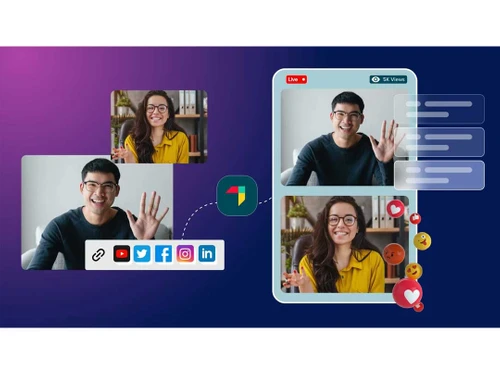
OnTheFly streaming live
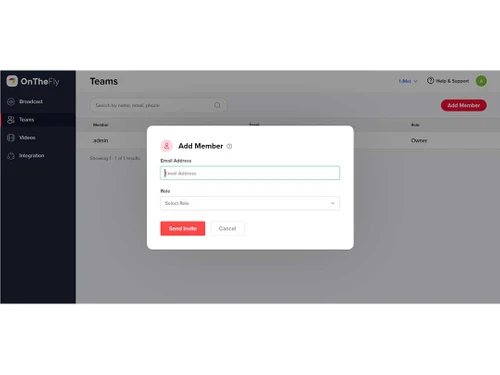
OnTheFly Teams
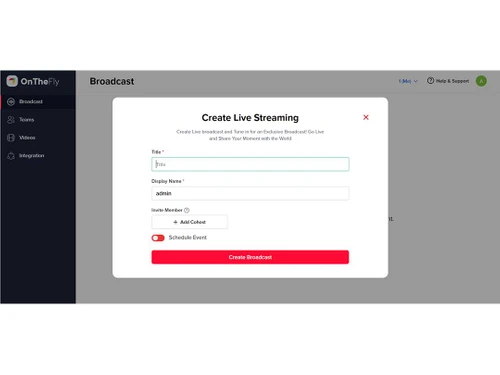
onthefly broadcast

OnTheFly

Brand: Contus Tech

  • 4

  • 4 Ratings

OnTheFly is a live streaming platform that enables creating, streaming, hosting, broadcasting, and recording professional-quality video content on any social platform.

See More

Have you used OnTheFly before?

Share your insights for better experience

Add a Review

Price Available on Request

Questions about pricing or customization? We’re here to help, just a click away.

100% Genuine
Products
Best Price
Guaranteed
Safe & Secure
Payment
  • Description

  • Pricing

  • Features

  • Specification

  • Review

  • Compare

  • Alternatives

  • FAQ

OnTheFly Software Overview

What is OnTheFly Software?

OnTheFly is a versatile live-streaming platform designed for easy video creation and sharing on different social platforms. It is a cloud-based service accessible from its website that does not require any software downloads or installations. Its user-friendly interface makes live content sharing easier, just under 5 minutes, without any setups or downloads.

The user can create a professional-grade streaming experience for its viewers with features such as multistreaming, guest invitations, and brand customization. It can be used for video-sharing content, live streams for podcasts, talk shows, social interactions, webinars, shopping broadcasting etc.

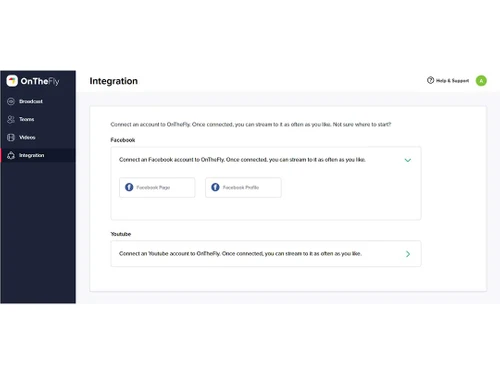
It allows the sharing and streaming of videos on multiple social platforms like Facebook, Twitter, and Instagram through a single dashboard for management. It supports multi-platform streaming in high quality with no video glitches or delays. It allows real-time streaming of videos without any pre-recorded content or editing and branding options. The live streams can be recorded and used later for other purposes or shared when needed. It gives its users audience engagement tools that allow them to interact with the viewers, capture their attention, and get feedback. These include live chat, comments, polls, surveys, and Q&A. Moreover, users can invite guests to join the live stream and have interactive sessions.

It also provides monitoring and measuring controls for getting an idea of the performance of the live streams with detailed statistics and reports. In this way, this platform makes live streaming, content sharing on multiple platforms, and audience interaction easier and more efficient.

Why Choose OnTheFly Platform?

  • Podcast: Stream, record, multistream, and engage with guests in high-quality podcast videos of studio quality and increase engagement.
  • Social hub: Influence to connect with followers on different social platforms simultaneously through live social sessions and with real-time engagement.
  • Live shopping: Transform online shopping with live broadcasts, where sellers promote products, answer queries, and create an interactive shopping session for customers.
  • Webinars: Deliver live webinars, presentations, demos, and training by including multiple admins, live polls, and surveys for greater experiences and audience interaction.
  • Live Fitness: Conduct live fitness classes and use pre-recorded videos with real-time interaction for workouts and exercise from anywhere.

Benefits of OnTheFly Live Streaming Software

  • No setup and Quality video: Allows live streaming without any setup and delivers high-quality video and audio streams without glitches or delays.
  • Social media integration: Reach a wider audience by simultaneously broadcasting the streams to multiple social platforms.
  • Audience engagement tools: Interact with viewers and get their feedback through live chat, comments, polls, surveys, and Q&A for more engaging content.
  • Branding options: You can customize the streams with your logo, watermark, colors, fonts, overlays, and graphics to match your brand identity.
  • Live analytics: Can monitor and measure the performance of the video content with detailed statistics and reports for better decision-making.

Pricing of OnTheFly Live Streaming Platform

OnTheFly Live Streaming platform pricing is available on request at techjockey.com.

Its price in India may vary based on factors like customization, additional features required, number of users, and the deployment type. Please request a call back for subscription-related details and to avail offers on premium packages.

Read more

Contus Tech Company Details

Founded Year:  2008

CONTUS TECH is a leading SaaS product company delivering innovative and tech-savvy solutions with two flagship products (MirrorFly & VPlayed) in the fields of unified communications and media streaming respectively.

Director/Founders Contus
Company Size 101-500 Employees

OnTheFly Pricing & Plans

Looking for The Right Pricing?

Share your requirements and get a plan built around your business.

  • Define your business needs
  • Get customised pricing
  • Choose features that fit your workflow

Price Available on Request

Get personalised OnTheFly pricing that fits your needs. Our team will connect with you.

OnTheFly Features

  • icon_check Multistream
    Allows live videos to be broadcast to multiple social platforms simultaneously from one dashboard.
  • icon_check Recording
    Can capture the live streams in good quality and use them later for distribution or sharing.
  • icon_check Comments
    Allows for engaging with the viewers and getting their feedback through live comments on the streams.
  • icon_check Share Media
    You can add images, videos, slides, and other media files to the streams to make them interactive and informative.
  • icon_check Unlimited Chat
    Chat with guests and viewers without limits on the number of messages or participants.
  • icon_check Branding
    Customize the streams with your logo, watermark, colors, and fonts to match your brand style.
  • icon_check Overlays
    Enhance streams with overlays such as banners, tickers, countdowns, and graphics to highlight important information.

OnTheFly Specifications

Supported Platforms
Windows Windows MacOS MacOS
Devices
Desktop Desktop Mobile Mobile Tablet Tablet iPad iPad
Deployment
Cloud-Based Cloud-Based
Suitable For
All Industries
Business Specific
All Businesses
Business Size
Startups Medium Business SMEs MSMEs
Customer Support
Email
Language
English
Training Resources
In Person Live Online Webinars

Explore the Best Alternative Solutions Similar to Your Business Size and Needs

Small Business

Designed for startups and growing businesses

vMix

4.5

GoBrunch

4.5

Restream

4.4

See More

OnTheFly Review

4

Out of 5

img

Overall Rating

Based on
4 Verified Ratings

Rating Breakdown

  • Features 4.1
  • Value for Money 4
  • Ease of Use 3.8
  • Customer Support 4

95% Recommend this Product

Add Review

Techjockey Trusted Reviews from Verified Users

No reviews are currently available for OnTheFly. Discover similar Live Streaming Software reviews

  • GudSho

    4.3

    Whats great - I can create branded channels for each subject, allowing me to organize my content and cater to different learning styles. read more

  • Yostream

    4.8

    Whats great - We had to organize a virtual event at very short notice. Yostream was perfect for our case, in a couple of minutes we were re... read more

  • OBS Studio

    4.2

    Whats great - Highly customizable, supports multiple sources (webcams, screen capture, images, etc.), excellent for live streaming on vario... read more

Compare OnTheFly With other Live Streaming Software

Products
Ratings
Pricing
Device Supported
Deployment
Supported Platforms
  • img

    OnTheFly

  • 4

  • Price On Request

  • Desktop

    Mobile

  • Web based

    On Premises

  • Windows

    Mac OS

  • img

    Livebox

  • 4.4

  • ₹ 1170

  • Desktop

    Mobile

  • Web based

    On Premises

  • Windows

    Mac OS

  • img

    Castr

  • 4.3

  • Price On Request

  • Desktop

    Mobile

  • Web based

    On Premises

  • Windows

    Mac OS

  • img

    Grabyo

  • 4.3

  • Price On Request

  • Desktop

    Mobile

  • Web based

    On Premises

  • Windows

    Mac OS

  • img

    Riverside

  • 4.1

  • Price On Request

  • Desktop

    Mobile

  • Web based

    On Premises

  • Windows

    Mac OS

  • img

    Yostream

  • 4.8

  • ₹ 1250

  • Desktop

    Mobile

  • Web based

    On Premises

  • Windows

    Mac OS

  • img

    Prism live Studio

  • 4.2

  • Price On Request

  • Desktop

    Mobile

  • Web based

    On Premises

  • Windows

    Mac OS

  • img

    Wirecast

  • 4.1

  • Price On Request

  • Desktop

    Mobile

  • Web based

    On Premises

  • Windows

    Mac OS

  • img

    Evmux

  • 4.5

  • Price On Request

  • Desktop

    Mobile

  • Web based

    On Premises

  • Windows

    Mac OS

  • img

    Vimeo Pro

  • 4.2

  • Price On Request

  • Desktop

    Mobile

  • Web based

    On Premises

  • Windows

    Mac OS

  • img

    Dacast

  • 4.4

  • Price On Request

  • Desktop

    Mobile

  • Web based

    On Premises

  • Windows

    Mac OS

(2) Product(s) selected

OnTheFly Alternatives

See All OnTheFly Alternatives

Starting Price:

$20 /Month

Available

Price on Request

Starting Price:

$29 /Month

Starting Price:

$25

Starting Price:

$39

Starting Price:

$49 /year

Starting Price:

$59 /month

Starting Price:

$39 /Month

Starting Price:

$70 /Month

Articles for OnTheFly

See All Related Articles

Which operating system does OnTheFly support?

OnTheFly is compatible with Windows, macOS, and Linux operating systems.

Is there any OnTheFly app?

OnTheFly app is not available for mobile devices.

What is the deployment type of OnTheFly?

OnTheFly supports cloud-based deployment.

How much does OnTheFly cost?

OnTheFly pricing is available on request at techjockey.com.

Who are the potential users of OnTheFly?

OnTheFly is typically used in media, education, e-commerce, fitness, and entertainment industries by content creators, instructors, influencers, and marketers for live streaming, webinars, and recording video content.

Is there any free trial or demo for OnTheFly?

OnTheFly demo is available for free with techjockey.com.

Is OnTheFly free?

OnTheFly does not offer a free trial. However, the premium plan with advanced features and exciting deals is available at techjockey.com.

How can you download OnTheFly?

OnTheFly installation is not required, as it is web-based. Just open the Setup Wizard to get started.

How does OnTheFly work?

OnTheFly helps with live streaming with features like multistreaming, social media sharing, guest invites, professional quality, brand customization, and live webinars, providing a perfect solution for content creators.

20,000+ Software Listed

Best Price Guranteed

Free Expert Consultation

2M+ Happy Customers

Terms and Condtions

close

Users with registered businesses can purchase goods from merchants on the platform to satisfy their business needs. Users are not permitted to utilize any products acquired through the platform for resale, advertising, business, or further distribution.

For each purchase made, users will receive a Tax Invoice (or 'GST invoice') that includes specific details such as:

  • the GSTIN of the user associated with their registered business, and

  • the specified Entity Name for their business.

It should be noted that not all products are eligible for GST Invoice. Only the products displayed by participating sellers with the 'GST-based Invoice Available' callout on the product description page would qualify.

Certain goods and services are not eligible to get a GST Invoice, including items with VAS, i.e., Value Added Services (e.g., Total Mobile Protection/Assured Buyback) and those involving an exchange offer at the time of purchase.

Users must ensure the accuracy of the GSTIN, and business entity name provided for the GST Invoice. Requests for corrections into GST Invoice would not be accommodated by Techjockey.com or any Seller, and any issues arising from user-provided information are the sole responsibility of users.

Techjockey.com is not liable for the GST Invoice or any associated input tax credit. To efficiently claim an input tax credit, users should select the registered place of business address as per the GST authority's data and follow the provisions of the GST Act and rules.

To claim an input tax credit, the delivery and billing addresses must match. Furthermore, input tax credits will not be granted if the delivery address and GSTIN on the invoice are from different states. In case of incorrect GST details provided during the order placement, the order will be canceled automatically.