 USA
USA UAE
UAESmall Business
Designed for startups and growing businesses

See More





Brand: Netradyne
An extensive solution for an effective end-to-end fleet management capability.
See MoreHave you used Netradyne before?
Share your insights for better experience
Brand: Netradyne
Founded Year: 2015
Netradyne engages in improving fleet safety through computer vision and in-depth data analysis.
Looking for The Right Pricing?
Share your requirements and get a plan built around your business.
Price Available on Request
Get personalised Netradyne pricing that fits your needs. Our team will connect with you.
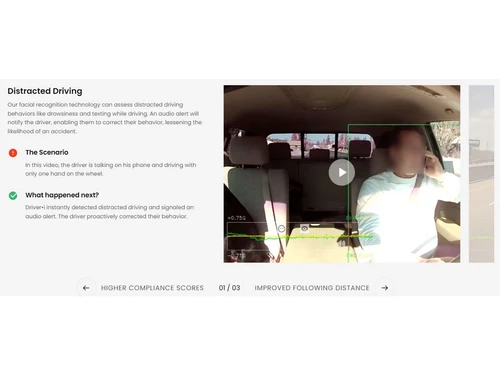
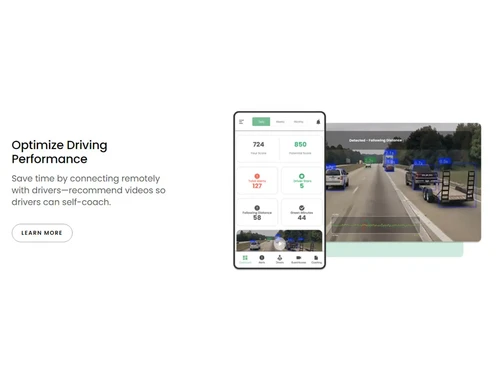
 Distracted Driving Capture the Full Picture Optimize Driving Performance Vehicle Tracking Improves Retention Enable Transparency Increase Profitability

Watch the demo video to explore key features, real workflows, and how the software fits your business needs.
 Windows
  Desktop
  Cloud-Based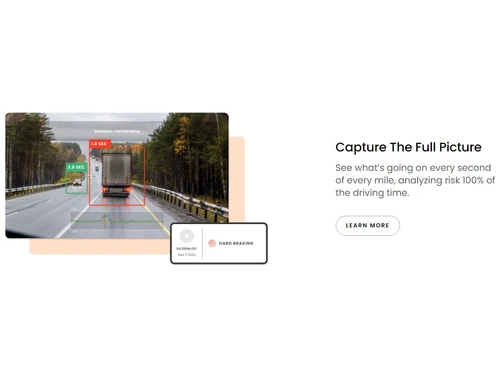
Small Business
Designed for startups and growing businesses
Medium Business
Built for business growth and flexibility
Enterprises
Designed for complex and large-scale business needs
4.2
Out of 5

Overall Rating
Based on
13 Verified Reviews
Rating Breakdown
88% Recommend this Product
Add ReviewCustomers generally appreciate Netradyne's Driver•i for its ongoing updates, which enhance fleet safety and accountability through detailed reporting and real-time monitoring. Users report a noticeable reduction in accidents and improved driving behavior, thanks to proactive alerts and coaching features. However, some common concerns include the complexity of certain reports, occasional glitches, and slower customer support response times. Overall, users find the system valuable for fleet management, despite initial setup challenges and minor usability issues.
Pros
"The Driver•i app is easy to use and helps drivers see how they're doing."
"The Driver•i app is easy to use and helps drivers see how they're doing."
Cons
"Sometimes the system gives alerts for things that didn't happen."
"Sometimes the system gives alerts for things that didn't happen."
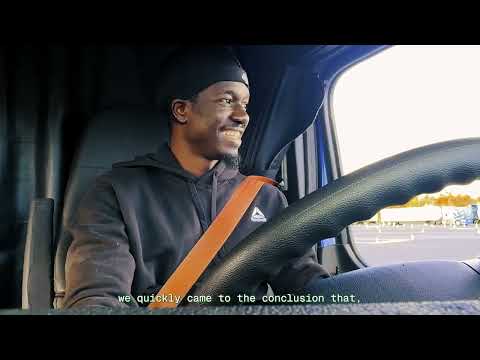

Apr 26, 2025
Techjockey Verified
“Supports Continuous Improvement”
Netradyne regularly updates Driver•i, adding new features and improvements. This commitment to continuous improvement helps us stay ahead in fleet safety. Occasionally, updates cause minor issues, but they're usually resolved quickly.
Pros
Ongoing updates and feature enhancements.
Cons
Frequent updates can sometimes cause temporary issues.
Reason to switch
We wanted a system that evolves with our needs.
Apr 2, 2025
Techjockey Verified
“Enhances Driver Accountability”
Driver•i tracks driver behavior and provides detailed reports, which helps us hold drivers accountable. While some reports are a bit complex, they offer valuable insights into driving habits. This has helped us improve overall safety.
Pros
Detailed reports and behavior tracking.
Cons
Some reports are hard to interpret.
Reason to switch
We needed more detailed behavior tracking.
Mar 14, 2025
Techjockey Verified
“Helps Reduce Accidents”
Since using Driver•i, we've seen a decrease in accidents. The system alerts drivers to risky behavior, allowing them to correct it before something happens. Setting it up was a bit tricky, but once it was running, it made a big difference.
Pros
Proactive alerts and driver coaching.
Cons
Initial setup was a bit complicated.
Reason to switch
We wanted a system that actively helps prevent accidents.

Netradyne
Price On Request
Desktop
Mobile
Web based
On Premises
Windows
Mac OS

Truckers Abode
Price On Request
Desktop
Mobile
Web based
On Premises
Windows
Mac OS
.jpg)
FleetAble FMS
Price On Request
Desktop
Mobile
Web based
On Premises
Windows
Mac OS

Verizon Connect
Price On Request
Desktop
Mobile
Web based
On Premises
Windows
Mac OS

Asti Fleet Management
Price On Request
Desktop
Mobile
Web based
On Premises
Windows
Mac OS

Fleetx
Price On Request
Desktop
Mobile
Web based
On Premises
Windows
Mac OS

Motive
Price On Request
Desktop
Mobile
Web based
On Premises
Windows
Mac OS

Trakzee
Price On Request
Desktop
Mobile
Web based
On Premises
Windows
Mac OS

Fleetio
Price On Request
Desktop
Mobile
Web based
On Premises
Windows
Mac OS
Quartix
Price On Request
Desktop
Mobile
Web based
On Premises
Windows
Mac OS

Samsara
Price On Request
Desktop
Mobile
Web based
On Premises
Windows
Mac OS
(0) Product(s) selected
Available
Price on Request
Available
Price on Request
Starting Price:
$5
Starting Price:
$16 /Month
Available
Price on Request
Available
Price on Request
Available
Price on Request
Available
Price on Request
Starting Price:
AED1,999 /License
Starting Price:
$6 /Month

Starting Price:
$5 /Month
Netrdyne Fleet Management Software is compatible with Windows operating systems.
The app is available for Android mobile devices.
The software supports Web-based deployment type.
The pricing is available on request at techjockey.com.
It is typically used in travel agencies, transportation, and small and medium businesses.
The demo is available for free with techjockey.com.
It offers a free trial. However, the premium plan with advanced features is available at techjockey.com with exciting deals.
Installation is not required, as it is web-based. Just open the Setup Wizard to get started.
Netradyne helps with transparency and distracted driving issues and increases profitability. It also provides real-time vehicle tracking.
20,000+ Software Listed
Best Price Guranteed
Free Expert Consultation
2M+ Happy Customers
Terms and Condtions

Users with registered businesses can purchase goods from merchants on the platform to satisfy their business needs. Users are not permitted to utilize any products acquired through the platform for resale, advertising, business, or further distribution.
For each purchase made, users will receive a Tax Invoice (or 'GST invoice') that includes specific details such as:
the GSTIN of the user associated with their registered business, and
the specified Entity Name for their business.
It should be noted that not all products are eligible for GST Invoice. Only the products displayed by participating sellers with the 'GST-based Invoice Available' callout on the product description page would qualify.
Certain goods and services are not eligible to get a GST Invoice, including items with VAS, i.e., Value Added Services (e.g., Total Mobile Protection/Assured Buyback) and those involving an exchange offer at the time of purchase.
Users must ensure the accuracy of the GSTIN, and business entity name provided for the GST Invoice. Requests for corrections into GST Invoice would not be accommodated by Techjockey.com or any Seller, and any issues arising from user-provided information are the sole responsibility of users.
Techjockey.com is not liable for the GST Invoice or any associated input tax credit. To efficiently claim an input tax credit, users should select the registered place of business address as per the GST authority's data and follow the provisions of the GST Act and rules.
To claim an input tax credit, the delivery and billing addresses must match. Furthermore, input tax credits will not be granted if the delivery address and GSTIN on the invoice are from different states. In case of incorrect GST details provided during the order placement, the order will be canceled automatically.



