linkedin
Net Nanny logo
play Get Net Nanny 10 | Stay Informed & Protect Your Kids with the #1-Rated Internet Filtering Software
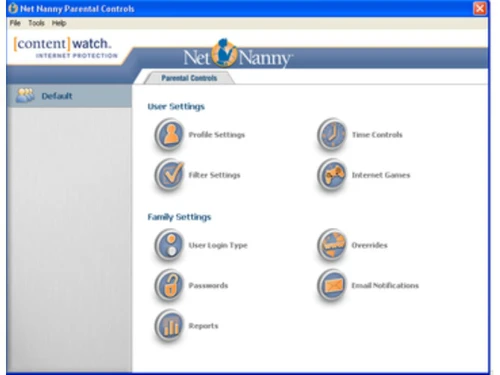
net nanny dashboard
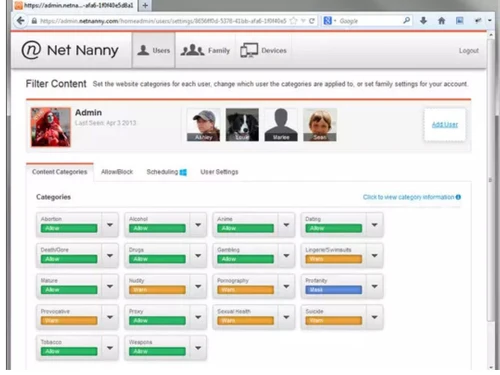
net nanny filter

Net Nanny

Brand: SafeToNet

  • 4.1

  • 3 Ratings

Net Nanny is parental control software designed to monitor and manage children's online activities, including internet browsing, app usage, and screen time, to ensure a safe and secure online environment.

See More

Have you used Net Nanny before?

Share your insights for better experience

Add a Review
Starting Price
$40

View plans

100% Genuine
Products
Best Price
Guaranteed
Safe & Secure
Payment
  • Description

  • Pricing

  • Features

  • Specification

  • Review

  • Compare

  • Alternatives

  • FAQ

Starting at $40

Net Nanny Software Overview

What is Net Nanny?

Net Nanny is a parental control software to safeguard children's online experiences. It offers features such as content filtering, website blocking, and screen time management to protect children from inappropriate content and manage their digital habits effectively. Parents can monitor their children's online activities, set usage limits, and receive alerts for concerning behaviour.

It works across various devices and platforms, providing flexible and customizable controls. It empowers parents to create a safe and nurturing online environment for their children while promoting responsible internet usage.

Why Choose Net Nanny Software?

  • Comprehensive Protection: It offers many features to protect children from online threats, including inappropriate content, cyberbullying, and predators.
  • Customizable Controls: Parents can tailor settings to their family's needs, adjusting filters, time limits, and monitoring preferences to suit each child's age and maturity level.
  • Peace of Mind: With real-time monitoring and alerts, parents can feel confident knowing they know their children's online activities and can intervene if necessary.
  • User-Friendly Interface: It provides an intuitive dashboard that allows parents to set up and manage controls without technical expertise.
  • Cross-Platform Compatibility: It works across various devices and operating systems, allowing parents to manage their children's online safety regardless of their device.
  • Trusted Reputation: It has a long-standing reputation as a leader in parental control software, trusted by millions of families worldwide to keep their children safe online.

Benefits of Net Nanny Platform

  • Enhanced Parental Guidance: It empowers parents to actively monitor and guide their children's online activities, fostering responsible digital citizenship.
  • Proactive Filtering: It employs advanced filtering technology to block access to inappropriate content in real-time, minimizing exposure to harmful material.
  • Time Management: It helps parents regulate screen time by setting limits and schedules, promoting a healthy balance between online and offline activities.
  • Remote Management: With remote access capabilities, parents can manage settings and monitor their children's online behaviour from anywhere, providing flexibility and peace of mind.
  • Educational Tools: It offers resources and guidance to educate parents and children about online safety, empowering them to make informed decisions and navigate the digital world responsibly.
  • Continuous Updates: It regularly updates its database of blocked content and features to adapt to evolving online threats, ensuring ongoing protection for children.

Pricing of Net Nanny Parental Control Software

Net Nanny price in India starts at $40 at techjockey.com.

The pricing model is based on different parameters, including extra features, deployment type, and the total number of users. If you have further queries related to the product, you can contact our product team to learn more about the pricing and offers.

Read more

SafeToNet Company Details

Founded Year:  2013

Pioneering safety-tech company that exists to keep children safe online.

Director/Founders Georgina Pursey, Jack Pursey, Richard Pursey, Sharon Pursey
Company Size 101-500 Employees

Net Nanny Pricing & Plans

1 Desktop
Starting at $40
    • Licenses

      Licenses
      Licenses
    • Yearly

      Yearly
      Yearly

Key Features

  • For Windows & Mac

  • Parental Controls

  • Screen Time Management

  • Website Blocker

  • Block Apps

  • Track Location

  • Internet Filter

  • Block Pornography

  • Alerts and Reporting

  • YouTube Monitoring

5 Devices
Starting at $55
    • Licenses

      Licenses
      Licenses
    • Yearly

      Yearly
      Yearly

Key Features

  • For Windows, macOS and iOS

  • Parental Controls

  • Screen Time Management

  • Website Blocker

  • Block Apps

  • Track Location

  • Internet Filter

  • Block Pornography

  • Alerts and Reporting

  • YouTube Monitoring

20 Devices
Starting at $90
    • Licenses

      Licenses
      Licenses
    • Yearly

      Yearly
      Yearly

Key Features

  • For Windows, macOS and iOS

  • Parental Controls

  • Screen Time Management

  • Website Blocker

  • Block Apps

  • Track Location

  • Internet Filter

  • Block Pornography

  • Alerts and Reporting

  • YouTube Monitoring

Net Nanny Features

  • icon_check Screen Time Management
    It enables parents to limit children's online time for healthy habits.
  • icon_check Website Blocking
    Parents can block inappropriate or harmful websites.
  • icon_check App Blocking
    Restrict access to specific apps or categories to prevent exposure to inappropriate content.
  • icon_check Location Tracking
    It provides location tracking for children's safety.
  • icon_check Internet Filter
    Filters web content in real-time to block harmful material.
  • icon_check Block Pornography
    Includes robust filters to block pornographic content.
  • icon_check Alerts & Reporting
    Parents receive alerts and reports on children's online activities.
  • icon_check Parent Dashboard
    A centralized interface for managing settings and monitoring online behaviour is offered.
  • icon_check YouTube Monitoring
    Monitors and filters YouTube content to ensure appropriateness.
  • icon_check Social Media Protection
    Provides tools to monitor and control interactions on social media platforms.
Net Nanny Demo Video play icon

Get Net Nanny Demo

Watch the demo video to explore key features, real workflows, and how the software fits your business needs.

Understand
Key Features
Personal
Demo Insights
Interactive
Demo Support

Net Nanny Specifications

Supported Platforms
Windows Windows iOS iOS MacOS MacOS
Devices
Desktop Desktop Mobile Mobile
Deployment
Perpetual Perpetual
Suitable For
All Industries
Business Specific
All Businesses
Business Size
Small Business Startups Medium Business Enterprises
Customer Support
Email Communities
Language
English
Training Resources
Documentation Videos

Explore the Best Alternative Solutions Similar to Your Business Size and Needs

Net Nanny Review

4.1

Out of 5

img

Overall Rating

Based on
3 Verified Ratings

Rating Breakdown

  • Features 3.8
  • Value for Money 4.1
  • Ease of Use 4.8
  • Customer Support 3.8

86% Recommend this Product

Add Review

Be the First to Review

This product has no reviews yet. Be the first to leave your feedback.

Add Review

Compare Net Nanny With other Parental Control Software

Products
Ratings
Pricing
Device Supported
Deployment
Supported Platforms
  • img

    Net Nanny

  • 4.1

  • Price On Request

  • Desktop

    Mobile

  • Web based

    On Premises

  • Windows

    Mac OS

  • img

    Qustodio

  • 4.1

  • Price On Request

  • Desktop

    Mobile

  • Web based

    On Premises

  • Windows

    Mac OS

  • img

    Norton Family

  • 4.3

  • ₹ 1749

  • Desktop

    Mobile

  • Web based

    On Premises

  • Windows

    Mac OS

  • img

    FlashGet Kids

  • 3.9

  • Price On Request

  • Desktop

    Mobile

  • Web based

    On Premises

  • Windows

    Mac OS

  • img

    Family Link

  • 4.5

  • Price On Request

  • Desktop

    Mobile

  • Web based

    On Premises

  • Windows

    Mac OS

  • img

    FamiSafe

  • 4.2

  • Price On Request

  • Desktop

    Mobile

  • Web based

    On Premises

  • Windows

    Mac OS

  • img

    FamilyTime

  • 4.3

  • Price On Request

  • Desktop

    Mobile

  • Web based

    On Premises

  • Windows

    Mac OS

  • img

    KidLogger

  • 4.2

  • Price On Request

  • Desktop

    Mobile

  • Web based

    On Premises

  • Windows

    Mac OS

  • img

    Refog

  • 4.2

  • Price On Request

  • Desktop

    Mobile

  • Web based

    On Premises

  • Windows

    Mac OS

(0) Product(s) selected

Net Nanny Alternatives

See All Net Nanny Alternatives

Starting Price:

$30 /Month

Which operating system does Net Nanny Software Support?

Net Nanny Software is compatible with Windows and macOS.

Is there any Net Nanny Software App?

Yes, Net Nanny Software is available for iOS app users.

What is the deployment type of Net Nanny Software?

It supports web-based deployment.

How much does Net Nanny Software Cost?

Net Nanny price in India starts at $40 at techjockey.com.

Who are the potential users of Net Nanny Software?

Net Nanny Software is typically used by all industries to ensure a safe and secure online environment.

Is there any free demo for Net Nanny Software?

Yes, a demo of Net Nanny is available at techjockey.com.

Is Net Nanny Software Free?

Net Nanny Software is not free. Contact our product experts to learn more about the pricing plans.

Does Net Nanny offer a free trial?

Net Nanny Software does not offer a free trial.

How can you download Net Nanny Software?

Net Nanny Software installation is not required, as it is web-based. Just open the Setup Wizard to get started.

How does Net Nanny Software Work?

Net Nanny Software enables parents to set up filters and controls to manage and monitor their children's online activities, ensuring a safe and secure online environment.

20,000+ Software Listed

Best Price Guranteed

Free Expert Consultation

2M+ Happy Customers

Terms and Condtions

close

Users with registered businesses can purchase goods from merchants on the platform to satisfy their business needs. Users are not permitted to utilize any products acquired through the platform for resale, advertising, business, or further distribution.

For each purchase made, users will receive a Tax Invoice (or 'GST invoice') that includes specific details such as:

  • the GSTIN of the user associated with their registered business, and

  • the specified Entity Name for their business.

It should be noted that not all products are eligible for GST Invoice. Only the products displayed by participating sellers with the 'GST-based Invoice Available' callout on the product description page would qualify.

Certain goods and services are not eligible to get a GST Invoice, including items with VAS, i.e., Value Added Services (e.g., Total Mobile Protection/Assured Buyback) and those involving an exchange offer at the time of purchase.

Users must ensure the accuracy of the GSTIN, and business entity name provided for the GST Invoice. Requests for corrections into GST Invoice would not be accommodated by Techjockey.com or any Seller, and any issues arising from user-provided information are the sole responsibility of users.

Techjockey.com is not liable for the GST Invoice or any associated input tax credit. To efficiently claim an input tax credit, users should select the registered place of business address as per the GST authority's data and follow the provisions of the GST Act and rules.

To claim an input tax credit, the delivery and billing addresses must match. Furthermore, input tax credits will not be granted if the delivery address and GSTIN on the invoice are from different states. In case of incorrect GST details provided during the order placement, the order will be canceled automatically.