linkedin
Neo logo
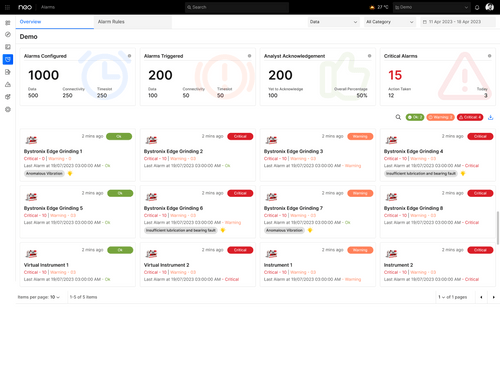
Neo Dashboard
Neo Energy Monitoring
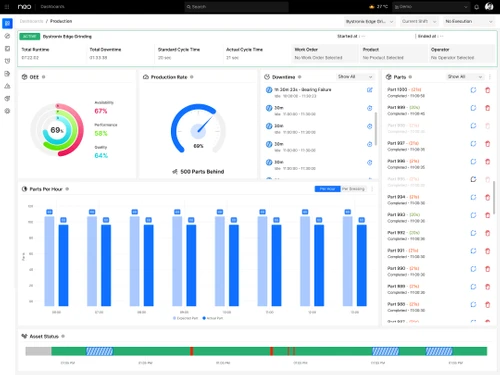
Neo Production Monitoring

Neo

Brand: Saint-Gobain

  • 4.1

  • 4 Ratings

Neo is a tool that helps industries use energy more efficiently. It gives real-time insights and analytics to improve energy use and support sustainability.

See More

Have you used Neo before?

Share your insights for better experience

Add a Review
Starting Price
€15

View plans

100% Genuine
Products
Best Price
Guaranteed
Safe & Secure
Payment
  • Description

  • Pricing

  • Features

  • Specification

  • Review

  • Compare

  • Alternatives

  • FAQ

Starting at €15

Neo Software Overview

What is Neo?

Neo is an advanced energy monitoring solution designed to optimize energy consumption in industrial settings. It provides real-time insights into energy usage, enabling businesses to identify inefficiencies and reduce operational costs. With features like smart data analytics, Neo helps users track energy patterns and make informed decisions to enhance sustainability.

The system offers customizable dashboards that present critical information in an easily digestible format, allowing for proactive management of energy resources. Additionally, Neo integrates seamlessly with existing infrastructure, making it adaptable to various industrial environments. By leveraging cutting-edge technology, Neo empowers organizations to achieve their energy efficiency goals while contributing to environmental sustainability.

Why Choose Neo Software?

  • Real-Time Insights: Neo provides instant access to energy consumption data, allowing businesses to quickly identify inefficiencies and make informed decisions.
  • Enhanced Efficiency: The software helps optimize energy usage, reduce operational costs, and improve overall efficiency in industrial settings.
  • Customizable Dashboards: Users can create tailored dashboards that display critical metrics in an easily understandable format, facilitating better monitoring and management.
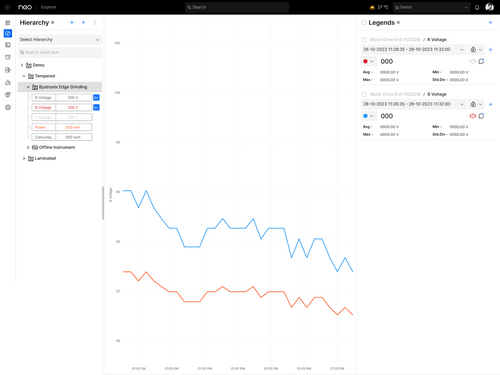
  • Smart Data Analytics: It utilizes advanced analytics to track energy patterns, enabling proactive interventions and strategic planning for energy consumption.
  • Seamless Integration: The solution integrates smoothly with existing infrastructure, making it adaptable to various industrial environments without significant disruptions.
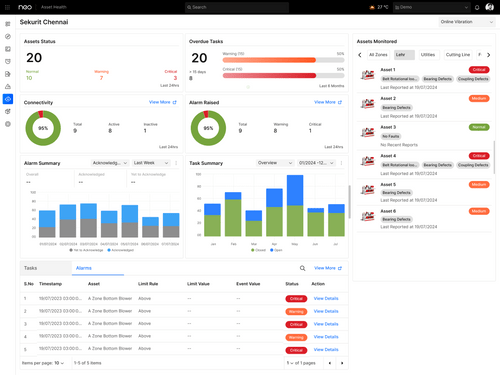
  • Condition Monitoring: Continuously monitors the condition of equipment to prevent energy inefficiencies and equipment failures.
  • Scalable Solution: It is suitable for businesses of all sizes, providing scalability to meet the evolving needs of any organization.

Benefits of Neo Platform

  • Real-Time Monitoring: Users gain instant access to energy usage data, enabling quick identification of inefficiencies and timely interventions.
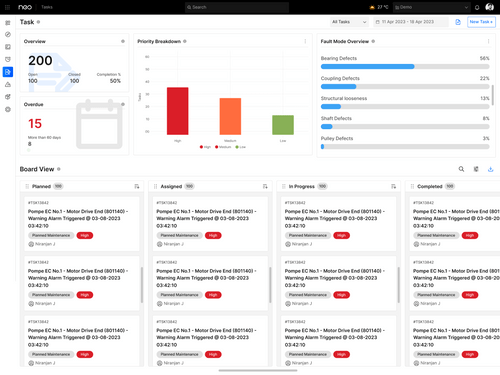
  • Task Management: Assists in managing and prioritizing energy efficiency and equipment maintenance tasks.
  • Data-Driven Insights: The software provides advanced analytics that helps businesses understand energy patterns and make informed decisions.
  • Proactive Alerts: The system can send notifications for unusual energy consumption, helping organizations respond promptly to potential issues.
  • Sustainability Support: By promoting energy efficiency, Neo aids organizations in achieving their sustainability goals and reducing their carbon footprint.
  • User-Friendly Interface: The intuitive design ensures users can navigate the software easily, enhancing overall user experience.
  • Alerts and Notifications: Neo sends alerts for unusual energy consumption, enabling proactive management.
  • Improved Operational Performance: Optimizing energy management contributes to overall operational efficiency and productivity in industrial settings.

Neo pricing

Neo pricing starts from €15 at techjockey.com.

The pricing model is based on different parameters, including extra features, deployment type, and the total number of users. For further queries related to the product, you can contact our product team and learn more about the pricing and offers.

Read more

Neo Pricing & Plans

Starter
Key Features
  • Online and Offline Historian
  • Standard & User defined Dashboards
  • Customizable Reports
  • Tasks Management
Starting at €15
    • Yearly

      Yearly
      Yearly

Key Features

  • Online and Offline Historian

  • Standard & User defined Dashboards

  • Customizable Reports

  • Tasks Management

Neo Features

  • icon_check Production Management
    Oversees and optimizes production processes.
  • icon_check Tasks
    Manages and tracks tasks within the system.
  • icon_check Energy Monitoring
    Monitors energy usage to improve efficiency.
  • icon_check Condition Monitoring
    Tracks the condition of equipment to prevent failures.
  • icon_check Reporting & Analytics
    Provides detailed reports and analytics for better decision-making.
  • icon_check OEE Monitoring
    Monitors Overall Equipment Effectiveness (OEE) to maximize productivity.
  • icon_check Facility Monitoring
    Keeps an eye on the entire facility's operations and conditions.
  • icon_check GrindSmart
    A specialized feature likely focused on optimizing grinding processes.
Product Enrichment Section Image

Neo Specifications

Supported Platforms
Ubuntu Ubuntu Windows Windows iOS iOS Android Android MacOS MacOS Linux Linux
Devices
Desktop Desktop Mobile Mobile Tablet Tablet iPad iPad
Deployment
Cloud-Based Cloud-Based
Suitable For
All Industries
Business Specific
All Businesses
Business Size
Small Business Medium Business Enterprises
Customer Support
Email Communities
Language
English
Training Resources
Videos

Neo Review

4.1

Out of 5

img

Overall Rating

Based on
4 Verified Ratings

Rating Breakdown

  • Features 3.8
  • Value for Money 4
  • Ease of Use 4.2
  • Customer Support 4.5

87% Recommend this Product

Add Review

Be the First to Review

This product has no reviews yet. Be the first to leave your feedback.

Add Review

Compare Neo With other IOT Software

Products
Ratings
Pricing
Device Supported
Deployment
Supported Platforms
  • img

    Neo

  • 4.1

  • Price On Request

  • Desktop

    Mobile

  • Web based

    On Premises

  • Windows

    Mac OS

  • img

    SOTI ONE Platform

  • 4.5

  • Price On Request

  • Desktop

    Mobile

  • Web based

    On Premises

  • Windows

    Mac OS

  • img

    Blynk

  • Price On Request

  • Desktop

    Mobile

  • Web based

    On Premises

  • Windows

    Mac OS

  • img

    Armis

  • 4.0

  • Price On Request

  • Desktop

    Mobile

  • Web based

    On Premises

  • Windows

    Mac OS

  • img

    ThingSpeak

  • Price On Request

  • Desktop

    Mobile

  • Web based

    On Premises

  • Windows

    Mac OS

  • img

    SOTI Snap

  • 4.4

  • Price On Request

  • Desktop

    Mobile

  • Web based

    On Premises

  • Windows

    Mac OS

  • img

    Thingworx

  • 4.2

  • Price On Request

  • Desktop

    Mobile

  • Web based

    On Premises

  • Windows

    Mac OS

  • img

    Belladati

  • 4.1

  • Price On Request

  • Desktop

    Mobile

  • Web based

    On Premises

  • Windows

    Mac OS

(0) Product(s) selected

Starting Price:

$29 /Month

Available

Price on Request

Available

Price on Request

Available

Price on Request

Available

Price on Request

How much does Neo Software cost?

Neo software pricing starts from € 15 at techjockey.com.

Is there any mobile application for Neo?

Yes, Neo Software has Android and iOS apps.

Which operating system does Neo Software support?

Neo Software supports Ubuntu, Windows, MacOS and Linux.

Does Neo offer a free trial?

No, it does not offer a free trial to users.

How does Neo Software work?

Neo Software continuously monitors energy consumption in real-time, utilizing advanced analytics to provide insights and optimize energy usage for improved efficiency and sustainability.

Who are the potential users of Neo Software?

The potential users of Neo Software include industrial companies, manufacturing facilities, energy managers, and organizations focused on optimizing energy consumption and enhancing sustainability.

Is there any free demo for Neo Software?

Yes, Neo free demo is available.

Is Neo Software free?

No, Neo Software is not free.

How does Neo Software enhance energy efficiency?

Neo continuously monitors energy use, identifies inefficiencies, and provides data-driven insights to help organizations reduce operational costs.

How does Neo support sustainability goals?

By promoting energy efficiency and providing insights into energy consumption patterns, Neo helps organizations reduce their carbon footprint.

20,000+ Software Listed

Best Price Guranteed

Free Expert Consultation

2M+ Happy Customers

Terms and Condtions

close

Users with registered businesses can purchase goods from merchants on the platform to satisfy their business needs. Users are not permitted to utilize any products acquired through the platform for resale, advertising, business, or further distribution.

For each purchase made, users will receive a Tax Invoice (or 'GST invoice') that includes specific details such as:

  • the GSTIN of the user associated with their registered business, and

  • the specified Entity Name for their business.

It should be noted that not all products are eligible for GST Invoice. Only the products displayed by participating sellers with the 'GST-based Invoice Available' callout on the product description page would qualify.

Certain goods and services are not eligible to get a GST Invoice, including items with VAS, i.e., Value Added Services (e.g., Total Mobile Protection/Assured Buyback) and those involving an exchange offer at the time of purchase.

Users must ensure the accuracy of the GSTIN, and business entity name provided for the GST Invoice. Requests for corrections into GST Invoice would not be accommodated by Techjockey.com or any Seller, and any issues arising from user-provided information are the sole responsibility of users.

Techjockey.com is not liable for the GST Invoice or any associated input tax credit. To efficiently claim an input tax credit, users should select the registered place of business address as per the GST authority's data and follow the provisions of the GST Act and rules.

To claim an input tax credit, the delivery and billing addresses must match. Furthermore, input tax credits will not be granted if the delivery address and GSTIN on the invoice are from different states. In case of incorrect GST details provided during the order placement, the order will be canceled automatically.