linkedin
Nagios Network Analyzer logo
play Introducing Nagios Network Analyzer - Nagios Network Analyzer Demo
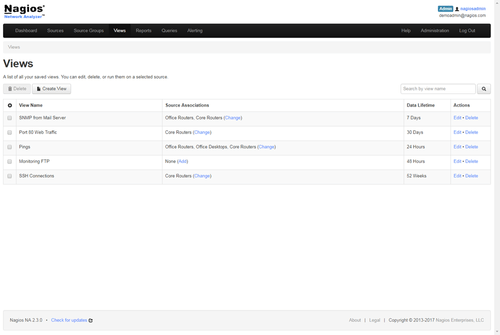
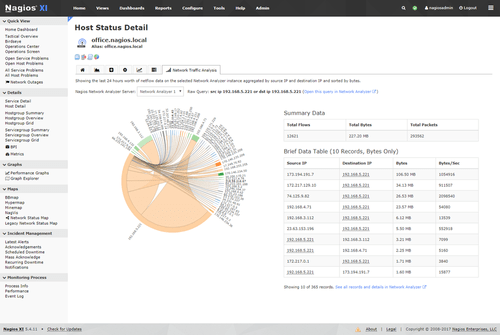
Nagios Network Analyzer views
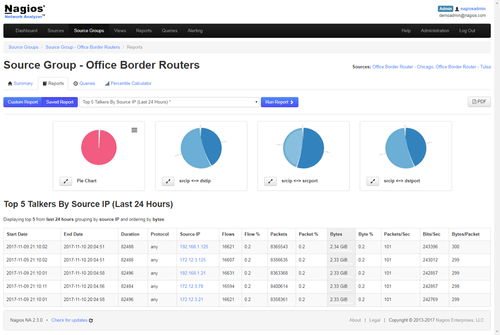
Nagios Network Analyzer source group

Nagios Network Analyzer

Brand: Nagios

  • 4.3

  • 1 Rating & 1 Review

About Nagios Network Analyzer Nagios Network Analyzer is a NetFlow analyzing, bandwidth utilization and monitoring software that helps users perform timely security checks on their network. It provides an in-depth look at the network traffic sources and allows users to gather essential data related ...

See More

Have you used Nagios Network Analyzer before?

Share your insights for better experience

Add a Review
Starting Price
$4995

View plans

100% Genuine
Products
Best Price
Guaranteed
Safe & Secure
Payment
  • Description

  • Pricing

  • Features

  • Specification

  • Review

  • Compare

  • Alternatives

  • FAQ

Starting at $4,995

Nagios Network Analyzer Software Overview

About Nagios Network Analyzer

Nagios Network Analyzer is a NetFlow analyzing, bandwidth utilization and monitoring software that helps users perform timely security checks on their network. It provides an in-depth look at the network traffic sources and allows users to gather essential data related to the network’s health. The software features an advanced interface with excellent speed and performance. It also offers a wide range of efficient wizards that enables the users to add various sources and put up timely alerts as per their requirement. Users can easily create a new network analyzer environment that suits the identity of their network. 

How does Nagios Network Analyzer help users to monitor their network?

Nagios Network Analyzer detects any threats on the user’s network in real-time. It offers intuitive visuals, provides valuable information about the available data and alerts users about all suspicious activities that may affect the network. The software features a comprehensive dashboard, advanced visualization facility along with custom monitoring tools. The advanced reporting feature of the software makes IT staff fully aware of their network-related issues.

Compatible Platforms of Nagios Network Analyzer        

Nagios Network Analyzer is compatible with -

  1. Microsoft Windows
  2. Linux
  3. Unix
  4. Ubuntu 14.04 to 18.04
  5. MacOS
  6. Debian 8.x and 9.x

What are the benefits of using Nagios Network Analyzer?

  1. Extensive Network Analysis: The software offers an in-depth look at network sources and assists one in detecting all possible network threats. It helps users in gathering data and information for complete network analysis. 
  2. Bandwidth Utilization Calculator: Nagios Network Analyzer offers a customizable bandwidth utilization calculator, enabling users to create detailed reports on bandwidth utilization as per the source, IP or other combinations as per their requirements. 
  3. Adaptability: The software helps users create a network identity. It assists them in organizing sources, applying views and queries to those sources with ease. The add-ons let users show SNMP notifications, monitor and pay attention to SNMP trap management systems. It easily adapts to existing environments and can be set up in minutes.
  4. Network Clarity: Nagios Network Analyzer offers a central view of network traffic, bandwidth data and looks into potential network hindrances. The dashboard offers a clear view of NetFlow or sFlow data sources, different server metrics and various abnormal network behaviours related to network health. Users can drill down network clarity by fetching information on individual IPs, source ports, and finding out the destination ports. 
  5. Intuitive Design: The software comes with an intuitive user-friendly design, coupled with powerful features. Users can easily integrate the software with Nagios XI, which offers a safe and secure network for them to work upon. They can even set up alerts and add sources with a few clicks. 
  6. In-Depth Insight: Nagios Network Monitor sends in real-time alerts and reports to its users. The data on it can be accessed and archived for tracking, analyzing and other essential functions. In case of any abnormal network activity or bandwidth restriction, it sends alerts and allows the administrators to resolve the problems immediately.

Pricing of Nagios Network Analyzer

The exclusive network monitoring software is available at a price of $4,995. If you want to avail the service provided by the software, send us a callback request. Our executive will assist you with an activation key. 

Read more

Nagios Network Analyzer Pricing & Plans

Network Analyzer
Key Features
  • Bandwidth Analysis
  • Performance Monitoring
  • Security
  • Alerts
  • Visualizations
  • Monitoring
  • User Management
  • Integration
  • Dashboards
Starting at $4995
    • Licenses

      Licenses
      Licenses

Key Features

  • Bandwidth Analysis

  • Performance Monitoring

  • Security

  • Alerts

  • Visualizations

  • Monitoring

  • User Management

  • Integration

  • Dashboards

Nagios Network Analyzer Features

  • icon_check Bandwidth Analysis
    The software has a customizable bandwidth calculator, that enables users to create reports based on IP or bandwidth utilized per
  • icon_check Performance Monitoring
    Users can seamlessly monitor network usage of specific applications with the help of views, individualized queries and detailed
  • icon_check Dashboards
    Nagios Network Analyzer features an intuitive dashboard, where users get access to checks, detailed information, an overview of
  • icon_check Security
    The software alerts users and ensures security to avoid all kinds of suspicious activity on the network and helps it run
  • icon_check Alerts
    The automated alert system feature of the software alerts the user whenever there is any abnormal activity or the bandwidth usage
  • icon_check Visualizations
    With the help of advanced visualizations, one can provide quick and thorough insights on network traffic along with the overall
  • icon_check Monitoring
    Nagios Network Analyzer offers individualized queries, reports and views to the users, enabling them to monitor the network usage
  • icon_check User Management
    The advanced user management options offered by Nagios network Analyzer helps IT teams to work together and maintain a smooth
  • icon_check Integration
    Nagios Network Analyzer enables its users to integrate with Nagios XI. It also allows them to go through the Network Analyzer's
Nagios Network Analyzer Demo Video play icon

Get Nagios Network Analyzer Demo

Watch the demo video to explore key features, real workflows, and how the software fits your business needs.

Understand
Key Features
Personal
Demo Insights
Interactive
Demo Support

Nagios Network Analyzer Specifications

Supported Platforms
Windows Windows
Devices
Desktop Desktop
Deployment
Cloud-Based Cloud-Based
Suitable For
All Industries
Business Specific
All Businesses
Language
English

Explore the Best Alternative Solutions Similar to Your Business Size and Needs

Nagios Network Analyzer Review

4.3

Out of 5

img

Overall Rating

Based on
1 Verified Review

Rating Breakdown

  • Features 4.5
  • Value for Money 4.5
  • Ease of Use 4.5
  • Customer Support 4

80% Recommend this Product

Add Review

Vijay Kalita

User

4.3

Reviewed on: Aug 19, 2020

Techjockey Verified

“Detects threats very efficiently”

Pros

It detects and notifies threats very quickly and efficiently

Cons

NO CONS

Compare Nagios Network Analyzer With other Network Monitoring Tools

Products
Ratings
Pricing
Device Supported
Deployment
Supported Platforms
  • img

    Nagios Network Analyzer

  • 4.3

  • Price On Request

  • Desktop

    Mobile

  • Web based

    On Premises

  • Windows

    Mac OS

  • img

    NCrpted Connectin

  • 4.4

  • Price On Request

  • Desktop

    Mobile

  • Web based

    On Premises

  • Windows

    Mac OS

  • img

    Checkmk

  • 4.3

  • Price On Request

  • Desktop

    Mobile

  • Web based

    On Premises

  • Windows

    Mac OS

  • img

    Intruder

  • 4.1

  • Price On Request

  • Desktop

    Mobile

  • Web based

    On Premises

  • Windows

    Mac OS

  • img

    Auvik

  • 4.2

  • Price On Request

  • Desktop

    Mobile

  • Web based

    On Premises

  • Windows

    Mac OS

(0) Product(s) selected

Nagios Network Analyzer Alternatives

See All Nagios Network Analyzer Alternatives

Starting Price:

$225 /Month

Starting Price:

$99 /Month

Available

Price on Request

Available

Price on Request

Available

Price on Request

Available

Price on Request

Articles for Nagios Network Analyzer

See All Related Articles

Does Nagios Network Analyzer help users enjoy a smooth network?

With Nagios Network Analyzer, one can easily monitor all internet traffic-related information and allow users to connect to the server successfully. It can detect any unauthorized access and abnormal activity within the user’s network.

How efficient is the Network Analyzer tool of Nagios Network Analyzer?

The network analyzer provides a collective view of all bandwidth data, network traffic and potential compromises. Users also get to view specified information on the source port, individual IPs and destination port.

Can I get a demo of Nagios Network Analyzer?

Yes, Techjockey provides a live demo for Nagios Network Analyzer. You can simply schedule your convenient date and time and drop us a demo request.

What are the system requirements for using Nagios Network Analyzer?

RAM: Starting from 2GB to 8GB+ Processor: A Quad-Core Processor Hard Disk: Minimum of 40GB

Does Nagios Network Analyzer have a mobile app?

Currently, Nagios Network Analyzer does not have a mobile app of its own.

20,000+ Software Listed

Best Price Guranteed

Free Expert Consultation

2M+ Happy Customers

Terms and Condtions

close

Users with registered businesses can purchase goods from merchants on the platform to satisfy their business needs. Users are not permitted to utilize any products acquired through the platform for resale, advertising, business, or further distribution.

For each purchase made, users will receive a Tax Invoice (or 'GST invoice') that includes specific details such as:

  • the GSTIN of the user associated with their registered business, and

  • the specified Entity Name for their business.

It should be noted that not all products are eligible for GST Invoice. Only the products displayed by participating sellers with the 'GST-based Invoice Available' callout on the product description page would qualify.

Certain goods and services are not eligible to get a GST Invoice, including items with VAS, i.e., Value Added Services (e.g., Total Mobile Protection/Assured Buyback) and those involving an exchange offer at the time of purchase.

Users must ensure the accuracy of the GSTIN, and business entity name provided for the GST Invoice. Requests for corrections into GST Invoice would not be accommodated by Techjockey.com or any Seller, and any issues arising from user-provided information are the sole responsibility of users.

Techjockey.com is not liable for the GST Invoice or any associated input tax credit. To efficiently claim an input tax credit, users should select the registered place of business address as per the GST authority's data and follow the provisions of the GST Act and rules.

To claim an input tax credit, the delivery and billing addresses must match. Furthermore, input tax credits will not be granted if the delivery address and GSTIN on the invoice are from different states. In case of incorrect GST details provided during the order placement, the order will be canceled automatically.