linkedin
MediBang logo
play Drawing with Smartphone - Finger painting. (MediBang Paint) (subtitled)
MediBang Drawing
MediBang Illustration

MediBang

Brand: MediBang

  • 4.1

  • 4 Ratings

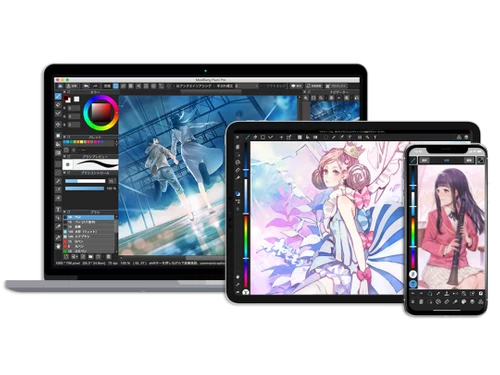
MediBang is digital painting and illustration software for artists and manga creators, it provides various drawing tools and is accessible on multiple platforms.

See More

Have you used MediBang before?

Share your insights for better experience

Add a Review
Starting Price
$2

View plans

100% Genuine
Products
Best Price
Guaranteed
Safe & Secure
Payment
  • Description

  • Pricing

  • Features

  • Specification

  • Review

  • Compare

  • Alternatives

  • FAQ

Starting at $2

MediBang Software Overview

What is MediBang?

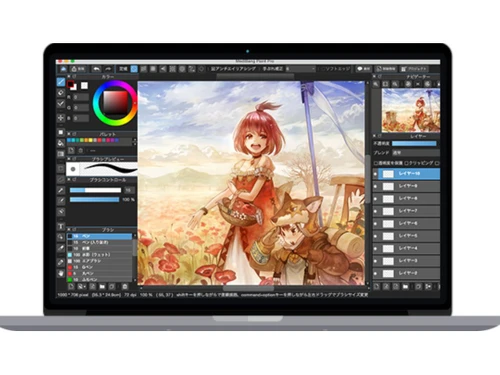
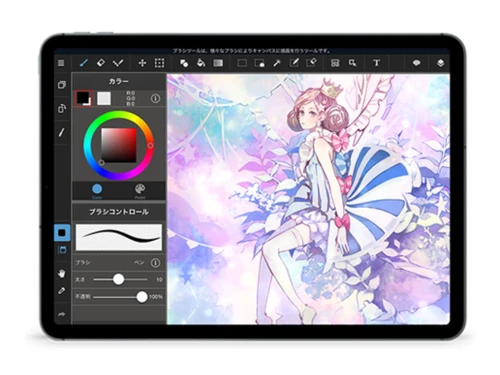
MediBang sketching software is a versatile digital painting and illustration application developed by MediBang Inc. It offers a comprehensive set of drawing tools and features tailored for artists, illustrators, and manga creators. MediBang software enables users to create artwork digitally on desktop computers, tablets, and smartphones.

It supports various platforms, providing accessibility to a wide range of users. With its user-friendly interface and diverse toolset, MediBang is suitable for artists of all skill levels. Whether creating illustrations, comics, or manga, MediBang software offers a powerful and intuitive platform for digital art creation.

Why Choose MediBang Software?

  • Versatility: It offers a wide range of drawing tools and features suitable for various art styles and projects, including illustrations, comics, and manga.
  • Accessibility: It is available on multiple platforms, including desktop computers, tablets, and smartphones, allowing users to create artwork anytime, anywhere.
  • User-Friendly Interface: With its intuitive interface and easy-to-use tools, it is accessible to artists of all skill levels, from beginners to experienced professionals.
  • Collaboration: The software supports collaboration features, enabling multiple users to work on the same project simultaneously, fostering teamwork and creativity.
  • Community Support: It has a vibrant online community where users can share their artwork, participate in contests, and collaborate with other artists, providing inspiration and support.
  • Cost-Effectiveness: It offers a range of free and affordable features, making it accessible to artists on a budget without compromising on quality or functionality.

Benefits of MediBang Platform

  • Brush Customization: Users can customize brush settings such as size, opacity, and texture to achieve desired effects in their artwork.
  • Comic Panel Creation: It includes tools for creating comic panels and layouts, streamlining the process for comic and manga creators.
  • Text Tool: It offers a text tool for adding dialogue, captions, and titles to artwork, enhancing storytelling capabilities.
  • Screen Tone Library: Users have access to a library of screen tones for adding shading and texture to their artwork, particularly useful for manga and comic creation.
  • Cloud Storage Integration: It integrates with cloud storage services, allowing users to save and access their artwork across multiple devices seamlessly.
  • Export Options: It offers various export options, including different file formats and resolutions, suitable for printing or sharing online.
  • Animation Support: It supports basic animation features, enabling users to create simple animations directly within the program.

Pricing of MediBang Sketching Software

MediBang price details are available on request at techjockey.com.

The pricing model is based on different parameters, including extra features, deployment type, and the total number of users. For further queries related to the product, you can contact our product team and learn more about the pricing and offers.

Read more

MediBang Company Details

Founded Year:  2014

MediBang is a communication internet company to help people connect through art.

Director/Founders Takashima Hideyuki
Company Size 1-100 Employees

MediBang Pricing & Plans

MediBang Premium
Key Features
  • Cloud storage-20 GB
  • Illustration for Design
  • Customizable Gestures
  • Concept Art & Painting
  • Layers
  • Unlimited Brush Customization
Starting at $2
    • Licenses

      Licenses
      Licenses

Key Features

  • Cloud storage-20 GB

  • Illustration for Design

  • Customizable Gestures

  • Concept Art & Painting

  • Layers

  • Unlimited Brush Customization

MediBang Features

  • icon_check Drawing Tools
    Offers a variety of digital drawing tools for creating artwork and illustrations.
  • icon_check Illustration for Design
    Supports illustration creation for design projects, providing tools and features tailored for designers.
  • icon_check Customizable Gestures
    Allows users to customize gestures for shortcuts and actions, enhancing workflow efficiency.
  • icon_check Concept Art & Painting
    Suitable for concept art and painting, offering features to bring creative ideas to life digitally.
  • icon_check Layers
    Provides support for multiple layers, enabling users to organize and edit elements of their artwork separately.
  • icon_check Unlimited Brush Customization
    Allows extensive customization of brush settings such as size, opacity, and texture for achieving desired artistic effects.
MediBang Demo Video play icon

Get MediBang Demo

Watch the demo video to explore key features, real workflows, and how the software fits your business needs.

Understand
Key Features
Personal
Demo Insights
Interactive
Demo Support

MediBang Specifications

Supported Platforms
Windows Windows iOS iOS Android Android MacOS MacOS
Devices
Desktop Desktop Mobile Mobile Tablet Tablet iPad iPad
Deployment
Cloud-Based Cloud-Based Perpetual Perpetual
Suitable For
All Industries
Business Specific
All Businesses
Business Size
Small Business Medium Business SMBs SMEs
Customer Support
Email Communities
Language
English
Training Resources
Videos

Explore the Best Alternative Solutions Similar to Your Business Size and Needs

Medium Business

Built for business growth and flexibility

ibisPaint

4.4

Krita

4.2

Vizcom

4.4

See More

MediBang Review

4.1

Out of 5

img

Overall Rating

Based on
4 Verified Ratings

Rating Breakdown

  • Features 4.2
  • Value for Money 4.1
  • Ease of Use 3.8
  • Customer Support 4.5

97% Recommend this Product

Add Review

Techjockey Trusted Reviews from Verified Users

No reviews are currently available for MediBang. Discover similar Sketching Software reviews

  • ibisPaint

    4.5

    Whats great - Layer support is comparable to desktop software. read more

  • Sketchbook

    4.2

    Whats great - Great for quick sketching and idea generation, customizable brushes, smooth performance even on large canvases, scan sketch f... read more

  • Fusion 360

    4.5

    Whats great - I use Fusion 360 as a speedy and straightforward approach to effortlessly coax things out. It is an a lot quicker stacking an... read more

Compare MediBang With other Sketching Software

Products
Ratings
Pricing
Device Supported
Deployment
Supported Platforms
  • img

    MediBang

  • 4.1

  • Price On Request

  • Desktop

    Mobile

  • Web based

    On Premises

  • Windows

    Mac OS

  • img

    Procreate

  • 4.6

  • ₹ 999

  • Desktop

    Mobile

  • Web based

    On Premises

  • Windows

    Mac OS

  • img

    ZBrush

  • 4.3

  • ₹ 5767

  • Desktop

    Mobile

  • Web based

    On Premises

  • Windows

    Mac OS

  • img

    dreamlike art

  • 4.7

  • Price On Request

  • Desktop

    Mobile

  • Web based

    On Premises

  • Windows

    Mac OS

  • img

    Tux Paint

  • 4.3

  • Price On Request

  • Desktop

    Mobile

  • Web based

    On Premises

  • Windows

    Mac OS

  • img

    ibisPaint

  • 4.4

  • Price On Request

  • Desktop

    Mobile

  • Web based

    On Premises

  • Windows

    Mac OS

  • img

    Sketchbook

  • 4.2

  • Price On Request

  • Desktop

    Mobile

  • Web based

    On Premises

  • Windows

    Mac OS

  • img

    Vizcom

  • 4.4

  • Price On Request

  • Desktop

    Mobile

  • Web based

    On Premises

  • Windows

    Mac OS

  • img

    Flame Painter

  • 4.3

  • ₹ 1560

  • Desktop

    Mobile

  • Web based

    On Premises

  • Windows

    Mac OS

  • img

    Clip Studio Paint

  • 4.4

  • Price On Request

  • Desktop

    Mobile

  • Web based

    On Premises

  • Windows

    Mac OS

  • img

    Apexwin

  • 4.4

  • Price On Request

  • Desktop

    Mobile

  • Web based

    On Premises

  • Windows

    Mac OS

(2) Product(s) selected

MediBang Alternatives

See All MediBang Alternatives

Available

Price on Request

Starting Price:

$395 /Quantity

SAVE UPTO 67%

Starting Price:

$5 /License

Starting Price:

$2 /Monthly

Which operating system does MediBang Software Support?

MediBang Software is compatible with Windows, and MacOS.

Is there any MediBang Software App?

Yes, MediBang Software is available for Android and iOS app users.

What is the deployment type of MediBang Software?

MediBang Software supports on-premises deployment.

How much does MediBang Software Cost?

MediBang price details are available on request at techjockey.com.

Who are the potential users of MediBang Software?

MediBang Software is typically used by all industries to create artwork digitally using various drawing tools and features.

Is there any free trial or demo for MediBang Software?

Yes, MediBang Software free demo is available at techjockey.com.

Is MediBang Software Free?

MediBang Software does not offer a free trial. However, the premium plan with advanced features is available at techjockey.com with exciting deals.

How can you download MediBang Software?

For MediBang software installation, you can go directly to Techjockey’s official website and buy this solution. Once purchased, you will receive a key to download the same via email.

How does MediBang Software Work?

MediBang Software provides a digital canvas and a range of drawing tools for users to create artwork and illustrations. Users can utilize features like customizable gestures and extensive brush customization to enhance their workflow and achieve desired artistic effects.

20,000+ Software Listed

Best Price Guranteed

Free Expert Consultation

2M+ Happy Customers

Terms and Condtions

close

Users with registered businesses can purchase goods from merchants on the platform to satisfy their business needs. Users are not permitted to utilize any products acquired through the platform for resale, advertising, business, or further distribution.

For each purchase made, users will receive a Tax Invoice (or 'GST invoice') that includes specific details such as:

  • the GSTIN of the user associated with their registered business, and

  • the specified Entity Name for their business.

It should be noted that not all products are eligible for GST Invoice. Only the products displayed by participating sellers with the 'GST-based Invoice Available' callout on the product description page would qualify.

Certain goods and services are not eligible to get a GST Invoice, including items with VAS, i.e., Value Added Services (e.g., Total Mobile Protection/Assured Buyback) and those involving an exchange offer at the time of purchase.

Users must ensure the accuracy of the GSTIN, and business entity name provided for the GST Invoice. Requests for corrections into GST Invoice would not be accommodated by Techjockey.com or any Seller, and any issues arising from user-provided information are the sole responsibility of users.

Techjockey.com is not liable for the GST Invoice or any associated input tax credit. To efficiently claim an input tax credit, users should select the registered place of business address as per the GST authority's data and follow the provisions of the GST Act and rules.

To claim an input tax credit, the delivery and billing addresses must match. Furthermore, input tax credits will not be granted if the delivery address and GSTIN on the invoice are from different states. In case of incorrect GST details provided during the order placement, the order will be canceled automatically.