USA
USA UAE
UAESmall Business
Designed for startups and growing businesses
See More





Brand: Malwarebytes
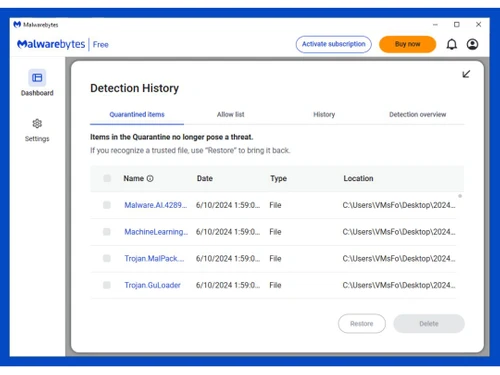
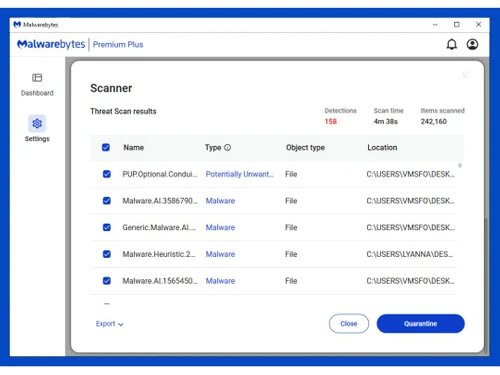
Malwarebytes is an anti-malware software that detects and removes various forms of malware, providing comprehensive protection for computer systems and networks.
See MoreHave you used Malwarebytes before?
Share your insights for better experience
Brand: Malwarebytes
Founded Year: 2008
Cybersecurity solution that protects people and businesses against dangerous threats such as malware, ransomware, and exploits
 Phishing Protection Malware Protection real-Time Reporting Ransomware 24/7 Support Malicious Links/Websites VPN Protection

Watch the demo video to explore key features, real workflows, and how the software fits your business needs.
 Windows
  iOS
iOS  Android MacOS
  Desktop
  Mobile
  Cloud-Based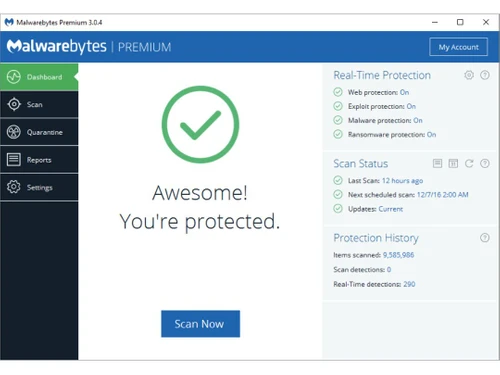
Small Business
Designed for startups and growing businesses
Medium Business
Built for business growth and flexibility
Enterprises
Designed for complex and large-scale business needs
4.5
Out of 5

Overall Rating
Based on
7 Verified Reviews
Rating Breakdown
91% Recommend this Product
Add ReviewUsers generally express high satisfaction with Malwarebytes, praising its effectiveness in detecting and removing malware, as well as its user-friendly interface and responsive technical support. Many appreciate the absence of intrusive upgrade prompts. However, some users have noted limitations, including occasional failures to detect certain viruses and the necessity for annual renewals, which can be inconvenient. Overall, the software is well-regarded among small to medium-sized businesses for its protective capabilities.


Sep 5, 2022
Techjockey Verified
“One of the best anti-malware tools on the market.”
Pros
I was looking for security software to install on my computer that would scan for malware & malicious software and clean my system from viruses and bugs. I found this software and the reviews were very good. Malwarebytes scans for a wide array of common threats, including viruses, spyware, and rootkits, and can detect and remove them without the need for signature files.
Cons
The GUI can be a bit improved.
Reason to switch
There are lots of issues associated with BitDefender Total Security that I faced. To mention some, it offers very less features, the password manager is there but for Windows only, and the VPN service offered by Bitdefender is not free.
Sep 5, 2022
Techjockey Verified
“Excellent software that finds and removes malicious software!”
Pros
I've used a lot of anti-malware programs, but this one has the best interface and it's the fastest one I've ever used. It has the best technical support I've ever seen, and its chat support is the fastest I've ever experienced. Plus, they don't do those annoying pop-ups asking you to upgrade. I highly recommend this one.
Cons
It has always failed to detect viruses. Also, every year one needs to renew it which is trouble and doesn’t even serve the purpose.
Reason to switch
It has always failed to detect viruses. Also, every year one needs to renew it which is trouble and doesn’t even serve the purpose.
Sep 1, 2022
Techjockey Verified
“The best way to protect your device from viruses and trojans.”
Pros
I am so glad I found Malwarebytes because the software has been instrumental in keeping my computer clear of malware. Malwarebytes not only scans and removes malware, but it also has a feature that allows you to block malicious websites and stop threats before they spread to other devices.
Cons
Offers and Discounts should also be provided.
Reason to switch
Very highly priced for advanced features.

Malwarebytes
Price On Request
Desktop
Mobile
Web based
On Premises
Windows
Mac OS

Adaware Web Companion
Price On Request
Desktop
Mobile
Web based
On Premises
Windows
Mac OS

HitmanPro
Price On Request
Desktop
Mobile
Web based
On Premises
Windows
Mac OS

Watchdog Anti-Malware
Price On Request
Desktop
Mobile
Web based
On Premises
Windows
Mac OS

TotalAV Anti-Malware
Price On Request
Desktop
Mobile
Web based
On Premises
Windows
Mac OS

Emsisoft Anti-Malware Home
₹ 2414
Desktop
Mobile
Web based
On Premises
Windows
Mac OS

ShieldApps Anti Malware
Price On Request
Desktop
Mobile
Web based
On Premises
Windows
Mac OS

Auslogics Anti-Malware
₹ 1504
Desktop
Mobile
Web based
On Premises
Windows
Mac OS

Gridinsoft Anti-Malware
Price On Request
Desktop
Mobile
Web based
On Premises
Windows
Mac OS

Virustotal
Price On Request
Desktop
Mobile
Web based
On Premises
Windows
Mac OS

SUPERAntiSpyware
Price On Request
Desktop
Mobile
Web based
On Premises
Windows
Mac OS
(2) Product(s) selected
Starting Price:
$20 /PC/Year
Malwarebytes Software is compatible with Windows, iOS, Android and MacOS.
Yes, Malwarebytes Software app is available for Android and iOS app users.
Malwarebytes Anti Malware Software supports web-based deployment.
Malwarebytes price in India starts at $4 at techjockey.com.
Malwarebytes Software is typically used by all industries for safeguarding computers and networks against a wide range of malicious threats.
Free demo of Malwarebytes is available at techjockey.com.
Malwarebytes Software is not available for free. You can connect with our product experts to know more about the pricing plans.
Malwarebytes Software does not offer a free trial.
Malwarebytes Software installation is not required, as it is web-based. Just open the Setup Wizard to get started.
Malwarebytes Software works by continuously scanning and monitoring computer systems for malicious activity, detecting and removing malware to ensure system security.
20,000+ Software Listed
Best Price Guranteed
Free Expert Consultation
2M+ Happy Customers
Terms and Condtions

Users with registered businesses can purchase goods from merchants on the platform to satisfy their business needs. Users are not permitted to utilize any products acquired through the platform for resale, advertising, business, or further distribution.
For each purchase made, users will receive a Tax Invoice (or 'GST invoice') that includes specific details such as:
the GSTIN of the user associated with their registered business, and
the specified Entity Name for their business.
It should be noted that not all products are eligible for GST Invoice. Only the products displayed by participating sellers with the 'GST-based Invoice Available' callout on the product description page would qualify.
Certain goods and services are not eligible to get a GST Invoice, including items with VAS, i.e., Value Added Services (e.g., Total Mobile Protection/Assured Buyback) and those involving an exchange offer at the time of purchase.
Users must ensure the accuracy of the GSTIN, and business entity name provided for the GST Invoice. Requests for corrections into GST Invoice would not be accommodated by Techjockey.com or any Seller, and any issues arising from user-provided information are the sole responsibility of users.
Techjockey.com is not liable for the GST Invoice or any associated input tax credit. To efficiently claim an input tax credit, users should select the registered place of business address as per the GST authority's data and follow the provisions of the GST Act and rules.
To claim an input tax credit, the delivery and billing addresses must match. Furthermore, input tax credits will not be granted if the delivery address and GSTIN on the invoice are from different states. In case of incorrect GST details provided during the order placement, the order will be canceled automatically.