 USA
USA UAE
UAESmall Business
Designed for startups and growing businesses

See More





Brand: Skylum
Elevate your photo editing with Luminar Neo's powerful tools for enhancing, retouching, and transforming images, along with AI-powered editing capabilities.
See MoreHave you used Luminar Neo before?
Share your insights for better experience
View plans
 Save upto 18%, Get GST Invoice on your business purchase T&C Buy Now & Pay Later, Check offer on payment page.
 Brand: Skylum
Founded Year: 2017
Skylum is a global imaging technology company with over 40 million users in 141 countries and offices in New York City and Kyiv, Ukraine. Our mission is to create software that empowers photographers to bring their creative ideas to life.
 Enhance an image with AI Builds a 3D depth map of your image Erase objects instantly AI-powered photo masking Apply layer masking Remove Portrait Background Realistically replace the sky Perfect contrast enhancer Clone tool Batch processing Sky Replacement Portrait Bokeh AI Structure AI Tool Body AI Sculpting Face AI Enhancer Noiseless AI Pro

Watch the demo video to explore key features, real workflows, and how the software fits your business needs.
 Windows
  iOS
iOS  Android MacOS
  Desktop
  Cloud-Based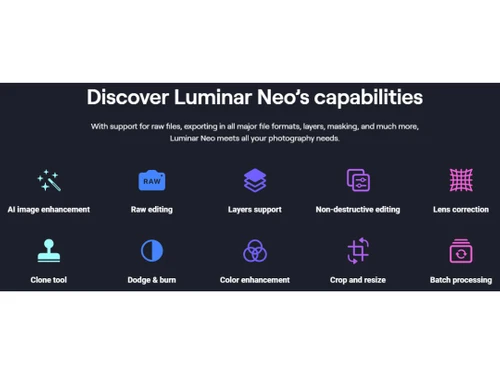


Small Business
Designed for startups and growing businesses
Medium Business
Built for business growth and flexibility
Enterprises
Designed for complex and large-scale business needs
4.7
Out of 5

Overall Rating
Based on
11 Verified Reviews
Rating Breakdown
96% Recommend this Product
Add ReviewUsers generally express high satisfaction with Luminar Neo, highlighting its intuitive interface and effective AI tools that streamline the editing process. Many appreciate the balance between automated features and manual adjustments, making it suitable for both beginners and experienced users. Common praises include the software's ability to enhance images quickly and its one-time purchase model. However, some users note limitations in advanced editing capabilities, particularly in color correction and layer management, suggesting that while it excels in speed and ease of use, it may not fully replace more complex software like Photoshop for detailed tasks.
Pros
"Extremely beginner-friendly with a clean and intuitive interface and powerful AI. Great for experimenting with creative looks, presets, and overlays."
"Very easy to useGreat quality tools and content, Constant updates and new features Built-in marketplace for presets, effects, and overlays."
Cons
"There is not always enough flexibility in color correction by zones - sometimes you need to go to Photoshop"
"While I haven’t experienced major drawbacks yet, I’ve noticed some tools might still need refinement and may not always be 100% perfect."
"Performance is generally good thanks to it's optimized engine, though very large RAW files or mass batch edits can sometimes slow things down."


Apr 24, 2026
Techjockey Verified
“A program that doesn’t get in the way of creativity”
This honestly feels more like a helpful tool in the background than a complicated editor. I don’t spend time digging through menus or trying to figure out where everything is. I just open a RAW file, make a few quick changes, and I already have a pretty good base to work with. The edit history is super clear, so I can always go back and try something different without stress. What I like most is the balance. The AI tools do a lot of the boring heavy lifting, but I can still jump in and fine-tune things manually when I want more control. So I’m not stuck doing everything by hand, but I’m also not locked into fully automatic results.
Pros
The interface is clean and easy to get around, so I’m not wasting time looking for tools. Sky AI, Relight AI, and portrait tools are the ones I use the most, and they usually give solid results fast. I also like that it’s not a subscription, just a one-time purchase.
Cons
Some tools still feel a bit rough around the edges, especially masking and object removal in tricky areas. Overall, it’s just a solid balance of quick AI help and manual control when I need it.
Reason to switch
It saves me so much time with all these AI tools. And even without it, it is very intuitive, I don't have to spend 5 minutes just to find one tool
Aug 21, 2025
Techjockey Verified
“A program that does not interfere with creativity”
This is not a program, this is a co-author. Allows you not to waste energy on technical issues, but to do the most important thing — to see and enhance the frame.
Pros
There is no need to “fight” with the interface. Everything is clear on an intuitive level. The history of changes is transparent, all steps can be easily rolled back. I open RAW - make a couple of movements - and I already see a live picture.
Cons
There is not always enough flexibility in color correction by zones - sometimes you need to go to Photoshop
Jul 24, 2025
Techjockey Verified
“Great AI tools, easy to use”
The AI features do most of the work, but you can still tweak things manually if you want more control. Perfect mix for fast edits and creative flexibility. It’s been my main editor for months now, and I’m happy with the results.
Pros
Luminar Neo is super easy to use day by day. The interface is clean and intuitive, so I don’t waste time searching for tools. My favorite features are Sky AI, Relight AI, and the portrait tool and it is a one time purchase tool with no subscription.
Cons
I wish the Erase tool was more accurate, sometimes it leaves weird textures behind. Coming from Lightroom, I also miss more advanced file organization. It can lag a bit with large RAW files, but it’s not a huge deal overall.
Reason to switch
I used Let’s Enhance for basic upscaling, but I needed more creative tools

Luminar Neo
₹ 4999.00 excl. GST
Desktop
Mobile
Web based
On Premises
Windows
Mac OS

Adobe Photoshop
Price On Request
Desktop
Mobile
Web based
On Premises
Windows
Mac OS

Karizma Album
₹ 3500
Desktop
Mobile
Web based
On Premises
Windows
Mac OS

Affinity Photo
₹ 619
Desktop
Mobile
Web based
On Premises
Windows
Mac OS

Cutout Pro
₹ 247
Desktop
Mobile
Web based
On Premises
Windows
Mac OS

darktable
Price On Request
Desktop
Mobile
Web based
On Premises
Windows
Mac OS

AfterShot Pro 3
₹ 5966
Desktop
Mobile
Web based
On Premises
Windows
Mac OS

Lensa AI
Price On Request
Desktop
Mobile
Web based
On Premises
Windows
Mac OS

Adobe Photoshop Elements
Price On Request
Desktop
Mobile
Web based
On Premises
Windows
Mac OS

Evoto AI
Price On Request
Desktop
Mobile
Web based
On Premises
Windows
Mac OS

Pica AI
Price On Request
Desktop
Mobile
Web based
On Premises
Windows
Mac OS
(0) Product(s) selected
Available
Price on Request
Starting Price:
$36 /Year
Starting Price:
$100 /Year
Starting Price:
$10 /Month

Starting Price:
$35 /Lifetime

Starting Price:
$8 /Month

Starting Price:
$15 /Month

Starting Price:
$810 /Year
Starting Price:
$50 /License

Starting Price:
$12 /month








Luminar Neo is compatible with Windows and macOS operating systems.
Luminar Neo app is unavailable on Android and iOS devices.
Luminar Neo system supports web-based deployment.
Luminar Neo solution pricing starts at INR 4,999 at techjockey.com
Luminar Neo is used by Photographers, Content Creators, Graphic Designers, Social Media Managers, and more.
The Luminar Neo Software demo is available for free with techjockey.com.
No, Luminar Neo is not available for free.
Luminar Neo solution is a web-based platform. So, you need not download any software or app to use it.
Luminar Neo uses AI-powered tools to automatically enhance photos with features like sky replacement, portrait retouching, and colour correction, while also offering manual editing controls for detailed adjustments.
Luminar Neo is an AI-powered photo editing software used to enhance, retouch, and creatively transform images with automated tools like sky replacement, portrait editing, and advanced colour grading.
Yes, Luminar Neo has a mobile app.
To connect luminar flex to PS, you need to install luminar flex plug-in.
0 0
To add the Luminar plug-in to Photoshop CC, follow the steps given below:
0 0
To add images to Luminar without importing, simply drag and drop the image files directly into the Luminar workspace.
0 0
To add a signature in Luminar, follow the steps given below:
0 0
To add more filters in Luminar software, you can simply open Luminar and click on the Add Filters button on the right of the screen.
0 0
20,000+ Software Listed
Best Price Guranteed
Free Expert Consultation
2M+ Happy Customers
Terms and Condtions

Users with registered businesses can purchase goods from merchants on the platform to satisfy their business needs. Users are not permitted to utilize any products acquired through the platform for resale, advertising, business, or further distribution.
For each purchase made, users will receive a Tax Invoice (or 'GST invoice') that includes specific details such as:
the GSTIN of the user associated with their registered business, and
the specified Entity Name for their business.
It should be noted that not all products are eligible for GST Invoice. Only the products displayed by participating sellers with the 'GST-based Invoice Available' callout on the product description page would qualify.
Certain goods and services are not eligible to get a GST Invoice, including items with VAS, i.e., Value Added Services (e.g., Total Mobile Protection/Assured Buyback) and those involving an exchange offer at the time of purchase.
Users must ensure the accuracy of the GSTIN, and business entity name provided for the GST Invoice. Requests for corrections into GST Invoice would not be accommodated by Techjockey.com or any Seller, and any issues arising from user-provided information are the sole responsibility of users.
Techjockey.com is not liable for the GST Invoice or any associated input tax credit. To efficiently claim an input tax credit, users should select the registered place of business address as per the GST authority's data and follow the provisions of the GST Act and rules.
To claim an input tax credit, the delivery and billing addresses must match. Furthermore, input tax credits will not be granted if the delivery address and GSTIN on the invoice are from different states. In case of incorrect GST details provided during the order placement, the order will be canceled automatically.




