linkedin
KPA Flex logo
play About KPA
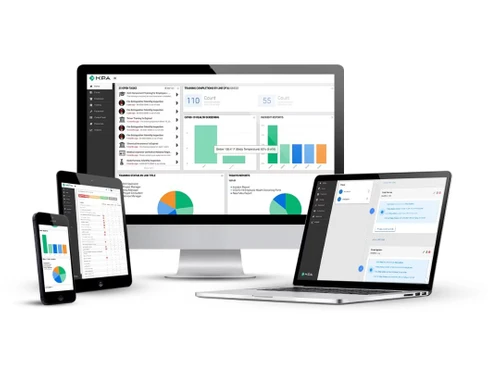
kpa flex dashbaord
kpa flex laptop

KPA Flex

Brand: KPA Flex

  • 4.1

  • 3 Ratings

KPA Flex software is an all-in-one cloud-based safety management platform renowned for its ease of use and industry expertise, facilitating comprehensive safety programs and real-time action for employee safety and compliance.

See More

Have you used KPA Flex before?

Share your insights for better experience

Add a Review

Price Available on Request

Questions about pricing or customization? We’re here to help, just a click away.

100% Genuine
Products
Best Price
Guaranteed
Safe & Secure
Payment
  • Description

  • Pricing

  • Features

  • Specification

  • Review

  • Compare

  • Alternatives

  • FAQ

KPA Flex Software Overview

What is KPA Flex?

KPA Flex EHS software is a safety management tool in the cloud that helps companies set up and run safety programs. It has forms that can be changed for different safety jobs and an app for workers to use on their phones when they're out in the field.

It also has a good system for teaching people things and tools for making reports, so bosses can make choices based on facts and keep getting better at safety. The software got an update to make it easier to use and better for people, and it's known for being helpful, simple, and able to do lots of different things, which makes it a top choice for safety management.

Why Choose KPA Flex EHS Software?

  • Comprehensive Solution: It has everything needed for safety management, like forms that can be changed, an app for phones, a system for teaching, and tools for making reports, so it's all in one place.
  • Industry Expertise: With lots of experience in safety management, it knows what it's doing and can give companies the right solutions for their needs.
  • Ease of Use: It's easy for people to use because it's simple and can be changed to fit what each company wants, so everyone can use it easily.
  • Real-Time Action: It helps companies do things right away to keep people safe and follow rules by giving them tools and info quickly when they need it.
  • Data-Driven Decision-Making: It shows companies what's happening with safety using reports and charts, so they can make good choices and keep getting better at safety.
  • Continuous Improvement: It helps companies keep getting better at safety by making everyone care about it and follow rules, so workplaces are safer and there's less risk for everyone.

Benefits of KPA Flex Software

  • Incident and Near-Miss Management: Helps organizations keep track of and handle incidents and near-misses well, so they can find out what happened and stop it from happening again.
  • Equipment Inspection Management: Lets organizations plan and do checks on equipment, making sure it's looked after and follows safety rules.
  • OSHA Case Management: Gives tools for dealing with OSHA cases, like reporting them, keeping records, and doing what's needed to follow rules.
  • Document and Resource Access: Gives one place to find all the documents and things needed for safety, like how to do things safely, rules for workers, and policies for clients.
  • Task Notifications: It sends notifications to staff members for assigned tasks, ensuring timely completion and compliance with safety protocols.
  • Audits and Inspections: It facilitates the planning, execution, and tracking of audits and inspections, enabling organizations to identify and address safety issues proactively.
  • Reporting and Record-Keeping: It generates comprehensive reports and maintains records of safety-related activities, facilitating compliance monitoring and performance evaluation.
  • Issue Tracking: It allows organizations to track and manage safety-related issues, ensuring timely resolution and preventing potential hazards.

Pricing of KPA Flex

KPA Flex price details are available on request at techjockey.com.

The pricing model is based on different parameters, including extra features, deployment type, and the total number of users. For further queries related to the product, you can contact our product team and learn more about the pricing and offers.

Read more

KPA Flex Company Details

Founded Year:  1986

KPA is a leading provider of Safety Management and Workforce Compliance software and services for a wide range of businesses.

Director/Founders Dagen Boyd, Deren Boyd, Josh Wright
Company Size 101-500 Employees

KPA Flex Pricing & Plans

Looking for The Right Pricing?

Share your requirements and get a plan built around your business.

  • Define your business needs
  • Get customised pricing
  • Choose features that fit your workflow

Price Available on Request

Get personalised KPA Flex pricing that fits your needs. Our team will connect with you.

KPA Flex Features

  • icon_check Flexible Workflow Engine
    Improves safety management by adapting workflows to fit how the organization works.
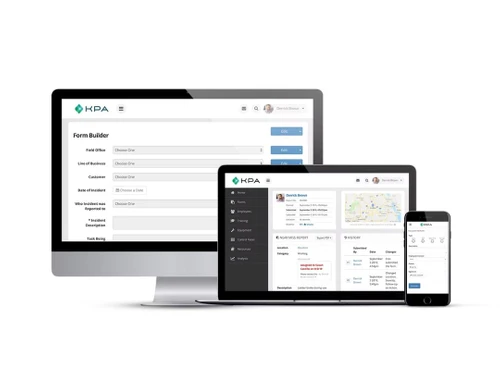
  • icon_check Forms Library
    Makes it easy to collect data and follow rules with forms that can be changed for different safety jobs.
  • icon_check Flexible EHS Audit
    Checks if the company is following rules and makes sure everything is done right with audits that can be changed.
  • icon_check Visualization
    Makes it easier to understand safety info with pictures and charts of data and trends.
  • icon_check Generate Flexible Reports
    Shows how well safety is being done and if rules are being followed with reports that can be changed.
  • icon_check OSHA Case Management
    Handles OSHA cases from the start to the end, making sure rules are followed.
  • icon_check Scheduled Reports
    Shows important safety info right away with reports that are made and sent out automatically.
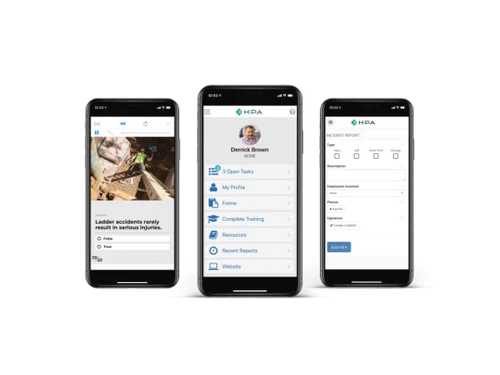
  • icon_check Mobile Safety & Compliance Trainings
    Teaches workers about safety and following rules on their phones, so they learn quickly.
  • icon_check Generate/Remove API Tokens
    Helps the software work with other programs safely by making codes that connect them and controlling who can use them.
  • icon_check Dashboard
    Facilitates real-time monitoring and management of safety initiatives with a centralized dashboard for key metrics.
KPA Flex Demo Video play icon

Get KPA Flex Demo

Watch the demo video to explore key features, real workflows, and how the software fits your business needs.

Understand
Key Features
Personal
Demo Insights
Interactive
Demo Support

KPA Flex Specification

Supported Platforms
Ubuntu Ubuntu Windows Windows iOS iOS Android Android MacOS MacOS Linux Linux
Devices
Desktop Desktop Mobile Mobile Tablet Tablet iPad iPad
Deployment
Web-Based Web-Based
Suitable For
Manufacturing Retail Logistics Automobiles Transportation Oil & Gas Textiles
Business Specific
All Businesses
Business Size
Small Business Startups Medium Business Enterprises
Customer Support
Phone Email Communities
Language
English
Integration
API Integration
Training Resources
Webinars Documentation Videos

Explore the Best Alternative Solutions Similar to Your Business Size and Needs

KPA Flex Review

4.1

Out of 5

img

Overall Rating

Based on
3 Verified Ratings

Rating Breakdown

  • Features 4.5
  • Value for Money 4.1
  • Ease of Use 3.8
  • Customer Support 4

93% Recommend this Product

Add Review

Be the First to Review

This product has no reviews yet. Be the first to leave your feedback.

Add Review

Compare KPA Flex With other EHS Software

Products
Ratings
Pricing
Device Supported
Deployment
Supported Platforms
  • img

    KPA Flex

  • 4.1

  • Price On Request

  • Desktop

    Mobile

  • Web based

    On Premises

  • Windows

    Mac OS

  • img

    Enablon EHS

  • 4.2

  • Price On Request

  • Desktop

    Mobile

  • Web based

    On Premises

  • Windows

    Mac OS

  • img

    Evotix

  • 4.0

  • Price On Request

  • Desktop

    Mobile

  • Web based

    On Premises

  • Windows

    Mac OS

  • img

    CorityOne

  • 4.3

  • Price On Request

  • Desktop

    Mobile

  • Web based

    On Premises

  • Windows

    Mac OS

  • img

    Notify

  • Price On Request

  • Desktop

    Mobile

  • Web based

    On Premises

  • Windows

    Mac OS

  • img

    Intelex EHS

  • 4.5

  • Price On Request

  • Desktop

    Mobile

  • Web based

    On Premises

  • Windows

    Mac OS

  • img

    Ideagen EHS

  • 4.3

  • Price On Request

  • Desktop

    Mobile

  • Web based

    On Premises

  • Windows

    Mac OS

  • img

    EHSSaral

  • Price On Request

  • Desktop

    Mobile

  • Web based

    On Premises

  • Windows

    Mac OS

  • img

    Immuware

  • 4.4

  • Price On Request

  • Desktop

    Mobile

  • Web based

    On Premises

  • Windows

    Mac OS

  • img

    Intenseye

  • 4.3

  • Price On Request

  • Desktop

    Mobile

  • Web based

    On Premises

  • Windows

    Mac OS

(0) Product(s) selected

KPA Flex Alternatives

See All KPA Flex Alternatives

Available

Price on Request

Available

Price on Request

Available

Price on Request

Available

Price on Request

Available

Price on Request

Available

Price on Request

Starting Price:

$9,000 /Year

Which operating system does KPA Flex Software Support?

KPA Flex Software is compatible with Windows, Linux, iOS, Android and MacOS devices.

Is there any KPA Flex Software App?

Yes, the KPA Flex Software app is available for Android and iOS app users.

What is the deployment type of KPA Flex EHS Software?

KPA Flex Software supports web-based deployment.

How much does KPA Flex Software Cost?

KPA Flex price details are available on request at techjockey.com.

Who are the potential users of KPA Flex Software?

KPA Flex Software is typically used by manufacturing, retail, logistics, automobiles, transportation, oil & gas and textiles to help organizations establish and implement effective safety programs.

Is there any free trial or demo for KPA Flex EHS Software?

Yes, KPA Flex Software free demo is available at techjockey.com.

Is KPA Flex Software Free?

No, KPA Flex software is not available for free.

Does KPA Flex EHS Software Offer a Free Trial?

KPA Flex Software does not offer a free trial. However, the premium plan with advanced features is available at techjockey.com with exciting deals.

How can you download KPA Flex EHS Software?

KPA Flex Software installation is not required, as it is web-based. Just open the Setup Wizard to get started.

How does KPA Flex Software Work?

KPA Flex Software works by providing customizable tools for safety management, including forms, audits, and reports, enabling organizations to adapt workflows, streamline data collection, and ensure compliance with regulatory standards. It facilitates real-time monitoring and decision-making through visualizations and dashboards, enhancing overall safety performance and risk management.

20,000+ Software Listed

Best Price Guranteed

Free Expert Consultation

2M+ Happy Customers

Terms and Condtions

close

Users with registered businesses can purchase goods from merchants on the platform to satisfy their business needs. Users are not permitted to utilize any products acquired through the platform for resale, advertising, business, or further distribution.

For each purchase made, users will receive a Tax Invoice (or 'GST invoice') that includes specific details such as:

  • the GSTIN of the user associated with their registered business, and

  • the specified Entity Name for their business.

It should be noted that not all products are eligible for GST Invoice. Only the products displayed by participating sellers with the 'GST-based Invoice Available' callout on the product description page would qualify.

Certain goods and services are not eligible to get a GST Invoice, including items with VAS, i.e., Value Added Services (e.g., Total Mobile Protection/Assured Buyback) and those involving an exchange offer at the time of purchase.

Users must ensure the accuracy of the GSTIN, and business entity name provided for the GST Invoice. Requests for corrections into GST Invoice would not be accommodated by Techjockey.com or any Seller, and any issues arising from user-provided information are the sole responsibility of users.

Techjockey.com is not liable for the GST Invoice or any associated input tax credit. To efficiently claim an input tax credit, users should select the registered place of business address as per the GST authority's data and follow the provisions of the GST Act and rules.

To claim an input tax credit, the delivery and billing addresses must match. Furthermore, input tax credits will not be granted if the delivery address and GSTIN on the invoice are from different states. In case of incorrect GST details provided during the order placement, the order will be canceled automatically.