USA
USA UAE
UAESmall Business
Designed for startups and growing businesses

See More





Brand: Kladana Pvt. Ltd.
Have you used Kladana ERP before?
Share your insights for better experience
View plans
 Save upto 18%, Get GST Invoice on your business purchase T&C Buy Now & Pay Later, Check offer on payment page.
 Brand: Kladana Pvt. Ltd.
Founded Year: 2008
Cloud ERP for small and medium trade, manufacturing and e-commerce companies.
Financial/Accounts Management
 Multi-Currency Support Budgeting And Forecasting General Ledger Accounts Payable & Accounts Receivable Fixed Asset Management Tax Management Bank Reconciliation
 Human Resource Management (HRM)
Payroll Management Employee Information Management Recruitment and Onboarding Performance Management Time and Attendance Learning Management Supply Chain Management
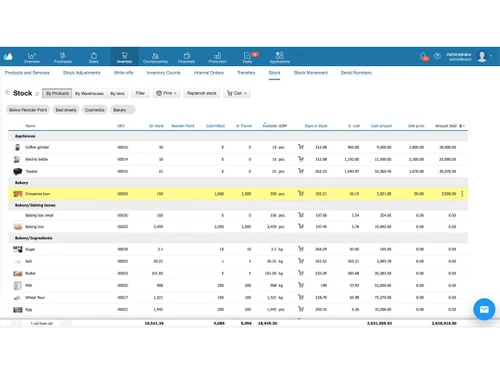
Inventory Management Procurement and Purchasing Demand Planning Supplier Relationship Management Logistics and Distribution Transportation Management Route Planning Manufacturing
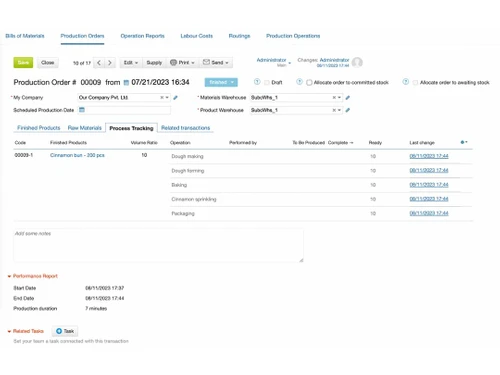
Bill Of Materials (BOM) Production Planning and Scheduling Quality Control Management Shop Floor Management Work Order Management Material Requirement Planning (MRP) Maintenance Management Customer Relationship Management (CRM)
Contact Management Sales Pipeline Management Lead Management Marketing Automation Audience Segmentation Project Management
Task Scheduling Resource Management Time Tracking Cost Management Collaboration Tools Reporting and Analytics
Sales Reports Dashboards Custom Reports Predictive Analytics Regulatory Compliance Reports Financial Reports Real Time Reports Business Intelligence Integrations
Customer Support Third Party Integration Ecommerce Integration API Integration Payment Gateway Integration Security and Compliance
Role-Based Access Control (RBAC) Audit Management Data Encryption GDPR and Other Compliance Disaster Recovery Administrative Features
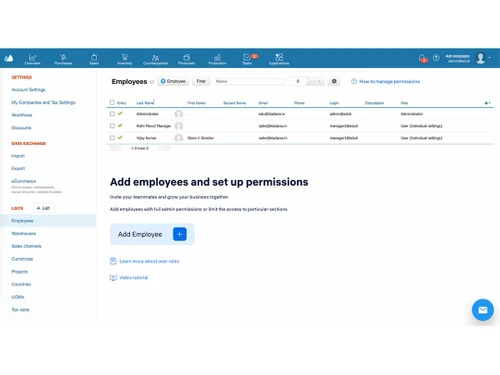
Workflow Automation Data Import/Export User Access Management Workflow Approval Centralized Database Admin Panel Alerts & Notifications
Email and SMS Notifications Custom Event Alerts Non-Compliance Issues Security Alerts Others
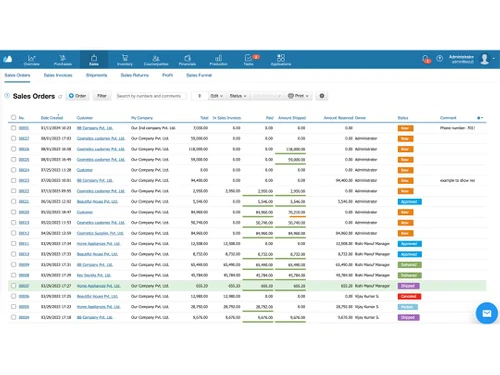
Contract Management Cash Flow Report Profit & Loss Statement of Accounts Adjustments Operation Reports Labour Costs Invoice Generation 

Watch the demo video to explore key features, real workflows, and how the software fits your business needs.
 Ubuntu
  Windows
  MacOS
MacOS  Linux
Linux  Desktop
  Cloud-Based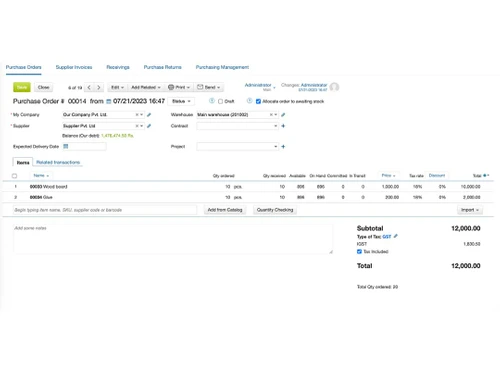
Small Business
Designed for startups and growing businesses
Medium Business
Built for business growth and flexibility
Enterprises
Designed for complex and large-scale business needs
4.9
Out of 5

Overall Rating
Based on
10 Verified Reviews
Rating Breakdown
100% Recommend this Product
Add ReviewKladana ERP has garnered overwhelmingly positive feedback from users across various industries, highlighting its efficiency in order management, inventory tracking, and production processes. Customers appreciate its user-friendly interface and robust features, which have significantly streamlined operations and improved accuracy. However, some users noted initial setup challenges and expressed a desire for additional specialized features tailored to their specific industries. Overall, Kladana is viewed as a reliable and cost-effective solution that enhances business operations, despite minor areas for improvement.

Jan 29, 2025
Techjockey Verified
“Kladana works well for Barcoding and Order Management”
Kladana has made my order processing faster and more accurate. The barcoding feature is a huge time-saver — it helps me track products easily and avoid errors. I can generate barcodes directly in the system, which keeps everything organized in one place. Managing orders is now so much easier, from creating invoices to tracking shipments. The system makes sure that I never miss an order or face delays. It’s been a reliable solution for improving efficiency in my business operations.
Pros
The barcoding feature simplifies inventory management and reduces mistakes. Order processing is smooth, with tools to handle everything from invoicing to delivery tracking. It’s a dependable system that boosts overall efficiency and accuracy.
Cons
Setting up barcoding initially takes a bit of time. Additional integrations with shipping platforms would enhance the order management process further.
Mar 11, 2024
Techjockey Verified
“Transformative Impact of Kladana on My Jewelry Wholesale Business”
Let me share the transformative impact Kladana ERP had on my jewelry wholesale business – and it was nothing short of remarkable! Before integrating Kladana into my operations, managing inventory, handling customer interactions, and ensuring financial stability felt like a juggling with chainsaws. Upon introducing Kladana, skepticism lingered in my mind. I questioned how this sophisticated software could navigate the intricacies of the jewelry business. However, my concerns proved unfounded. While the initial setup posed some challenges and felt like a prolonged process to tailor it precisely to our needs, overcoming that hurdle paved the way for seamless operations. What truly stands out about Kladana is its exceptional inventory management capabilities. Tracking every piece of jewelry, from large necklaces to the smallest earrings, has become effortlessly manageable. The user-friendly dashboard further enhances the overall experience, making it accessible even to individuals less tech-savvy – no offense intended to my grandma. And let's not forget the CRM features, which have elevated our customer service to VIP status.
Pros
Alright, let's dive into the positives. The inventory management is truly exceptional; it's as if Kladana has an innate understanding of the jewelry industry. It meticulously captures all the nuances that matter in our world. Once you grasp the system, it's incredibly user-friendly. It has revolutionized our approach, ensuring our team stays on course and avoids any mishaps. The financial insights provided are worth their weight in gold. Decision-making becomes a breeze when you have all the necessary data at your fingertips. I can easily identify our bestsellers, track outstanding payments to suppliers, and more. The suite of CRM tools has simplified the task of keeping our customers satisfied. Overall, it's been a transformative tool for our business.
Cons
I hope to encounter additional modules in the future, such as those for accounting, marketing, and HR. However, I anticipate that an increase in features may also come with a higher price.
Mar 7, 2024
Techjockey Verified
“My dairy manufacturing is blooming now thanks to Kladana ERP!”
Running a dairy business is no easy task – juggling expiration dates, handling online sales seamlessly, and avoiding unnecessary headaches when dealing with raw materials. It's a demanding job, but Kladana serves as the dependable partner that maintains order in the chaos. The ability to monitor expiration dates through Kladana has been a game-changer. It's like having an additional set of vigilant eyes to ensure that no outdated cheese leaves our facility, preserving our reputation in the competitive dairy industry. Enter the Online Order App – a true asset for managing our online sales effortlessly. Customers can place orders, and we can effortlessly track, process, and ensure a smooth flow of operations. Think of it as the contemporary, digital version of the traditional milkman. Let's not overlook the seamless handling of raw materials. Kladana simplifies inventory management, shipment tracking, and ensures a constant supply of milk to keep our production lines running smoothly. It's a streamlined, efficient solution that significantly simplifies our daily operations.
Pros
Top-notch features include expiration date and batch tracking. For a dairy enterprise, these are indispensable, and Kladana excels in delivering them. The Online Order App is a boon for managing online sales. It boasts intuitiveness, user-friendliness, and remarkable convenience, all at an affordable price. Facilitating the creation of bills of materials (BOMs), scheduling production orders, and tracking each completed operation, it's a practical tool. Additionally, it allows for the partial production of goods and the sale of ready-made items.
Cons
However, no system is flawless. While Kladana has proven to be a reliable partner, I find myself yearning for additional features specifically tailored to the food industry. Don't get me wrong; it excels at the fundamentals, but there's always room for that extra touch of customization. Fortunately, Kladana's dedicated team has been incredibly helpful. They create unique print forms and workflows for me, which has been more than sufficient thus far. In all honesty, Kladana ERP has been a game-changer for my business. It feels like we've finally streamlined our operations and are now poised to conquer the world.

Kladana ERP
₹ 1990.00 excl. GST
Desktop
Mobile
Web based
On Premises
Windows
Mac OS

Dynamics 365 Business Central
₹ 665
Desktop
Mobile
Web based
On Premises
Windows
Mac OS
Fablead ERP
₹ 999
Desktop
Mobile
Web based
On Premises
Windows
Mac OS

Odoo ERP
₹ 760
Desktop
Mobile
Web based
On Premises
Windows
Mac OS

iXpert ERP
₹ 19999
Desktop
Mobile
Web based
On Premises
Windows
Mac OS

Bigsun ERP
₹ 6000
Desktop
Mobile
Web based
On Premises
Windows
Mac OS

Deskera All in One
₹ 36000
Desktop
Mobile
Web based
On Premises
Windows
Mac OS
Esarwa Enterprise ERP
Price On Request
Desktop
Mobile
Web based
On Premises
Windows
Mac OS
Axolon ERP
Price On Request
Desktop
Mobile
Web based
On Premises
Windows
Mac OS
MenThee ERP
Price On Request
Desktop
Mobile
Web based
On Premises
Windows
Mac OS

Microsoft Dynamics 365
₹ 34944
Desktop
Mobile
Web based
On Premises
Windows
Mac OS
(0) Product(s) selected
Starting Price:
₹999 /Month
Starting Price:
₹6,000 /User/Month
Available
Price on Request
Available
Price on Request
Starting Price:
₹34,944 /User/Month

Starting Price:
$300 /Year

Available
Price on Request
Starting Price:
₹10,000 /Month

Available
Price on Request

Available
Price on Request

Available
Price on Request





Kladana offers a free plan, and paid plans start at around $60 per year, with pricing depending on features and business size.
Kladana works as a cloud-based ERP system that centralizes inventory, sales, warehouse, production, and financial data into one online platform accessible from any device.
Kladana is used by small and medium businesses in manufacturing, wholesale, retail, and e-commerce industries.
Yes, it is specifically designed for SMEs, solo founders, small teams, and companies with up to 300+ employees.
Kladana is fully cloud-based and does not require installation.
Yes, it includes MRP, BOM management, production scheduling, subcontracting, and WIP tracking features.
Yes, it integrates with accounting, e-commerce, CRM, and delivery platforms via API.
Yes, Kladana offers a 14-day free trial with full feature access and support.
20,000+ Software Listed
Best Price Guranteed
Free Expert Consultation
2M+ Happy Customers
Terms and Condtions

Users with registered businesses can purchase goods from merchants on the platform to satisfy their business needs. Users are not permitted to utilize any products acquired through the platform for resale, advertising, business, or further distribution.
For each purchase made, users will receive a Tax Invoice (or 'GST invoice') that includes specific details such as:
the GSTIN of the user associated with their registered business, and
the specified Entity Name for their business.
It should be noted that not all products are eligible for GST Invoice. Only the products displayed by participating sellers with the 'GST-based Invoice Available' callout on the product description page would qualify.
Certain goods and services are not eligible to get a GST Invoice, including items with VAS, i.e., Value Added Services (e.g., Total Mobile Protection/Assured Buyback) and those involving an exchange offer at the time of purchase.
Users must ensure the accuracy of the GSTIN, and business entity name provided for the GST Invoice. Requests for corrections into GST Invoice would not be accommodated by Techjockey.com or any Seller, and any issues arising from user-provided information are the sole responsibility of users.
Techjockey.com is not liable for the GST Invoice or any associated input tax credit. To efficiently claim an input tax credit, users should select the registered place of business address as per the GST authority's data and follow the provisions of the GST Act and rules.
To claim an input tax credit, the delivery and billing addresses must match. Furthermore, input tax credits will not be granted if the delivery address and GSTIN on the invoice are from different states. In case of incorrect GST details provided during the order placement, the order will be canceled automatically.