 USA
USA UAE
UAESmall Business
Designed for startups and growing businesses

See More


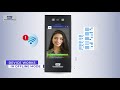


Brand: KENT Cam Technologies
Boost efficiency with a touchless, AI-powered attendance system that ensures quick, secure check-ins, and seamless data management.
See MoreHave you used Kent CamAttendance before?
Share your insights for better experience
View plans
 Save upto 18%, Get GST Invoice on your business purchase T&C Buy Now & Pay Later, Check offer on payment page.
 Brand: KENT Cam Technologies
Founded Year: 2004
Now managing vehicle security and your organization’s attendance made easy with KENT Cam series that offers first-of-its-kind Vehicle Security Device along with a Touchless Face Recognition based Attendance Management System.
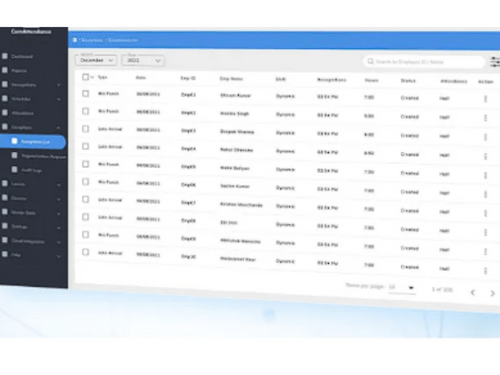
 Device Management Time and Attendance Data Import/Export Reports & Analytics Face Recognition Employee Management API Integration Touchless Operation 99.9% Accuracy Rate Real Person Detection Secure Cloud Storage Mask Detection Offline Mode Support Seamless HRMS Sync Visitor Management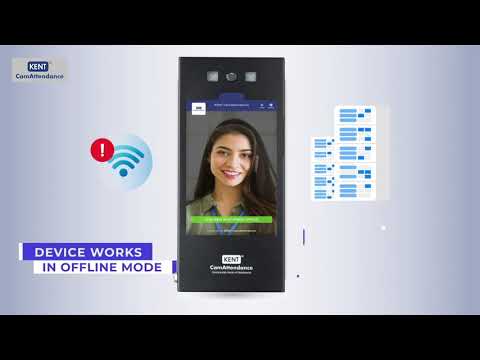

Watch the demo video to explore key features, real workflows, and how the software fits your business needs.
 Ubuntu
  Windows
  MacOS
MacOS  Linux
Linux  Desktop
  Mobile
  Tablet
  iPad
iPad  Cloud-Based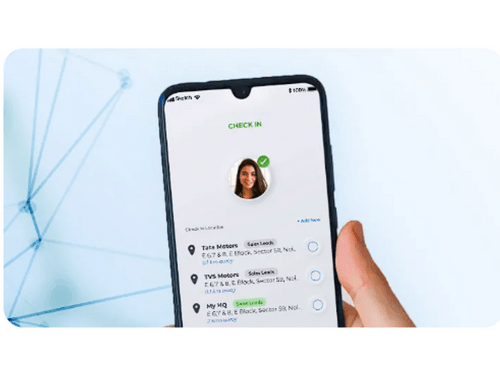

Small Business
Designed for startups and growing businesses
Medium Business
Built for business growth and flexibility
Enterprises
Designed for complex and large-scale business needs
4.3
Out of 5

Overall Rating
Based on
12 Verified Reviews
Rating Breakdown
86% Recommend this Product
Add ReviewKENT CamAttendance is generally well-received for its cost-effectiveness, robust features, and excellent customer support, making it a valuable tool for attendance management across various company sizes. Users appreciate the seamless integration with HR systems, detailed reporting, and the convenience of mobile access, particularly for remote teams. However, some common complaints include the need for initial training, occasional delays during peak usage, and dependency on stable internet connectivity for optimal performance. Overall, it enhances operational efficiency while requiring some setup effort.
Pros
"Affordable pricing, robust features, excellent customer support."
"Easy employee onboarding, quick data access, efficient leave management."
"AI-based facial recognition, cloud-based data storage, mobile app functionality."
Cons
"Initial setup takes time, requires stable internet connectivity for real-time sync."
"Initial setup required coordination, but support was helpful."


Jul 3, 2025
Techjockey Verified
“Efficient and Cost-Effective Solution”
KENT CamAttendance provides a cost-effective solution without compromising on features. The system is robust, and the customer support is commendable. It's been a valuable addition to our organization's operations.
Pros
Affordable pricing, robust features, excellent customer support.
Cons
Limited customization in basic plan.
Reason to switch
We needed a more affordable solution that still offered essential features.
May 2, 2025
Techjockey Verified
“Comprehensive Attendance Management”
KENT CamAttendance offers a comprehensive solution for attendance management. The detailed reports and customizable dashboards provide valuable insights. Integrating it with our HRMS was smooth, enhancing our overall HR operations.
Pros
Detailed reporting, customizable dashboards, seamless HRMS integration.
Cons
Requires training for optimal use.
Reason to switch
Our previous software lacked integration capabilities and detailed reporting.
Mar 29, 2025
Techjockey Verified
“Simplified Attendance for Remote Teams”
For our remote teams, KENT CamAttendance has been a boon. The mobile app allows employees to mark attendance from anywhere, and GPS tracking ensures authenticity. Cloud synchronization keeps our records up-to-date across all locations.
Pros
Mobile app accessibility, GPS tracking, cloud synchronization.
Cons
Dependent on internet connectivity.
Reason to switch
Email check-ins were inefficient and hard to track systematically.

Kent CamAttendance
₹ 20999.00 excl. GST
Desktop
Mobile
Web based
On Premises
Windows
Mac OS

Truein Face Attendance
Price On Request
Desktop
Mobile
Web based
On Premises
Windows
Mac OS
Nialabs
Price On Request
Desktop
Mobile
Web based
On Premises
Windows
Mac OS

InnBuilt Attendance
Price On Request
Desktop
Mobile
Web based
On Premises
Windows
Mac OS

PagarGuru
₹ 500
Desktop
Mobile
Web based
On Premises
Windows
Mac OS

Spryple
Price On Request
Desktop
Mobile
Web based
On Premises
Windows
Mac OS

Hajiri
₹ 69
Desktop
Mobile
Web based
On Premises
Windows
Mac OS

Tempus Central
Price On Request
Desktop
Mobile
Web based
On Premises
Windows
Mac OS

AttendHRM – Time Attendance Software
₹ 3800
Desktop
Mobile
Web based
On Premises
Windows
Mac OS

NoQu TAM
Price On Request
Desktop
Mobile
Web based
On Premises
Windows
Mac OS

Touchless Attendance System
₹ 925
Desktop
Mobile
Web based
On Premises
Windows
Mac OS
(0) Product(s) selected
Available
Price on Request
Starting Price:
₹600 /Month
Starting Price:
₹69 /Month
Available
Price on Request

Starting Price:
$3 /Month

Starting Price:
₹25,000 /Year

Available
Price on Request

Available
Price on Request

Starting Price:
$500 /Month

Available
Price on Request

Available
Price on Request




Pricing is based on the number of employees and begins at INR 16,999 for 1000 employee limit. Other options like mobile access were available for INR 249 per user. The advanced plans cost from INR 249 to INR 499 per head of employees.
It is scalable for organizations with different systems of HRMS. It also came with a setup guide to create the account and follow the right procedure to transfer data or else you get help from their support team.
For the first-time login, you need to use the login details provided via email after signing up. Enter your account details to configure your account and the features of the portal that you require.
Ensure that your gadget is connected to the internet, when you do this, you will be able to follow the setup that is provided with the cloud link.
Yes, it does work offline, which is perfected by the Kent CamAttendance app.
The facial recognition software provides a face recognition efficiency of above 99.9%, and it can maintain high efficiency identification in various environments.
It has no free version, but users can ask for a demo or consultation before the purchase.
Yes, it has been designed for its applicability to remote and field employees. They can take attendance by using the mobile app that will make it easier for them to record working hours from any remote place.
20,000+ Software Listed
Best Price Guranteed
Free Expert Consultation
2M+ Happy Customers
Terms and Condtions

Users with registered businesses can purchase goods from merchants on the platform to satisfy their business needs. Users are not permitted to utilize any products acquired through the platform for resale, advertising, business, or further distribution.
For each purchase made, users will receive a Tax Invoice (or 'GST invoice') that includes specific details such as:
the GSTIN of the user associated with their registered business, and
the specified Entity Name for their business.
It should be noted that not all products are eligible for GST Invoice. Only the products displayed by participating sellers with the 'GST-based Invoice Available' callout on the product description page would qualify.
Certain goods and services are not eligible to get a GST Invoice, including items with VAS, i.e., Value Added Services (e.g., Total Mobile Protection/Assured Buyback) and those involving an exchange offer at the time of purchase.
Users must ensure the accuracy of the GSTIN, and business entity name provided for the GST Invoice. Requests for corrections into GST Invoice would not be accommodated by Techjockey.com or any Seller, and any issues arising from user-provided information are the sole responsibility of users.
Techjockey.com is not liable for the GST Invoice or any associated input tax credit. To efficiently claim an input tax credit, users should select the registered place of business address as per the GST authority's data and follow the provisions of the GST Act and rules.
To claim an input tax credit, the delivery and billing addresses must match. Furthermore, input tax credits will not be granted if the delivery address and GSTIN on the invoice are from different states. In case of incorrect GST details provided during the order placement, the order will be canceled automatically.



