linkedin
iStudio Publisher logo
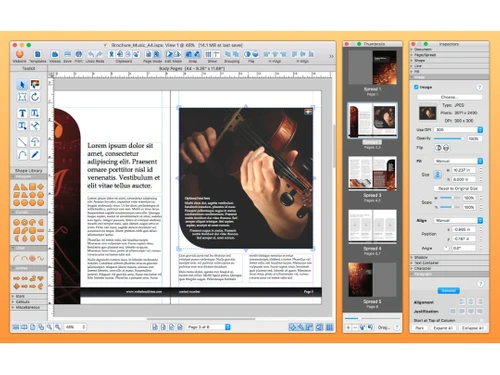
iStudio Publisher Dashboard
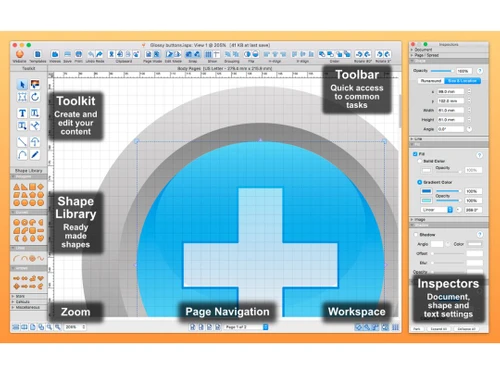
iStudio Publisher Toolkit
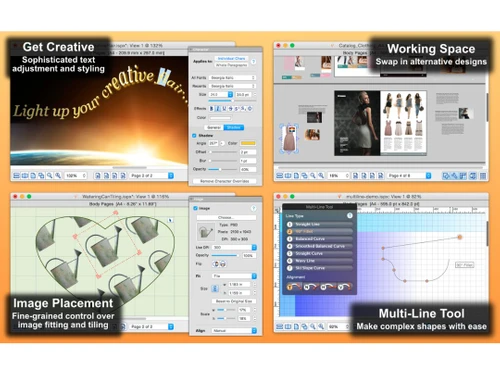
iStudio Publisher Working Space

iStudio Publisher

Brand: iStudio Software

  • 4.4

  • 4 Ratings

iStudio Publisher is a desktop publishing software for macOS designed to create professional-quality print materials such as brochures, magazines, and flyers.

See More

Have you used iStudio Publisher before?

Share your insights for better experience

Add a Review
Starting Price
$30

View plans

100% Genuine
Products
Best Price
Guaranteed
Safe & Secure
Payment
  • Description

  • Pricing

  • Features

  • Specification

  • Review

  • Compare

  • Alternatives

  • FAQ

Starting at $30

iStudio Publisher Software Overview

What is iStudio Publisher?

iStudio Publisher is a desktop publishing software for macOS that enables users to create a wide array of print materials, including brochures, magazines, and newsletters. It features a user-friendly interface with a focus on simplicity and ease of use, making it accessible for both beginners and professionals.

The software provides advanced layout tools, customizable templates, and precise control over typography and graphics. Users can arrange and manipulate elements using a drag-and-drop interface, and the software supports multiple page formats and sizes. iStudio Publisher is designed to deliver high-quality print results while offering flexibility in design and layout.

Why Choose iStudio Publisher Software?

  • User-Friendly Interface: Designed with a focus on simplicity, it provides an intuitive experience for both novices and experienced users.
  • Advanced Layout Tools: Offers precise control over layout and design, allowing for professional-quality document creation.
  • Customizable Templates: Includes a range of templates that can be easily customized to suit various project needs.
  • High-Quality Output: Produces high-resolution print materials, ensuring your designs look polished and professional.
  • Flexible Design Options: Supports multiple page sizes and formats, catering to diverse design requirements.
  • Efficient Workflow: Features a drag-and-drop interface and streamlined design process to enhance productivity and ease of use.

Benefits of iStudio Publisher Platform

  • Affordable Pricing: Offers a cost-effective solution for desktop publishing without compromising on features.
  • Support for Multiple Page Layouts: Allows users to create complex multi-page documents with ease.
  • Robust Typography Options: Provides a range of font styles and text formatting options for creative design work.
  • Design Precision: Includes tools for precise alignment, spacing, and object manipulation, ensuring accurate layouts.
  • Image Handling Capabilities: Supports various image formats and includes editing tools for basic image adjustments.
  • Regular Updates: Receives updates that enhance functionality and maintain compatibility with macOS advancements.

Pricing of iStudio Publisher

iStudio Publisher price in India starts at $30 at techjockey.com.

The pricing model is based on different parameters, including extra features, deployment type, and the total number of users. For further queries related to the product, you can contact our product team and learn more about the pricing and offers.

Read more

iStudio Software Company Details

Founded Year:  2019

iStudio Publisher is for Mac to create stunning documents.

Director/Founders N/A
Company Size 1-100 Employees

iStudio Publisher Pricing & Plans

Single Computer License
Key Features
  • Number of Macs - 1
  • Free updates
  • Free templates
  • Free support
  • Commercial usage
Starting at $30
    • Licenses

      Licenses
      Licenses

Key Features

  • Number of Macs - 1

  • Free updates

  • Free templates

  • Free support

  • Commercial usage

iStudio Publisher Features

  • icon_check Templates
    Provides a variety of pre-designed templates that can be customized for different projects.
  • icon_check Page Layout
    Offers tools for designing and arranging content on pages with precise control.
  • icon_check Design Tools
    Includes a range of tools for drawing, shapes, and text effects to enhance designs.
  • icon_check Collaboration Tools
    Facilitates teamwork with options for sharing and reviewing documents, though it may have limited collaborative features.
  • icon_check File Sharing
    Supports exporting and sharing files in various formats for easy distribution.
  • icon_check Document Management
    Allows the organization and management of multiple documents and projects within the software.
  • icon_check Third Party Integration
    Integrates with other applications for enhanced functionality and workflow.
  • icon_check User Interface
    Features a clean, intuitive interface that simplifies the design process and navigation.
  • icon_check Data Import/Export
    Supports importing data from and exporting files to various formats, aiding in integration with other tools.

iStudio Publisher Specifications

Supported Platforms
MacOS MacOS
Devices
Desktop Desktop
Deployment
Cloud-Based Cloud-Based
Suitable For
All Industries
Business Specific
All Businesses
Business Size
Small Business Startups Medium Business Enterprises
Customer Support
Email Communities
Language
English
Training Resources
Documentation Videos

Explore the Best Alternative Solutions Similar to Your Business Size and Needs

iStudio Publisher Review

4.4

Out of 5

img

Overall Rating

Based on
4 Verified Ratings

Rating Breakdown

  • Features 4.7
  • Value for Money 4.2
  • Ease of Use 4.5
  • Customer Support 4.3

92% Recommend this Product

Add Review

Techjockey Trusted Reviews from Verified Users

No reviews are currently available for iStudio Publisher. Discover similar Desktop Publishing Software reviews

  • Adobe FrameMaker

    4.5

    Whats great - I used to be surprised at how clean it became to open a huge ditamap created out of doors of adobe framemaker and how quick i... read more

  • QuarkXPress

    4.4

    Whats great - Since I initially utilized this product in school (which was more than some time prior) in spite of the fact that it has chan... read more

  • Movavi Pdf Editor

    4.5

    Whats great - Doesn't gobble up space and RAM. The interface is straightforward. Selected structure like Browser. Has fundamental Edi... read more

Compare iStudio Publisher With other Desktop Publishing Software

Products
Ratings
Pricing
Device Supported
Deployment
Supported Platforms
  • img

    iStudio Publisher

  • 4.4

  • Price On Request

  • Desktop

    Mobile

  • Web based

    On Premises

  • Windows

    Mac OS

  • img

    Adobe FrameMaker

  • 4.5

  • Price On Request

  • Desktop

    Mobile

  • Web based

    On Premises

  • Windows

    Mac OS

  • img

    QuarkXPress

  • 4.3

  • ₹ 23317

  • Desktop

    Mobile

  • Web based

    On Premises

  • Windows

    Mac OS

  • img

    Marq

  • 4.3

  • Price On Request

  • Desktop

    Mobile

  • Web based

    On Premises

  • Windows

    Mac OS

  • img

    Scribus

  • 4.3

  • Price On Request

  • Desktop

    Mobile

  • Web based

    On Premises

  • Windows

    Mac OS

  • img

    Amadine

  • 4.2

  • Price On Request

  • Desktop

    Mobile

  • Web based

    On Premises

  • Windows

    Mac OS

  • img

    Swift Publisher

  • 4.2

  • Price On Request

  • Desktop

    Mobile

  • Web based

    On Premises

  • Windows

    Mac OS

  • img

    Affinity Publisher

  • 4.2

  • Price On Request

  • Desktop

    Mobile

  • Web based

    On Premises

  • Windows

    Mac OS

  • img

    Xara Designer Pro

  • 4.3

  • Price On Request

  • Desktop

    Mobile

  • Web based

    On Premises

  • Windows

    Mac OS

(0) Product(s) selected

iStudio Publisher Alternatives

See All iStudio Publisher Alternatives

Marq

4.3

Starting Price:

$3

Available

Price on Request

Starting Price:

$30 /Licenses

Articles for iStudio Publisher

See All Related Articles

How much does iStudio Publisher software cost?

The price of iStudio Publisher in India starts at $30 on techjockey.com.

Is there an iStudio Publisher software app?

No, iStudio Publisher is not available as an app.

Which operating system does iStudio Publisher software support?

iStudio Publisher supports the MacOS operating system.

Does iStudio Publisher offer a free trial?

No, iStudio Publisher does not offer a free trial.

How does iStudio Publisher software work?

iStudio Publisher provides design tools and templates for creating professional print materials with a user-friendly interface.

Who are the potential users of iStudio Publisher software?

Potential users include graphic designers, small business owners, and individuals needing to create print materials.

Is there a free demo available for iStudio Publisher software?

No, iStudio Publisher does not offer a free demo.

Is iStudio Publisher software free?

No, iStudio Publisher software is not free, but it is available for purchase at a one-time cost.

What types of documents can I create with iStudio Publisher software?

You can create brochures, flyers, newsletters, magazines, and other print materials.

Can I import images from other applications into iStudio Publisher?

Yes, iStudio Publisher supports importing images from various sources.

20,000+ Software Listed

Best Price Guranteed

Free Expert Consultation

2M+ Happy Customers

Terms and Condtions

close

Users with registered businesses can purchase goods from merchants on the platform to satisfy their business needs. Users are not permitted to utilize any products acquired through the platform for resale, advertising, business, or further distribution.

For each purchase made, users will receive a Tax Invoice (or 'GST invoice') that includes specific details such as:

  • the GSTIN of the user associated with their registered business, and

  • the specified Entity Name for their business.

It should be noted that not all products are eligible for GST Invoice. Only the products displayed by participating sellers with the 'GST-based Invoice Available' callout on the product description page would qualify.

Certain goods and services are not eligible to get a GST Invoice, including items with VAS, i.e., Value Added Services (e.g., Total Mobile Protection/Assured Buyback) and those involving an exchange offer at the time of purchase.

Users must ensure the accuracy of the GSTIN, and business entity name provided for the GST Invoice. Requests for corrections into GST Invoice would not be accommodated by Techjockey.com or any Seller, and any issues arising from user-provided information are the sole responsibility of users.

Techjockey.com is not liable for the GST Invoice or any associated input tax credit. To efficiently claim an input tax credit, users should select the registered place of business address as per the GST authority's data and follow the provisions of the GST Act and rules.

To claim an input tax credit, the delivery and billing addresses must match. Furthermore, input tax credits will not be granted if the delivery address and GSTIN on the invoice are from different states. In case of incorrect GST details provided during the order placement, the order will be canceled automatically.