linkedin
GitGuardian logo
play GitGuardian Incident Validity and Presence Checks
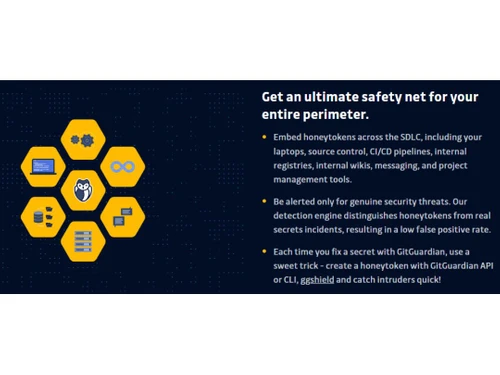
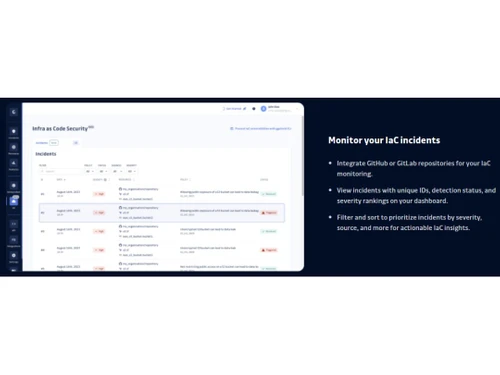
GitGuardian Monitor IaC incidents
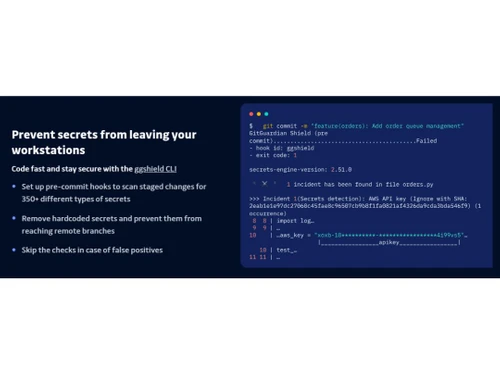
GitGuardian Prevent secrets

GitGuardian

Brand: GitGuardian

  • 4.5

  • 3 Ratings

GitGuardian software will safeguard your code & will help you discover vulnerabilities in your applications with powerful static analysis.

See More

Have you used GitGuardian before?

Share your insights for better experience

Add a Review
Starting Price
$25

View plans

100% Genuine
Products
Best Price
Guaranteed
Safe & Secure
Payment
  • Description

  • Pricing

  • Features

  • Specification

  • Review

  • Compare

  • Alternatives

  • FAQ

Starting at $25

GitGuardian Software Overview

What is GitGuardian Software?

GitGuardian is a cybersecurity tool for code security and secret detection. It uses automated secret detection algorithms to scan for source code repositories in real-time. It helps to identify any secrets in the codes like API keys, passwords and other important data in the code bases and protect their exposure. Its user interface provides an intuitive dashboard for alerts and remediation. It prevents confidential information leaks, thus increasing data security for organizations and helping the DevOps and security teams.

It operates by continuously monitoring source code repositories for sensitive data leaks. It employs advanced algorithms to scan code changes in real time, identifying secrets and critical information. When any secret is detected, it alerts the DevOps and security team. It thus allows for quick remediation by development and security teams. Its integration in the software development lifecycle protects sensitive information during the developer process and ensures compliance with security standards. It sends high-fidelity alerts by providing accurate alerts and reduces false alarms.

GitGuardian can be used to create custom secret detectors as per organization needs. It can be integrated with CI/CD in the development pipeline to detect secrets in the code early. It also helps identify the secrets of public repositories and internal repositories. It helps maintain security standards and compliance by preventing secrets exposure.

Why Choose GitGuardian System?

This security tool is a valuable tool for DevOps and the security team. It protects the source code by actively monitoring, detecting, and alerting the presence of secrets and sensitive data. It prevents any accidental exposure of critical sensitive information like API keys and passwords, helps to reduce the risk of data breaches, and protects the organization's reputation.

This security tool helps in developing collaboration between development and security teams. It increases security awareness among the team and enables developers to take ownership of incident response, decreasing the burden on security teams. In this way, it promotes a stronger security culture within the organization.

Benefits of GitGuardian Static Application Security Testing Solution

  • Greater security: It actively monitors and detects threats, preventing data breaches and protecting sensitive information from exposure.
  • Early detection: It identifies secrets in real-time, thus giving time for quick and early response and minimizing the potential impact of breaches.
  • Developer benefits: It encourages developers to participate in incident response, helping to develop security awareness.
  • Less false positive alert: It offers high-quality alerts and thus decreases false positive rates, thus making security teams focus on genuine threats.
  • Better compliance: It helps to maintain security standards and regulatory compliance by preventing secrets exposure in code repositories.

Pricing of GitGuardian Static Application Security Testing Software

GitGuardian static application security testing software pricing starts from $25 at techjockey.com.

The pricing model is based on different parameters, including extra features, deployment type, and total users. For further queries related to the product, you can contact our product team and learn more about the pricing and offers.

Read more

GitGuardian Company Details

Founded Year:  2017

GitGuardian is a cybersecurity startup solving the issue of secrets sprawling through source code, a widespread problem that leads to some credentials ending up in compromised places or even in the public space.

Director/Founders Eric Fourrier, Jérémy Thomas
Company Size 101-500 Employees

GitGuardian Pricing & Plans

Business
Key Features
  • Application source code, Infrastructure-as-Code, D
  • Developer workstations (git hooks)
  • CI environments
  • VCS (GitHub, GitHub Enterprise, GitLab, Bitbucket)
  • Pull requests (GitHub only)
  • Specific detectors (350+)
  • Generic detectors (10+)
  • Custom detectors
  • Validity and presence checks (periodicity)
  • Slack
Starting at $25
    • Licenses

      Licenses
      Licenses
    • Monthly

      Monthly
      Monthly

Key Features

  • Application source code, Infrastructure-as-Code, D

  • Developer workstations (git hooks)

  • CI environments

  • VCS (GitHub, GitHub Enterprise, GitLab, Bitbucket)

  • Pull requests (GitHub only)

  • Specific detectors (350+)

  • Generic detectors (10+)

  • Custom detectors

  • Validity and presence checks (periodicity)

  • Slack

GitGuardian Features

  • icon_check Keep Code Secrets-Free
    It ensures the codebase remains free of sensitive data and secrets.
  • icon_check Enforce Security Policies
    It implements and enforces security policies across the development pipeline.
  • icon_check Continuous Pipeline Security
    Maintain a continuous focus on security throughout the development and deployment.
  • icon_check Disseminate the Honeytokens
    It uses decoy secrets honeytokens to detect unauthorized access and breaches.
  • icon_check Low False Positive Rate
    Minimize false alert rates with accurate and trustworthy detection.
  • icon_check Detect Code Leakage
    Identifies code leakage and unauthorized access to secrets.
  • icon_check Scan Repositories or Submodules
    Supports scanning repositories and their submodules for thorough protection.
  • icon_check Catch outdated Transport Layer Security (TLS)
    Ensure Transport Layer Security (TLS) protocols are up-to-date and secure.
  • icon_check Monitor Your IaC Incidents
    To enhance security, keep track of Infrastructure as Code (IaC) incidents.
  • icon_check Reduce Secrets Exposure Risk
    Decreases the risk of exposing sensitive information by detecting secrets.
GitGuardian Demo Video play icon

Get GitGuardian Demo

Watch the demo video to explore key features, real workflows, and how the software fits your business needs.

Understand
Key Features
Personal
Demo Insights
Interactive
Demo Support

GitGuardian Specification

Supported Platforms
Ubuntu Ubuntu Windows Windows MacOS MacOS Linux Linux
Devices
Desktop Desktop Mobile Mobile Tablet Tablet iPad iPad
Deployment
Web-Based Web-Based Perpetual Perpetual
Suitable For
ITES
Business Specific
All Businesses
Business Size
Small Business Startups Medium Business Enterprises
Customer Support
Phone Email Communities
Language
English
Integration
API Integration
Training Resources
In Person Live Online Webinars Documentation Videos

GitGuardian Review

4.5

Out of 5

img

Overall Rating

Based on
3 Verified Ratings

Rating Breakdown

  • Features 4
  • Value for Money 4.6
  • Ease of Use 4.5
  • Customer Support 5

90% Recommend this Product

Add Review

Be the First to Review

This product has no reviews yet. Be the first to leave your feedback.

Add Review

Compare GitGuardian With other Static Application Security Testing (SAST) Software

Products
Ratings
Pricing
Device Supported
Deployment
Supported Platforms
  • img

    GitGuardian

  • 4.5

  • Price On Request

  • Desktop

    Mobile

  • Web based

    On Premises

  • Windows

    Mac OS

  • img

    Semgrep

  • 4.6

  • Price On Request

  • Desktop

    Mobile

  • Web based

    On Premises

  • Windows

    Mac OS

  • img

    Bearer SAST

  • 4.5

  • Price On Request

  • Desktop

    Mobile

  • Web based

    On Premises

  • Windows

    Mac OS

  • img

    CodeThreat

  • 4.5

  • Price On Request

  • Desktop

    Mobile

  • Web based

    On Premises

  • Windows

    Mac OS

  • img

    Coverity SAST

  • 4.1

  • Price On Request

  • Desktop

    Mobile

  • Web based

    On Premises

  • Windows

    Mac OS

  • img

    PVS Studio

  • 4.0

  • Price On Request

  • Desktop

    Mobile

  • Web based

    On Premises

  • Windows

    Mac OS

  • img

    BeSOURCE

  • 4.0

  • Price On Request

  • Desktop

    Mobile

  • Web based

    On Premises

  • Windows

    Mac OS

  • img

    Klocwork

  • 4.2

  • Price On Request

  • Desktop

    Mobile

  • Web based

    On Premises

  • Windows

    Mac OS

  • img

    Kiuwan

  • 4.4

  • Price On Request

  • Desktop

    Mobile

  • Web based

    On Premises

  • Windows

    Mac OS

(0) Product(s) selected

GitGuardian Alternatives

See All GitGuardian Alternatives

Starting Price:

$80 /Month

Available

Price on Request

Available

Price on Request

Available

Price on Request

Available

Price on Request

Which operating system does the GitGuardian Static Application Security Testing (SAST) Software support?

GitGuardian Static Application Security Testing (SAST) Software is compatible with Windows and macOS device systems.

Is there any GitGuardian app?

GitGuardian app is not available on Android and iOS devices.

What is the deployment type of the GitGuardian Static Application Security Testing (SAST) Software?

GitGuardian Static Application Security Testing (SAST) Software supports web-based deployment.

How much does the GitGuardian Static Application Security Testing (SAST) Software cost?

GitGuardian Static Application Security Testing (SAST) Software’s price in India starts at $ 25 at techjockey.com. This software has multiple pricing plans and caters to a diverse customer base.

Who are the potential users of the GitGuardian Static Application Security Testing (SAST) Software?

GitGuardian can be used by developers, security professionals, and quality assurance teams to scan code for vulnerabilities, bugs, and code standard compliance, making it a valuable tool for anyone involved in software development and security.

Is there any free trial or demo for GitGuardian Static Application Security Testing (SAST) Software?

GitGuardian Static Application Security Testing (SAST) Software’s demo is available for free with techjockey.com.

Is the GitGuardian Static Application Security Testing (SAST) Software free?

GitGuardian Static Application Security Testing (SAST) Software System does not offer a free trial.

How can you download the GitGuardian Static Application Security Testing (SAST) Software?

GitGuardian Static Application Security Testing (SAST) Software installation is not required, as it is web-based. Just open the Setup Wizard to get started.

How does GitGuardian Static Application Security Testing (SAST) Software work?

GitGuardian offers automated secrets detection and remediation capabilities, allowing development (Dev), security (Sec), and operations (Ops) teams to proactively identify and address vulnerabilities related to sensitive information, such as API keys or credentials, stored in code repositories. This helps enhance the overall security of software development and deployment processes.

20,000+ Software Listed

Best Price Guranteed

Free Expert Consultation

2M+ Happy Customers

Terms and Condtions

close

Users with registered businesses can purchase goods from merchants on the platform to satisfy their business needs. Users are not permitted to utilize any products acquired through the platform for resale, advertising, business, or further distribution.

For each purchase made, users will receive a Tax Invoice (or 'GST invoice') that includes specific details such as:

  • the GSTIN of the user associated with their registered business, and

  • the specified Entity Name for their business.

It should be noted that not all products are eligible for GST Invoice. Only the products displayed by participating sellers with the 'GST-based Invoice Available' callout on the product description page would qualify.

Certain goods and services are not eligible to get a GST Invoice, including items with VAS, i.e., Value Added Services (e.g., Total Mobile Protection/Assured Buyback) and those involving an exchange offer at the time of purchase.

Users must ensure the accuracy of the GSTIN, and business entity name provided for the GST Invoice. Requests for corrections into GST Invoice would not be accommodated by Techjockey.com or any Seller, and any issues arising from user-provided information are the sole responsibility of users.

Techjockey.com is not liable for the GST Invoice or any associated input tax credit. To efficiently claim an input tax credit, users should select the registered place of business address as per the GST authority's data and follow the provisions of the GST Act and rules.

To claim an input tax credit, the delivery and billing addresses must match. Furthermore, input tax credits will not be granted if the delivery address and GSTIN on the invoice are from different states. In case of incorrect GST details provided during the order placement, the order will be canceled automatically.