linkedin
Gather logo
play Gather 2.0: A Virtual Office Where Remote Work Feels Refreshingly Human
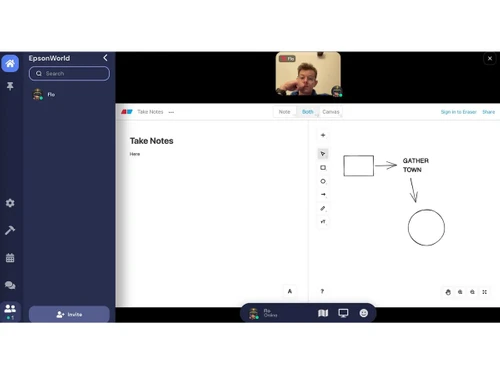
gather software-chats
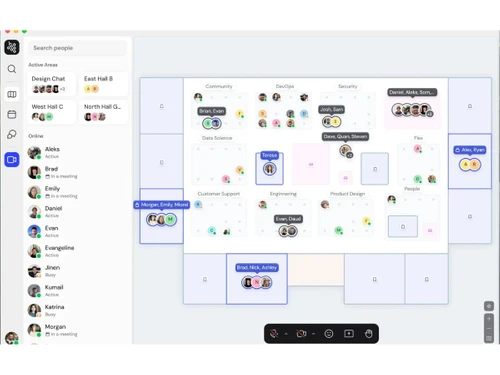
gather software-flowchart

Gather

Brand: Gather

  • 4.5

  • 6 Ratings & 1 Review

Gather is a collaborative software that enables virtual gatherings and meetings through customizable digital spaces.

See More

Have you used Gather before?

Share your insights for better experience

Add a Review
Starting Price
$15

View plans

100% Genuine
Products
Best Price
Guaranteed
Safe & Secure
Payment
  • Description

  • Pricing

  • Features

  • Specification

  • Review

  • Compare

  • Alternatives

  • FAQ

Starting at $15

Gather Software Overview

What is Gather?

Gather is a collaboration solution that provides a unified digital environment for distributed teams to enhance collaboration and productivity. With a focus on seamless communication and synchronized work, the platform offers a comprehensive platform that empowers teams to work effectively regardless of geographical barriers. Whether it's a spontaneous brainstorming session or a scheduled team meeting, it ensures that crucial information and ideas are shared in real-time.

Its robust toolset covers everything required by remote teams to streamline their work processes. From instant messaging and document sharing to scheduled team meetings, the platform eliminates the challenges of remote collaboration. The intuitive user interface ensures that team members can easily navigate and access the necessary tools.

It provides the ability to recreate the sense of a physical workspace in a virtual setting. Through customizable digital spaces, teams can virtually 'gather' around a shared digital table to engage in discussions, review documents, and collaborate as if they were in the same room.

Why Choose Gather collaboration software?

Gather allows teams to collaborate on projects using features like task lists, timelines, and project boards. It allows users to create and conduct polls and surveys to gather feedback and opinions from team members. Teams can also invite guests and external collaborators to participate in discussions and collaborations.

The collaboration tool supports threaded discussions to have focused conversations within specific topics. Users can create and customize templates for various types of projects and workflows. The platform can be used for mentoring and coaching programs to facilitate skill development. It also includes event management features, enabling teams to plan and execute virtual events and webinars.

Benefits of Gather Software

  • The collaboration solution provides a real-time collaborative environment where team members can work together on projects seamlessly.
  • It allows teams to hold virtual meetings and discussions with virtual conferencing capabilities.
  • The platform includes task tracking and management tools, helping teams stay organized and focused.
  • Teams can track their time spent on tasks and projects within the platform to streamline project management.
  • The collaboration tool offers an announcement board feature for important updates and company-wide communications.

Gather Pricing

Gather price in India starts at $15 per month per member on techjockey.com. Gather comes with multiple pricing plans and caters to the diverse customer base.

For subscription-related details and offers on premium packages, please request a call back from our product experts.

Read more

Gather Company Details

Founded Year:  2020

Gather is a video chat platform designed to make virtual interactions more human.

Director/Founders Alex Chen, Kumail Jaffer, Nathan Foss, Phillip Wang
Company Size 1-100 Employees

Gather Pricing & Plans

Essential
Key Features
  • Custom Virtual Office
  • Unlimited Meetings & Chat
  • Google Calendar Integration
  • Github & Spotify Integrations
  • Meeting Recordings-Starting at 20 hours
  • Meeting Transcriptions-Starting at 30 hours
  • Host Guests-Starting at 30 hours
Starting at $15
    • Users

      Users
      Users
    • Monthly

      Monthly
      Monthly

Key Features

  • Custom Virtual Office

  • Unlimited Meetings & Chat

  • Google Calendar Integration

  • Github & Spotify Integrations

  • Meeting Recordings-Starting at 20 hours

  • Meeting Transcriptions-Starting at 30 hours

  • Host Guests-Starting at 30 hours

Gather Features

  • icon_check Directory Search
    Provides a searchable list of all active participants to help users quickly locate and navigate to a specific colleague's spot.
  • icon_check Door Access Control
    Implements password protection or guest list requirements to restrict entry to specific rooms or the entire virtual workspace.
  • icon_check Space Analytics
    Generates data reports on user engagement, peak occupancy times, and room usage patterns to help optimize the virtual layout.
  • icon_check Private Meeting Zones
    Defines specific floor areas where audio and video are restricted to only the participants standing within the designated tiles.
  • icon_check Screen Share Portals
    Enables users to broadcast their desktop content to everyone in a room or a specific radius for collaborative project reviews.
  • icon_check Avatar Customization
    Provides a graphical interface for users to modify their digital representation to reflect personal identity within the space.
  • icon_check Whiteboard
    Integrates collaborative drawing tools that allow multiple participants to brainstorm and visualize ideas in real-time together.
  • icon_check Proximity Video Chat
    Automatically activates camera feeds when two or more avatars move into a close range to facilitate spontaneous interactions.
  • icon_check Map Customization
    Features a specialized editor for designing the layout, aesthetics, and functional flow of the virtual office or event space.
  • icon_check Integrated Chat
    Offers dedicated channels for direct messaging, local area communication, and global room-wide text exchange between participants.
  • icon_check User Status Label
    Enables individuals to set text descriptors or emoji indicators that inform colleagues of their current availability or task.
Gather Demo Video play icon

Get Gather Demo

Watch the demo video to explore key features, real workflows, and how the software fits your business needs.

Understand
Key Features
Personal
Demo Insights
Interactive
Demo Support

Gather Specifications

Supported Platforms
Ubuntu Ubuntu Windows Windows MacOS MacOS Linux Linux
Devices
Desktop Desktop
Deployment
Cloud-Based Cloud-Based Perpetual Perpetual

Suitable For
All Industries
Business Specific
All Businesses
Business Size
Small Business Startups Medium Business Enterprises SMBs SMEs MSMBs MSMEs
Customer Support
Email
Language
English
Training Resources
Videos
AI Features
AI Integrated
Compliance Regulation
CCPA CPRA ECPA

Explore the Best Alternative Solutions Similar to Your Business Size and Needs

Gather Review

4.5

Out of 5

img

Overall Rating

Based on
1 Verified Review

Rating Breakdown

  • Features 4.6
  • Value for Money 4.4
  • Ease of Use 4.4
  • Customer Support 4.7

88% Recommend this Product

Add Review

Gather Video Review

youtubeVideoId

4.1

“Gather Town Review | Virtual HQ For Remote Teams | Pros And Cons”

Review by: Pro Assistant

Compare Gather With other Collaboration Software

Products
Ratings
Pricing
Device Supported
Deployment
Supported Platforms
  • img

    Gather

  • 4.5

  • Price On Request

  • Desktop

    Mobile

  • Web based

    On Premises

  • Windows

    Mac OS

  • img

    WrkTalk

  • 4.9

  • ₹ 250

  • Desktop

    Mobile

  • Web based

    On Premises

  • Windows

    Mac OS

  • img

    Microsoft Teams

  • 4.4

  • ₹ 138

  • Desktop

    Mobile

  • Web based

    On Premises

  • Windows

    Mac OS

  • img

    Zoom Meetings

  • 4.5

  • ₹ 1449

  • Desktop

    Mobile

  • Web based

    On Premises

  • Windows

    Mac OS

  • img

    Pyngyn

  • 4.1

  • ₹ 999

  • Desktop

    Mobile

  • Web based

    On Premises

  • Windows

    Mac OS

  • img

    Wokay

  • 4.1

  • ₹ 14999

  • Desktop

    Mobile

  • Web based

    On Premises

  • Windows

    Mac OS

  • img

    Volley

  • 4.2

  • Price On Request

  • Desktop

    Mobile

  • Web based

    On Premises

  • Windows

    Mac OS

  • img

    Convo AI

  • 4.0

  • Price On Request

  • Desktop

    Mobile

  • Web based

    On Premises

  • Windows

    Mac OS

  • img

    Google Meet

  • 4.3

  • ₹ 720

  • Desktop

    Mobile

  • Web based

    On Premises

  • Windows

    Mac OS

  • img

    Troop Messenger

  • 4.9

  • ₹ 199

  • Desktop

    Mobile

  • Web based

    On Premises

  • Windows

    Mac OS

  • img

    Brity Works

  • 4.1

  • Price On Request

  • Desktop

    Mobile

  • Web based

    On Premises

  • Windows

    Mac OS

(0) Product(s) selected

Gather Alternatives

See All Gather Alternatives

Starting Price:

₹250

Starting Price:

₹14,999 /Month

Starting Price:

$29 /Month $49

SAVE UPTO 41%

Available

Price on Request

Rock

4.2

Starting Price:

$89 /Month

Starting Price:

$15 /Monthly

Starting Price:

$7 /User/Month

Starting Price:

$4 /User/Month

Starting Price:

$18 /User/Month

Articles for Gather

See All Related Articles

Which operating system does Gather support?

Gather is compatible with Ubuntu, Windows, MacOS, and Linux operating system.

Is there any Gather app?

Gather is unavailable for android and iOS apps.

What is the deployment type of Gather software?

Gather supports web-based deployment.

How much does Gather cost?

Gather price starts at $15 per month per member on techjockey.com.

Who are the potential users of Gather?

Gather is suitable for remote teams, educational institutions, and event organizers looking to create interactive and immersive virtual environments for meetings, classes, workshops, and social gatherings.

Is there any free trial or demo for Gather?

Gather free demo is available at techjockey.com.

Is Gather free?

Gather is not free. Price is available on request at techjockey.com.

How can you download Gather monitoring software?

Gather software is a web-based platform. So, installation is not required. Just open the Setup Wizard to get started.

How does Gather work?

This marketing tool helps users with Collaboration, File Sharing, Integrations, Streamlined Workflows, Data Security, and more.

20,000+ Software Listed

Best Price Guranteed

Free Expert Consultation

2M+ Happy Customers

Terms and Condtions

close

Users with registered businesses can purchase goods from merchants on the platform to satisfy their business needs. Users are not permitted to utilize any products acquired through the platform for resale, advertising, business, or further distribution.

For each purchase made, users will receive a Tax Invoice (or 'GST invoice') that includes specific details such as:

  • the GSTIN of the user associated with their registered business, and

  • the specified Entity Name for their business.

It should be noted that not all products are eligible for GST Invoice. Only the products displayed by participating sellers with the 'GST-based Invoice Available' callout on the product description page would qualify.

Certain goods and services are not eligible to get a GST Invoice, including items with VAS, i.e., Value Added Services (e.g., Total Mobile Protection/Assured Buyback) and those involving an exchange offer at the time of purchase.

Users must ensure the accuracy of the GSTIN, and business entity name provided for the GST Invoice. Requests for corrections into GST Invoice would not be accommodated by Techjockey.com or any Seller, and any issues arising from user-provided information are the sole responsibility of users.

Techjockey.com is not liable for the GST Invoice or any associated input tax credit. To efficiently claim an input tax credit, users should select the registered place of business address as per the GST authority's data and follow the provisions of the GST Act and rules.

To claim an input tax credit, the delivery and billing addresses must match. Furthermore, input tax credits will not be granted if the delivery address and GSTIN on the invoice are from different states. In case of incorrect GST details provided during the order placement, the order will be canceled automatically.