 USA
USA UAE
UAESmall Business
Designed for startups and growing businesses

See More


Brand: FlashGet Network
FlashGet Kids is designed to provide children a safe and secure online environment, allowing parents to monitor and manage their internet activities effectively.
See MoreHave you used FlashGet Kids before?
Share your insights for better experience
 Live Location Route History Remote Camera Screen Mirroring One-Way Audio Screen Time Limits App Time Limits App Blocking App Notifications Instant Alerts
  iOS
iOS  Android
  Mobile
  Tablet
  iPad
iPad  Perpetual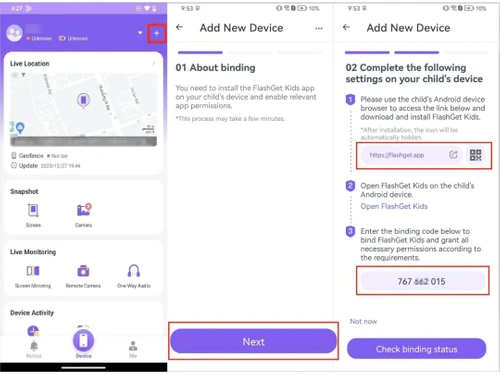
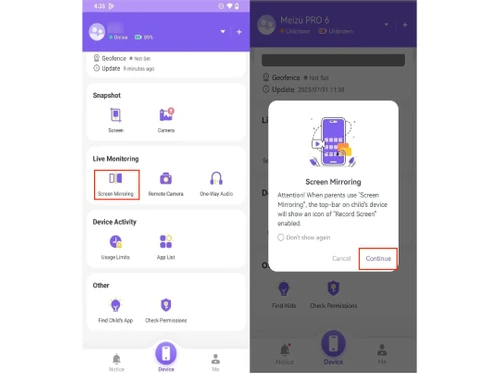
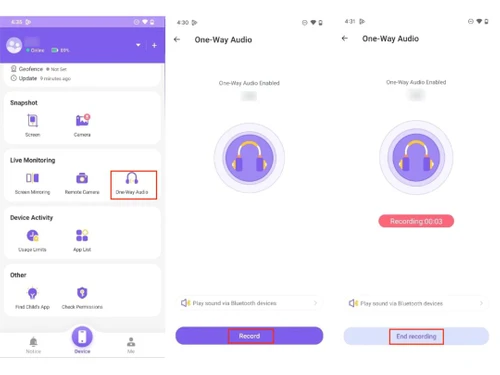
Small Business
Designed for startups and growing businesses
Medium Business
Built for business growth and flexibility
Enterprises
Designed for complex and large-scale business needs
3.9
Out of 5

Overall Rating
Based on
3 Verified Reviews
Rating Breakdown
80% Recommend this Product
Add Review
Sep 4, 2026
Techjockey Verified
“Makes It Easier to Manage My Child’s Phone”
FlashGet Kids has been a useful option for our family to manage device settings and monitor usage. I mainly use it to check activity, manage app access, and ensure the limits we set are working properly. While there are several features to explore, it has become easier to use after understanding which ones are most useful for us.
Pros
FlashGet Kids lets me manage my child’s phone settings remotely, including monitoring activity, managing app access, checking location, and adjusting usage limits when needed.
Cons
The setup process could be simpler, as several permissions and device settings need to be configured and occasionally checked to keep the features working properly.
Reason to switch
It saves me time when I need to manage something on my child’s phone. I can check the activity, change app or screen time settings, and check the location from my own phone.
Jul 30, 2026
Techjockey Verified
“Reliable App for Managing Kids' Screen Time”
FlashGet Kids has been a helpful app for managing my child's device usage with features like screen time controls, activity monitoring, and timely notifications. It makes parental supervision easier and offers useful tools for everyday use. While the initial setup and occasional syncing delays can be inconvenient, the overall experience has been positive.
Pros
FlashGet Kids makes it easy to manage screen time, monitor device activity, set schedules for different situations, and receive timely notifications, helping parents stay informed without constantly checking their child's phone.
Cons
FlashGet Kids could improve by simplifying the initial setup, reducing sync delays and battery usage, and providing faster resolution for technical support issues.
Feb 4, 2025
Techjockey Verified
“Reliable but Limited Parental Control”
FlashGet Kids is a solid parental control tool with effective content filtering and real-time alerts, but its limited device compatibility and lack of a free trial are drawbacks.
Pros
FlashGet Kids provides effective content filtering, real-time alerts, and customizable controls, ensuring a safe and secure digital experience for children.
Cons
FlashGet Kids has some drawbacks, including limited device compatibility and the absence of a free trial, which may restrict accessibility for some users.

FlashGet Kids
Price On Request
Desktop
Mobile
Web based
On Premises
Windows
Mac OS

Qustodio
Price On Request
Desktop
Mobile
Web based
On Premises
Windows
Mac OS

Kaspersky Safe Kids
Price On Request
Desktop
Mobile
Web based
On Premises
Windows
Mac OS

Norton Family
₹ 1749
Desktop
Mobile
Web based
On Premises
Windows
Mac OS

FamiSafe
Price On Request
Desktop
Mobile
Web based
On Premises
Windows
Mac OS

Family Link
Price On Request
Desktop
Mobile
Web based
On Premises
Windows
Mac OS

FamilyTime
Price On Request
Desktop
Mobile
Web based
On Premises
Windows
Mac OS

KidLogger
Price On Request
Desktop
Mobile
Web based
On Premises
Windows
Mac OS

Net Nanny
Price On Request
Desktop
Mobile
Web based
On Premises
Windows
Mac OS

Refog
Price On Request
Desktop
Mobile
Web based
On Premises
Windows
Mac OS

Parental Values
Price On Request
Desktop
Mobile
Web based
On Premises
Windows
Mac OS
(0) Product(s) selected
Starting Price:
$29 /Year
Starting Price:
$40 /Year
Starting Price:
$30 /Month

Starting Price:
$20 /Year
FlashGet Kids Software is compatible with Windows, and macOS devices.
FlashGet Kids Software is available for Android and iOS app users.
It supports on-premises deployment.
FlashGet Kids price in India starts at $9 at techjockey.com.
FlashGet Kids Software is typically used by all industries for children, allowing parents to monitor and manage their internet activities effectively.
Yes, a demo of FlashGet Kids is available at techjockey.com.
FlashGet Kids Software is not free. Contact our product experts to learn more about the pricing plans.
Yes, FlashGet Kids Software offers a free trial.
For Fortect software installation, you can go directly to Techjockey’s official website and buy this solution. Once purchased, you will receive a key to download the same via email.
FlashGet Kids monitors and alerts parents in real-time about concerning activity on their child's device, ensuring prompt intervention and protection.
To uninstall FlashGet Kids, you'll need to use the built-in uninstall methods for your operating system, or potentially a third-party uninstaller.
4 0
Yes, FlashGet Kids is available and can be used on iPhones and iPads.
0 0
To uninstall FlashGet Kids without a password on a child's device, you'll likely need to use the device's default uninstallation process or, if that fails, attempt to reset the device to factory settings.
5 0
To uninstall FlashGet Kids, you'll need to access your device's settings, find the app under 'Apps' or 'Installed Apps,' and then select 'Uninstall'.
0 0
20,000+ Software Listed
Best Price Guranteed
Free Expert Consultation
2M+ Happy Customers
Terms and Condtions

Users with registered businesses can purchase goods from merchants on the platform to satisfy their business needs. Users are not permitted to utilize any products acquired through the platform for resale, advertising, business, or further distribution.
For each purchase made, users will receive a Tax Invoice (or 'GST invoice') that includes specific details such as:
the GSTIN of the user associated with their registered business, and
the specified Entity Name for their business.
It should be noted that not all products are eligible for GST Invoice. Only the products displayed by participating sellers with the 'GST-based Invoice Available' callout on the product description page would qualify.
Certain goods and services are not eligible to get a GST Invoice, including items with VAS, i.e., Value Added Services (e.g., Total Mobile Protection/Assured Buyback) and those involving an exchange offer at the time of purchase.
Users must ensure the accuracy of the GSTIN, and business entity name provided for the GST Invoice. Requests for corrections into GST Invoice would not be accommodated by Techjockey.com or any Seller, and any issues arising from user-provided information are the sole responsibility of users.
Techjockey.com is not liable for the GST Invoice or any associated input tax credit. To efficiently claim an input tax credit, users should select the registered place of business address as per the GST authority's data and follow the provisions of the GST Act and rules.
To claim an input tax credit, the delivery and billing addresses must match. Furthermore, input tax credits will not be granted if the delivery address and GSTIN on the invoice are from different states. In case of incorrect GST details provided during the order placement, the order will be canceled automatically.


