Description
Pricing
Features
Specification
Review
Compare
FAQs
Alternatives
 Get Free Advice
Get Quote

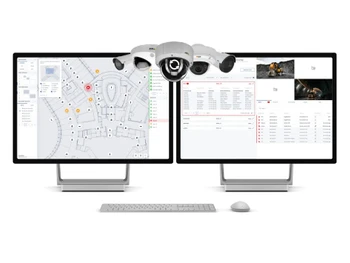
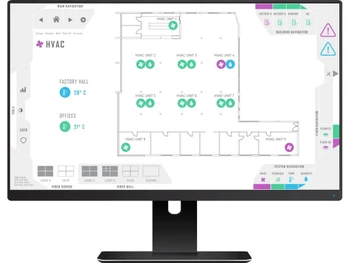
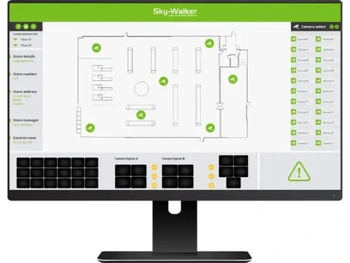


Brand : Entelec


4.2 
4 Ratings
Have Questions?
Price On Request
Save Extra with 2 Offers
 Save upto 18%, Get GST Invoice on your business purchase |
Users with registered businesses can purchase goods from merchants on the platform to satisfy their business needs. Users are not permitted to utilize any products acquired through the platform for resale, advertising, business, or further distribution.
For each purchase made, users will receive a Tax Invoice (or 'GST invoice') that includes specific details such as:
the GSTIN of the user associated with their registered business, and
the specified Entity Name for their business.
It should be noted that not all products are eligible for GST Invoice. Only the products displayed by participating sellers with the 'GST-based Invoice Available' callout on the product description page would qualify.
Certain goods and services are not eligible to get a GST Invoice, including items with VAS, i.e., Value Added Services (e.g., Total Mobile Protection/Assured Buyback) and those involving an exchange offer at the time of purchase.
Users must ensure the accuracy of the GSTIN, and business entity name provided for the GST Invoice. Requests for corrections into GST Invoice would not be accommodated by Techjockey.com or any Seller, and any issues arising from user-provided information are the sole responsibility of users.
Techjockey.com is not liable for the GST Invoice or any associated input tax credit. To efficiently claim an input tax credit, users should select the registered place of business address as per the GST authority's data and follow the provisions of the GST Act and rules.
To claim an input tax credit, the delivery and billing addresses must match. Furthermore, input tax credits will not be granted if the delivery address and GSTIN on the invoice are from different states. In case of incorrect GST details provided during the order placement, the order will be canceled automatically.
Buy Now & Pay Later, Check offer on payment page. A video management software that lets you easily watch, record, and control multiple security cameras in a building from a central dashboard. ...Read more
 Get Instant Expert
  Safe & Secure
  Assured Best Price
Video Capture & Recording
 Recording Modes Lets you record continuously or trigger recording based on motion or alarms. Anomaly Detection Integrates advanced camera-based motion and video analysis to flag unusual activity. Camera Compatibility Works with a wide range of cameras from different brands due to its open integration platform. Video Compression & Quality Displays clear video while efficiently managing data from multiple feeds. Multi-Live Streaming Simultaneous resolution streams to optimize bandwidth. PTZ Control Remote Pan-Tilt-Zoom (PTZ) with presets and automated patrol. Edge Storage & Failover SD card recording with auto-sync on connection restore. Multicast & Multi-Stream Bandwidth-efficient adaptive streaming support. Hardware-Accelerated Detection Supports NVIDIA & QuickSync acceleration. Tamper Detection Detects camera obstruction, redirection, video loss.
 Storage & Retention
Storage Options Local (HDD/SSD), NAS/SAN, cloud (AWS, Azure, Google), hybrid. Retention & Data Management Configurable retention, automated deletion, overwrite. Redundancy & Failover RAID (RAID 0, 1, 5, 10), failover mechanisms, scheduled backups. Hot & Cold Failover Recording Ensures uninterrupted recording. Evidence Locking & Retention Secure critical video data for legal compliance. Media Database Encryption Prevents tampering with stored video data. Video Playback & Retrieval
Playback Features Allows smooth live and recorded video viewing for quick incident review. Smart Search & Retrieval Supports incident-based search and previews to find video efficiently. Incident Manager & Bookmarks Lets operators bookmark important footage and trigger workflows during incidents. Export & Sharing MP4, AVI, encrypted formats, watermarking, password protection. Evidence Chain of Custody Tracks video access/modifications for compliance. Video Analytics
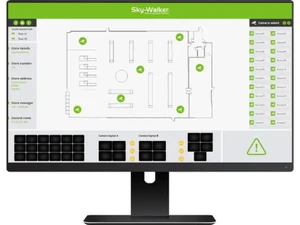
Customizable Dashboards Provides tailored visual dashboards showing camera status, alarms, and workflows Behavioral Analysis Incorporates video analysis modules (like object or motion detection) to monitor behavior Motion & Object Detection Detects movement and objects through integrated video analytics tools. Facial & License Plate Recognition Real-time alerts, whitelist/blacklist management. Integrations
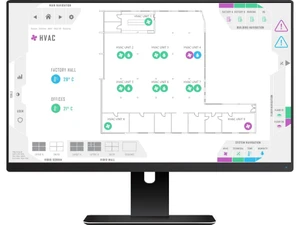
Third Party Integrations Seamlessly integrates with access control, fire, HVAC, intercom, and other systems Interconnected Video Feeds Allows combining video feeds with events from other security systems. Open API & Protocols Uses open standards (TCP/IP) and APIs for flexible system integration. Smart Map Integration Real-time tracking of incidents and objects across mapped areas. Multi-Site Federated Management Centralized and remote site connectivity. Firmware Upgrades Single & bulk updates for security patching and feature enhancements. LDAP/Active Directory Integration LDAP/Active Directory for centralized user management Automated Device Discovery Auto-detects and registers new cameras. Alerts & Notifications
Customizable Dashboards Provides tailored visual dashboards showing camera status, alarms, and workflows Event-Based Alerts Triggers alerts automatically based on custom incident workflows Alarm Manager Central hub to manage and resolve system alarms systematically. Notification Channels Email, SMS, push notifications, webhook-based alerts. Security & Compliance
Audit Logs Tracks all user actions and system events for accountability and review. Role-Based Access Control (RBAC) Limits access based on user roles and permissions. Authentication & Authorization Ensures only verified users can access and control the system. Incident Reporting Automated event logging for compliance. Data Security AES-256 encryption, HTTPS/SSL communication, secure user authentication. Data Encryption Protection against tampering and unauthorized access. Regulatory Compliance GDPR, ISO 27001, NIST cybersecurity framework adherence. ONVIF Compliance ONVIF compliance ensures interoperability. Secure Remote Access Web-based browser access, VPN, cloud relay for secure remote viewing. Device Password Management Secure camera and system access management. Audit Trails Track changes and updates within the system for enhanced security and transparency. | Brand Name | Entelec |
| Information | Entelec Control Systems is a Computer Software that develop management tools for physical security systems. |
| Founded Year | 1992 |
| Director/Founders | Miet Loix |
| Company Size | 1-100 Employees |


 20,000+ Software Listed
 Best Price Guaranteed
 Free Expert Consultation
 2M+ Happy Customers
 USA
USA UAE
UAE