USA
USA UAE
UAESmall Business
Designed for startups and growing businesses


See More


Brand: ElcomSoft
What is Elcomsoft EFS Data Recovery Software Elcomsoft EFS Data Recovery helps decrypt protected files in a quick and efficient manner. The software runs detailed scans within a hard disk for locating encrypted files. With the advanced file recovery software, users get to decrypt files that were tra...
See MoreHave you used Elcomsoft EFS Data Recovery before?
Share your insights for better experience
Brand: ElcomSoft
Founded Year: 1990
ElcomSoft
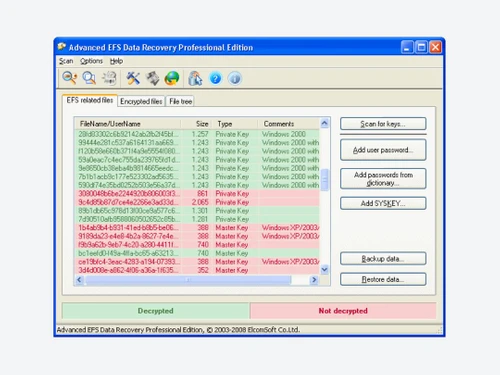
 Remote Access Recovering Encrypted Files Usage Scenarios Automatic Scanning Master Key Recovery Password Cracking Active Directory Support Direct Sector Access Format Independence User Key Extraction Offline Recovery Encrypted SAM Support Intuitive Interface BitLocker Compatibility Detailed Auditing & Logging

Watch the demo video to explore key features, real workflows, and how the software fits your business needs.
 Windows
  Desktop
  Perpetual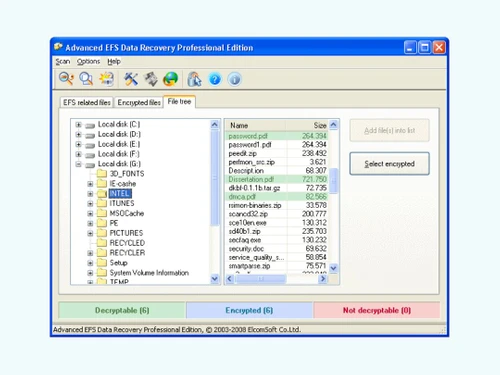
Small Business
Designed for startups and growing businesses
Medium Business
Built for business growth and flexibility
Enterprises
Designed for complex and large-scale business needs
4.7
Out of 5

Overall Rating
Based on
3 Verified Reviews
Rating Breakdown
93% Recommend this Product
Add ReviewUsers generally appreciate Elcomsoft EFS Data Recovery for its effectiveness in recovering encrypted files and the clarity it provides during the scanning process. Many highlight the software's reliability and commendable customer support, often recommending it highly. However, some users note that the scanning process can be time-consuming, particularly with larger files. Overall, the sentiment is positive, with users feeling satisfied with the value it delivers in data recovery scenarios.

May 19, 2019
Techjockey Verified
“Document Safety ”
Pros
elcomsoft-information recuperation Locking your vehicle to shield the road punks from taking it is brilliant. In any case, when you lock the keys inside it, that is an entire diverse security issue. Similarly, Windows conveniently scrambles private documents, yet numerous regular occasions can forget you bolted also. On the off chance that you've out and out overlooked the secret word, you're in a bad way. Had you recently upheld up your encryption qualifications, you could recapture access to your records, yet couple of clients have the prescience and specialized ability to do this.
Cons
NO CONS
Feb 26, 2019
Techjockey Verified
“Encoded things”
Pros
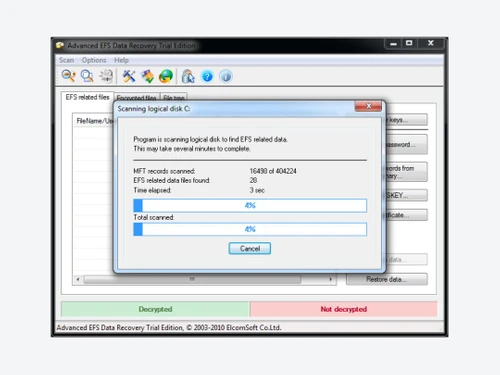
Progressed EFS Data Recovery empowers you to perform scans for finding scrambled records, and you can choose the circles. It offers time estimation for finishing the activity and showcases the quantity of examined records and encoded things. Contingent upon the span of the records on the circle, it may set aside some effort to do the examining activity.
Cons
NO CONS
Jun 8, 2018
Techjockey Verified
“very helpful and no pressure.”
Pros
these folks are great - they deliver what they promise. kudos and keep the streak of excellence going for all times! cheers
Cons
N/A

Elcomsoft EFS Data Recovery
Price On Request
Desktop
Mobile
Web based
On Premises
Windows
Mac OS

Elcomsoft System Recovery
Price On Request
Desktop
Mobile
Web based
On Premises
Windows
Mac OS

Dr.Fone - Data Recovery
₹ 1899
Desktop
Mobile
Web based
On Premises
Windows
Mac OS

Ideas Plus
Price On Request
Desktop
Mobile
Web based
On Premises
Windows
Mac OS

Iperius Data Backup Software
₹ 3190
Desktop
Mobile
Web based
On Premises
Windows
Mac OS

Apna Backup
₹ 1562
Desktop
Mobile
Web based
On Premises
Windows
Mac OS

Allway Sync
Price On Request
Desktop
Mobile
Web based
On Premises
Windows
Mac OS

Staz
₹ 1000
Desktop
Mobile
Web based
On Premises
Windows
Mac OS

Veeam Data Cloud
Price On Request
Desktop
Mobile
Web based
On Premises
Windows
Mac OS

Retrospect Backup
Price On Request
Desktop
Mobile
Web based
On Premises
Windows
Mac OS

iTransor for iOS
₹ 3289
Desktop
Mobile
Web based
On Premises
Windows
Mac OS
(0) Product(s) selected
Starting Price:
$499
Starting Price:
₹1,562 /Month ₹2,003
Available
Price on Request
Starting Price:
$20
Starting Price:
₹3,289 /Quantity ₹4,936

Available
Price on Request
Available
Price on Request

Starting Price:
$579 Yearly/

Available
Price on Request

Available
Price on Request

Available
Price on Request
You can use Elcomsoft EFS Data Recovery to regain access to deleted user profiles, access files within damaged disks, unbootable operating systems and system partitions containing encrypted files on another disk.
Yes, the data backup software for PCs can manage system loads. You will get to choose between three different types of load levels - Low, Normal and High.
Techjockey does provide an online demo of Elcomsoft EFS Data Recovery, you just need to send in a preferred date and time.
When you encrypt your file with EFS Data Recovery, you can rest assured of its added security from an unauthorized access.
No, Elcomsoft EFS Data Recovery does not have a mobile app.
Elcomsoft EFS Data Recovery software is available as per the following pricing plans: 1. Standard Edition - USD 149 on a yearly basis, 2. Professional Edition - USD 299 on a yearly basis.
20,000+ Software Listed
Best Price Guranteed
Free Expert Consultation
2M+ Happy Customers
Terms and Condtions

Users with registered businesses can purchase goods from merchants on the platform to satisfy their business needs. Users are not permitted to utilize any products acquired through the platform for resale, advertising, business, or further distribution.
For each purchase made, users will receive a Tax Invoice (or 'GST invoice') that includes specific details such as:
the GSTIN of the user associated with their registered business, and
the specified Entity Name for their business.
It should be noted that not all products are eligible for GST Invoice. Only the products displayed by participating sellers with the 'GST-based Invoice Available' callout on the product description page would qualify.
Certain goods and services are not eligible to get a GST Invoice, including items with VAS, i.e., Value Added Services (e.g., Total Mobile Protection/Assured Buyback) and those involving an exchange offer at the time of purchase.
Users must ensure the accuracy of the GSTIN, and business entity name provided for the GST Invoice. Requests for corrections into GST Invoice would not be accommodated by Techjockey.com or any Seller, and any issues arising from user-provided information are the sole responsibility of users.
Techjockey.com is not liable for the GST Invoice or any associated input tax credit. To efficiently claim an input tax credit, users should select the registered place of business address as per the GST authority's data and follow the provisions of the GST Act and rules.
To claim an input tax credit, the delivery and billing addresses must match. Furthermore, input tax credits will not be granted if the delivery address and GSTIN on the invoice are from different states. In case of incorrect GST details provided during the order placement, the order will be canceled automatically.