 USA
USA UAE
UAESmall Business
Designed for startups and growing businesses


See More


![AI Image Upscaler Demo [4K]](https://img.youtube.com/vi/Pml_AkRccpM/default.jpg)


Brand: Deep Dream Generator
DeepDream is an AI image generation tool that uses deep learning neural networks to enhance and transform images, often resulting in surreal, dream-like visuals reminiscent of psychedelic art by identifying and amplifying patterns within the input image.
See MoreHave you used DeepDream before?
Share your insights for better experience
This Product is Available Free Forever.
Start instantly with no fees, no subscriptions, and no commitments.
Free Forever Plan
Get started immediately at no cost. Upgrade anytime if your business demand more.
Free ForeverImage Generation and Processing
 Text-to-Image Generation High-Resolution Output Preset Styles Image-to-Image Transformation Real-time Preview Real-Time Rendering Multi-Layer Image Processing Batch Generation Drag and Drop
 Editing and Customization Tools
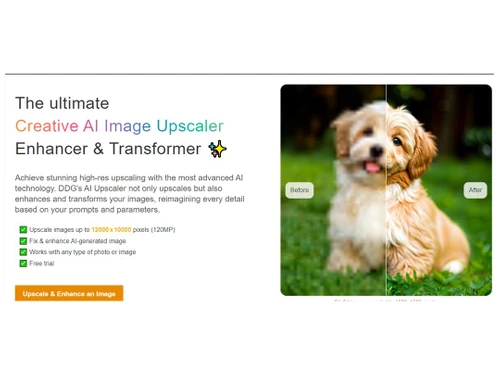
Style Transfer Adjustable Parameters Image Upscaling Resolution Control Style Adaptation AI Editor 3D Effects Content Filters Layer Control Realistic Object Generation Object Removal Background Removal Text Overlay Image Tiling Denoising Image Weights Prompt Control and Enhancements
Prompt Editing Prompt Enhancer Negative Prompt Prompt Flexibility Prompt Sensitivity Prompt Matrix Seed Real-Time Generation Model and AI Capabilities
Model Merging Multi-Model Support Fine Tuning Collaboration and Sharing
Custom Templates Image Sharing Prompt Libraries Collaboration Tools Branding and Commercial Use
Brand Kit Integration Commercial Rights Data Privacy Integration Supported
API Integration Content Management Systems (CMS) Integration Design and Editing Software Integration Cloud Storage and Collaboration Tools Integration E-Commerce Platforms Integration 3D Modeling Software Integration Game Engines Integration Video Editing Tools Integration Animation Tools Integration NFT Marketplaces Plugin & Extensions 

Watch the demo video to explore key features, real workflows, and how the software fits your business needs.
 Ubuntu
  Windows
  MacOS
MacOS  Linux
Linux  Desktop
  Cloud-Based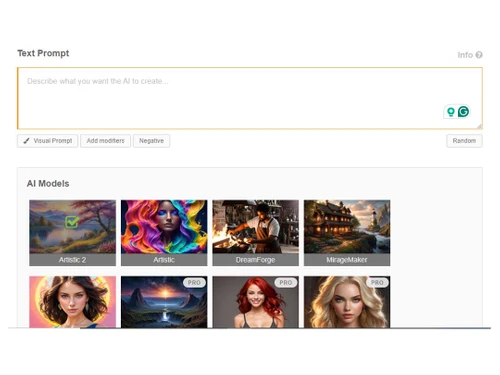
Small Business
Designed for startups and growing businesses
Medium Business
Built for business growth and flexibility
Enterprises
Designed for complex and large-scale business needs
4.1
Out of 5

Overall Rating
Based on
11 Verified Reviews
Rating Breakdown
84% Recommend this Product
Add ReviewOverall, users appreciate DeepDream for its ability to transform simple images into unique and abstract art, highlighting its fun and creative potential. Many find the interface user-friendly and enjoy the variety of filters available. However, common complaints include the processing time for images and a desire for more control over the output, as the randomness can be frustrating. Some users also note that the software can feel repetitive and has room for improvement in terms of features and community engagement.
Pros
"The AI applies effects that make the image look like something out of a dream. It also support high resolution output."
"Easy to use software, well known for its flexibility and features."
"Deepdream is packed with a range of features including text-to-image, high resolution output, preset styles, adjustable parameters, style transfer, image upscaling and more."
Cons
"The downside is that some of the edits can feel a bit repetitive. "
"It does not offer object removal feature, background removal, image tiling feature. "
"The downside is that setting everything up can be a bit tricky. "

Sep 20, 2024
Techjockey Verified
“DeepDream : A Great Platform for Abstract Art Exploration”
DeepDream 2 is an exciting platform for anyone who wants to explore AI art. It can turn simple images into surreal masterpieces, and the variety of options keeps it fresh.
Pros
What stands out about DeepDream 2 is how much fun it is to create abstract and dreamlike art. It gives you so many different filters and options to tweak your images, so each one feels different. It’s easy to start using, even if you don’t have a lot of experience with AI art, and the results are often quite stunning. I also appreciate that it lets you create something totally new from a simple photo with just a few clicks.
Cons
N/A
Reason to switch
I was looking for a tool that offered more variety in style and the ability to experiment more with AI art without needing too much technical input.
Sep 24, 2024
Techjockey Verified
“DeepDream : A Creative Way to Make Unique Art”
DeepDream is a fun tool that allows me to create abstract and surreal images from regular photos. While the results are often surprising, that’s part of the charm. The interface is pretty easy to navigate once you get used to it, though I do wish it didn’t take so long for the images to process. Despite the randomness, it’s a great way to explore AI art, and I’ve ended up with some truly cool pieces.
Pros
What I love about DeepDream 2 is the level of creativity it allows. It can turn any simple picture into something truly different. The variety of filters and patterns available makes it fun to experiment with. I’ve created some truly unique pieces that I wouldn’t have been able to without it. It’s easy to lose yourself in the possibilities it offers, and the results are always unexpected, which keeps it interesting.
Cons
One downside is the time it takes for images to process. Sometimes I wish it was quicker. And while it offers a lot of creative freedom, the randomness of the output can be frustrating if you're aiming for a particular style.
Reason to switch
I wanted a platform that allowed me to push the boundaries of creativity and offered more unpredictable results for my art projects.
Jun 28, 2024
Techjockey Verified
“DeepDream : A Fun Way to Explore AI-Generated Art”
DeepDream 2 has been my go-to for creating AI-generated art. The interface is simple enough, but the results are mind-bending. It turns regular images into something completely abstract, and that’s what keeps me hooked.
Pros
DeepDream is a great tool if you're someone who loves experimenting with art. I found it easy to dive into once I got started. It gives you a lot of freedom to create unique images, especially with the different styles and patterns it offers. The level of customization is what I like the most because it really allows you to add your personal touch to the artwork. The results are always a surprise, which keeps it exciting every time I use it.
Cons
The biggest issue for me is that sometimes the images can take a while to generate. Also, it can feel a bit random when it comes to the output—it’s not always exactly what I imagined. While it’s fun, there are times when I wish I had more control over the final image. Some of the filters can be a bit repetitive too, so more variety would be great.
Reason to switch
I wanted something that didn’t require too much technical knowledge and allowed me to focus on the creative process without getting lost in the settings.

DeepDream
FREE
Desktop
Mobile
Web based
On Premises
Windows
Mac OS

Remaker AI
Price On Request
Desktop
Mobile
Web based
On Premises
Windows
Mac OS

Deepnude
Price On Request
Desktop
Mobile
Web based
On Premises
Windows
Mac OS

Leonardo AI
Price On Request
Desktop
Mobile
Web based
On Premises
Windows
Mac OS

Adobe Firefly
Price On Request
Desktop
Mobile
Web based
On Premises
Windows
Mac OS

DeepSukebe
Price On Request
Desktop
Mobile
Web based
On Premises
Windows
Mac OS

Facet AI
Price On Request
Desktop
Mobile
Web based
On Premises
Windows
Mac OS

SUPERMACHINE
Price On Request
Desktop
Mobile
Web based
On Premises
Windows
Mac OS
GoEnhance AI
Price On Request
Desktop
Mobile
Web based
On Premises
Windows
Mac OS

DiffusionBee
Price On Request
Desktop
Mobile
Web based
On Premises
Windows
Mac OS

Getimg AI
₹ 850
Desktop
Mobile
Web based
On Premises
Windows
Mac OS
(0) Product(s) selected
Starting Price:
$30 /Month
Starting Price:
$19 /Month
Starting Price:
$10 /Month
Available
Price on Request

Available
Price on Request

Starting Price:
$9 /Month

Available
Price on Request

Available
Price on Request

Starting Price:
$5
Starting Price:
$12 /Month


DeepDream is available for free on techjockey.com.
No, DeepDream does not offer mobile apps for users.
DeepDream supports the Windows operating system.
Yes, DeepDream free trial is available for users.
DeepDream software uses neural networks to analyze and enhance image patterns, creating surreal, dream-like visuals.
The target users of DeepDream software are artists, designers, and creative individuals looking to generate unique, surreal visuals through AI-driven image enhancement.
Yes, DeepDream free demo is available on request.
Yes, DeepDream is a free software.
Yes, DeepDream supports high-resolution image generation for professional-quality visuals.
DeepDream fosters a community of artists and creators who share and discuss their AI-generated works.
Model Merging is the process of combining many machine-learning models to achieve a variety of goals, including strengthening generalization, boosting accuracy, boosting robustness, and optimizing resource use.
0 0
A Project is a collection of tasks related to the creation of images or the images that are getting processed. It helps the users in keeping the record of the data for future use.
0 0
Neural networks, specifically Convolutional Neural Networks (CNNs), are used in DeepDream and other ‘deep art’ techniques to produce images. The process involves feeding an image through the network, calculating gradients to identify areas of high activation, and then modifying the image to further amplify the patterns and features the network recognizes within it.
0 0
The preferred model for generating realistic and high-definition imagery is Photonic. Its mechanism is aimed at producing images as near to reality as possible, with a high degree of clarity.
0 0
DeepDream controls the degree of alteration of an image throughout the algorithm. The process leads to:
0 0
20,000+ Software Listed
Best Price Guranteed
Free Expert Consultation
2M+ Happy Customers
Terms and Condtions

Users with registered businesses can purchase goods from merchants on the platform to satisfy their business needs. Users are not permitted to utilize any products acquired through the platform for resale, advertising, business, or further distribution.
For each purchase made, users will receive a Tax Invoice (or 'GST invoice') that includes specific details such as:
the GSTIN of the user associated with their registered business, and
the specified Entity Name for their business.
It should be noted that not all products are eligible for GST Invoice. Only the products displayed by participating sellers with the 'GST-based Invoice Available' callout on the product description page would qualify.
Certain goods and services are not eligible to get a GST Invoice, including items with VAS, i.e., Value Added Services (e.g., Total Mobile Protection/Assured Buyback) and those involving an exchange offer at the time of purchase.
Users must ensure the accuracy of the GSTIN, and business entity name provided for the GST Invoice. Requests for corrections into GST Invoice would not be accommodated by Techjockey.com or any Seller, and any issues arising from user-provided information are the sole responsibility of users.
Techjockey.com is not liable for the GST Invoice or any associated input tax credit. To efficiently claim an input tax credit, users should select the registered place of business address as per the GST authority's data and follow the provisions of the GST Act and rules.
To claim an input tax credit, the delivery and billing addresses must match. Furthermore, input tax credits will not be granted if the delivery address and GSTIN on the invoice are from different states. In case of incorrect GST details provided during the order placement, the order will be canceled automatically.



