linkedin
CloudSkew logo
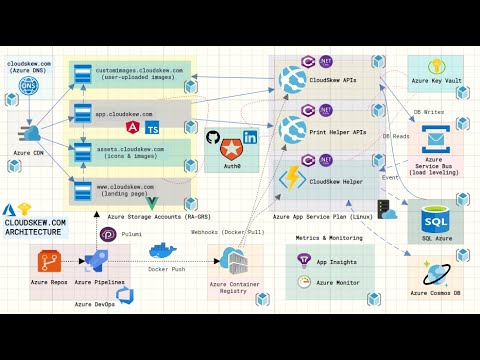
play CloudSkew's Infrastructure | Built with Azure
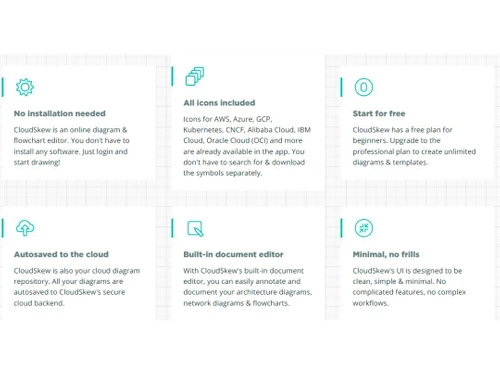
CloudSkew Features
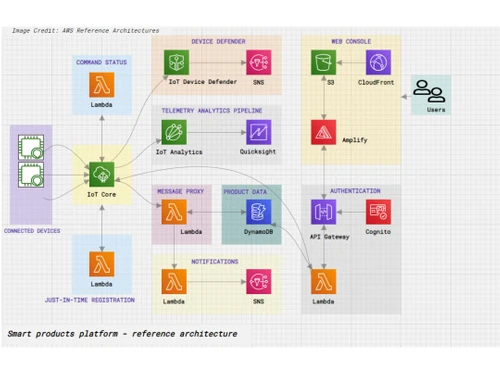
CloudSkew AWS Smart products platform

CloudSkew

Brand: Skewed Ventures

  • 4.4

  • 5 Ratings

CloudSkew Cloud Visualization Software simplifies complex cloud architecture planning with its intuitive drag-and-drop interface, enabling users to create, visualize, and collaborate on cloud diagrams effortlessly.

See More

Have you used CloudSkew before?

Share your insights for better experience

Add a Review
Starting Price
$36

View plans

100% Genuine
Products
Best Price
Guaranteed
Safe & Secure
Payment
  • Description

  • Pricing

  • Features

  • Specification

  • Review

  • Compare

  • Alternatives

  • FAQ

Starting at $36

CloudSkew Software Overview

What is CloudSkew Software?

CloudSkew is a user-friendly and feature-rich diagram and flowchart editor that revolutionizes how you create and visualize diagrams. With CloudSkew, unleash your creativity with unlimited diagrams and templates, all on an infinite canvas, providing limitless possibilities for your visualizations. So, say goodbye to complex workflows and installations, as CloudSkew operates effortlessly on any browser without needing installation.

This cloud visualization software will help you unlock boundless creativity with the freedom to create unlimited diagrams and templates. You will experience a straightforward and user-friendly interface, eliminating the hassle of complex workflows. CloudSkew will also help you visualize your ideas on an infinite canvas, providing ample space to explore and expand your visualizations. You can access CloudSkew directly from any browser without installing or setting up. You will also get access to a comprehensive icons’ library, ensuring all necessary elements are readily available.

So, begin your diagramming journey with a free and accessible starting point on CloudSkew. CloudSkew will help you seamlessly edit your documents directly, ensuring a unified and efficient workflow. You will experience a minimalist and clutter-free design, focusing solely on the essential tools for an unobtrusive diagramming experience. Whether diagramming a complex process or creating a simple flowchart, CloudSkew provides the ideal platform to streamline your visualizations easily and precisely.

Why Choose CloudSkew?

CloudSkew is a versatile and user-friendly diagram and flowchart editor suitable for a wide range of professionals. Business analysts, project managers, and system architects can utilize CloudSkew to visually represent complex processes, systems, and workflows, enabling clearer communication and understanding among team members and stakeholders. Entrepreneurs and startups can benefit from CloudSkew's free start and minimal learning curve, allowing them to create business models, product roadmaps, and flowcharts without investing in costly diagramming tools.

That's not all, as students and educators can also leverage CloudSkew for academic purposes, illustrating concepts and creating visual aids for presentations or assignments. CloudSkew is well-suited for creative professionals such as graphic designers and artists, who can easily utilize the platform's expansive canvas size and comprehensive icon library to conceptualize and craft visual designs.

Benefits of CloudSkew Cloud Visualization Software

  • Unleash creativity with a versatile editor for diagrams and flowcharts, backed by an infinite canvas for limitless exploration.
  • Simplify workflow with a user-friendly interface, creating unlimited diagrams and templates effortlessly.
  • Access a comprehensive library of icons without needing installations and enjoy autosaved progress to the cloud.
  • Begin diagramming for free, benefiting from a built-in document editor for seamless editing.
  • Embrace a clutter-free and minimalist design, focusing solely on essential tools for an intuitive diagramming experience.
  • Collaborate efficiently with autosaved documents and a no-frills approach, easily streamlining visualization projects.

CloudSkew Pricing

CloudSkew cloud visualization platform pricing starts from $36 at techjockey.com.

The pricing model is based on different parameters, including extra features, deployment type, and total users. For further queries related to the product, you can contact our product team and learn more about the pricing and offers.

Read more

Skewed Ventures Company Details

Founded Year:  2019

CloudSkew is an online flowchart, diagram maker, useful for sketching cloud architecture diagrams. CloudSkew also has a built-in document editor which allows for easy annotation and documentation of the diagrams. Diagrams can be printed, exported (to JPG, PNG, BMP formats), and shared via links.

Director/Founders Mithun Shanbhag
Company Size 1-100 Employees

CloudSkew Pricing & Plans

Professional
Key Features
  • Unlimited diagrams
  • Unlimited templates
  • Priority support
  • Infinite canvas size
  • Autosaved to cloud
  • Built-in document editor
  • Print, export, share
Starting at $36
    • Licenses

      Licenses
      Licenses
    • Yearly

      Yearly
      Yearly

Key Features

  • Unlimited diagrams

  • Unlimited templates

  • Priority support

  • Infinite canvas size

  • Autosaved to cloud

  • Built-in document editor

  • Print, export, share

CloudSkew Features

  • icon_check Diagram & flowchart editor
    Create and edit diagrams and flowcharts effortlessly with an intuitive and versatile editor.
  • icon_check Create unlimited diagrams & templates
    Enjoy limitless creativity with the freedom to create as many diagrams and templates as you need.
  • icon_check No complex workflows
    Experience a user-friendly interface with straightforward processes, eliminating complexity.
  • icon_check Infinite canvas size
    Visualize ideas without limitations on an expansive and infinite canvas space.
  • icon_check No installation needed
    Access the platform directly from any browser without the installation hassle.
  • icon_check All icons included
    Access a comprehensive library to enhance your visualizations.
  • icon_check Start for free
    Begin your diagramming journey with a free and accessible starting point.
  • icon_check Autosaved to the cloud
    Never lose progress as your work is autosaved to the cloud for convenience.
  • icon_check Built-in document editor
    Seamlessly edit your documents within the platform for an efficient workflow.
  • icon_check Minimal, no frills
    Enjoy a clutter-free and minimalist design, focusing solely on essential tools for a discreet experience.
CloudSkew Demo Video play icon

Get CloudSkew Demo

Watch the demo video to explore key features, real workflows, and how the software fits your business needs.

Understand
Key Features
Personal
Demo Insights
Interactive
Demo Support

CloudSkew Specifications

Supported Platforms
Ubuntu Ubuntu Windows Windows MacOS MacOS Linux Linux
Devices
Desktop Desktop Mobile Mobile Tablet Tablet iPad iPad
Deployment
Cloud-Based Cloud-Based
Suitable For
All Industries
Business Specific
All Businesses
Business Size
Small Business Startups Medium Business Enterprises SMBs SMEs MSMBs MSMEs
Customer Support
Email Communities
Language
English
Training Resources
Documentation

CloudSkew Review

4.4

Out of 5

img

Overall Rating

Based on
5 Verified Ratings

Rating Breakdown

  • Features 4.4
  • Value for Money 4.2
  • Ease of Use 4.5
  • Customer Support 4.6

94% Recommend this Product

Add Review

Be the First to Review

This product has no reviews yet. Be the first to leave your feedback.

Add Review

Compare CloudSkew With other Cloud Visualization Tools

Products
Ratings
Pricing
Device Supported
Deployment
Supported Platforms
  • img

    CloudSkew

  • 4.4

  • Price On Request

  • Desktop

    Mobile

  • Web based

    On Premises

  • Windows

    Mac OS

  • img

    Cloudockit

  • 4.7

  • Price On Request

  • Desktop

    Mobile

  • Web based

    On Premises

  • Windows

    Mac OS

  • img

    Hyperglance

  • 4.6

  • Price On Request

  • Desktop

    Mobile

  • Web based

    On Premises

  • Windows

    Mac OS

  • img

    Cloudviz

  • 4.4

  • Price On Request

  • Desktop

    Mobile

  • Web based

    On Premises

  • Windows

    Mac OS

  • img

    Hava

  • 4.7

  • Price On Request

  • Desktop

    Mobile

  • Web based

    On Premises

  • Windows

    Mac OS

  • img

    Lucidscale

  • 4.5

  • Price On Request

  • Desktop

    Mobile

  • Web based

    On Premises

  • Windows

    Mac OS

  • img

    Kumolus

  • 4.3

  • Price On Request

  • Desktop

    Mobile

  • Web based

    On Premises

  • Windows

    Mac OS

  • img

    Cloudcraft

  • 4.2

  • Price On Request

  • Desktop

    Mobile

  • Web based

    On Premises

  • Windows

    Mac OS

(0) Product(s) selected

CloudSkew Alternatives

See All CloudSkew Alternatives

Starting Price:

$1,500 /Yearly

Starting Price:

$1,458 /Yearly

Starting Price:

$10 /Monthly

Hava

4.7

Starting Price:

$59 /Month

Starting Price:

$2,000 /Monthly

Available

Price on Request

Available

Price on Request

Which operating system does the CloudSkew Software Support?

CloudSkew software is compatible with Windows and macOS operating systems.

Is there any CloudSkew Cloud Visualization App?

CloudSkew Cloud Visualization app is unavailable on Android and iOS devices.

What is the deployment type of the CloudSkew?

CloudSkew supports web-based deployment.

How much does the CloudSkew Cloud Visualization Software Cost?

CloudSkew Cloud Visualization software pricing starts from $36 at techjockey.com.

Who are the potential users of the CloudSkew?

CloudSkew caters to a wide range of potential users, including cloud architects, IT managers, DevOps teams etc.

Is there any free trial or demo for the CloudSkew Cloud Visualization Platform?

CloudSkew Cloud Visualization platform demo is available for free with techjockey.com.

Is CloudSkew Cloud Visualization System Free?

CloudSkew Cloud Visualization system does not offer a free trial.

How can you download the CloudSkew Cloud Visualization Software?

CloudSkew is a web-based platform. So, you need not download any software or app to use it.

How does the CloudSkew Cloud Visualization Software Work?

CloudSkew is an intuitive online diagram and flowchart editor that simplifies cloud visualization. With no software installation required, users can effortlessly create diagrams and flowcharts by logging in and accessing a rich library of icons. Its user-friendly interface streamlines the process of producing stunning cloud-related artwork.

20,000+ Software Listed

Best Price Guranteed

Free Expert Consultation

2M+ Happy Customers

Terms and Condtions

close

Users with registered businesses can purchase goods from merchants on the platform to satisfy their business needs. Users are not permitted to utilize any products acquired through the platform for resale, advertising, business, or further distribution.

For each purchase made, users will receive a Tax Invoice (or 'GST invoice') that includes specific details such as:

  • the GSTIN of the user associated with their registered business, and

  • the specified Entity Name for their business.

It should be noted that not all products are eligible for GST Invoice. Only the products displayed by participating sellers with the 'GST-based Invoice Available' callout on the product description page would qualify.

Certain goods and services are not eligible to get a GST Invoice, including items with VAS, i.e., Value Added Services (e.g., Total Mobile Protection/Assured Buyback) and those involving an exchange offer at the time of purchase.

Users must ensure the accuracy of the GSTIN, and business entity name provided for the GST Invoice. Requests for corrections into GST Invoice would not be accommodated by Techjockey.com or any Seller, and any issues arising from user-provided information are the sole responsibility of users.

Techjockey.com is not liable for the GST Invoice or any associated input tax credit. To efficiently claim an input tax credit, users should select the registered place of business address as per the GST authority's data and follow the provisions of the GST Act and rules.

To claim an input tax credit, the delivery and billing addresses must match. Furthermore, input tax credits will not be granted if the delivery address and GSTIN on the invoice are from different states. In case of incorrect GST details provided during the order placement, the order will be canceled automatically.