linkedin
Clockify logo
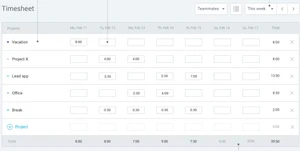
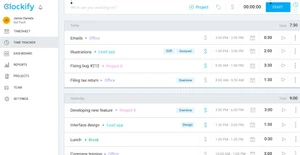
clockify timesheet
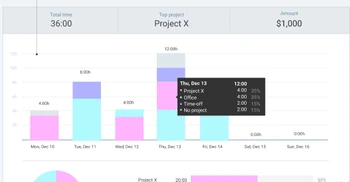
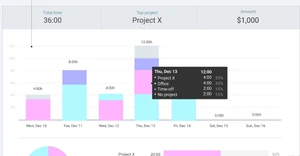
clockify summary
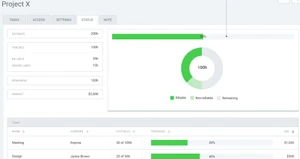
clockify project x

Clockify

Brand: Clockify

  • 4.5

  • 2 Ratings & 2 Reviews

Clockify is attendance management software designed to track employee work hours, attendance, and time-off requests.

See More

Have you used Clockify before?

Share your insights for better experience

Add a Review
Starting Price
$5

View plans

100% Genuine
Products
Best Price
Guaranteed
Safe & Secure
Payment
  • Description

  • Pricing

  • Features

  • Specification

  • Review

  • Compare

  • Alternatives

  • FAQ

Starting at $5

Clockify Software Overview

What is Clockify?

Clockify is an advanced attendance management software tailored to streamline employee work hours, attendance, and time-off request tracking. It offers comprehensive features for recording clock-in and clock-out times, managing shifts, and generating attendance reports. With its user-friendly interface, Clockify simplifies the process of monitoring employee attendance and ensures accurate payroll calculations.

The software also facilitates seamless integration with payroll systems for efficient payroll processing. Clockify helps organizations maintain compliance with labor regulations and optimize workforce management strategies.

Why Choose Clockify Software?

  • Comprehensive time tracking: It offers robust features for tracking work hours, projects, and tasks, providing accurate data for payroll and productivity analysis.
  • User-friendly interface: With its intuitive design, It is easy to use for both employees and managers, minimizing training time and maximizing adoption.
  • Flexibility and scalability: It is scalable to meet the needs of businesses of all sizes and flexible enough to adapt to various industries and workflows.
  • Cost-effectiveness: It offers a free version with essential features and affordable pricing plans for additional functionality, ensuring cost-effectiveness for organizations.
  • Integration capabilities: It seamlessly integrates with other tools and systems, such as project management software and payroll systems, enhancing workflow efficiency.
  • Transparency and accountability: By providing transparent and accurate time-tracking data, we promote employee accountability and help managers make informed decisions.

Benefits of Clockify Platform

  • Enhanced productivity: It enables organizations to identify time-wasting activities and optimize workflows, leading to increased productivity and efficiency.
  • Improved project management: Detailed time tracking data helps project managers monitor progress, allocate resources effectively, and make informed decisions.
  • Better resource allocation: Tracking time spent on different tasks and projects allows organizations to allocate resources more accurately and optimize project budgets.
  • Remote work support: Its cloud-based platform and mobile app enable seamless time tracking for remote workers, ensuring accurate records regardless of location.
  • Compliance management: It helps organizations comply with labor regulations by accurately tracking work hours, breaks, and overtime, reducing the risk of non-compliance issues.
  • Enhanced employee satisfaction: By providing transparency and autonomy over time tracking, trust and transparency within the organization are promoted, leading to higher employee satisfaction.

Pricing of Clockify Attendance Management Software

Clockify pricing in India starts from $5 on techjockey.com.

The pricing model is based on different parameters, including extra features, deployment type, and the total number of users. If you have further queries related to the product, you can contact our product team to learn more about the pricing and offers.

Read more

Clockify Company Details

Founded Year:  2017

The only 100% free time tracking software

Director/Founders Nenad Milanovic
Company Size 1-100 Employees

Clockify Pricing & Plans

BASIC
Starting at $5
    • Licenses

      Licenses
      Licenses
    • Monthly

      Monthly
      Monthly

Key Features

  • Add time for others

  • Required fields

  • Bulk edit

  • Decimal format

  • Time audit

  • Hide time & pages

STANDARD
Starting at $7
    • Licenses

      Licenses
      Licenses
    • Monthly

      Monthly
      Monthly

Key Features

  • All BASIC features

  • Invoicing

  • Approval

  • Lock time

  • Attendance & overtime

  • Time off

PRO
Starting at $10
    • Licenses

      Licenses
      Licenses
    • Monthly

      Monthly
      Monthly

Key Features

  • All STANDARD features

  • Forecasting

  • Expenses

  • Labor cost & profit

  • Budget & estimates

  • Scheduling

ENTERPRISE
Starting at $15
    • Licenses

      Licenses
      Licenses
    • Monthly

      Monthly
      Monthly

Key Features

  • All PRO features

  • Custom subdomain

  • Control accounts

  • Audit log

  • Single sign-on (SSO)

Clockify Features

  • icon_check Scheduling
    Allows users to schedule tasks and appointments efficiently.
  • icon_check Invoicing
    Enables users to create and send invoices based on tracked time and expenses.
  • icon_check Calendar
    Provides a calendar view to organize and plan tasks and events.
  • icon_check Integrations
    Seamlessly integrates with other tools and software for enhanced functionality.
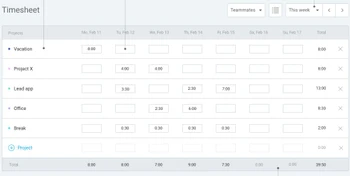
  • icon_check Timesheets
    Allows users to track and manage their work hours and activities.
  • icon_check Dashboards
    Offers a centralized dashboard for users to monitor their time tracking data and performance.
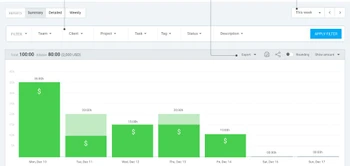
  • icon_check Reports
    Generates detailed reports on time tracking, project progress, and productivity.
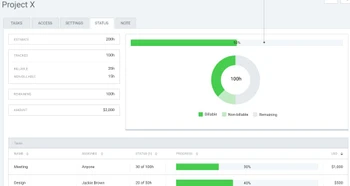
  • icon_check Projects
    Organize tasks and activities into projects for better management and tracking.
  • icon_check Custom Fields
    Allows users to customize data fields to fit specific project or task requirements.
  • icon_check Access Anywhere, Any Time
    Provides access to the software from any device with an internet connection, offering flexibility and convenience for users.

Clockify Specifications

Supported Platforms
Ubuntu Ubuntu Windows Windows iOS iOS Android Android MacOS MacOS Linux Linux
Devices
Desktop Desktop Mobile Mobile Tablet Tablet iPad iPad
Deployment
Cloud-Based Cloud-Based
Suitable For
All Industries
Business Specific
All Businesses
Business Size
Small Business Startups Medium Business Enterprises
Customer Support
Email Communities
Language
English
Training Resources
Videos

Explore the Best Alternative Solutions Similar to Your Business Size and Needs

Clockify Reviews

4.5

Out of 5

img

Overall Rating

Based on
2 Verified Reviews

Rating Breakdown

  • Features 4.5
  • Value for Money 4.2
  • Ease of Use 4.7
  • Customer Support 4.5

95% Recommend this Product

Add Review

Clockify Video Review

youtubeVideoId

4.3

“Clockify Review: How a Time Management Coach Uses Time Tracking”

Review by: Garland Coulson

Madhu M.Nair

Chief Technology Officer

Industry: IT User since: < 6 months

4.7

Reviewed on: Jul 9, 2023

Techjockey Verified

“This app is very user friendly.”

Pros

The application makes it very easy to create tasks based on projects/ clients. It has a easy to view calendar and generates time sheet.

Cons

cannot run 2 parallel task at the same time . cant find import time sheet

Switched from eAttendence

Compare Clockify With other Attendance Management Software

Products
Ratings
Pricing
Device Supported
Deployment
Supported Platforms
  • img

    Clockify

  • 4.5

  • Price On Request

  • Desktop

    Mobile

  • Web based

    On Premises

  • Windows

    Mac OS

  • img

    Nialabs

  • 5

  • Price On Request

  • Desktop

    Mobile

  • Web based

    On Premises

  • Windows

    Mac OS

  • img

    PagarGuru

  • 4.3

  • ₹ 500

  • Desktop

    Mobile

  • Web based

    On Premises

  • Windows

    Mac OS

  • img

    Spryple

  • 4.2

  • Price On Request

  • Desktop

    Mobile

  • Web based

    On Premises

  • Windows

    Mac OS

  • img

    Hajiri

  • 4.3

  • ₹ 69

  • Desktop

    Mobile

  • Web based

    On Premises

  • Windows

    Mac OS

  • img

    Tempus Central

  • 4.3

  • Price On Request

  • Desktop

    Mobile

  • Web based

    On Premises

  • Windows

    Mac OS

  • img

    NoQu TAM

  • 4.1

  • Price On Request

  • Desktop

    Mobile

  • Web based

    On Premises

  • Windows

    Mac OS

(2) Product(s) selected

Clockify Alternatives

See All Clockify Alternatives

Available

Price on Request

Starting Price:

₹600 /Month

Starting Price:

₹69 /Month

Available

Price on Request

Starting Price:

₹200 /Month

Available

Price on Request

FRAS

4.0

Available

Price on Request

Starting Price:

$500 /Month

Articles for Clockify

See All Related Articles

Which operating system does Clockify Software Support?

Clockify Software is compatible with Ubuntu, Windows, Linux, and macOS.

Is there any Clockify App?

Yes, Clockify Software is available for Android and iOS app users.

What is the deployment type of Clockify Software?

Clockify Software supports web-based deployment.

How much does Clockify Software Cost?

Clockify price in India starts at $5 at techjockey.com.

Who are the potential users of Clockify Software?

Clockify Software is typically used by all industries for payroll and productivity analysis.

Is there any free demo for Clockify Software?

Yes, a demo of Clockify is available at techjockey.com.

Is Clockify Software Free?

Clockify software is available for free.

Does Clockify offer a free trial?

Yes, Clockify attendance management software offers a free trial to users.

How can you download Clockify Software?

Clockify Software installation is not required, as it is web-based. Just open the Setup Wizard to get started.

How does Clockify Software Work?

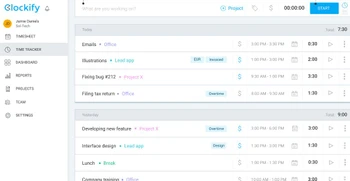
Clockify software works by allowing users to track their time spent on tasks and projects, providing insights for productivity analysis, project management, and invoicing purposes.

20,000+ Software Listed

Best Price Guranteed

Free Expert Consultation

2M+ Happy Customers

Terms and Condtions

close

Users with registered businesses can purchase goods from merchants on the platform to satisfy their business needs. Users are not permitted to utilize any products acquired through the platform for resale, advertising, business, or further distribution.

For each purchase made, users will receive a Tax Invoice (or 'GST invoice') that includes specific details such as:

  • the GSTIN of the user associated with their registered business, and

  • the specified Entity Name for their business.

It should be noted that not all products are eligible for GST Invoice. Only the products displayed by participating sellers with the 'GST-based Invoice Available' callout on the product description page would qualify.

Certain goods and services are not eligible to get a GST Invoice, including items with VAS, i.e., Value Added Services (e.g., Total Mobile Protection/Assured Buyback) and those involving an exchange offer at the time of purchase.

Users must ensure the accuracy of the GSTIN, and business entity name provided for the GST Invoice. Requests for corrections into GST Invoice would not be accommodated by Techjockey.com or any Seller, and any issues arising from user-provided information are the sole responsibility of users.

Techjockey.com is not liable for the GST Invoice or any associated input tax credit. To efficiently claim an input tax credit, users should select the registered place of business address as per the GST authority's data and follow the provisions of the GST Act and rules.

To claim an input tax credit, the delivery and billing addresses must match. Furthermore, input tax credits will not be granted if the delivery address and GSTIN on the invoice are from different states. In case of incorrect GST details provided during the order placement, the order will be canceled automatically.