linkedin
ClickHCM logo
play About To ClickHCM
ClickHCM Hrms
ClickHCM Income

ClickHCM

Brand: ClickHCM

  • 4.6

  • 5 Ratings & 1 Review

ClickHCM is a top of the line HR management software for companies. The software provides enterprise-standard solution for organizations. It helps in monitoring different types of tasks such as performance assessment, payroll, attendance calculation, etc. for the entire workforce. This HCM software is highly acclaimed for its scalability and reliability. The HRMS software is built on Oracle RDBMS...

See More

Have you used ClickHCM before?

Share your insights for better experience

Add a Review
Starting Price
₹20 excl.GST
₹ 24 incl. GST

View plans

100% Genuine
Products
Best Price
Guaranteed
Safe & Secure
Payment
  • Description

  • Pricing

  • Features

  • Specification

  • Review

  • Compare

  • Alternatives

  • FAQ

Starting at ₹20

ClickHCM Software Overview

What is ClickHCM?

ClickHCM is a top of the line HR management software for companies. The software provides enterprise-standard solution for organizations. It helps in monitoring different types of tasks such as performance assessment, payroll, attendance calculation, etc. for the entire workforce. This HCM software is highly acclaimed for its scalability and reliability. The HRMS software is built on Oracle RDBMS platform to deliver high levels of security and performance. Offices can setup the software as per their guidelines and set incoming time, outgoing time, monthly salary delivery date, etc. 

ClickHCM aims to boost transparency while simultaneously reducing the rate of error and administrative costs. Companies are empowered to streamline their HR operations through process automation and integration. The software helps companies to digitize their daily activities and modify the organizational structure for enhanced workforce utilization.

How does ClickHCM HCM portal help with the workforce management? 

ClickHCM offers unique features for organizations to keep track of their employee’s performance. The software helps in maintaining a company-wide list of Key Performance Areas (KPAs). It allows managers to get a bird’s eye view of all the responsibilities the employee’s and their progress on daily basis. These KPAs can be further categorized based on designations and departments to ease the performance tracking process.  

Furthermore, it allows managers to properly define and supervise the performance metrics for an employee based on their Key Performance Indicators (KPIs) and Key Result Indicator (KRIs). The software enables users to set different performance management cycles for different employees to make sure that they work at their maximum capacity without feeling the stress.   

What are the features offers by ClickHCM HRMS software? 

Here are some key features offered by ClickHCM: 

  1. Recruitment and onboarding management 
  2. Employee management 
  3. Leave management 
  4. Attendance management 
  5. Payroll management 
  6. Performance evaluation 
  7. Expense management 

What is the price of ClickHCM human capital management software? 

ClickHCM is available in 4 different plans, these are: 

  1. Basic – ₹ 20/- per month per employee 
  2. Standard – ₹ 30/- per month per employee 
  3. Professional – ₹ 40 per month per employee 
  4. Enterprise – ₹ 50 per month per employee
Read more

ClickHCM Pricing & Plans

Basic

Calculated Price

20 Exclusive of all taxes
    • Users (Employee(s))

      Users (Employee(s))
      Users (Employee(s))
    • Monthly (Month(s))

      Monthly (Month(s))
      Monthly (Month(s))

Key Features

  • Leave Management

  • Attendance Management

  • Core HR Management

  • Reports

Standard

Calculated Price

30 Exclusive of all taxes
    • Users (Employee(s))

      Users (Employee(s))
      Users (Employee(s))
    • Monthly (Month(s))

      Monthly (Month(s))
      Monthly (Month(s))

Key Features

  • Leave Management

  • Attendance Management

  • Core HR Management

  • Payroll Management

  • Reports

Professional

Calculated Price

40 Exclusive of all taxes
    • Users (Employee(s))

      Users (Employee(s))
      Users (Employee(s))
    • Monthly (Month(s))

      Monthly (Month(s))
      Monthly (Month(s))

Key Features

  • Leave Management

  • Attendance Management

  • Core HR Management

  • Payroll Management

  • Employee Expense Management

  • Reports

Enterprise

Calculated Price

50 Exclusive of all taxes
    • Users (Employee(s))

      Users (Employee(s))
      Users (Employee(s))
    • Monthly (Month(s))

      Monthly (Month(s))
      Monthly (Month(s))

Key Features

  • Leave Management

  • Attendance Management

  • Core HR Management

  • Payroll Management

  • Employee Expense Management

  • Reports

  • Training Management

ClickHCM Features

  • icon_check Training Management
    ClickHCM offers training module which can be used by HR teams to guide new joiners.
  • icon_check Leave Management
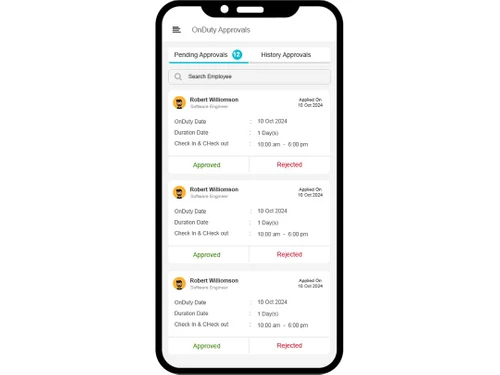
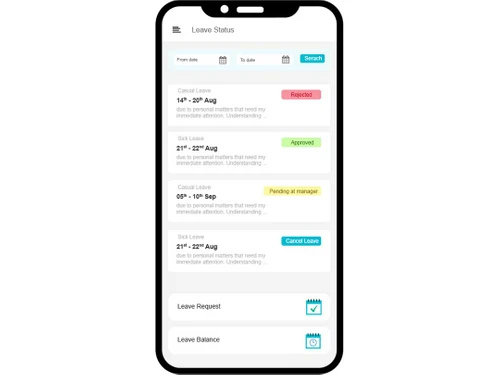
    Employees can use this software to apply for their leaves and get them approved by their managers.
  • icon_check Attendance Management
    The software helps track attendance of the entire workforce through biometric device. It also provides location-based time
  • icon_check Core HR Management
    This HRMS software supports all the core HRMS activities which are required to be performed, such as, staffing, compensation,
  • icon_check Payroll Management
    HR teams are equipped to calculate the salaries of the entire workforce from the software.
  • icon_check Organization Structure
    Business owners can use ClickHCM to create proper hierarchies and structure within their organization.
  • icon_check Dashboards
    The dashboard feature provides detailed visibility into the productivity of the entire workforce. It accounts for details such as
  • icon_check Employee Expense Management
    This HRMS software offers a comprehensive view of all the expenses that are made on an employee to quantify their output for
  • icon_check Project Management
    This HCM portal empowers organizations to manage their projects seamlessly. Managers/business owners can track the progress of
  • icon_check Reports
    Business owners, HR teams and managers can access insightful reports regarding an employee’s performance.
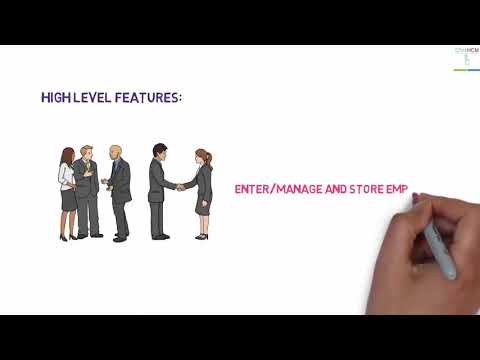
ClickHCM Demo Video play icon

Get ClickHCM Demo

Watch the demo video to explore key features, real workflows, and how the software fits your business needs.

Understand
Key Features
Personal
Demo Insights
Interactive
Demo Support

ClickHCM Specifications

Supported Platforms
Windows Windows iOS iOS Android Android
Devices
Desktop Desktop Mobile Mobile
Deployment
Cloud-Based Cloud-Based
Suitable For
All Industries
Business Specific
All Businesses
Language
English

Explore the Best Alternative Solutions Similar to Your Business Size and Needs

ClickHCM Review

4.6

Out of 5

img

Overall Rating

Based on
1 Verified Review

Rating Breakdown

  • Features 4.4
  • Value for Money 4.3
  • Ease of Use 4.9
  • Customer Support 4.8

86% Recommend this Product

Add Review

siva

Chief Marketing Officer

Industry: Manufacturing

5

Reviewed on: Nov 15, 2024

Techjockey Verified

“Enterprise product”

Enterprise product built for Large users group.

Pros

User-friendly and customizable according to organization requirements.

Cons

Implementation Timeline

Compare ClickHCM With other HR Software

Products
Ratings
Pricing
Device Supported
Deployment
Supported Platforms
  • img

    ClickHCM

  • 4.6

  • ₹ 20.00 excl. GST

  • Desktop

    Mobile

  • Web based

    On Premises

  • Windows

    Mac OS

  • img

    Spine HR

  • 4.3

  • Price On Request

  • Desktop

    Mobile

  • Web based

    On Premises

  • Windows

    Mac OS

  • img

    ClusterHR

  • 5

  • ₹ 40

  • Desktop

    Mobile

  • Web based

    On Premises

  • Windows

    Mac OS

  • img

    Fix HR

  • 4.9

  • ₹ 600

  • Desktop

    Mobile

  • Web based

    On Premises

  • Windows

    Mac OS

  • img

    Zfour HRMS

  • 4.9

  • ₹ 45

  • Desktop

    Mobile

  • Web based

    On Premises

  • Windows

    Mac OS

  • img

    WeekMate

  • 4.7

  • ₹ 3999

  • Desktop

    Mobile

  • Web based

    On Premises

  • Windows

    Mac OS

  • img

    SignalHRM

  • 4.6

  • ₹ 648

  • Desktop

    Mobile

  • Web based

    On Premises

  • Windows

    Mac OS

  • img

    WoCo

  • 4.8

  • ₹ 50

  • Desktop

    Mobile

  • Web based

    On Premises

  • Windows

    Mac OS

  • img

    Presence360

  • 4.9

  • ₹ 2999

  • Desktop

    Mobile

  • Web based

    On Premises

  • Windows

    Mac OS

  • img

    TruHR

  • 4.9

  • ₹ 2200

  • Desktop

    Mobile

  • Web based

    On Premises

  • Windows

    Mac OS

  • img

    Keka HR

  • 4.4

  • Price On Request

  • Desktop

    Mobile

  • Web based

    On Premises

  • Windows

    Mac OS

(0) Product(s) selected

ClickHCM Alternatives

See All ClickHCM Alternatives

Starting Price:

₹600 /Month ₹900

SAVE UPTO 33%

Starting Price:

₹2,200 /Month

Starting Price:

₹49 /Month

Starting Price:

₹890 /Month
Starting Price:

₹1,499 /Month

Starting Price:

$49 /Month

Available

Price on Request

Starting Price:

₹5,000 /Month

Articles for ClickHCM

See All Related Articles

How many employees can onboard in ClickHCM?

There is no upper limit to the number employees that can be added in ClickHCM. The HRMS software uses the per employee pricing system which allows business owners to manage as many employees as they want.

Where does ClickHCM save all the data?

ClickHCM uses a cloud-based system to save the operational data online and make it readily accessible across different platforms and remotely.

Which smartphone platforms does ClickHCM support?

ClickHCM app is available for both Android and iPhone platforms.

Can I get a demo for ClickHCM?

Yes, ClickHCM is available for a demo before purchase at Techjockey. Please request a call to get your demo scheduled for better product understanding.

Can I define working shifts in ClickHCM?

Yes, you can define working shifts and working days for the company and inform your employees about these accordingly.

20,000+ Software Listed

Best Price Guranteed

Free Expert Consultation

2M+ Happy Customers

Terms and Condtions

close

Users with registered businesses can purchase goods from merchants on the platform to satisfy their business needs. Users are not permitted to utilize any products acquired through the platform for resale, advertising, business, or further distribution.

For each purchase made, users will receive a Tax Invoice (or 'GST invoice') that includes specific details such as:

  • the GSTIN of the user associated with their registered business, and

  • the specified Entity Name for their business.

It should be noted that not all products are eligible for GST Invoice. Only the products displayed by participating sellers with the 'GST-based Invoice Available' callout on the product description page would qualify.

Certain goods and services are not eligible to get a GST Invoice, including items with VAS, i.e., Value Added Services (e.g., Total Mobile Protection/Assured Buyback) and those involving an exchange offer at the time of purchase.

Users must ensure the accuracy of the GSTIN, and business entity name provided for the GST Invoice. Requests for corrections into GST Invoice would not be accommodated by Techjockey.com or any Seller, and any issues arising from user-provided information are the sole responsibility of users.

Techjockey.com is not liable for the GST Invoice or any associated input tax credit. To efficiently claim an input tax credit, users should select the registered place of business address as per the GST authority's data and follow the provisions of the GST Act and rules.

To claim an input tax credit, the delivery and billing addresses must match. Furthermore, input tax credits will not be granted if the delivery address and GSTIN on the invoice are from different states. In case of incorrect GST details provided during the order placement, the order will be canceled automatically.