linkedin
CheckTime logo
play How To Install Install Fingerprint Attendance Management System (Check Time Software) - CheckTime Demo
checktime attendance

CheckTime

Brand: CheckTime

  • 4.1

  • 4 Ratings

Simplify attendance tracking with AI-powered accuracy, payroll integration, and flexible shift scheduling for your business.

See More

Have you used CheckTime before?

Share your insights for better experience

Add a Review

Price Available on Request

Questions about pricing or customization? We’re here to help, just a click away.

100% Genuine
Products
Best Price
Guaranteed
Safe & Secure
Payment
  • Description

  • Pricing

  • Features

  • Specification

  • Review

  • Compare

  • Alternatives

  • FAQ

  • Questions

CheckTime Software Overview

What is CheckTime? 

CheckTime is an attendance management software built for offices to track the attendance and movement of employees. It has an easy-to-use interface that allows the HR and admin teams to get familiar with the software instantly. It makes their work easier by providing a centralized database. This database can store the personal information of employees for instant access whenever required. It uses the biometric verification process for conducting attendance. It has low FAR and FRR rates for users to record attendance with high levels of accuracy.

Check-Time attendance management system has a simple but intuitive time-tracking function. The software offers real-time insights into attendance data of the organization which reduces the workload of monitoring every employee’s incoming and outgoing timings manually. Furthermore, it automatically calculates the payroll for the entire workforce by incorporating leaves, overtime, etc. 

Features of CheckTime Attendance Management Software

  • Payroll exporting capabilities: Quickly transfer the timings of the employees into the payroll software to minimize time and avoid mistakes in computing salaries.
  • Leave and time off management: Coordinate schedules and vacation and sick requests in such a way that business processes will not be interrupted, and necessary staffing levels will be maintained.
  • Shift scheduling management: Schedule all shifts that your employee may work and do it smoothly so that there will be no conflict in work or unnecessary overtime.
  • Employee data management: Essentials to keep include, Employee contact details, basic personal information, and job positions to mention a few can all be stored and accessed in one central location.
  • Easy-to-use interface: Easy-to-understand system that demands little time to be trained so that any employee or manager can use the system with great efficiency.
  • Biometric verification system: Fingerprint or facial recognition enables clock in and out for easy attendance recording and security of employees.
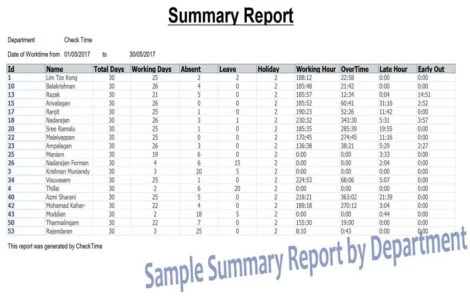
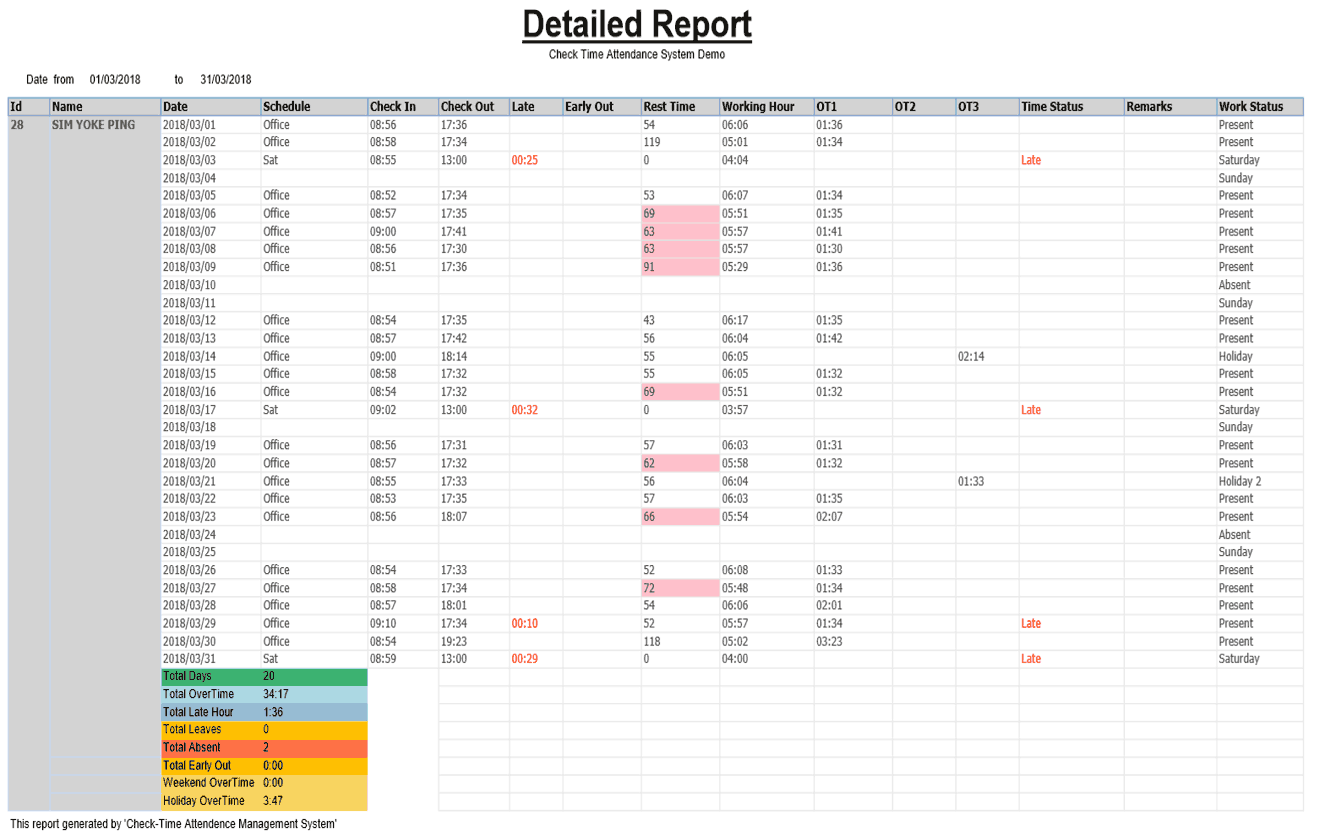
  • Effective real-time reporting: Produce attendance, overtime, and other working information in a flash to optimize decision-making processes.

Why Choose CheckTime?

  • AI-Powered Automation: Facial and biometric ID is used to automatically track attendance with not much effort and the accuracy is relatively high.
  • Error-Free Attendance: Using facial recognition and biometric identification, eliminates such mistakes as buddy punching and wrong clock-in times.
  • Smart Workforce Management: The system studies employees’ information to offer the identified key value in saving time to perform time checks while helping organize institutions’ resources and timetables.
  • Data Security: Employees’ information is securely independent and easily processed through a company’s database, thus restricting privacy for all users.
  • Industry Versatility: It uses biometric data capturing across multiple sectors including the health sector, retail, and manufacturing hence ensuring it meets different needs.
  • Experienced Workforce Solution: It has been developed with over 10 years of expertise in time management and has been changed and improved regularly to suit the modern workforce.

Benefits of using CheckTime Attendance Management Software

Here are a few benefits that organizations can reap from using the CheckTime attendance management system: 

  • It improves employee productivity by removing the use of manual timecards. 
  • It avoids the trouble of maintaining paper records for every employee’s attendance. 
  • The software reduces the payroll processing time by automating the entire process. 
  • CheckTime attendance management software helps with the better management of flexible work shifts of employees. 
  • It allows HR teams to monitor the attendance of employees from remote locations. 
  • The attendance monitoring software is developed to analyze and remove time theft activities, such as buddy punching. 

Pricing of CheckTime

CheckTime attendance management system price varies and further details are available on request at Techjockey.com. Please request a callback for subscription-related details.

Read more

CheckTime Pricing & Plans

Looking for The Right Pricing?

Share your requirements and get a plan built around your business.

  • Define your business needs
  • Get customised pricing
  • Choose features that fit your workflow

Price Available on Request

Get personalised CheckTime pricing that fits your needs. Our team will connect with you.

CheckTime Features

  • icon_check Easy to Use
    The software has an easy to use interface that requires little to no training to get familiar with.
  • icon_check Employee Database
    Companies can save all the personal information of employees such as designation, phone number, email addresses, etc. in the
  • icon_check Time Tracking
    The software enables companies to check incoming and outgoing timings of the entire workforce.
  • icon_check Attendance & Leave Management
    Check-Time allows employees to file for attendance and leaves seamlessly from the software and all of it is recorded in their
  • icon_check Time Shift Management
    HR teams can schedule work shifts for employees to make sure that they can optimize their resources and workforce properly.
  • icon_check Leave & Attendance Management
  • icon_check Payroll Processing
    The software has the capability to calculate the salary of the entire workforce based on their leaves, attendances, absents,
  • icon_check Reporting
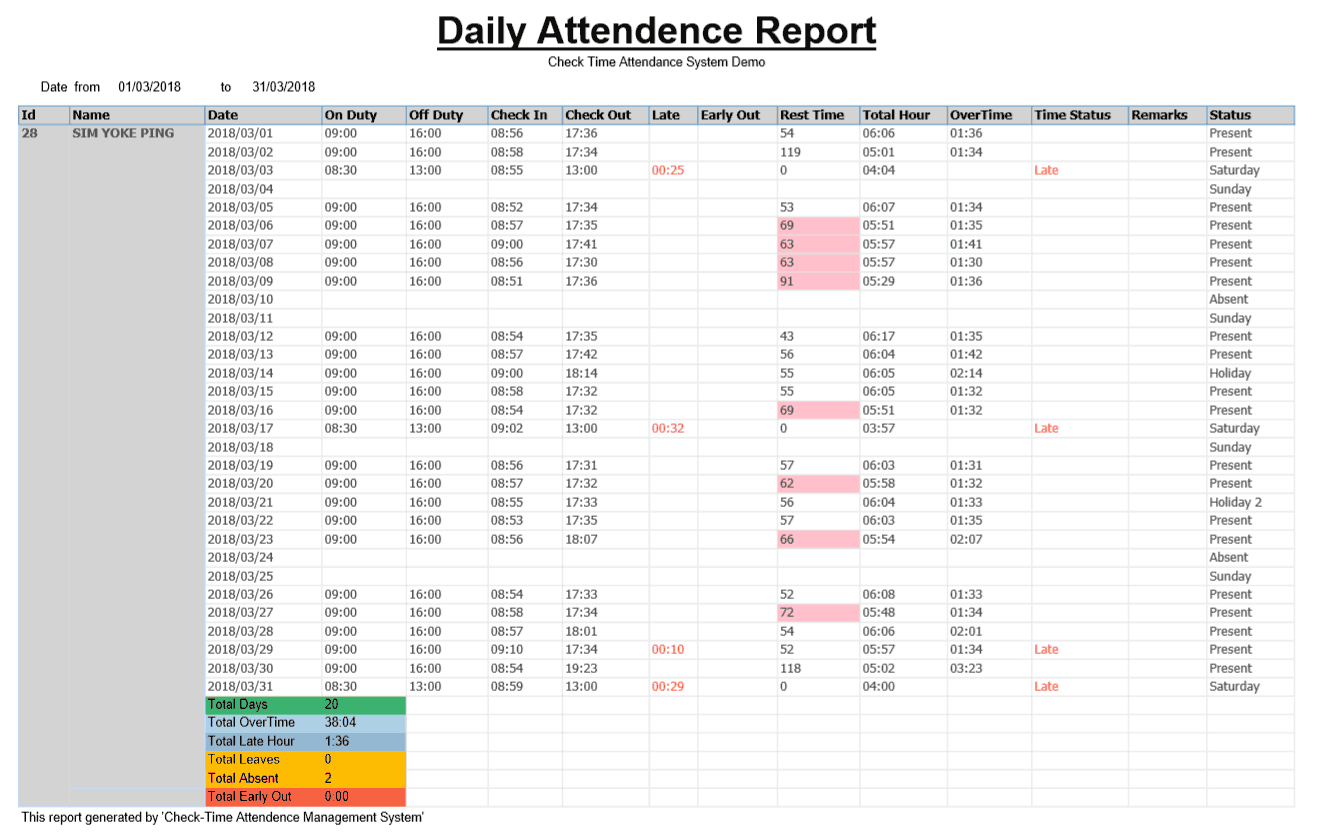
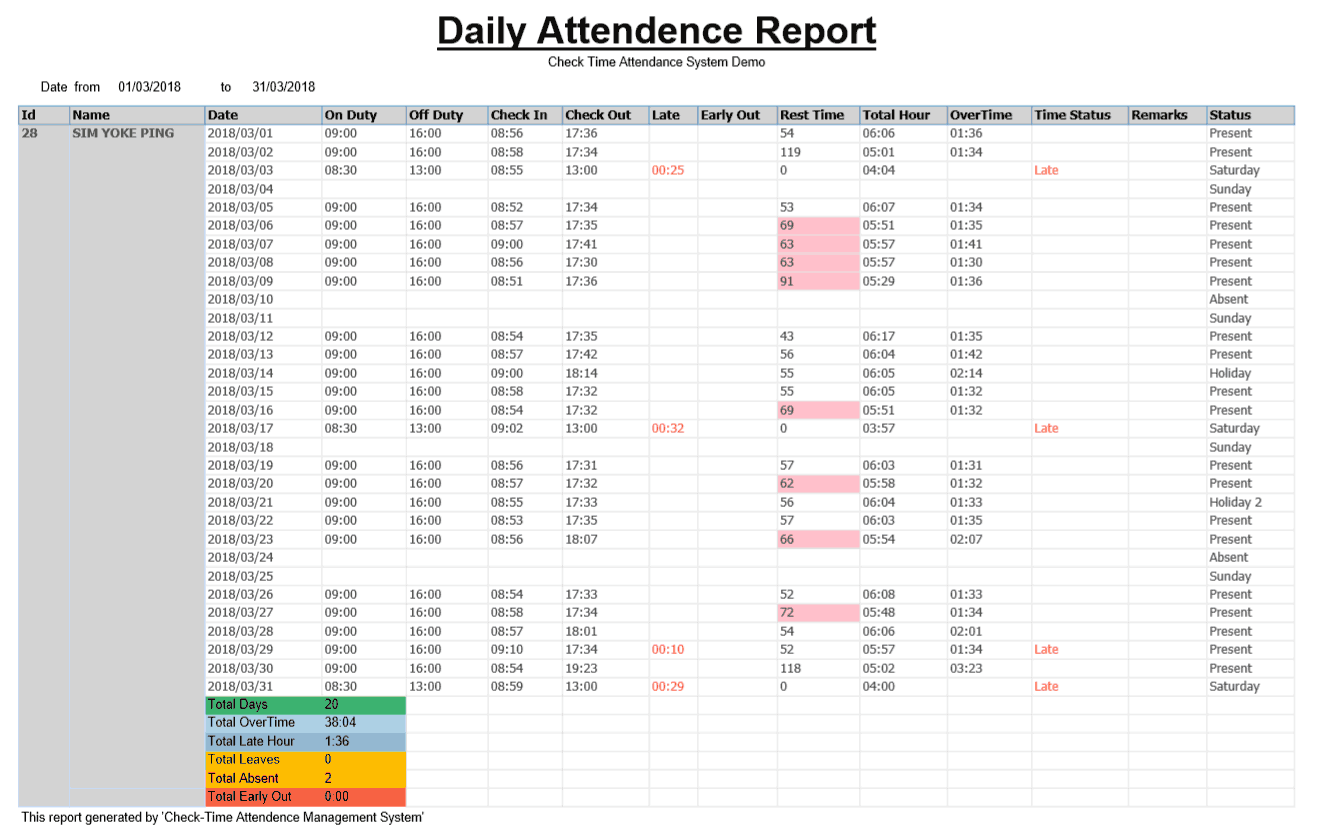
    The software generates automated reports for employee worktime, absenteeism, attendance irregularity, etc.
CheckTime Demo Video play icon

Get CheckTime Demo

Watch the demo video to explore key features, real workflows, and how the software fits your business needs.

Understand
Key Features
Personal
Demo Insights
Interactive
Demo Support

CheckTime Specifications

Supported Platforms
Ubuntu Ubuntu Windows Windows MacOS MacOS Linux Linux
Devices
Desktop Desktop Mobile Mobile Tablet Tablet iPad iPad
Deployment
Cloud-Based Cloud-Based
Suitable For
All Industries
Business Specific
All Businesses
Business Size
Small Business Startups Medium Business Enterprises
Customer Support
Email Communities
Language
English
Training Resources
Videos

Explore the Best Alternative Solutions Similar to Your Business Size and Needs

CheckTime Review

4.1

Out of 5

img

Overall Rating

Based on
4 Verified Ratings

Rating Breakdown

  • Features 4.3
  • Value for Money 4.6
  • Ease of Use 3.6
  • Customer Support 4.1

95% Recommend this Product

Add Review

Techjockey Trusted Reviews from Verified Users

No reviews are currently available for CheckTime. Discover similar Attendance Management Software reviews

  • Kent CamAttendance

    4.4

    Whats great - Affordable pricing, robust features, excellent customer support. read more

  • truMe Attendance Management

    4.9

    Whats great - Rule based configuration help you apply your policy on need basis read more

  • RollCall Attendance

    4.4

    Whats great - Techjockey was very helpful in taking my listed requirements and narrowing my search to a usable list of providers. Techjocke... read more

Compare CheckTime With other Attendance Management Software

Products
Ratings
Pricing
Device Supported
Deployment
Supported Platforms
  • img

    CheckTime

  • 4.1

  • Price On Request

  • Desktop

    Mobile

  • Web based

    On Premises

  • Windows

    Mac OS

  • img

    Nialabs

  • 5

  • Price On Request

  • Desktop

    Mobile

  • Web based

    On Premises

  • Windows

    Mac OS

  • img

    PagarGuru

  • 4.3

  • ₹ 500

  • Desktop

    Mobile

  • Web based

    On Premises

  • Windows

    Mac OS

  • img

    Spryple

  • 4.2

  • Price On Request

  • Desktop

    Mobile

  • Web based

    On Premises

  • Windows

    Mac OS

  • img

    Hajiri

  • 4.3

  • ₹ 69

  • Desktop

    Mobile

  • Web based

    On Premises

  • Windows

    Mac OS

  • img

    Tempus Central

  • 4.3

  • Price On Request

  • Desktop

    Mobile

  • Web based

    On Premises

  • Windows

    Mac OS

  • img

    NoQu TAM

  • 4.1

  • Price On Request

  • Desktop

    Mobile

  • Web based

    On Premises

  • Windows

    Mac OS

(2) Product(s) selected

CheckTime Alternatives

See All CheckTime Alternatives

Available

Price on Request

Starting Price:

₹600 /Month

Starting Price:

₹69 /Month

Available

Price on Request

Starting Price:

₹200 /Month

Available

Price on Request

FRAS

4.0

Available

Price on Request

Starting Price:

$500 /Month

Articles for CheckTime

See All Related Articles

Does CheckTime comply with labor laws for payroll?

Yes, Check-Time complies with all the labor laws for payroll processing including overtime regulations.

What are the system requirements for CheckTime?

This attendance management software is a web application, which makes it accessible from any device through an internet browser.

How can I reduce overtime costs through CheckTime?

You can proactively adjust the work schedules of your employees to reduce overtime costs.

How can my employees file for leaves in CheckTime?

Employees are provided with a self-service portal that enables them to file for leaves and check their leave balance.

Where does CheckTime host the office data?

It saves all the workflow data on a cloud-based storage service.

Does CheckTime attendance management software offer a free trial?

Yes, it offers a free trial so that every user can use the software before deciding on purchasing it.

What is the cost of the CheckTime attendance management system?

This depends on the needs of your business and the rates charged will also differ. Contact Techjockey.com to get a personalized quote.

How to download CheckTime software?

Go to the official website, create an account, and get the software from the main option 'Download'.

CheckTime Questions

A:

To edit leave management in CheckTime for time attendance, follow the steps given below:

  • Open CheckTime
  • Navigate to the Leave Management tab
  • Choose the leave record to edit
  • Alter it as per your requirements
  • Hit Save
Hardik • Dec 2, 2024
A:

To import an Excel employee list into CheckTime, follow the steps given below:

  • Open CheckTime
  • Navigate to the Employee Management tab
  • Click on Import Employees
  • Upload your Excel file
  • Map the data fields
  • Confirm the import
Vimala Sivakumar • Dec 1, 2024
A:

To upload employee data to the fingerprint device in CheckTime, follow the steps given below:

  • Open CheckTime
  • Export the employee data
  • Transfer it to a USB drive
  • Insert the USB into the device
  • Import the data.
dayaram upadhyay • Dec 1, 2024
Q:

How do I view reports in CheckTime?

Ramees • Nov 30, 2024
A:

To view reports in CheckTime, follow the steps given below:

  • Open CheckTime
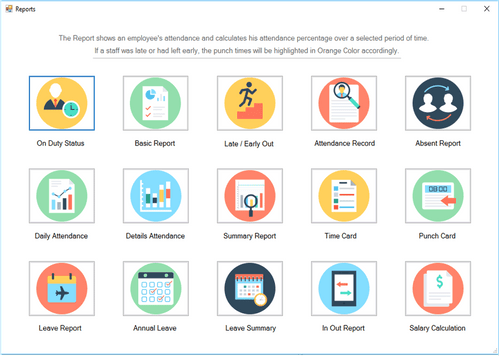
  • Navigate to the Reports section
  • Choose the desired report type
  • Filter by date or employee
  • Generate and download the report as needed
Harsh kanth • Dec 2, 2024
A:

To assign a temporary shift to an employee schedule in CheckTime, follow the steps given below:

  • Open CheckTime
  • Open the employee schedule
  • Click Assign Shift
  • Select a temporary shift
  • Save it
Hasan • Nov 30, 2024
See All CheckTime Questions

20,000+ Software Listed

Best Price Guranteed

Free Expert Consultation

2M+ Happy Customers

Terms and Condtions

close

Users with registered businesses can purchase goods from merchants on the platform to satisfy their business needs. Users are not permitted to utilize any products acquired through the platform for resale, advertising, business, or further distribution.

For each purchase made, users will receive a Tax Invoice (or 'GST invoice') that includes specific details such as:

  • the GSTIN of the user associated with their registered business, and

  • the specified Entity Name for their business.

It should be noted that not all products are eligible for GST Invoice. Only the products displayed by participating sellers with the 'GST-based Invoice Available' callout on the product description page would qualify.

Certain goods and services are not eligible to get a GST Invoice, including items with VAS, i.e., Value Added Services (e.g., Total Mobile Protection/Assured Buyback) and those involving an exchange offer at the time of purchase.

Users must ensure the accuracy of the GSTIN, and business entity name provided for the GST Invoice. Requests for corrections into GST Invoice would not be accommodated by Techjockey.com or any Seller, and any issues arising from user-provided information are the sole responsibility of users.

Techjockey.com is not liable for the GST Invoice or any associated input tax credit. To efficiently claim an input tax credit, users should select the registered place of business address as per the GST authority's data and follow the provisions of the GST Act and rules.

To claim an input tax credit, the delivery and billing addresses must match. Furthermore, input tax credits will not be granted if the delivery address and GSTIN on the invoice are from different states. In case of incorrect GST details provided during the order placement, the order will be canceled automatically.