linkedin
CAE Fidesys logo
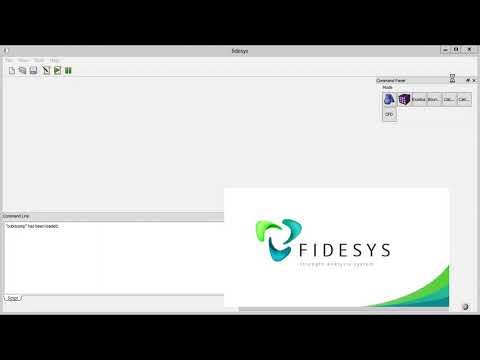
play Buckling simulation in CAE Fidesys
CAE Fidesys Description
CAE Fidesys Advantages

CAE Fidesys

Brand: Fidesys

  • 4.2

  • 5 Ratings

CAE Fidesys is an engineering software with tools for structural analysis, nonlinear dynamics, materials modeling, and thermal effects analysis.

See More

Have you used CAE Fidesys before?

Share your insights for better experience

Add a Review

Price Available on Request

Questions about pricing or customization? We’re here to help, just a click away.

100% Genuine
Products
Best Price
Guaranteed
Safe & Secure
Payment
  • Description

  • Pricing

  • Features

  • Specification

  • Review

  • Compare

  • Alternatives

  • FAQ

CAE Fidesys Software Overview

What is CAE Fidesys Software?

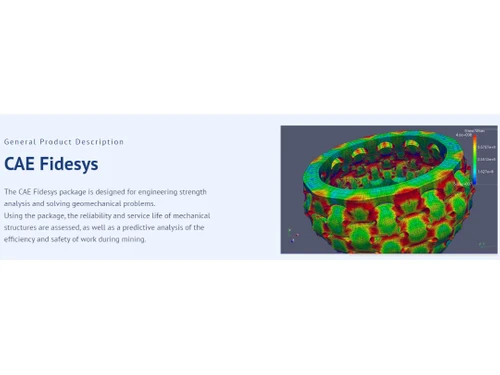
CAE Fidesys is computer aided software engineering tools. It is used for strength analysis and geomechanically problem-solving. The software comes with tools and user-friendly interfaces that help evaluate the mechanical structure reliability, predict mining operation efficiency, safety assessments, etc. It has wide use in industries like aerospace, mining, oil, and gas, etc., to carry out strength analysis, material property assessments, large deformation analysis, spectral elements methods, etc. It supports the usage of CAD model defects and can be integrated with Python for projects.

CAE Fidesys provides tools and features that evaluate mechanical structure reliability, assess material property changes, and assess the impact on structures and materials under the impact of external forces through computer-aided graphics models. It also carries out predictive and forecasting analyses and helps solve geomechanical problems. It also supports static as well as non-stationary dynamic structure analysis. It uses parallelization for problem-solving and graphical processing, thus making the computation time faster and reducing the analysis time.

Why Choose CAE Fidesys?

  • Strength Analysis: Supports the analysis of the strength of structures like turbine blades and assembled structures under various conditions through graphical analysis.
  • Forecast: It can help evaluate the data on the material's properties and make predictions on changes in productivity, for example, in oil and gas extraction.
  • Stability assessment: Can analyze quarry walls for stability during open-pit mining and help decrease the risk, thus making the mining operations safe.
  • Material evaluation: It can assess composite materials' strength and failure characteristics, which can help select the best materials for making reliable products.
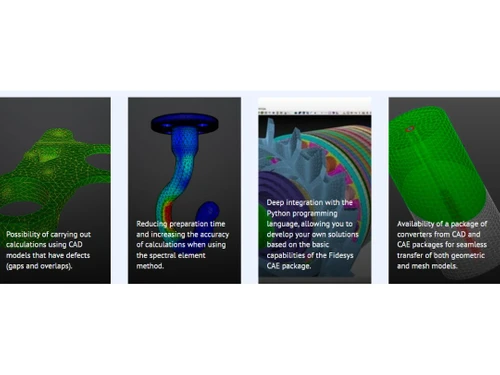
  • Customized Solution: Makes use of deep Python integration to develop customized solutions.

Benefits of CAE Fidesys Software

  • Structural safety: Helps identify structural weaknesses and material strengths, thus helping make products and structures meet safety standards.
  • Resource utilization: Evaluate mechanical structures that help allocate resources and minimize operational costs.
  • Predictive analytics: This can help in forecasting and predictive analysis in the oil and gas sector, like reservoir productivity, thus minimizing risks and efforts.
  • Innovative material design: It helps assess composite materials and thus helps develop advanced and reliable products.
  • Time and cost saving: It can perform calculations on CAD models with defects, such as gaps and overlaps, and thus can reduce the time and cost of preparing the models.

CAE Fidesys Pricing

CAE Fidesys' price details are available upon request at techjockey.com.

CAE Fidesys price in India may vary based on factors like customization, additional features required, number of users, and the deployment type. Please request a call back for subscription-related details and to avail yourself of offers on premium packages.

Read more

Fidesys Company Details

Founded Year:  2009

CAE Fidesys is an easy-to-use and effective tool for performing a full cycle of strength analysis — loading a CAD-model and its analysis, meshing, setting loads and the material mechanical properties, selecting and setting a FEM-solver, model calculation, and results visualization.

Director/Founders Vladimir A. Levin
Company Size 1-100 Employees

CAE Fidesys Pricing & Plans

Looking for The Right Pricing?

Share your requirements and get a plan built around your business.

  • Define your business needs
  • Get customised pricing
  • Choose features that fit your workflow

Price Available on Request

Get personalised CAE Fidesys pricing that fits your needs. Our team will connect with you.

CAE Fidesys Features

  • icon_check Strength Analysis
    Evaluate structural strength to ensure reliability under changing conditions and stress.
  • icon_check Nonlinear FEM Solver
    Make use of advanced numerical techniques for getting solutions to nonlinear engineering problems.
  • icon_check Physically nonlinear models of materials
    Capture real-world material behaviors for increasing accuracy in diverse mechanical analyses.
  • icon_check Thermomechanical Analysis
    Study material responses under thermal effects for assessment in changing environments.
  • icon_check Non-destructive Testing Simulation
    Simulate testing processes for product integrity and performance verification without damage.
  • icon_check Highly Accurate Description
    Provide detailed engineering insights, increasing the understanding of structural behaviors.
  • icon_check OpenMP/MPI Technologies
    Utilize parallel processing for faster and more efficient problem-solving in computational engineering tasks.
  • icon_check Linear static & dynamic strength problems
    Solve linear and dynamic strength problems to get detailed structural analysis.
  • icon_check Natural Frequencies Analysis
    Examine the inherent frequencies of structures, which are critical for avoiding resonance-related issues.
  • icon_check Critical Loads Analysis
    Identify and assess critical loads to prevent structural failure and ensure safety.
CAE Fidesys Demo Video play icon

Get CAE Fidesys Demo

Watch the demo video to explore key features, real workflows, and how the software fits your business needs.

Understand
Key Features
Personal
Demo Insights
Interactive
Demo Support

CAE Fidesys Specifications

Supported Platforms
Ubuntu Ubuntu Windows Windows MacOS MacOS Linux Linux
Devices
Desktop Desktop Mobile Mobile Tablet Tablet iPad iPad
Deployment
Cloud-Based Cloud-Based Perpetual Perpetual
Suitable For
Manufacturing Education Aerospace Universities Electronics
Business Specific
All Businesses
Business Size
Small Business Startups Medium Business Enterprises
Customer Support
Phone Email Communities
Language
English русский
Training Resources
Documentation Videos

Explore the Best Alternative Solutions Similar to Your Business Size and Needs

CAE Fidesys Review

4.2

Out of 5

img

Overall Rating

Based on
5 Verified Ratings

Rating Breakdown

  • Features 4.5
  • Value for Money 4.1
  • Ease of Use 3.9
  • Customer Support 4.5

92% Recommend this Product

Add Review

Be the First to Review

This product has no reviews yet. Be the first to leave your feedback.

Add Review

Compare CAE Fidesys With other CAE Software

Products
Ratings
Pricing
Device Supported
Deployment
Supported Platforms
  • img

    CAE Fidesys

  • 4.2

  • Price On Request

  • Desktop

    Mobile

  • Web based

    On Premises

  • Windows

    Mac OS

  • img

    Azore CFD

  • 4.3

  • Price On Request

  • Desktop

    Mobile

  • Web based

    On Premises

  • Windows

    Mac OS

  • img

    CAEplex

  • 4.6

  • Price On Request

  • Desktop

    Mobile

  • Web based

    On Premises

  • Windows

    Mac OS

  • img

    Altair SimSolid

  • 4.4

  • Price On Request

  • Desktop

    Mobile

  • Web based

    On Premises

  • Windows

    Mac OS

  • img

    FLOW 3D

  • 4.3

  • Price On Request

  • Desktop

    Mobile

  • Web based

    On Premises

  • Windows

    Mac OS

  • img

    BETA CAE Systems

  • 4.4

  • Price On Request

  • Desktop

    Mobile

  • Web based

    On Premises

  • Windows

    Mac OS

  • img

    Moldex3D

  • 4.3

  • Price On Request

  • Desktop

    Mobile

  • Web based

    On Premises

  • Windows

    Mac OS

  • img

    Samadii SCIV

  • 4.1

  • Price On Request

  • Desktop

    Mobile

  • Web based

    On Premises

  • Windows

    Mac OS

  • img

    Moldflow

  • 4.0

  • Price On Request

  • Desktop

    Mobile

  • Web based

    On Premises

  • Windows

    Mac OS

(0) Product(s) selected

CAE Fidesys Alternatives

See All CAE Fidesys Alternatives

Starting Price:

$8,760

Which operating system does CAE Fidesys support?

CAE Fidesys is compatible with Windows, Linux, and Ubuntu operating systems.

Is there any CAE Fidesys app?

The CAE Fidesys app is not available for mobile devices.

What is the deployment type of CAE Fidesys?

CAE Fidesys supports web-based deployment.

How much does CAE Fidesys cost?

CAE Fidesys pricing is available on request at techjockey.com.

Who are the potential users of CAE Fidesys?

CAE Fidesys is typically used in aerospace, oil and gas, mining, and other industries by engineers for structural analysis and computer-based simulations.

Is there any free trial or demo for CAE Fidesys?

The CAE Fidesys demo is available for free at techjockey.com.

Is CAE Fidesys free?

CAE Fidesys offers a free trial. However, the premium plan with advanced features and exciting deals is available at techjockey.com.

How can you download CAE Fidesys?

For CAE, Fidesys software installation is not needed since it supports web-based deployment. Just open the setup wizard and get started.

How does CAE Fidesys work?

CAE Fidesys helps with structural analysis and geomechanically problem-solving through advanced features, including nonlinear FEM, accurate modeling, and parallel computing.

20,000+ Software Listed

Best Price Guranteed

Free Expert Consultation

2M+ Happy Customers

Terms and Condtions

close

Users with registered businesses can purchase goods from merchants on the platform to satisfy their business needs. Users are not permitted to utilize any products acquired through the platform for resale, advertising, business, or further distribution.

For each purchase made, users will receive a Tax Invoice (or 'GST invoice') that includes specific details such as:

  • the GSTIN of the user associated with their registered business, and

  • the specified Entity Name for their business.

It should be noted that not all products are eligible for GST Invoice. Only the products displayed by participating sellers with the 'GST-based Invoice Available' callout on the product description page would qualify.

Certain goods and services are not eligible to get a GST Invoice, including items with VAS, i.e., Value Added Services (e.g., Total Mobile Protection/Assured Buyback) and those involving an exchange offer at the time of purchase.

Users must ensure the accuracy of the GSTIN, and business entity name provided for the GST Invoice. Requests for corrections into GST Invoice would not be accommodated by Techjockey.com or any Seller, and any issues arising from user-provided information are the sole responsibility of users.

Techjockey.com is not liable for the GST Invoice or any associated input tax credit. To efficiently claim an input tax credit, users should select the registered place of business address as per the GST authority's data and follow the provisions of the GST Act and rules.

To claim an input tax credit, the delivery and billing addresses must match. Furthermore, input tax credits will not be granted if the delivery address and GSTIN on the invoice are from different states. In case of incorrect GST details provided during the order placement, the order will be canceled automatically.