linkedin
BeEF logo
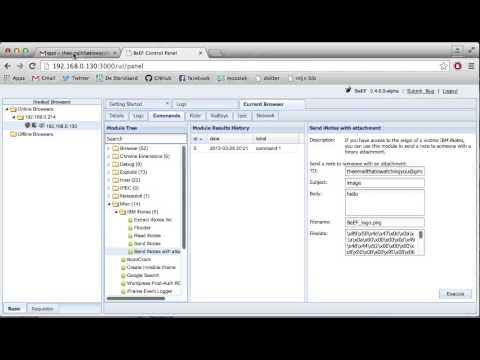
play BeEF iNotes modules
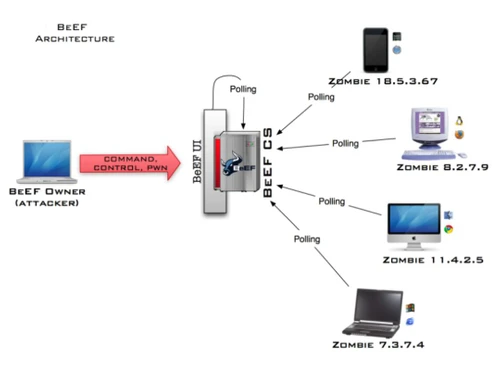
BeEF Polling
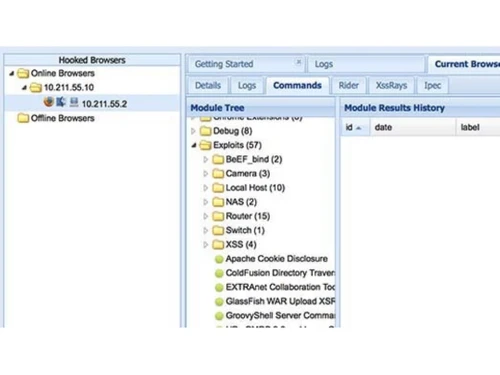
BeEF Hooked Browsers

BeEF

Brand: BeEF

  • 4.3

  • 16 Ratings & 10 Reviews

BeEF is a penetration testing tool designed to assess the security of web browsers by exploiting client-side vulnerabilities and launching targeted attacks on web applications.

See More

Have you used BeEF before?

Share your insights for better experience

Add a Review

Price Available on Request

Questions about pricing or customization? We’re here to help, just a click away.

100% Genuine
Products
Best Price
Guaranteed
Safe & Secure
Payment
  • Description

  • Pricing

  • Features

  • Specification

  • Review

  • Compare

  • Alternatives

  • FAQ

BeEF Software Overview

What is BeEF?

BeEF, or the Browser Exploitation Framework, is a powerful penetration testing tool used to assess the security of web browsers. It enables security professionals to exploit client-side vulnerabilities and launch targeted attacks on web applications to evaluate their defenses.

It provides a comprehensive suite of tools for testing the effectiveness of security measures against browser-based threats. Simulating real-world attack scenarios helps identify and address potential vulnerabilities in web applications. BeEF is widely used in penetration testing to enhance cybersecurity posture and mitigate risks associated with client-side vulnerabilities.

Why Choose BeEF Software?

  • Client-Side Exploitation: It exploits vulnerabilities in web browsers, allowing ethical hackers to conduct client-side attacks. This is crucial as browsers can be a weak link even if the system or network is secure.
  • In-Depth Browser Analysis: It can provide detailed information about the hooked browsers, such as browser type, version, installed plugins, cookies, and other environment details, giving security professionals deep visibility.
  • Real-World Simulation: It enables ethical hackers to mimic real-world attack scenarios, helping organizations better understand their risk posture and test the effectiveness of their security measures.
  • Persistent Access: It can maintain control over a hooked browser even if the IP address changes, providing ongoing access to the target for further exploitation and assessment.
  • Easy-to-Use Interface: The user-friendly web-based interface makes it easier for security professionals to manage hooked browsers and execute various command modules.
  • Open-Source and Actively Developed: The software is an open-source tool that is actively developed, allowing security professionals to customize modules and access the code per their needs.
  • Versatility: It also offers a range of tools and modules that can be used for various tasks, such as stealing cookies, conducting social engineering attacks, and launching network attacks, providing a comprehensive security assessment.

Benefits of BeEF Platform

  • Remote Control: It allows testers to remotely control web browsers, enabling them to execute various commands and actions within the browser environment for testing purposes.
  • Real-Time Interaction: It facilitates real-time interaction with web browsers, providing testers with immediate feedback on the effectiveness of attacks and the status of vulnerabilities.
  • Client-Side Exploitation: It specializes in client-side exploitation, focusing on vulnerabilities within web browsers and their associated plugins, extensions, and functionalities.
  • Cross-Browser Testing: It supports testing across multiple web browsers and platforms, ensuring comprehensive coverage and compatibility with diverse environments.
  • Visibility into Browser Behavior: It provides visibility into browser behavior and security posture, helping testers understand how browsers handle different requests and interactions.
  • Integration with Other Tools: It seamlessly integrates with other penetration testing tools and frameworks, enhancing workflow efficiency and extending its capabilities for advanced testing scenarios.

Pricing of BeEF Penetration Testing Tool

BeEF price details are available on request at techjockey.com.

The pricing model is based on different parameters, including extra features, deployment type, and the total number of users. For further queries related to the product, you can contact our product team and learn more about the pricing and offers.

Read more

BeEF Pricing & Plans

Looking for The Right Pricing?

Share your requirements and get a plan built around your business.

  • Define your business needs
  • Get customised pricing
  • Choose features that fit your workflow

Price Available on Request

Get personalised BeEF pricing that fits your needs. Our team will connect with you.

BeEF Features

  • icon_check Geolocation Modules
    Determine approximate location of hooked browsers to support targeted reconnaissance activities.
  • icon_check WebRTC Extensions
    Extend hooks using WebRTC for rich client-side testing and real-time communications.
  • icon_check Session Management
    Track multiple hooked browsers simultaneously with session status and event logs.
  • icon_check Collaborative Research Platform
    Open-source contributions allow community enhancement of modules and tactics.
  • icon_check Bug Reporting
    It enables reporting and tracking security vulnerabilities and bugs found during tests.
  • icon_check Penetration Testing
    It offers tools for assessing the security of web browsers and associated components.
  • icon_check Security
    It focuses on identifying and exploiting vulnerabilities in web browsers, plugins, and extensions.
  • icon_check User Interface
    It provides a user-friendly interface for easy navigation and interaction.
  • icon_check Issue Tracking
    It includes features for managing security issues and vulnerabilities detected during testing.
  • icon_check Dashboard
    It offers a centralized dashboard for monitoring and analyzing testing activities.
  • icon_check Vulnerability Scan
    It conducts scans to identify potential weaknesses in web browsers.
  • icon_check Browser Hooking Engine
    Injects JavaScript into a target page to “hook” browsers and establish a control channel for exploitation.
BeEF Demo Video play icon

Get BeEF Demo

Watch the demo video to explore key features, real workflows, and how the software fits your business needs.

Understand
Key Features
Personal
Demo Insights
Interactive
Demo Support

BeEF Specifications

Supported Platforms
Ubuntu Ubuntu Windows Windows MacOS MacOS Linux Linux
Devices
Desktop Desktop
Deployment
Cloud-Based Cloud-Based
Suitable For
All Industries
Business Specific
All Businesses
Business Size
Small Business Medium Business Enterprises
Customer Support
Email Communities
Language
English
Integration
API Integration
Training Resources
Documentation Videos

BeEF Reviews

4.3

Out of 5

img

Overall Rating

Based on
10 Verified Reviews

Rating Breakdown

  • Features 4.3
  • Value for Money 4.3
  • Ease of Use 4.3
  • Customer Support 4.4

87% Recommend this Product

Add Review

Pros

  • "Flexible payload options, strong integration possibilities, and good reporting."

    Suchita Devi Jul 27, 2025

  • "Specialized, community-supported, and integrates into penetration testing workflows."

    Dilip Kumar J Bhansali Jun 30, 2025

  • "Unique angle on browser exploitation, works well in tandem with other frameworks."

    Sunil YadavJun 27, 2025

Cons

  • "Not a standalone solution; best when combined with other tools."

    Sunil YadavJun 27, 2025

  • "Some payloads are outdated and don’t work on modern browsers."

    Paulo César MorazApr 25, 2025

  • "Can be resource-intensive if running large-scale simulations."

    Her Prakash Feb 5, 2025

Dilip kumar j Bhansali

Accountant

Industry: Wholesale User since: 6-12 months

4.3

Reviewed on: Jun 30, 2025

Techjockey Verified

“A Must-Have for Browser Security Testing”

BeEF is now part of every assessment I run that involves client-side vectors. It adds depth to my reporting and gives clients actionable insights.

Pros

Specialized, community-supported, and integrates into penetration testing workflows.

Cons

Limited scope beyond browsers.

Switched from Burp Suite Pro

Reason to switch

Burp Suite Pro remains in my toolkit, but I switched to BeEF for browser exploitation scenarios since Burp doesn’t cover them in the same way.

Sunil Kukreja

Chartered Accountant

Industry: Digital Marketing User since: 6-12 months

4.3

Reviewed on: Sep 8, 2025

Techjockey Verified

“Great for Research and Learning”

BeEF helped me as a cybersecurity student to learn about browser vulnerabilities. Its open-source nature makes it a great learning platform.

Pros

Open source, customizable, and highly educational.

Cons

Requires strong security knowledge to use effectively.

Switched from Netsparker

Reason to switch

Netsparker is more automated, but I wanted a tool where I could get hands-on with browser exploit development. BeEF was perfect for that.

Syed Nayeem

Digital Marketer

Industry: Digital Marketing User since: 6-12 months

4.5

Reviewed on: Aug 3, 2025

Techjockey Verified

“Eye-Opening Tool for Clients”

BeEF helped me show clients how easily their employees’ browsers could be compromised. This visual proof made it easier to push for better patching policies.

Pros

Helps demonstrate practical risk instead of theoretical.

Cons

Outdated modules can frustrate new users.

Reason to switch

Acunetix is strong for web scanning, but I needed browser-specific exploitation tests that Acunetix couldn’t provide.

See All BeEF Reviews

Compare BeEF With other Penetration Testing Tools

Products
Ratings
Pricing
Device Supported
Deployment
Supported Platforms
  • img

    BeEF

  • 4.3

  • Price On Request

  • Desktop

    Mobile

  • Web based

    On Premises

  • Windows

    Mac OS

  • img

    Strix

  • 4.5

  • Price On Request

  • Desktop

    Mobile

  • Web based

    On Premises

  • Windows

    Mac OS

  • img

    AutoSecT

  • 4.4

  • Price On Request

  • Desktop

    Mobile

  • Web based

    On Premises

  • Windows

    Mac OS

  • img

    Strobes PTaaS

  • 4.1

  • Price On Request

  • Desktop

    Mobile

  • Web based

    On Premises

  • Windows

    Mac OS

  • img

    sqlmap

  • 4.3

  • Price On Request

  • Desktop

    Mobile

  • Web based

    On Premises

  • Windows

    Mac OS

  • img

    Metasploit

  • 4.2

  • Price On Request

  • Desktop

    Mobile

  • Web based

    On Premises

  • Windows

    Mac OS

  • img

    Wireshark

  • 4.2

  • Price On Request

  • Desktop

    Mobile

  • Web based

    On Premises

  • Windows

    Mac OS

(0) Product(s) selected

BeEF Alternatives

See All BeEF Alternatives

Starting Price:

$49 /Month

Starting Price:

$79 /Month

Available

Price on Request

Available

Price on Request

Available

Price on Request

Who can benefit from using BeEF software?

Penetration testers, security researchers, and ethical hackers can benefit from using BeEF software to assess and demonstrate the security risks associated with web browsers and client-side applications.

What does BeEF Software do?

BeEF Software allows users to assess and exploit security vulnerabilities in web browsers, plugins, and extensions for penetration testing purposes.

What operating systems does BeEF support?

BeEF supports multiple operating systems, including Ubuntu, Linux, Windows, and macOS.

How much does BeEF Software Cost?

BeEF price details are available on request at techjockey.com.

Does BeEF software provide support for users?

BeEF provides comprehensive documentation, tutorials, and community forums to assist users with using and troubleshooting the software effectively. Additionally, professional support services may be available through third-party providers.

Is there any free demo for BeEF Software?

Yes, a demo of BeEF is available at techjockey.com.

Is BeEF Software Free?

Yes, BeEF Software is free to use.

Does BeEF software provide support for users?

BeEF provides comprehensive documentation, tutorials, and community forums to assist users with using and troubleshooting the software effectively. Additionally, professional support services may be available through third-party providers.

Does BeEF offer a free trial?

Yes, BeEF Software offers a free trial.

Are there any tutorials or guides available for using BeEF software?

Yes, tutorials and guides are available for using BeEF software.

How does BeEF software work?

BeEF software works by deploying a web-based server that serves as a command and control center for controlling and interacting with web browsers that have been compromised or are vulnerable to exploitation.

20,000+ Software Listed

Best Price Guranteed

Free Expert Consultation

2M+ Happy Customers

Terms and Condtions

close

Users with registered businesses can purchase goods from merchants on the platform to satisfy their business needs. Users are not permitted to utilize any products acquired through the platform for resale, advertising, business, or further distribution.

For each purchase made, users will receive a Tax Invoice (or 'GST invoice') that includes specific details such as:

  • the GSTIN of the user associated with their registered business, and

  • the specified Entity Name for their business.

It should be noted that not all products are eligible for GST Invoice. Only the products displayed by participating sellers with the 'GST-based Invoice Available' callout on the product description page would qualify.

Certain goods and services are not eligible to get a GST Invoice, including items with VAS, i.e., Value Added Services (e.g., Total Mobile Protection/Assured Buyback) and those involving an exchange offer at the time of purchase.

Users must ensure the accuracy of the GSTIN, and business entity name provided for the GST Invoice. Requests for corrections into GST Invoice would not be accommodated by Techjockey.com or any Seller, and any issues arising from user-provided information are the sole responsibility of users.

Techjockey.com is not liable for the GST Invoice or any associated input tax credit. To efficiently claim an input tax credit, users should select the registered place of business address as per the GST authority's data and follow the provisions of the GST Act and rules.

To claim an input tax credit, the delivery and billing addresses must match. Furthermore, input tax credits will not be granted if the delivery address and GSTIN on the invoice are from different states. In case of incorrect GST details provided during the order placement, the order will be canceled automatically.