linkedin
Balsamiq logo
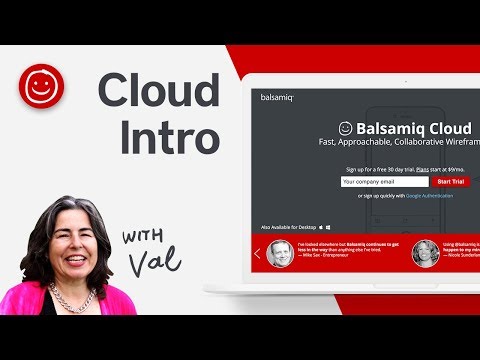
play Balsamiq Cloud demo
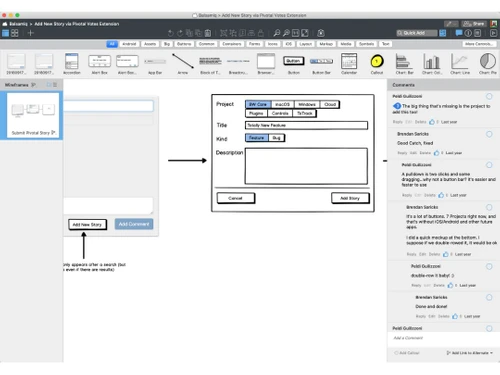
balsamiq-dashboard
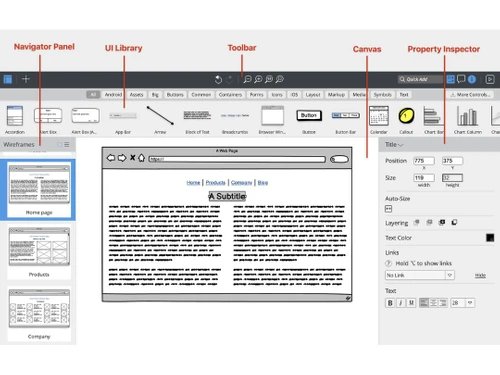
balsamiq-editor

Balsamiq

Brand: Balsamiq Studios

  • 4.7

  • 1 Rating & 1 Review

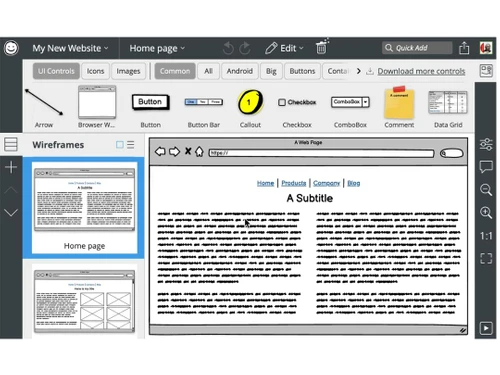
Balsamiq is a user-friendly wireframing tool designed to help teams quickly create mockups and prototypes for websites and applications. With simple drag-and-drop features, templates, and collaboration tools, Balsamiq makes the design process smooth for both professionals and beginners.

See More

Have you used Balsamiq before?

Share your insights for better experience

Add a Review
Starting Price
$144

View plans

100% Genuine
Products
Best Price
Guaranteed
Safe & Secure
Payment
  • Description

  • Pricing

  • Features

  • Specification

  • Review

  • Compare

  • Alternatives

  • FAQ

Starting at $144

Balsamiq Software Overview

What is Balsamiq?

Balsamiq is a cloud-based wireframe tool that simplifies the process of designing and creating user interfaces for websites and applications. It is used by teams in web development, project management software, and business software to visualize ideas and structure before moving on to full development.

By offering a drag-and-drop interface and pre-built templates, Balsamiq helps teams sketch and share wireframes quickly and efficiently. This platform is perfect for both professionals and beginners who need to bring their ideas to life without the complexity of advanced design tools.

Balsamiq’s main goal is to provide a simple yet powerful solution for creating mockups. It promotes collaboration between team members, allowing them to share ideas, provide feedback, and make changes to the wireframes in real-time. Balsamiq’s easy-to-use interface ensures that even those with minimal design experience can participate in the brainstorming and prototyping process. Whether you are building a new app or redesigning a website, Balsamiq is a great tool to turn your ideas into actionable plans.

Why Choose Balsamiq Wireframe Tools?

  • Simple and Easy to Use: Balsamiq’s interface is designed with simplicity in mind. It uses a drag-and-drop system, making it easy to create mockups without any design experience.
  • Fast Prototyping: Users can create wireframes quickly, allowing for faster idea development and decision-making during early project stages.
  • Collaboration-Friendly: Balsamiq promotes teamwork by allowing multiple users to provide feedback, edit wireframes, and share ideas in real-time.
  • Template Library:With a wide range of pre-built templates, users can choose from various wireframe elements, saving time and effort.
  • Affordable Solution: Balsamiq offers an affordable pricing model, making it accessible for businesses of all sizes, from startups to large enterprises.

Benefits of Balsamiq Wireframe Software

  • Visualize Ideas Easily: Balsamiq helps you translate ideas into visual representations, simplifying the design process.
  • Boost Team Productivity: With Balsamiq, team members can work together more effectively, reducing back-and-forth communication.
  • Faster Decision-Making: Quick wireframe creation allows for faster decisions and pivots in projects, speeding up the development process.
  • Reduces Development Time: By solving design issues early in the process, Balsamiq helps reduce errors, saving time in the development stage.
  • Collaborative Environment: Balsamiq’s built-in collaboration tools make it easy to receive feedback and make adjustments to the mockups as needed.
  • Cross-Functional: Whether you’re a product manager, designer, or developer, Balsamiq is easy to use and fits into any workflow.

Balsamiq Pricing

Balsamiq price starts at $144 at techjockey.com.

The pricing model is based on different parameters, including extra features, deployment type, and the total number of users. For further queries related to the product, you can contact our product team and learn more about the pricing and offers.

Read more

Balsamiq Studios Company Details

Founded Year:  2008

Balsamiq is a wireframing tool that allows users to sketch and share user interface mockups for web, desktop, and mobile apps.

Director/Founders Giacomo Guilizzoni, Leon Barnard
Company Size 1-100 Employees

Balsamiq Pricing & Plans

Business
Starting at $144
    • Project

      Project
      Project
    • Yearly

      Yearly
      Yearly

Key Features

  • Unlimited wireframes

  • Unlimited users

  • Fast customer support

  • Pause your plan anytime

Enterprise
Starting at $216
    • Project

      Project
      Project
    • Yearly

      Yearly
      Yearly

Key Features

  • Everything in Business , plus:

  • SSO with SAML

  • Legal/security form assistance

  • Enterprise SLA

  • Data storage in the US or EU

  • Pause your plan anytime

Balsamiq Features

  • icon_check Version Control
    Maintain multiple versions of wireframes, compare alternates, and restore previous iterations easily.
  • icon_check Asset Management
    Upload, organize, and manage project assets such as logos, images, and external resources.
  • icon_check Search and Filter
    Quickly locate UI elements or assets using search and filtering capabilities within the library.
  • icon_check Offline Functionality
    Continue creating wireframes without internet access using Balsamiq Desktop for local editing.
  • icon_check Multiple Project Support
    Organize multiple wireframes and projects in one workspace for structured management.
  • icon_check Cross-Platform Support
    Access Balsamiq on desktop, cloud, or integrated plugins for versatile wireframing use.
  • icon_check Drag and Drop Functionality
    Build wireframes quickly by dragging UI elements onto the canvas with intuitive mouse interactions.
  • icon_check UI Component Library
    Access a vast collection of built-in interface components, icons, and controls for rapid prototyping.
  • icon_check Prototyping
    Link wireframes together to create interactive user flows that simulate real application behavior.
  • icon_check Alignment and Snapping
    Use smart guides and snap-to-grid alignment tools to ensure clean and precise wireframe layouts.
  • icon_check Data Import/Export
    Export projects as PDFs, PNGs, or shareable links for presentation and stakeholder review.
  • icon_check Sketch Style Rendering
    Present wireframes in a hand-drawn sketch style to emphasize structure over visual design.
Balsamiq Demo Video play icon

Get Balsamiq Demo

Watch the demo video to explore key features, real workflows, and how the software fits your business needs.

Understand
Key Features
Personal
Demo Insights
Interactive
Demo Support

Balsamiq Specifications

Supported Platforms
Ubuntu Ubuntu Windows Windows MacOS MacOS Linux Linux
Devices
Desktop Desktop
Deployment
Cloud-Based Cloud-Based Perpetual Perpetual
Suitable For
All Industries
Business Specific
All Businesses
Business Size
Small Business Startups Medium Business Enterprises
Customer Support
Email Communities
Language
English
Training Resources
Documentation Videos

Balsamiq Review

4.7

Out of 5

img

Overall Rating

Based on
1 Verified Review

Rating Breakdown

  • Features 5
  • Value for Money 5
  • Ease of Use 4
  • Customer Support 5

90% Recommend this Product

Add Review

Khemesh Thakur linkedin_verify

Product Manager

Industry: IT User since: < 6 months

4.7

Reviewed on: Jan 20, 2023

Techjockey Verified

“Best tool for wireframe”

Pros

Easy to use, You can crate good mockups and prototype here, easy to set up this tool. Highly recomended.

Cons

A little expensive for full commercial licenses

Switched from Figma

Reason to switch

Easy to use and share files with team

Compare Balsamiq With other Wireframe Tools

Products
Ratings
Pricing
Device Supported
Deployment
Supported Platforms
  • img

    Balsamiq

  • 4.7

  • Price On Request

  • Desktop

    Mobile

  • Web based

    On Premises

  • Windows

    Mac OS

  • img

    Visily

  • 4.7

  • Price On Request

  • Desktop

    Mobile

  • Web based

    On Premises

  • Windows

    Mac OS

  • img

    Moqups

  • 4.2

  • Price On Request

  • Desktop

    Mobile

  • Web based

    On Premises

  • Windows

    Mac OS

  • img

    Wireframe.cc

  • 4.2

  • Price On Request

  • Desktop

    Mobile

  • Web based

    On Premises

  • Windows

    Mac OS

  • img

    Freehand

  • 4.5

  • Price On Request

  • Desktop

    Mobile

  • Web based

    On Premises

  • Windows

    Mac OS

  • img

    Ninjamock

  • 4.3

  • Price On Request

  • Desktop

    Mobile

  • Web based

    On Premises

  • Windows

    Mac OS

  • img

    Fluid Ui

  • 4.4

  • Price On Request

  • Desktop

    Mobile

  • Web based

    On Premises

  • Windows

    Mac OS

  • img

    MockFlow

  • 4.5

  • Price On Request

  • Desktop

    Mobile

  • Web based

    On Premises

  • Windows

    Mac OS

  • img

    Mockplus

  • 4

  • Price On Request

  • Desktop

    Mobile

  • Web based

    On Premises

  • Windows

    Mac OS

(2) Product(s) selected

Balsamiq Alternatives

See All Balsamiq Alternatives

Starting Price:

$132

Starting Price:

$12 /Month

Available

Price on Request

Starting Price:

$15 /Monthly

Starting Price:

$19 /Month

Starting Price:

$15 $30

SAVE UPTO 50%

Articles for Balsamiq

See All Related Articles

What is Balsamiq used for?

Balsamiq is primarily used to create wireframes and mockups for websites and applications, helping teams visualize their ideas.

Is Balsamiq easy to use for beginners?

Yes, Balsamiq is very beginner-friendly, offering a drag-and-drop interface and pre-built templates to simplify the design process.

Can Balsamiq be used for collaboration?

Yes, Balsamiq offers collaboration tools that allow team members to share feedback, edit wireframes, and work together in real-time.

How much does Balsamiq cost?

Balsamiq price in India starts at $144 at techjockey.com.

What kind of templates does Balsamiq offer?

Balsamiq offers a range of pre-made templates for various wireframe elements, such as buttons, text fields, and navigation menus.

Can I export my wireframes from Balsamiq?

Yes, Balsamiq allows users to export wireframes into different formats, making it easy to share them with clients or developers.

What platforms does Balsamiq support?

Balsamiq is a cloud-based tool, which means it can be accessed through any modern web browser. There is also a desktop version.

Can I use Balsamiq for mobile app designs?

Yes, Balsamiq supports wireframing for both mobile apps and websites, making it a versatile tool for different design projects.

Is there a free demo of Balsamiq?

Yes, a free demo of Balsamiq is available at Techjockey.com, allowing users to explore its features before making a purchase.

Does Balsamiq offer customer support?

Yes, Balsamiq provides customer support to assist users with any questions or issues they may encounter.

20,000+ Software Listed

Best Price Guranteed

Free Expert Consultation

2M+ Happy Customers

Terms and Condtions

close

Users with registered businesses can purchase goods from merchants on the platform to satisfy their business needs. Users are not permitted to utilize any products acquired through the platform for resale, advertising, business, or further distribution.

For each purchase made, users will receive a Tax Invoice (or 'GST invoice') that includes specific details such as:

  • the GSTIN of the user associated with their registered business, and

  • the specified Entity Name for their business.

It should be noted that not all products are eligible for GST Invoice. Only the products displayed by participating sellers with the 'GST-based Invoice Available' callout on the product description page would qualify.

Certain goods and services are not eligible to get a GST Invoice, including items with VAS, i.e., Value Added Services (e.g., Total Mobile Protection/Assured Buyback) and those involving an exchange offer at the time of purchase.

Users must ensure the accuracy of the GSTIN, and business entity name provided for the GST Invoice. Requests for corrections into GST Invoice would not be accommodated by Techjockey.com or any Seller, and any issues arising from user-provided information are the sole responsibility of users.

Techjockey.com is not liable for the GST Invoice or any associated input tax credit. To efficiently claim an input tax credit, users should select the registered place of business address as per the GST authority's data and follow the provisions of the GST Act and rules.

To claim an input tax credit, the delivery and billing addresses must match. Furthermore, input tax credits will not be granted if the delivery address and GSTIN on the invoice are from different states. In case of incorrect GST details provided during the order placement, the order will be canceled automatically.