 USA
USA UAE
UAESmall Business
Designed for startups and growing businesses
.jpg)

See More





Brand: Ashampoo
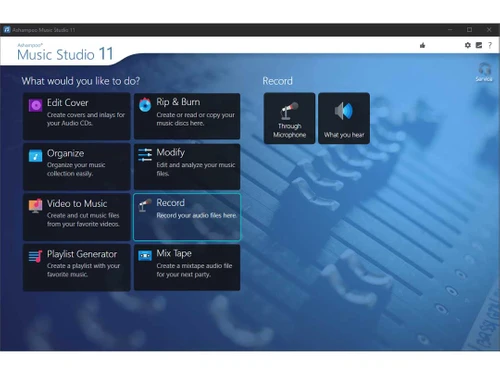
Ashampoo Music Studio is an all-in-one audio editing software, perfect for editing, recording, converting, and organizing audio files. With an intuitive interface and features like robust recording and seamless track mixing, it's ideal for both beginners and professionals alike.
See MoreHave you used Ashampoo Music Studio before?
Share your insights for better experience
Brand: Ashampoo
Founded Year: 1999
Ashampoo is one of the leading Internet-based companies worldwide in the field of software development, sales and web portal sites. Ashampoo's innovative software products set technological standards right from the start and are known for their advanced, mature technology and usability.
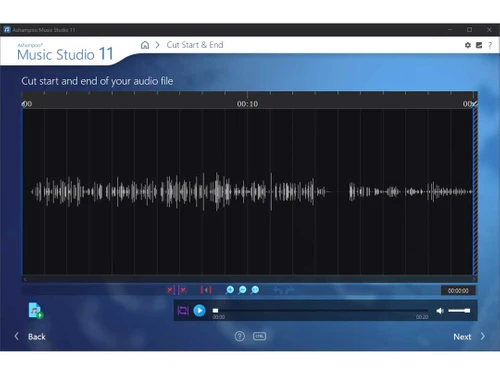
 Audio Editing Audio Recording StereoMix Trim and Merge Audio Files Converting Audio Formats Playlists to Organize Background Removal

Watch the demo video to explore key features, real workflows, and how the software fits your business needs.
 Windows
  Desktop
  Cloud-Based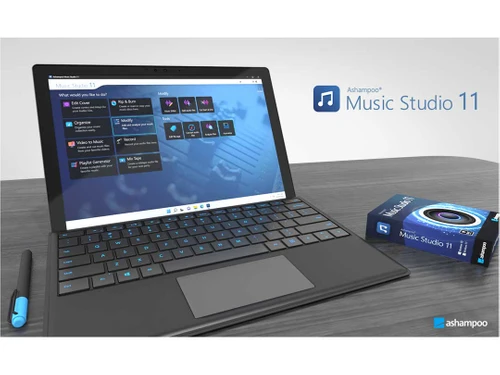
Small Business
Designed for startups and growing businesses
Medium Business
Built for business growth and flexibility
Enterprises
Designed for complex and large-scale business needs
4.4
Out of 5

Overall Rating
Based on
10 Verified Reviews
Rating Breakdown
86% Recommend this Product
Add ReviewOverall, users appreciate Ashampoo Music Studio for its affordability, user-friendly interface, and effective basic audio editing capabilities, making it a suitable choice for beginners and those with simple needs. The batch processing feature and playlist organization are also highlighted positively. However, several users express frustration over the lack of advanced features, such as MIDI editing and streaming integration, as well as infrequent updates and occasional performance issues with larger files.
Pros
"I purchased it due to its affordable price when comparing it with other music editing software, it is priced and offers more value that its actual cost."
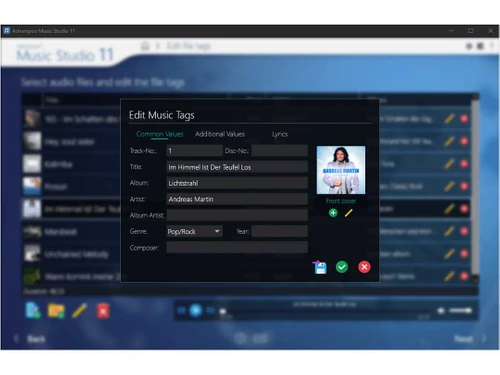
"It is a small feature but a unique and thoughtful one, the “Tag Editor” enables me to update metadata, which keeps my music library well-organized and easily accessible."
"Ashampoo Music Studio has one of the smoothest volume adjustment tools since I can adjust the volume of my music simply without losing the sound quality of the audio."
Cons
"I have been using it for two months now, and I feel like the updates rarely come and for the most part, some bugs and issues remain unresolved for a while."
"It has a basic recording feature nothing special, it lacks advanced settings such as multi-input recording or live effect application, unlike other DAWs."
"I really dislike the fact that it has no integration with streaming services so I cannot export or directly share my projects to popular streaming platforms."

Nov 13, 2024
Techjockey Verified
“Great Value for the Price”
Because Ashampoo Music Studio is more reasonably priced and provides better value than many other music editing programs, I choose to get it. For my simple editing needs, it has worked well. But after two months of use, updates are infrequent and that some flaws can persist longer than I would want.
Pros
I purchased it due to its affordable price when comparing it with other music editing software, it is priced and offers more value that its actual cost.
Cons
I have been using it for two months now, and I feel like the updates rarely come and for the most part, some bugs and issues remain unresolved for a while.
Reason to switch
I needed a simpler and more affordable solution; therefore, I moved away from LMMS. Even though LMMS is free and strong, it seemed too complicated for my purposes, and I wanted something simpler for my side musical endeavours.
Nov 8, 2024
Techjockey Verified
“Handy Tag Editor”
I like Ashampoo Music Studio's "Tag Editor" because it allows me to change metadata and maintain an orderly, accessible music library. The recording capability is simple and lacks sophisticated features that other DAWs provide, such as multi-input recording or live effect application.
Pros
It is a small feature but a unique and thoughtful one, the “Tag Editor” enables me to update metadata, which keeps my music library well-organized and easily accessible.
Cons
It has a basic recording feature nothing special, it lacks advanced settings such as multi-input recording or live effect application, unlike other DAWs.
Reason to switch
I wanted a more straightforward tool with decent organizing tools; therefore, I moved away from FL Studio. FL Studio was excellent for intricate projects, but I did not want that degree of intricacy for managing my music library daily.
Nov 1, 2024
Techjockey Verified
“No Streaming Integration but Good Volume Control”
Because Ashampoo Music Studio's seamless volume adjustment capabilities let me alter the volume without sacrificing sound quality, I like using it. Sharing my music is made more difficult by the fact that I am unable to export or share my projects straight to streaming services, which is a disappointment.
Pros
Ashampoo Music Studio has one of the smoothest volume adjustment tools since I can adjust the volume of my music simply without losing the sound quality of the audio.
Cons
I really dislike the fact that it has no integration with streaming services so I cannot export or directly share my projects to popular streaming platforms.
Reason to switch
I left Reaper because I wanted a more straightforward application that prioritized basic editing and quick volume adjustments. Although Reaper was strong, it was too complicated for the easier jobs I required.

Ashampoo Music Studio
Price On Request
Desktop
Mobile
Web based
On Premises
Windows
Mac OS

Cleanvoice AI
Price On Request
Desktop
Mobile
Web based
On Premises
Windows
Mac OS

AudioDirector 365
₹ 1599
Desktop
Mobile
Web based
On Premises
Windows
Mac OS

Cubase Elements
₹ 9281
Desktop
Mobile
Web based
On Premises
Windows
Mac OS

Moises
Price On Request
Desktop
Mobile
Web based
On Premises
Windows
Mac OS

Audacity
Price On Request
Desktop
Mobile
Web based
On Premises
Windows
Mac OS

Adobe Podcast
Price On Request
Desktop
Mobile
Web based
On Premises
Windows
Mac OS

Qtractor
Price On Request
Desktop
Mobile
Web based
On Premises
Windows
Mac OS

Supertone CLEAR
Price On Request
Desktop
Mobile
Web based
On Premises
Windows
Mac OS

BandLab
Price On Request
Desktop
Mobile
Web based
On Premises
Windows
Mac OS

LALAL AI
Price On Request
Desktop
Mobile
Web based
On Premises
Windows
Mac OS
(0) Product(s) selected
Starting Price:
₹9,281
Available
Price on Request
Available
Price on Request
Starting Price:
$58
Starting Price:
$15 /month
Starting Price:
$15

Starting Price:
$60

Available
Price on Request

Starting Price:
$9 /Month

Available
Price on Request

Available
Price on Request







Ashampoo Music Studio is an all-in-one music editing software that allows users to edit, convert, mix, and organize audio files. It offers tools for recording, track splitting, burning CDs, and creating playlists.
Yes, Ashampoo Music Studio is designed for both beginners and advanced users. Its intuitive interface makes it easy to navigate, while offering powerful features for more experienced users.
Yes, Ashampoo Music Studio allows you to record high-quality audio from apps like Spotify, Deezer, and Amazon Music. You can select specific apps to record while avoiding background noise.
Ashampoo Music Studio supports multiple formats, including MP3, WAV, FLAC, and more. It also allows easy conversion between formats without losing audio quality.
Yes, Ashampoo Music Studio offers a 30-day free trial, allowing users to explore its features before making a purchase decision.
Ashampoo Music Studio is primarily designed for Windows, and currently doesn't support macOS. Ensure your system meets the software’s requirements before downloading.
Ashampoo offers a 30-day money-back guarantee. If you're unsatisfied with your purchase, you can request a refund within 30 days of buying the software.
20,000+ Software Listed
Best Price Guranteed
Free Expert Consultation
2M+ Happy Customers
Terms and Condtions

Users with registered businesses can purchase goods from merchants on the platform to satisfy their business needs. Users are not permitted to utilize any products acquired through the platform for resale, advertising, business, or further distribution.
For each purchase made, users will receive a Tax Invoice (or 'GST invoice') that includes specific details such as:
the GSTIN of the user associated with their registered business, and
the specified Entity Name for their business.
It should be noted that not all products are eligible for GST Invoice. Only the products displayed by participating sellers with the 'GST-based Invoice Available' callout on the product description page would qualify.
Certain goods and services are not eligible to get a GST Invoice, including items with VAS, i.e., Value Added Services (e.g., Total Mobile Protection/Assured Buyback) and those involving an exchange offer at the time of purchase.
Users must ensure the accuracy of the GSTIN, and business entity name provided for the GST Invoice. Requests for corrections into GST Invoice would not be accommodated by Techjockey.com or any Seller, and any issues arising from user-provided information are the sole responsibility of users.
Techjockey.com is not liable for the GST Invoice or any associated input tax credit. To efficiently claim an input tax credit, users should select the registered place of business address as per the GST authority's data and follow the provisions of the GST Act and rules.
To claim an input tax credit, the delivery and billing addresses must match. Furthermore, input tax credits will not be granted if the delivery address and GSTIN on the invoice are from different states. In case of incorrect GST details provided during the order placement, the order will be canceled automatically.



