linkedin
Akiflow logo
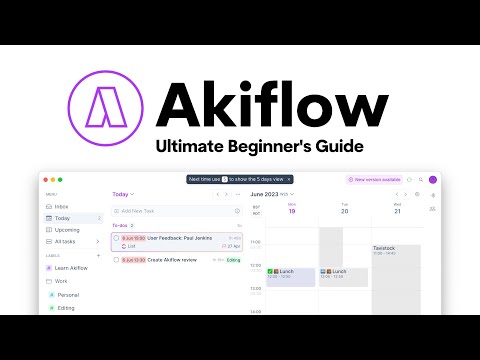
play Ultimate Akiflow Beginner's Guide
Akiflow Integrations
Akiflow Notifications

Akiflow

Brand: Akiflow

  • 4.7

  • 2 Ratings & 2 Reviews

Akiflow Task Management Software streamlines your team's workflow by providing intuitive task creation, real-time collaboration, and visual progress tracking.

See More

Have you used Akiflow before?

Share your insights for better experience

Add a Review
Starting Price
$34

View plans

100% Genuine
Products
Best Price
Guaranteed
Safe & Secure
Payment
  • Description

  • Pricing

  • Features

  • Specification

  • Review

  • Compare

  • Alternatives

  • FAQ

Starting at $34

Akiflow Software Overview

What is Akiflow Software?

Akiflow Task Management Software is an innovative application that helps manage tasks and time by integrating tools, calendars, and studies in a single platform and displaying a to-do list. It is an application that enhances the user's productivity by offering time blocking, notification, and easy management of all tasks from multiple applications and scheduling them properly. It helps you to stay organized, collaborate with others on time and streamline your tasks efficiently.

It comes as an application that can be downloaded from a browser and is compatible with OS like Android, Windows, Mac, and iOS. It imports all tasks from your multiple applications, drag and drop them, and builds a well-organized and straightforward schedule.

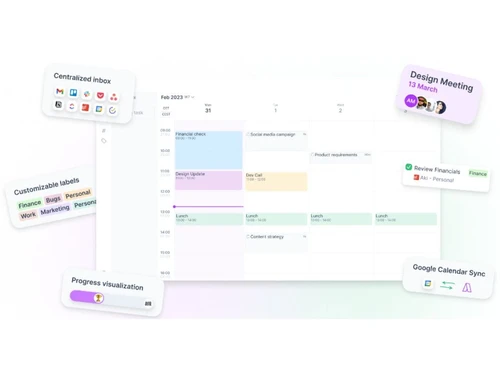
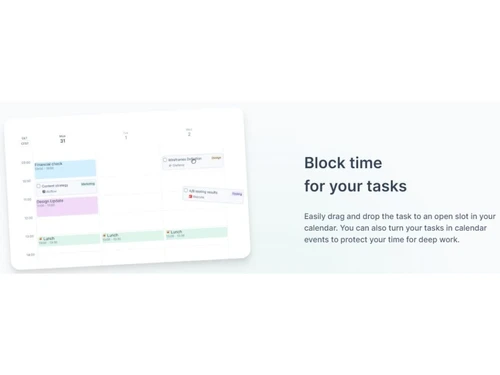
Akiflow has accessible features that help integrate various applications and list their tasks in a proper schedule. It offers a time-blocking feature that allows the user to allocate specific time blocks for each task and helps to manage the program efficiently by focusing on one study at a time. Users can drag and drop charges from applications like Gmail, access the calendar simultaneously and set time frames through time blocks. It sends timely notifications for upcoming tasks.

A planned schedule can help decide the free time and allow users to share their availability with others, thus helping set proper appointments. It automates repetitive tasks and provides multiple time zones and local time views for better coordination in different regions. Akiflow interface comes with features that make searching, interaction, and navigation smoother. It provides keyboard shortcuts for quick navigation and settings, a search feature for searching tasks or people or emails, etc.

It also provides customizable labels to help users visually organize their tasks and get an instant overview. It comes with a focus mode option that creates a distraction-free environment. The Command Bar feature provides a text-based interface for quickly executing tasks and setting dates, times, labels, and priorities. The application can be linked with other apps and services to extend functionality.

Why Choose Akiflow?

This application provides a highly intuitive interface that makes task management easier. It allows drag-and-drop functionality and has keyboard shortcuts integrated with the calendar, making scheduling tasks easier. The time-blocking features help in the proper scheduling of tasks. Labels and search options make task highlighting and searching more efficient. Thus, by integrating various tools and features into a single platform, this application helps create task schedules quickly and efficiently.

It facilitates sharing of availability with the users, thus making the user get free time schedules and make better appointment schedules. It enhances communication and leads to better teamwork without any conflicts. It automates repetitive tasks and provides multiple time zones and local time views for better coordination in different regions.

Benefits of Akiflow Task Management Software

  • Integration: It integrates tools and generates a better task management schedule from multiple applications.
  • Productivity: Its focus mode decreases distractions and keeps better focus.
  • Scheduling: Time blocking, and shared availability features simplify scheduling, reducing conflicts.
  • Shortcuts: Its interface provides keyboard shortcuts for quick navigation.
  • Better organization: It uses smart labels, search, and upcoming view features for a better and quicker view of tasks.

Akiflow Pricing

Akiflow pricing starts from $34 at techjockey.com.

The pricing model is based on different parameters, including extra features, deployment type, and total users. For further queries related to the product, you can contact our product team and learn more about the pricing and offers.

Read more

Akiflow Company Details

Founded Year:  2019

Akiflow is a productivity software

Director/Founders Nunzio Martinello, Sebastiano Favaro
Company Size 1-100 Employees

Akiflow Pricing & Plans

Monthly
Starting at $34
    • Monthly

      Monthly
      Monthly
    • Licenses

      Licenses
      Licenses

Key Features

  • 7 days free trial

  • Cancel anytime

  • 1:1 Dedicated onboarding call

Yearly
Starting at $228
    • Yearly

      Yearly
      Yearly
    • Licenses

      Licenses
      Licenses

Key Features

  • 7 days free trial

  • Cancel anytime

  • 1:1 Dedicated onboarding call

Akiflow Features

  • icon_check Task Management
    It schedules tasks using the time-blocking feature, making creating and managing them easy.
  • icon_check Time Blocking
    It allocates time slots to tasks to prevent multitasking distractions.
  • icon_check Integrations
    It connects multiple favourite tools for unified task management.
  • icon_check Calender Management
    It integrates tasks and events in one place by displaying a calendar for time allocation.
  • icon_check Collaboration
    It facilitates teamwork by sharing schedules and quick information sharing.
  • icon_check Reminders & Notifications
    It sends timely alerts for tasks, so nothing gets overlooked.
  • icon_check Task Scheduling
    It easily assigns tasks to specific time slots and generates a proper schedule.
  • icon_check Reporting & Analytics
    Provides reports to gain insights into task completion status.
  • icon_check Productivity
    This tool and its features collectively enhance workflow.
  • icon_check Universal Inbox Integration
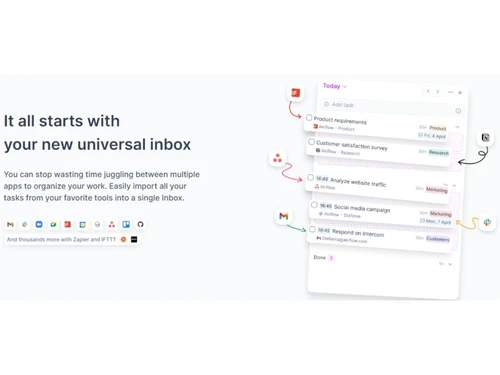
    Automatically collect tasks, emails, calendar events and items from 3000+ tools into one unified Inbox for simplicity.
  • icon_check AI Project Auto-Assign
    Let the system learn and auto-assign your tasks to the correct project using AI-based model trained on your prior entries.
  • icon_check Time-Blocking Scheduler
    Drag tasks into open calendar slots or create blocks to allocate dedicated time for focused work efficiently.
  • icon_check Natural Language Task Capture
    Create tasks using plain language (e.g., “Call Joe tomorrow 3pm for 1h”) and the system parses date/time accordingly.
  • icon_check Smart Notifications & Meeting Alerts
    Receive real-time alerts for upcoming meetings, tasks and time-slots across devices to never miss key items.
Akiflow Demo Video play icon

Get Akiflow Demo

Watch the demo video to explore key features, real workflows, and how the software fits your business needs.

Understand
Key Features
Personal
Demo Insights
Interactive
Demo Support

Akiflow Specifications

Supported Platforms
Windows Windows iOS iOS Android Android MacOS MacOS
Devices
Desktop Desktop Mobile Mobile Tablet Tablet iPad iPad
Deployment
Cloud-Based Cloud-Based
Suitable For
All Industries
Business Specific
All Businesses
Business Size
Small Business Startups Medium Business Enterprises SMBs SMEs MSMBs MSMEs
Customer Support
Email Live Chat Communities
Language
English
Training Resources
Documentation Videos
AI Features
AI Integrated

Explore the Best Alternative Solutions Similar to Your Business Size and Needs

Akiflow Reviews

4.7

Out of 5

img

Overall Rating

Based on
2 Verified Reviews

Rating Breakdown

  • Features 5
  • Value for Money 4.7
  • Ease of Use 4.5
  • Customer Support 4.7

90% Recommend this Product

Add Review

Akiflow Video Reviews

youtubeVideoId

4.8

“Akiflow Review | To-Do List & Calendar | App Review”

Review by: keepproductive

youtubeVideoId

4.8

“Akiflow's AMAZING Notion Integration”

Review by: Demetri Panici

Compare Akiflow With other Task Management Software

Products
Ratings
Pricing
Device Supported
Deployment
Supported Platforms
  • img

    Akiflow

  • 4.7

  • Price On Request

  • Desktop

    Mobile

  • Web based

    On Premises

  • Windows

    Mac OS

  • img

    TickTick

  • 4.3

  • Price On Request

  • Desktop

    Mobile

  • Web based

    On Premises

  • Windows

    Mac OS

  • img

    TaskOPad

  • 4.7

  • Price On Request

  • Desktop

    Mobile

  • Web based

    On Premises

  • Windows

    Mac OS

  • img

    Task Tracker

  • 4.9

  • ₹ 225

  • Desktop

    Mobile

  • Web based

    On Premises

  • Windows

    Mac OS

  • img

    Zoho ToDo

  • 4.5

  • Price On Request

  • Desktop

    Mobile

  • Web based

    On Premises

  • Windows

    Mac OS

  • img

    Taskmaan

  • 4.5

  • ₹ 2000

  • Desktop

    Mobile

  • Web based

    On Premises

  • Windows

    Mac OS

  • img

    Todoist

  • 4.5

  • ₹ 330

  • Desktop

    Mobile

  • Web based

    On Premises

  • Windows

    Mac OS

  • img

    Workona

  • 4.7

  • Price On Request

  • Desktop

    Mobile

  • Web based

    On Premises

  • Windows

    Mac OS

  • img

    Sunsama

  • 4.4

  • Price On Request

  • Desktop

    Mobile

  • Web based

    On Premises

  • Windows

    Mac OS

(0) Product(s) selected

Akiflow Alternatives

See All Akiflow Alternatives

Starting Price:

$4 /Month

SAVE UPTO 17%

Available

Price on Request

Starting Price:

$7 /month

Starting Price:

$20 /month

SAVE UPTO 50%

Starting Price:

$4 /Month

Starting Price:

$30 /Month

Articles for Akiflow

See All Related Articles

Which operating system does the Akiflow Software Support?

Akiflow software is compatible with Windows and macOS operating systems.

Is there any Akiflow App?

Akiflow app is available on Android and iOS devices.

What is the deployment type of the Akiflow Software?

Akiflow Software supports web-based deployment.

How much does the Akiflow cost?

Akiflow Software pricing starts from $34 at techjockey.com.

Who are the potential users of the Akiflow Software?

Akiflow can be used by companies, startups, small and big organizations and teams looking for a robust task management system.

Is there any free trial or demo for the Akiflow?

Akiflow demo is available for free with techjockey.com.

Is the Akiflow free?

The Akiflow does not offer a free trial.

How can you download the Akiflow?

Akiflow is a web-based platform. So, you need not download any software or app to use it.

How does the Akiflow Work?

Akiflow is a powerful task management software that revolutionizes how you handle daily tasks. Centralizing your schedule optimizes your workflow and enhances productivity. Its intuitive interface and intelligent features streamline task organization, making it a game changer for effective time management.

20,000+ Software Listed

Best Price Guranteed

Free Expert Consultation

2M+ Happy Customers

Terms and Condtions

close

Users with registered businesses can purchase goods from merchants on the platform to satisfy their business needs. Users are not permitted to utilize any products acquired through the platform for resale, advertising, business, or further distribution.

For each purchase made, users will receive a Tax Invoice (or 'GST invoice') that includes specific details such as:

  • the GSTIN of the user associated with their registered business, and

  • the specified Entity Name for their business.

It should be noted that not all products are eligible for GST Invoice. Only the products displayed by participating sellers with the 'GST-based Invoice Available' callout on the product description page would qualify.

Certain goods and services are not eligible to get a GST Invoice, including items with VAS, i.e., Value Added Services (e.g., Total Mobile Protection/Assured Buyback) and those involving an exchange offer at the time of purchase.

Users must ensure the accuracy of the GSTIN, and business entity name provided for the GST Invoice. Requests for corrections into GST Invoice would not be accommodated by Techjockey.com or any Seller, and any issues arising from user-provided information are the sole responsibility of users.

Techjockey.com is not liable for the GST Invoice or any associated input tax credit. To efficiently claim an input tax credit, users should select the registered place of business address as per the GST authority's data and follow the provisions of the GST Act and rules.

To claim an input tax credit, the delivery and billing addresses must match. Furthermore, input tax credits will not be granted if the delivery address and GSTIN on the invoice are from different states. In case of incorrect GST details provided during the order placement, the order will be canceled automatically.