linkedin
Agisoft Metashape logo
play Agisoft Metashape 1.7 presentation
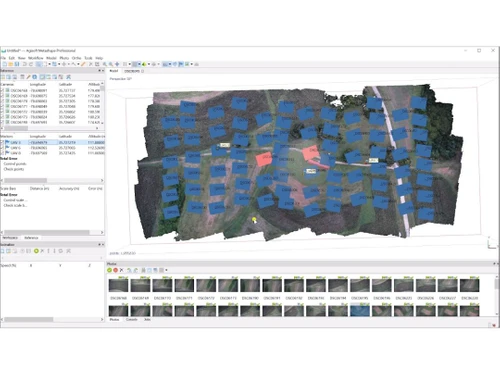
Agisoft Metashape Orthophoto
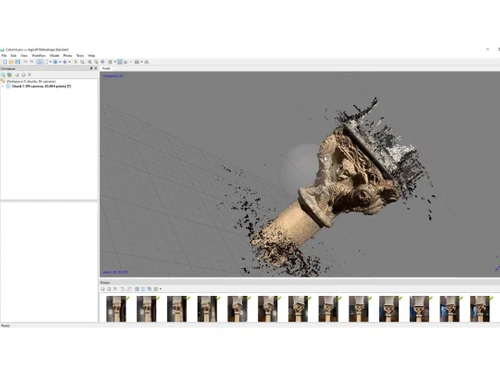
Agisoft Metashape 3D Model

Agisoft Metashape

Brand: Agisoft

  • 4.3

  • 3 Ratings

Agisoft Metashape is a photogrammetry software that performs photogrammetric processing of digital images and generates 3D spatial data.

See More

Have you used Agisoft Metashape before?

Share your insights for better experience

Add a Review

Price Available on Request

Questions about pricing or customization? We’re here to help, just a click away.

100% Genuine
Products
Best Price
Guaranteed
Safe & Secure
Payment
  • Description

  • Pricing

  • Features

  • Specification

  • Review

  • Compare

  • FAQ

Agisoft Metashape Software Overview

What is Agisoft Metashape?

Agisoft Metashape is a photogrammetry software that performs photogrammetric processing of digital images and generates 3D spatial data. It is used in various applications such as GIS, cultural heritage documentation, visual effects production, and indirect measurements of objects of various scales.

The software is available in Standard and Pro versions, with the Pro version designed for authoring GIS content. Archaeologists and UAV companies widely use it, and it can run on Microsoft Windows, macOS, or Linux operating systems. The software includes advanced features such as dense point cloud processing, automatic multi-class points classification, and georeferencing based on EXIF metadata or flight logs. It also supports various types of imagery, including aerial, close-range, and satellite images.

It can be used for tasks such as building information modeling (BIM), virtual reality (VR), and terrestrial laser scanning (TLS).

Why Choose Agisoft Metashape Software?

  • High Precision: It is renowned for its accuracy in generating 3D spatial data from digital images, making it a trusted choice for professionals.
  • Versatile Applications: Its utility spans across GIS applications, cultural heritage documentation, and visual effects production, showcasing its versatility.
  • User-Friendly Interface: Despite its advanced capabilities, It offers an intuitive interface, making it accessible for beginners and professionals alike.
  • Customizable Workflows: With features like Python scripting, it provides a platform for customized processing workflows to meet specific project requirements.
  • Robust Support and Implementation: Akeydor Limited enhances the user experience by providing support services and implementation assistance, ensuring a smooth integration into your projects.
  • Advanced Features: The Professional edition includes advanced features such as georeferencing, network processing, and support for multispectral and thermal imaging processing, making it suitable for complex projects.
  • Interoperability: It can easily communicate with many software products, facilitating data exchange and making it a valuable tool in a multi-software environment.
  • Machine Learning Technologies: The Professional edition incorporates machine learning technologies for analysis and post-processing to deliver the highest accuracy results.
  • Ease of Use: The software is designed to be easy to learn and operate, even for those without specialized knowledge and training in photogrammetry.
  • High-Quality Results: It can produce high-quality results, similar to those achieved with laser scans, with precision up to 1:500.

Benefits of Agisoft Metashape Platform

  • Efficient Processing: It efficiently handles large datasets, enabling quick processing of thousands of images into detailed 3D models and maps.
  • Realistic Visualization: It provides tools for realistic visualization of 3D models, enhancing presentations and project communication.
  • Multi-Spectral and Thermal Imaging Support: The Professional edition supports the processing of multi-spectral and thermal images, expanding its utility in fields such as agriculture and environmental monitoring.
  • Customizable Reports: Users can generate customizable reports and export data in various formats, facilitating collaboration and project documentation.
  • Continuous Development: It maintains regular updates and improvements, ensuring compatibility with new technologies and enhancing software capabilities over time.

Pricing of Agisoft Metashape

Agisoft Metashape price details are available upon request at techjockey.com.

The pricing model is based on different parameters, including extra features, deployment type, and the total number of users. For further queries related to the product, you can contact our product team and learn more about the pricing and offers.

Read more

Agisoft Company Details

Founded Year:  2006

Agisoft PhotoScan is a stand-alone software product that performs photogrammetric processing of digital images and generates 3D spatial data

Director/Founders Dmitry Semyonov
Company Size 1-100 Employees

Agisoft Metashape Pricing & Plans

Looking for The Right Pricing?

Share your requirements and get a plan built around your business.

  • Define your business needs
  • Get customised pricing
  • Choose features that fit your workflow

Price Available on Request

Get personalised Agisoft Metashape pricing that fits your needs. Our team will connect with you.

Agisoft Metashape Features

  • icon_check Orthophoto Map
    Creates high-resolution, georeferenced maps from aerial images, ensuring accurate terrain representations.
  • icon_check 3D Modeling
    Generates detailed 3D models using photogrammetry from overlapping images.
  • icon_check Photogrammetry
    Processes images to produce precise 3D models or maps with high accuracy.
  • icon_check Measure Distances
    Measures distances, areas, and volumes from 3D models or maps for detailed analysis.
  • icon_check Site Progress Tracking
    Tracks construction progress by overlaying new data on existing models or maps.
  • icon_check Multispectral
    Processes multispectral images for agriculture, forestry, and environmental analysis.
  • icon_check Stereoscopic Measurements
    Provides precise measurements from paired images for accurate 3D model assessments.
  • icon_check Panorama Stitching
    Stitches images to create seamless panoramic views for immersive documentation.
Agisoft Metashape Demo Video play icon

Get Agisoft Metashape Demo

Watch the demo video to explore key features, real workflows, and how the software fits your business needs.

Understand
Key Features
Personal
Demo Insights
Interactive
Demo Support

Agisoft Metashape Specifications

Supported Platforms
Ubuntu Ubuntu Windows Windows MacOS MacOS Linux Linux
Devices
Desktop Desktop
Deployment
Cloud-Based Cloud-Based
Suitable For
All Industries
Business Specific
All Businesses
Business Size
Small Business Medium Business Enterprises
Customer Support
Email Communities
Language
English
Training Resources
Videos

Explore the Best Alternative Solutions Similar to Your Business Size and Needs

Agisoft Metashape Review

4.3

Out of 5

img

Overall Rating

Based on
3 Verified Ratings

Rating Breakdown

  • Features 4.3
  • Value for Money 3.6
  • Ease of Use 4.6
  • Customer Support 4.6

93% Recommend this Product

Add Review

Be the First to Review

This product has no reviews yet. Be the first to leave your feedback.

Add Review

Compare Agisoft Metashape With other Photogrammetry Software

Products
Ratings
Pricing
Device Supported
Deployment
Supported Platforms
  • img

    Agisoft Metashape

  • 4.3

  • Price On Request

  • Desktop

    Mobile

  • Web based

    On Premises

  • Windows

    Mac OS

  • img

    Autodesk ReCap

  • 4.2

  • Price On Request

  • Desktop

    Mobile

  • Web based

    On Premises

  • Windows

    Mac OS

  • img

    Nexys

  • 4.4

  • Price On Request

  • Desktop

    Mobile

  • Web based

    On Premises

  • Windows

    Mac OS

  • img

    ImageStation

  • 4.1

  • Price On Request

  • Desktop

    Mobile

  • Web based

    On Premises

  • Windows

    Mac OS

  • img

    PIX4Dmapper

  • 4.1

  • Price On Request

  • Desktop

    Mobile

  • Web based

    On Premises

  • Windows

    Mac OS

  • img

    PhotoModeler

  • 4.1

  • Price On Request

  • Desktop

    Mobile

  • Web based

    On Premises

  • Windows

    Mac OS

  • img

    Mapware

  • 4.1

  • Price On Request

  • Desktop

    Mobile

  • Web based

    On Premises

  • Windows

    Mac OS

(0) Product(s) selected

Which operating system does Agisoft Metashape Software Support?

Agisoft Metashape supports Ubuntu, Windows, MacOS, and Linux operating systems.

Is there an Agisoft Metashape Software App?

No, Agisoft Metashape does not have an app.

How much does Agisoft Metashape Software Cost?

Price details for Agisoft Metashape are available upon request on techjockey.com.

Does Agisoft Metashape offer a free trial?

Yes, Agisoft Metashape offers a free trial for users to evaluate its features and capabilities.

How does Agisoft Metashape Software work?

Agisoft Metashape is a photogrammetry software that performs photogrammetric processing of digital images and generates 3D spatial data to be used in GIS applications, cultural heritage documentation, and visual effects production.

Who are the potential users of Agisoft Metashape Software?

Potential users of Agisoft Metashape Software include professionals in surveying, mining, precision agriculture, archaeology, and cultural heritage preservation industries.

20,000+ Software Listed

Best Price Guranteed

Free Expert Consultation

2M+ Happy Customers

Terms and Condtions

close

Users with registered businesses can purchase goods from merchants on the platform to satisfy their business needs. Users are not permitted to utilize any products acquired through the platform for resale, advertising, business, or further distribution.

For each purchase made, users will receive a Tax Invoice (or 'GST invoice') that includes specific details such as:

  • the GSTIN of the user associated with their registered business, and

  • the specified Entity Name for their business.

It should be noted that not all products are eligible for GST Invoice. Only the products displayed by participating sellers with the 'GST-based Invoice Available' callout on the product description page would qualify.

Certain goods and services are not eligible to get a GST Invoice, including items with VAS, i.e., Value Added Services (e.g., Total Mobile Protection/Assured Buyback) and those involving an exchange offer at the time of purchase.

Users must ensure the accuracy of the GSTIN, and business entity name provided for the GST Invoice. Requests for corrections into GST Invoice would not be accommodated by Techjockey.com or any Seller, and any issues arising from user-provided information are the sole responsibility of users.

Techjockey.com is not liable for the GST Invoice or any associated input tax credit. To efficiently claim an input tax credit, users should select the registered place of business address as per the GST authority's data and follow the provisions of the GST Act and rules.

To claim an input tax credit, the delivery and billing addresses must match. Furthermore, input tax credits will not be granted if the delivery address and GSTIN on the invoice are from different states. In case of incorrect GST details provided during the order placement, the order will be canceled automatically.