linkedin
Moqups logo
play Moqups Tour
Moqups
Moqups

Moqups

Brand: S.C Evercoder Software

  • 4.2

  • 5 Ratings

Moqups is an online mind mapping software that is designed to help you create and collaborate on diagrams, mock-ups, wireframes and even prototypes. It is a visual collaboration software that comprises diagrams, design features, a whiteboard, and online app software. With Moqups, you get the flexibility to think, plan, and communicate on a real-time basis for creating a vast range of visual proj...

See More

Have you used Moqups before?

Share your insights for better experience

Add a Review
Starting Price
$12

View plans

100% Genuine
Products
Best Price
Guaranteed
Safe & Secure
Payment
  • Description

  • Pricing

  • Features

  • Specification

  • Review

  • Compare

  • Alternatives

  • FAQ

Starting at $12

Moqups Software Overview

What is Moqups?

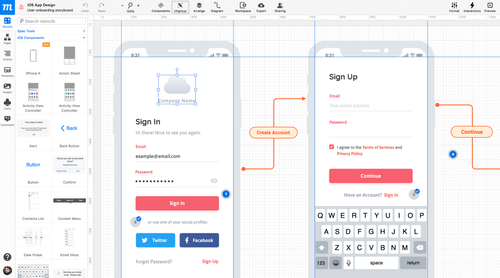
Moqups is an online mind mapping software that is designed to help you create and collaborate on diagrams, mock-ups, wireframes and even prototypes. 

It is a visual collaboration software that comprises diagrams, design features, a whiteboard, and online app software. With Moqups, you get the flexibility to think, plan, and communicate on a real-time basis for creating a vast range of visual projects, whether it is mock-ups, wireframes, diagrams, dashboards or mind maps.

Currently, Moqups is the designing partner of more than 1.5 million business analysts, product managers, UX professionals, cross-functional teams and executives that work on foundational and complex projects. 

Other than this, you also get ready-to-use and crisp stencils for all the cases. Its well-working integration system works with almost all the operating systems including Android, iOS, Bootstrap and many more.

Benefits of Moqups

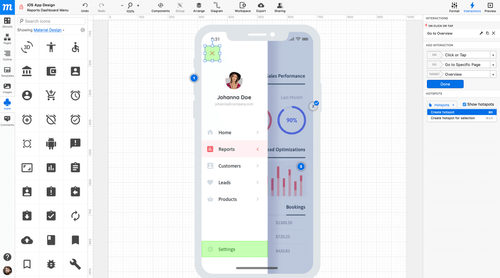
  1. Moqups has an in-built library with a numerous set of popular icons. You can choose from material design, font awesome and Hawcons, all at your fingertips. The updated icons have an intelligent drag and drop replacement that preserves position, style and size.
  2. Images- You can use the drag and drop option to import images from your applications or desktop. You may also upload custom made or ready-made designs and instantly convert them into interactive prototypes. Additionally, with non-destructive cropping, you can create multiple versions of the same image.
  3. Fonts- Moqups has an extensive range of styling options and fonts. With Google Fonts, you can select a font style from various available options. 
  4. Object editing- Moqups is a precise and fast object editing mechanism. You can rotate, resize, style and align objects to transform multiple groups and objects with dynamic and smart tools.

Pricing of Moqups

Moqups price in India starts at $12 per month at techjockey.com

The pricing model is based on different parameters, including extra features, deployment type, and the total number of users. For further queries related to the product, you can contact our product team and learn more about the pricing and offers.

Read more

S.C Evercoder Software Company Details

Founded Year:  2012

Moqups is a visual collaboration tool that combines whiteboard, diagram, and design features in a single, online app.

Director/Founders Adi Geana, Cornel Cozar, Dan Burzo, Emil Tamas, Flavius Matis, Sergiu Cociug
Company Size 1-100 Employees

Moqups Pricing & Plans

Solo
Starting at $12
    • Licenses

      Licenses
      Licenses
    • Monthly

      Monthly
      Monthly

Key Features

  • 1 seat

  • Unlimited projects & objects

  • PNG & PDF export

  • View-only guests

Team
Starting at $30
    • Licenses

      Licenses
      Licenses
    • Monthly

      Monthly
      Monthly

Key Features

  • 5 seats

  • Everything in Solo, plus:

  • Real-time collaboration

  • Roles & permissions

  • SAML Single Sign On

Unlimited
Starting at $89
    • Licenses

      Licenses
      Licenses
    • Monthly

      Monthly
      Monthly

Key Features

  • No seat limit

  • Everything in Team, plus:

  • Unlimited teams

  • SCIM provisioning

  • Enhanced access controls

Moqups Features

  • icon_check Drag-and-Drop Editor
    Design intuitively with a simple drag-and-drop interface that streamlines your wireframing workflow.
  • icon_check Extensive Stencil Library
    Access ready-to-use UI kits (iOS, Android, Bootstrap) with templates and visual elements for rapid design.
  • icon_check Icon Sets Integration
    Use built-in icon libraries (Font Awesome, Material Design, Lucide) for consistent and stylish visual elements.
  • icon_check Image Upload & Cropping
    Import your own images, crop non-destructively, and position them freely within your mockups and diagrams.
  • icon_check Typography & Font Support
    Choose from hundreds of fonts (via Google Fonts), with fine-grained controls over styling and text layout.
  • icon_check Precise Object Editing
    Resize, rotate, align, group, lock and rename objects; use guides, snap-to-grid and rulers for precision.
  • icon_check Page & Folder Management
    Organize pages, reorder via drag-and-drop, hide or search through folders for scalable projects.
  • icon_check Unlimited Projects & Objects
    Create and manage unlimited projects with no restrictions on design elements or object counts.
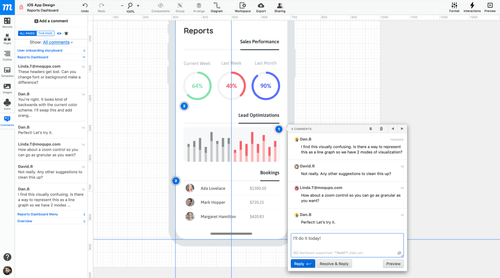
  • icon_check Realtime & Collaboration
    Work with your team simultaneously in real-time, ensuring seamless communication and instant updates.
  • icon_check Roles & Permissions
    Assign custom roles and access permissions to control who can view, edit, or comment on your designs.
  • icon_check Flow Diagramming
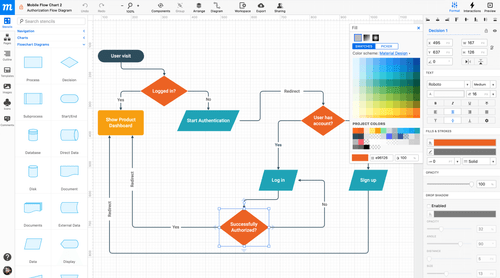
    Easily visualize workflows and user journeys with built-in tools for creating professional flow diagrams.
  • icon_check Quickly replace icons with drag & drop
    Swap icons effortlessly using drag-and-drop, keeping your wireframes consistent and visually accurate.
  • icon_check Dropbox/ Google Drive
    Integrate with Dropbox or Google Drive to store, access, and sync your design assets in the cloud.
  • icon_check Slack Notifications
    Get instant Slack alerts for project updates, comments, and activity to keep your team informed.
Moqups Demo Video play icon

Get Moqups Demo

Watch the demo video to explore key features, real workflows, and how the software fits your business needs.

Understand
Key Features
Personal
Demo Insights
Interactive
Demo Support

Moqups Specifications

Supported Platforms
Ubuntu Ubuntu Windows Windows MacOS MacOS Linux Linux
Devices
Desktop Desktop
Deployment
Cloud-Based Cloud-Based
Suitable For
All Industries
Business Specific
All Businesses
Business Size
Individual Small Business Startups Medium Business Enterprises
Customer Support
Email Communities
Language
English
Training Resources
Videos

Moqups Review

4.2

Out of 5

img

Overall Rating

Based on
5 Verified Ratings

Rating Breakdown

  • Features 4.4
  • Value for Money 4.5
  • Ease of Use 4
  • Customer Support 4

94% Recommend this Product

Add Review

Be the First to Review

This product has no reviews yet. Be the first to leave your feedback.

Add Review
Compare Moqups With other Wireframe Tools

Products
Ratings
Pricing
Device Supported
Deployment
Supported Platforms
  • img

    Moqups

  • 4.2

  • Price On Request

  • Desktop

    Mobile

  • Web based

    On Premises

  • Windows

    Mac OS

  • img

    Visily

  • 4.7

  • Price On Request

  • Desktop

    Mobile

  • Web based

    On Premises

  • Windows

    Mac OS

  • img

    Balsamiq

  • 4.7

  • Price On Request

  • Desktop

    Mobile

  • Web based

    On Premises

  • Windows

    Mac OS

  • img

    Wireframe.cc

  • 4.2

  • Price On Request

  • Desktop

    Mobile

  • Web based

    On Premises

  • Windows

    Mac OS

  • img

    Freehand

  • 4.5

  • Price On Request

  • Desktop

    Mobile

  • Web based

    On Premises

  • Windows

    Mac OS

  • img

    Fluid Ui

  • 4.4

  • Price On Request

  • Desktop

    Mobile

  • Web based

    On Premises

  • Windows

    Mac OS

  • img

    Ninjamock

  • 4.3

  • Price On Request

  • Desktop

    Mobile

  • Web based

    On Premises

  • Windows

    Mac OS

  • img

    MockFlow

  • 4.5

  • Price On Request

  • Desktop

    Mobile

  • Web based

    On Premises

  • Windows

    Mac OS

  • img

    Mockplus

  • 4

  • Price On Request

  • Desktop

    Mobile

  • Web based

    On Premises

  • Windows

    Mac OS

(0) Product(s) selected

Moqups Alternatives

See All Moqups Alternatives

Starting Price:

$132

Starting Price:

$144 /Year

Available

Price on Request

Starting Price:

$15 /Monthly

Starting Price:

$19 /Month

Starting Price:

$15 $30

SAVE UPTO 50%

Articles for Moqups

See All Related Articles

Are there any hidden charges or contracts?

No, one can upgrade or downgrade at any time, without any extra costs.

Does the data remain secure with Moqups?

Moqups understands the sensitivity of its user’s information and hence, it encrypts all the communications through SSL. All the information and data are stored securely and regularly backed up.

Can one use Moqups in classroom?

Yes, Moqups can be used by colleges, schools and universities.

Does one lose data on downgrading?

No, the data remains secured and you will not lose any project, work or information.

Are there any limitations to the free plan?

Yes, with the free plan, you get one active project, 200 stencils, and a storage of 5MB. This plan does not include privacy settings, master pages, project archiving or export to PDF or PNG.

How much does Moqups Software Cost?

Moqups price in India starts at $12 per month at techjockey.com.

20,000+ Software Listed

Best Price Guranteed

Free Expert Consultation

2M+ Happy Customers

Terms and Condtions

close

Users with registered businesses can purchase goods from merchants on the platform to satisfy their business needs. Users are not permitted to utilize any products acquired through the platform for resale, advertising, business, or further distribution.

For each purchase made, users will receive a Tax Invoice (or 'GST invoice') that includes specific details such as:

  • the GSTIN of the user associated with their registered business, and

  • the specified Entity Name for their business.

It should be noted that not all products are eligible for GST Invoice. Only the products displayed by participating sellers with the 'GST-based Invoice Available' callout on the product description page would qualify.

Certain goods and services are not eligible to get a GST Invoice, including items with VAS, i.e., Value Added Services (e.g., Total Mobile Protection/Assured Buyback) and those involving an exchange offer at the time of purchase.

Users must ensure the accuracy of the GSTIN, and business entity name provided for the GST Invoice. Requests for corrections into GST Invoice would not be accommodated by Techjockey.com or any Seller, and any issues arising from user-provided information are the sole responsibility of users.

Techjockey.com is not liable for the GST Invoice or any associated input tax credit. To efficiently claim an input tax credit, users should select the registered place of business address as per the GST authority's data and follow the provisions of the GST Act and rules.

To claim an input tax credit, the delivery and billing addresses must match. Furthermore, input tax credits will not be granted if the delivery address and GSTIN on the invoice are from different states. In case of incorrect GST details provided during the order placement, the order will be canceled automatically.